https://github.com/bsthen/bakong-khqr
A Python package for generating payment transactions compliant with the Bakong KHQR standard.
https://github.com/bsthen/bakong-khqr
bakong khqr khr payments pypi python python3 qr qrcode riel usd
Last synced: 3 months ago
JSON representation
A Python package for generating payment transactions compliant with the Bakong KHQR standard.
- Host: GitHub
- URL: https://github.com/bsthen/bakong-khqr
- Owner: bsthen
- License: mit
- Created: 2024-08-08T03:20:32.000Z (almost 2 years ago)
- Default Branch: main
- Last Pushed: 2026-04-10T10:09:34.000Z (4 months ago)
- Last Synced: 2026-04-10T12:17:19.821Z (4 months ago)
- Topics: bakong, khqr, khr, payments, pypi, python, python3, qr, qrcode, riel, usd
- Language: Python
- Homepage: https://pypi.org/project/bakong-khqr/
- Size: 386 KB
- Stars: 21
- Watchers: 1
- Forks: 10
- Open Issues: 0
-
Metadata Files:
- Readme: README.md
- Funding: .github/FUNDING.yml
- License: LICENSE
- Security: SECURITY.md
Awesome Lists containing this project
README
Bakong-KHQR (Unofficial NBC)
A Python package for generating payment transactions compliant with the Bakong KHQR standard.


## 📱 Download Mobile App
- 
Bakong App

|

- 
Bakong Tourists
|
## 📋 Requirement
- Python3
- A Bakong account with full KYC verification
- A Bakong developer token (register here: [https://api-bakong.nbc.gov.kh/register/](https://api-bakong.nbc.gov.kh/register/) or RBK Token: [https://bakongrelay.com/](https://bakongrelay.com/))
- A VPS or hosting service located in Cambodia or use RBK Token.
## 📦 Installation
```bash
pip3 install bakong-khqr
```
or Update Last Version
```bash
pip3 install --upgrade bakong-khqr
```
## 🚀 Usage
The bakong-khqr package provides the KHQR class for generating QR code, Deeplink, Check Payment, Get Payment transaction for Bakong KHQR.
### Importing the package
You can import the KHQR class from the package as follows:
```bash
from bakong_khqr import KHQR
```
### Creating Payment Transaction
To generate QR code data for a transaction, create an instance of the KHQR() class with Bakong Token and call the:
- create_qr() method with the required parameters.
- generate_deeplink() method with the required parameters.
- generate_md5() method with the required parameters.
- check_payment() method with the required parameters.
- get_payment() method with the required parameters.
- check_bulk_payments() method with the required parameters.
Example:
```bash
from bakong_khqr import KHQR
# Create an instance of KHQR with Bakong Developer Token:
khqr = KHQR("eyJhbGciOiJIUzI1NiIsI...nMhgG87BWeDg9Lu-_CKe1SMqC0")
# Generate QR code data for a transaction:
qr_string = khqr.create_qr(
bank_account='user_name@bank', # Check your user_name@bank under Bakong profile (Mobile App)
merchant_name='Your Name',
merchant_city='Phnom Penh',
amount=9800, #9800 Riel
currency='KHR', # USD or KHR
store_label='Phsar Thmei',
phone_number='012345678',
bill_number='TRX012345',
terminal_label='POS-01',
static=False, # Static or Dynamic QR code (default: False)
expiration=1 # Expiration time in 1 day for the QR code (default: 1 day). This is used to calculate the expiration time for the QR code.
)
print(qr_string)
# String Result: 00020101021229180014your_name@bank520459995303116540498005802KH5909Your Name6010Phnom Penh62510109TRX01234502090123456780311Phsar Thmei0706POS-01993400131773894603019011317738947758196304A5A3
# Generate Deeplink:
deeplink = khqr.generate_deeplink(
qr=qr_string,
appDeepLinkCallback="https://your_website.com/shop/details?q=ABC", # Or your app's custom scheme (e.g., mshop://purchase/39482)
appIconUrl="https://your_website.com/images/logo.png", # Your logo image .png or .svg
appName="MyAppName" # (e.g., MSHOP)
)
print(deeplink)
# String Result: https://bakong.page.link/CgXb....ks6az9a38
# Get Hash MD5
md5 = khqr.generate_md5(qr_string)
print(md5)
# String Result: dfcabf4598d1c405a75540a3d4ca099d
# Check Transaction paid or unpaid:
payment_status = khqr.check_payment(md5)
print(payment_status)
# String Result: "UNPAID"
# Indicates that this transaction has not yet been paid.
# Retrieve the payment information:
#e.g. In case static QR code (static=True) is used for payment, and the amount is not known from the user's input.
payment_info = khqr.get_payment(md5)
print(payment_info)
# Object Result:
# {
# "hash": "a7121ca103c.....eb3671b9601a6",
# "fromAccountId": "bankkhppxxx@bank",
# "toAccountId": "your_name@bank",
# "currency": "KHR",
# "amount": 9800,
# "description": "Cashier-01",
# "createdDateMs": 1739###953000,
# "acknowledgedDateMs": 1739###954000,
# "trackingStatus": null,
# "receiverBank": null,
# "receiverBankAccount": null,
# "instructionRef": null,
# "externalRef": "100FT3###6550298"
# }
# You can retrieve information such as the amount to integrate into your system.
# Check Bulk Transactions:
md5_list = [
"dfcabf4598d1c405a75540a3d4ca099d",
"5154e4f795634ff1a0ae4b48e53a6d9c",
"a57d9bb85f52f12a20cf7beecb03d11d",
"495fdaec0be5d94c89bc1283c7283d3d",
"31bca02094ad576588e42b60db57bc98"
]
bulk_payments_status = khqr.check_bulk_payments(md5_list)
print(bulk_payments_status)
# List Result: ["5154e4f795634ff1a0ae4b48e53a6d9c", "495fdaec0be5d94c89bc1283c7283d3d"]
# Returns a list containing only the MD5 hashes that correspond to successful (paid) transactions.
# ⚠️ Bulk Transaction Check Limit
# The Bakong API allows a maximum of 50 MD5 hashes per request when using the check_bulk_payments() method.
#If you pass more than 50 hashes, the function will raise a ValueError to prevent unexpected API errors.
md5_list = [md5_1, md5_2, ..., md5_51] # 51 hashes
# This will raise:
# ValueError: The md5_list exceeds the allowed limit of 50 hashes per request.
result = khqr.check_bulk_payments(md5_list)
# ✅ If you need to check more than 50 transactions, you must handle chunking manually:
def chunked(iterable, size=50):
for i in range(0, len(iterable), size):
yield iterable[i:i + size]
all_md5 = [...] # more than 50 md5 hashes
paid_md5 = []
for batch in chunked(all_md5):
paid_md5.extend(khqr.check_bulk_payments(batch))
print(paid_md5)
# List Result: ["5154e4f795634ff1a0ae4b48e53a6d9c", "495fdaec0be5d94c89bc1283c7283d3d"]
# Returns a list containing only the MD5 hashes that correspond to successful (paid) transactions.
```
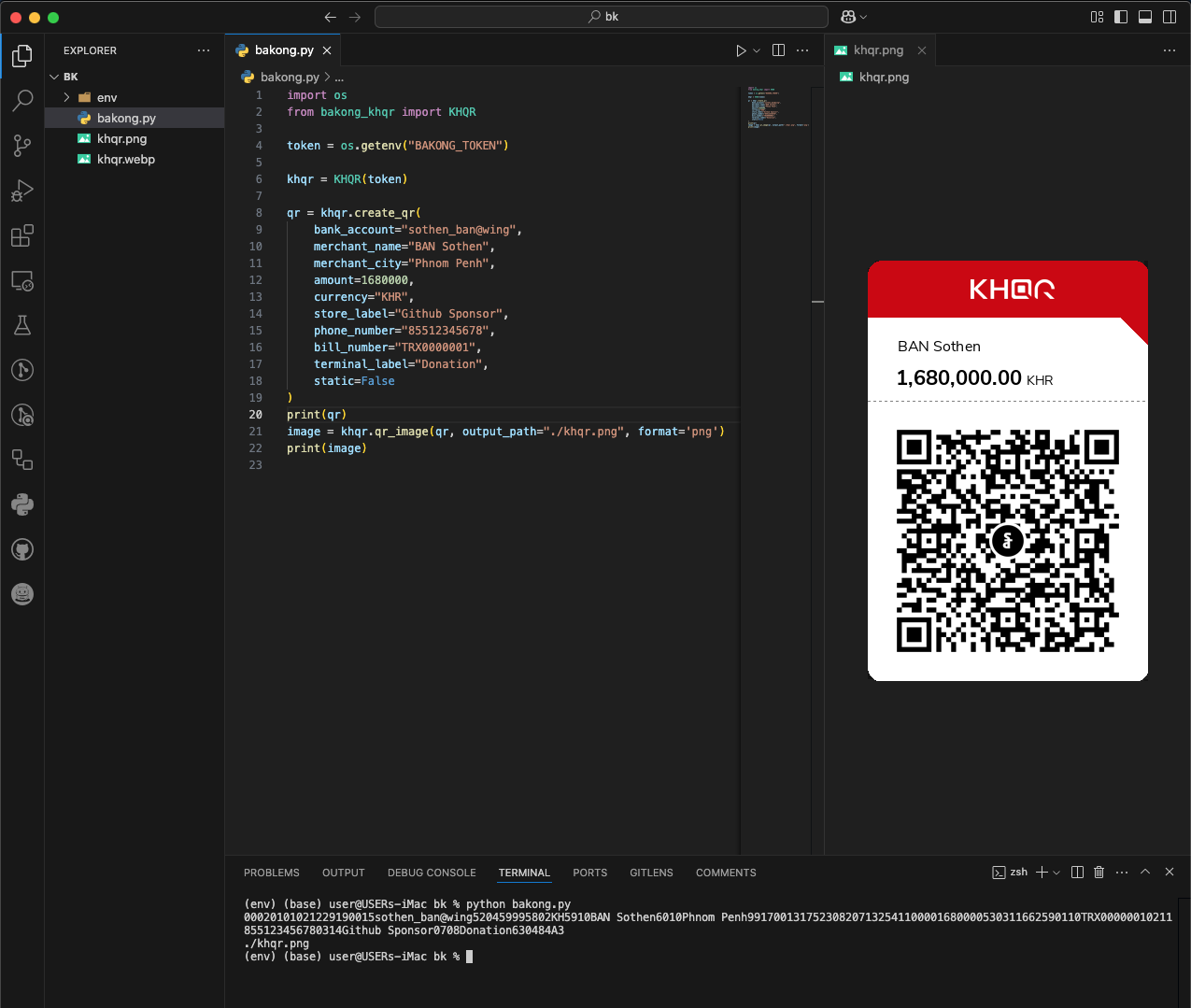
### Generate QR Image
The `qr_image()` method generates a QR code image from a QR string.
Make sure you install the optional [image] extras to get dependencies like Pillow and qrcode:
```bash
pip3 install "bakong-khqr[image]"
```
Example:
```bash
from bakong_khqr import KHQR
khqr = KHQR("your_bakong_token")
qr = khqr.create_qr(
bank_account='user_name@bank',
merchant_name='Your Name',
merchant_city='Phnom Penh',
amount=100.00,
currency='USD',
store_label='MShop',
phone_number='85512345678',
bill_number='TRX123456',
terminal_label='Cashier-01',
static=False,
expiration=1
)
# Generate QR image as PNG file path
png_path = khqr.qr_image(qr)
print("QR image saved at:", png_path)
```
#### Parameters for `create_qr()` Method
- `bank_account`: The bank account associated with the transaction.
- `merchant_name`: Name of the merchant.
- `merchant_city`: City where the merchant is located.
- `amount`: Amount to be transacted.
- `currency`: Currency of the transaction (e.g., 'USD', 'KHR').
- `store_label` (optional): Label or name of the store.
- `phone_number` (optional): Contact phone number.
- `bill_number` (optional): Reference number for the bill.
- `terminal_label` (optional): Label for the terminal.
- `static` (optional): Static or Dynamic QR code (default: static = False).
- `expiration` (optional): Expiration time in days for the QR code (default: 1 day).
`Note`: Using static mode will create a Static QR Code for payment, allowing unlimited transactions, usage, and a zero amount included.
#### Parameters for `generate_deeplink()` Method
- `qr`: Valid QR Code data as string that generate from create_qr() method.
- `appDeepLinkCallback`: Deeplink URL for opening your app after payment is completed.
- `appIconUrl`: Your App Icon URL.
- `appName`: Your App Name.
***Deprecation Note***: The parameter `callback` has been renamed to `appDeepLinkCallback` to align with the Bakong standard. While `callback` still works in the current version for backward compatibility, it will be removed in future releases. Please update your implementation.
#### Parameters for `generate_md5()` Method
- `qr`: Valid QR Code data as string that generate from create_qr() method.
#### Parameters for `check_payment()` Method
- `md5`: Valid hash md5 from generate_md5() method of the correct transaction.
#### Parameters for `check_bulk_payments()` Method
- `md5_list`: md5 list of all transacrions generate from generate_md5() method.
#### Parameters for `get_payment()` Method
- `md5`: Valid hash md5 from generate_md5() method of the correct transaction.
#### Parameters for `qr_image()` Method
- `qr`: QR string to convert into an image from create_qr().
- `output_path`: Optional path to save the image. If not provided, returns a temp file path.
- `format`: Image format to export ('png', 'jpeg','webp', 'bytes', 'base64' or 'base64_uri'). Default: 'png'.
## ✨ Bakong Relay API Support (New in v0.5.*)
### Why Use Bakong Relay? (Optional)
Many developers face **HTTP 403 errors** when accessing Bakong APIs from servers outside Cambodia.
This service allows you to use **RBK tokens** directly in `bakong-khqr` (Python SDK), so your application can reliably check transactions, accounts, and references without restrictions.
**Important**: Only `bakong-khqr` (Python SDK) supports RBK tokens.
Using Bakong Relay is **optional**.
If your server is in Cambodia or you have no access issues, you can continue using official Bakong tokens — no changes are needed.
For more information, token creation, pricing, and full documentation, visit:
👉 **[bakongrelay.com](https://bakongrelay.com)** or **[Telegram Bot](https://t.me/bakong_relay_bot/)**
## 📄 Bakong Official
KHQR SDK Documentation:
- [https://api-bakong.nbc.gov.kh/document](https://api-bakong.nbc.gov.kh/document)
- [KHQR Content Guideline v1.4.pdf](https://bakong.nbc.gov.kh/download/KHQR/integration/KHQR%20Content%20Guideline%20v.1.3.pdf)
- [QR Payment Integration.pdf](https://bakong.nbc.gov.kh/download/KHQR/integration/QR%20Payment%20Integration.pdf)
- [KHQR SDK Document.pdf](https://bakong.nbc.gov.kh/download/KHQR/integration/KHQR%20SDK%20Document.pdf)
Development API: [https://sit-api-bakong.nbc.gov.kh/](https://sit-api-bakong.nbc.gov.kh/)
Production API: [https://api-bakong.nbc.gov.kh/](https://api-bakong.nbc.gov.kh/)
## 📜 License
This project is licensed under the MIT License. See the [LICENSE](https://github.com/bsthen/bakong-khqr/blob/main/LICENSE) file for details.
## 🤝 Contributing
If you would like to contribute to this project, please fork the repository and submit a pull request.
## 📬 Contact
For any questions or feedback, you can contact me via [Mail](mailto:bansokthen@gmail.com), [Telegram](https://t.me/bakongRelaySupport/) or [Buy Me A Coffee ☕️](https://buymeacoffee.com/bsthen)


## ❤️ Sponsors
This project is supported by the community.
👉 [List Sponsors & Donors](https://github.com/bsthen/bakong-khqr/blob/main/SPONSORS.md)