https://github.com/bugsplat-git/bugsplat-node
BugSplat integration with helpers for node.js environments
https://github.com/bugsplat-git/bugsplat-node
Last synced: 11 months ago
JSON representation
BugSplat integration with helpers for node.js environments
- Host: GitHub
- URL: https://github.com/bugsplat-git/bugsplat-node
- Owner: BugSplat-Git
- Created: 2020-08-20T21:27:26.000Z (almost 6 years ago)
- Default Branch: master
- Last Pushed: 2024-02-09T00:08:09.000Z (over 2 years ago)
- Last Synced: 2025-08-09T02:47:58.203Z (11 months ago)
- Language: TypeScript
- Size: 52.7 KB
- Stars: 6
- Watchers: 2
- Forks: 0
- Open Issues: 4
-
Metadata Files:
- Readme: README.md
Awesome Lists containing this project
README
[](https://bugsplat.com)
#
BugSplat
### **Crash and error reporting built for busy developers.**


## 👋 Introduction
BugSplat-node is a JavaScript error reporting system for Node.js and Electron applications. Before continuing with the tutorial please make sure you have completed the following checklist:
* [Sign Up](https://app.bugsplat.com/v2/sign-up) as a new BugSplat user
* Complete the [Welcome](https://app.bugsplat.com/v2/welcome) workflow and make a note of your BugSplat database
* Review our [my-node-crasher](https://github.com/BugSplat-Git/my-node-crasher) or [my-electron-crasher](https://github.com/BugSplat-Git/my-electron-crasher) projects to see a sample Node.js project integrated with BugSplat
## ⚙️ Configuration
To add the bugsplat package to your application, run the following shell command at the root of your project’s directory:
```shell
npm install --save bugsplat-node
```
Require the bugsplat module at the entry point of your application.
```js
const { BugSplatNode } = require("bugsplat-node");
```
Create a new instance of the BugSplat class with the name of your BugSplat database, the name of your application and the version of your application:
```js
const bugsplat = new BugSplatNode("DatabaseName", "AppName", "1.0.0.0");
```
Set the bugsplat.post function as an event handler for uncaught exceptions:
```js
process.on("uncaughtException", bugsplat.postAndExit);
```
If your application uses promises you will also want to listen for unhandled promise rejections. Please note that this will only work for native promises:
```js
process.on("unhandledRejection", bugsplat.postAndExit);
```
Throw an exception after the event handler has been added.
```js
throw new Error("BugSplat!");
```
You can also use bugsplat-node to post errors from non-fatal promise rejections and errors that originate inside of try-catch blocks:
```js
Promise.reject(new Error("BugSplat!")).catch(error => bugsplat.post(error, {}));
```
```js
try {
throw new Error("BugSplat");
} catch(error) {
await bugsplat.post(error, {});
}
```
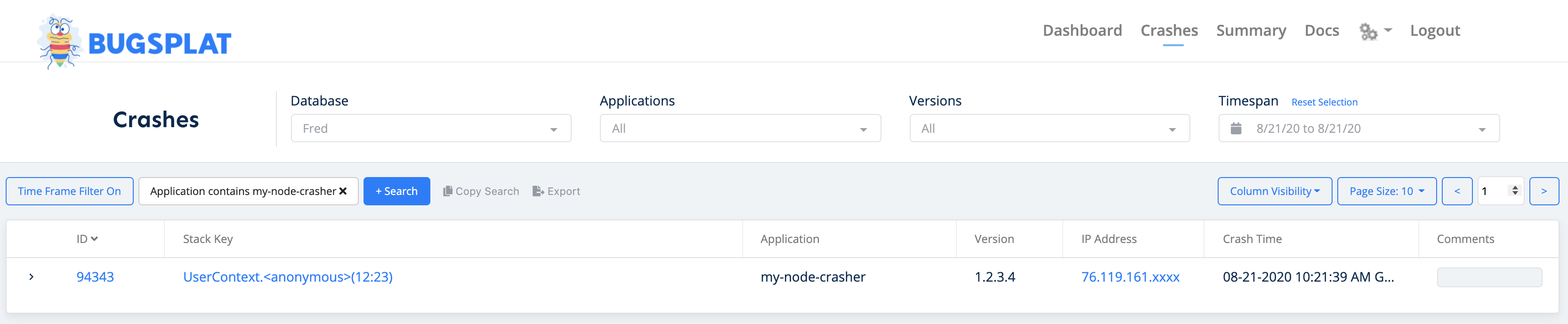
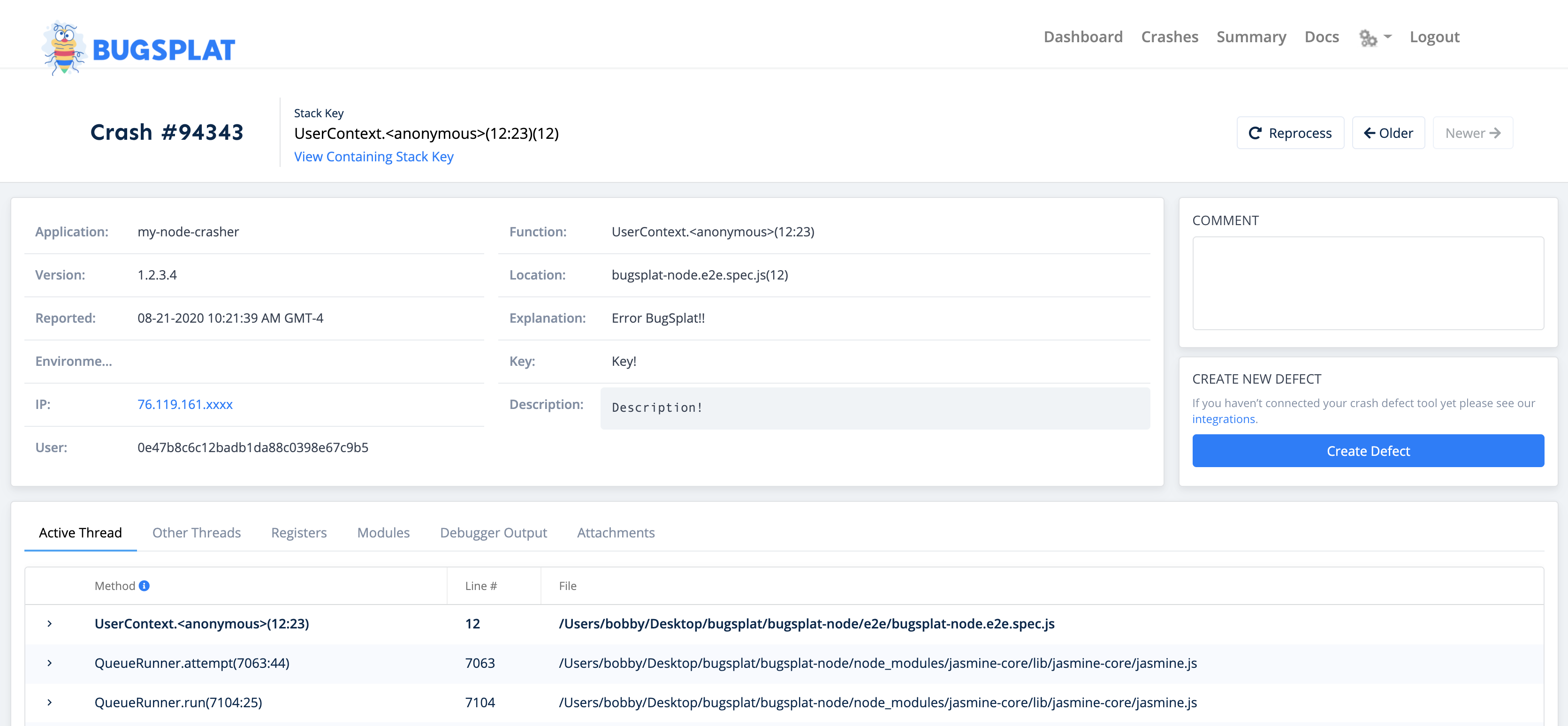
After posting an error with bugsplat-node, navigate to the [Crashes](https://app.bugsplat.com/v2/crashes?database=Demo) page. You should see a new crash report for the application you just configured. Click the link in the ID column to see details about your crash on the [Crash](https://app.bugsplat.com/v2/crash?database=Demo&id=405) page:
That’s it! Your application is now configured to post crash reports to BugSplat.
## 🧩 API
In addition to the configuration demonstrated above, there are a few public methods that can be used to customize your BugSplat integration:
```js
bugsplat.setDefaultAppKey(appKey); // Additional metadata that can be queried via BugSplat's web application
bugsplat.setDefaultUser(user); // The name or id of your user
bugsplat.setDefaultEmail(email); // The email of your user
bugsplat.setDefaultDescription(description); // Additional info about your crash that gets reset after every post
bugsplat.setDefaultAdditionalFilePaths(paths); // Paths to files to be added at post time (limit 10MB)
bugsplat.postAndExit(error); // Wrapper for post that calls process.exit(1) after posting error to BugSplat
bugsplat.post(error, options); // Posts an arbitrary Error object to BugSplat
// If the values options.appKey, options.user, options.email, options.description, options.additionalFilePaths are set the corresponding default values will be overwritten
// Returns a promise that resolves with properties: error (if there was an error posting to BugSplat), response (the response from the BugSplat crash post API), and original (the error passed by bugsplat.post)
```
## 🤔 Additional Considerations
It is recommended that you exit and restart your application after an uncaughtException or unhandledRejection occurs. Packages such as [pm2](https://www.npmjs.com/package/pm2) and [forever](https://www.npmjs.com/package/forever) can be configured to restart your application.
Additionally you can use [domains](https://nodejs.org/api/domain.html#domain_warning_don_t_ignore_errors) to handle errors differently across various parts of your application. Domains are pending deprecation according the the Node.js [documentation](https://nodejs.org/api/domain.html), however a suitable replacement has not been added yet.
More information regarding domain deprecation can be found [here](https://github.com/nodejs/node/issues/10843).
## 🧑💻 Contributing
BugSplat loves open source software! Please check out our project on [GitHub](https://github.com/BugSplat-Git/bugsplat-node) and send us a [pull request](https://github.com/BugSplat-Git/bugsplat-node/pulls). Found an bug or have a feature request? Open an [issue](https://github.com/BugSplat-Git/bugsplat-node/issues) and we'll address it.