https://github.com/bugsplat-git/symbol-upload
Cross-platform symbol upload utility
https://github.com/bugsplat-git/symbol-upload
Last synced: over 1 year ago
JSON representation
Cross-platform symbol upload utility
- Host: GitHub
- URL: https://github.com/bugsplat-git/symbol-upload
- Owner: BugSplat-Git
- License: mit
- Created: 2021-03-28T18:18:40.000Z (over 5 years ago)
- Default Branch: main
- Last Pushed: 2024-04-19T00:03:56.000Z (about 2 years ago)
- Last Synced: 2024-05-01T11:28:43.276Z (about 2 years ago)
- Language: TypeScript
- Size: 5.9 MB
- Stars: 10
- Watchers: 5
- Forks: 3
- Open Issues: 4
-
Metadata Files:
- Readme: README.md
- License: LICENSE
Awesome Lists containing this project
README
[](https://bugsplat.com)
#
BugSplat
### **Crash and error reporting built for busy developers.**


# symbol-upload
This repo is a simple Node.js utility, set of libraries, and GitHub action for uploading symbol files or source maps to [BugSplat](https://www.bugsplat.com). This utility is designed to be used in your build process to upload symbols to BugSplat automatically for each production build. This package can be used as a library or a command line utility.
## Action
Use the `symbol-upload` action in your [GitHub Actions](https://github.com/features/actions) workflow by modifying the following snippet.
```yml
- name: Symbols 📦
uses: BugSplat-Git/symbol-upload@main
with:
clientId: "${{ secrets.SYMBOL_UPLOAD_CLIENT_ID }}"
clientSecret: "${{ secrets.SYMBOL_UPLOAD_CLIENT_SECRET }}"
database: "${{ secrets.BUGSPLAT_DATABASE }}"
application: "your-application"
version: "your-version"
files: "**/*.{pdb,exe,dll}"
directory: "your-build-directory"
node-version: "22"
dumpSyms: false
```
Be sure to use [secrets](https://docs.github.com/en/actions/security-guides/using-secrets-in-github-actions) so that you don't expose the values for `clientId`, `clientSecret`, and `database`.
## Command Line
1. Install this package globally `npm i -g @bugsplat/symbol-upload`
2. Run symbol-upload with `-h` to see the latest usage information and package version:
```bash
bobby@BugSplat % ~ % symbol-upload -h
@bugsplat/symbol-upload v10.1.0
symbol-upload contains a command line utility and a set of libraries to help
you upload symbol files to BugSplat.
Usage
-h, --help Print this usage guide.
-b, --database string Your BugSplat database name. The value of database must match the value used
to post crash reports. This value can also be provided via the
BUGSPLAT_DATABASE environment variable.
-a, --application string The name of your application. The value of application must match the value
used to post crash reports. If not provided symbol-upload will attempt to use
the value of the name field in package.json if it exists in the current
working directory.
-v, --version string Your application's version. The value of version must match the value used to
post crash reports. If not provided symbol-upload will attempt to use the
value of the version field in package.json if it exists in the current
working directory.
-u, --user string (optional) The email address used to log into your BugSplat account. If provided
--password must also be provided. This value can also be provided via the
SYMBOL_UPLOAD_USER environment variable.
-p, --password string (optional) The password for your BugSplat account. If provided --user must also be
provided. This value can also be provided via the SYMBOL_UPLOAD_PASSWORD
environment variable.
-i, --clientId string (optional) An OAuth2 Client Credentials Client ID for the specified database. If
provided --clientSecret must also be provided. This value can also be
provided via the SYMBOL_UPLOAD_CLIENT_ID environment variable.
-s, --clientSecret string (optional) An OAuth2 Client Credentials Client Secret for the specified database. If
provided --clientId must also be provided. This value can also be provided
via the SYMBOL_UPLOAD_CLIENT_SECRET environment variable.
-r, --remove Removes symbols for a specified database, application, and version. If this
option is provided no other actions are taken.
-f, --files string (optional) Glob pattern that specifies a set of files to upload. Defaults to '*.js.map'
-d, --directory string (optional) Path of the base directory used to search for symbol files. This value will
be combined with the --files glob. Defaults to '.'
-m, --dumpSyms boolean (optional) Use dump_syms to generate and upload sym files for specified binaries.
The -u and -p arguments are not required if you set the environment variables
SYMBOL_UPLOAD_USER and SYMBOL_UPLOAD_PASSWORD, or provide a clientId and
clientSecret.
The -i and -s arguments are not required if you set the environment variables
SYMBOL_UPLOAD_CLIENT_ID and SYMBOL_UPLOAD_CLIENT_SECRET, or provide a user
and password.
Example
symbol-upload -b your-bugsplat-database -a your-application-name -v your-
version [ -f "*.js.map" -d "/path/to/containing/dir" [ -u your-bugsplat-email
-p your-bugsplat-password ] OR [ -i your-client-id -s your-client-secret] ]
Links
🐛 https://bugsplat.com
💻 https://github.com/BugSplat-Git/symbol-upload
💌 support@bugsplat.com
```
3. Run symbol-upload specifying a [glob](https://www.npmjs.com/package/glob#glob-primer) pattern for `-f` and a path with forward slashes for `-d`. Multiple file types can be specified in curly brackets separated by a comma, and wildcards can be used to search directories recursively. For example, `**/*.{pdb,exe,dll}` will search for all `.pdb`, `.exe`, and `.dll` files in the current directory and all subdirectories. Optionally, you can specify the `-m` flag to run [dump_syms](https://github.com/BugSplat-Git/node-dump-syms) against the specified binaries and upload the resulting `.sym` files.
## API
1. Install this package locally `npm i @bugsplat/symbol-upload`.
2. Import `BugSplatApiClient` and `VersionsApiClient` from @bugsplat/symbol-upload. Alternatively, you can import `OAuthClientCredentialsClient` if you'd prefer to authenticate with an [OAuth2 Client Credentials](https://docs.bugsplat.com/introduction/development/web-services/oauth2#client-credentials) Client ID and Client Secret.
```ts
import { BugSplatApiClient, OAuthClientCredentialsClient, uploadSymbolFiles } from '@bugsplat/symbol-upload';
```
3. Create a new instance of `BugSplatApiClient` using the `createAuthenticatedClientForNode` async factory function or `OAuthClientCredentialsClient` using the `createAuthenticatedClient` async factory function.
```ts
const bugsplat = await BugSplatApiClient.createAuthenticatedClientForNode(email, password);
```
```ts
const bugsplat = await OAuthClientCredentialsClient.createAuthenticatedClient(clientId, clientSecret);
```
4. Upload your symbol files to bugsplat by calling the `uploadSymbolFiles` function.
```ts
const directory = '/path/to/symbols/dir';
const files = ['my-cool-app.exe', 'my-cool-app.pdb'];
await uploadSymbolFiles(bugsplat, database, application, version, directory, files);
```
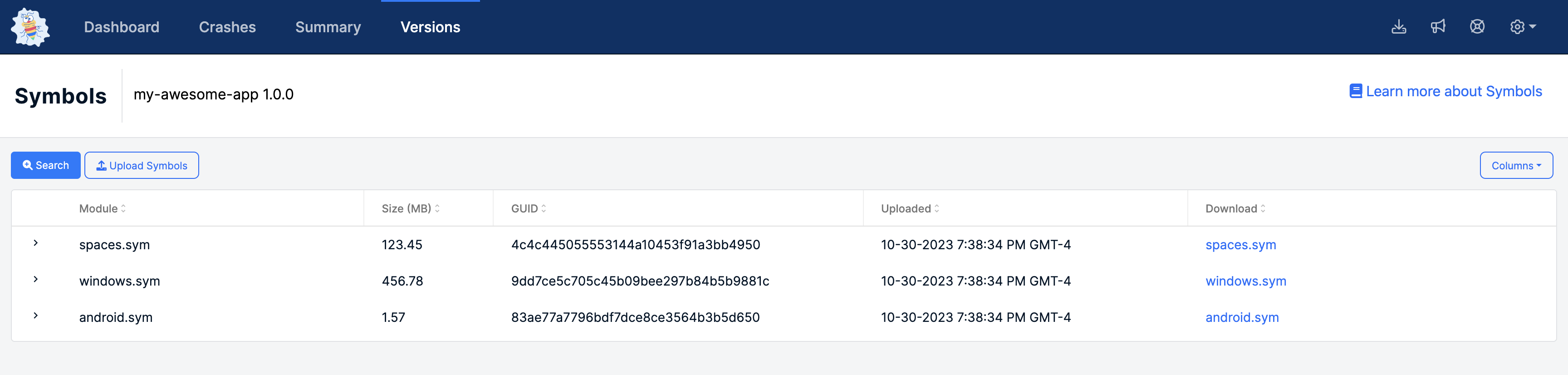
If you've done everything correctly, your symbols should be shown by clicking the application link on the [Versions](https://app.bugsplat.com/v2/versions) page.
Thanks for using BugSplat!