https://github.com/builderio/builder-shopify-hydrogen
Builder.io Visual CMS + page builder example with Shopify Hydrogen
https://github.com/builderio/builder-shopify-hydrogen
Last synced: about 1 year ago
JSON representation
Builder.io Visual CMS + page builder example with Shopify Hydrogen
- Host: GitHub
- URL: https://github.com/builderio/builder-shopify-hydrogen
- Owner: BuilderIO
- Created: 2022-02-08T22:42:27.000Z (over 4 years ago)
- Default Branch: main
- Last Pushed: 2023-04-10T18:45:51.000Z (over 3 years ago)
- Last Synced: 2025-06-30T09:42:13.212Z (about 1 year ago)
- Language: TypeScript
- Homepage:
- Size: 1.37 MB
- Stars: 80
- Watchers: 5
- Forks: 33
- Open Issues: 2
-
Metadata Files:
- Readme: README.md
Awesome Lists containing this project
README
# Builder.io + Shopify Hydrogen - headless visual page building example
### 🚧 🚧 🚧
## This starter is deprecated.
## This starter works for *Hydrogen v1* only. For Hydrogen V2, visit our [integration guide](https://www.builder.io/c/docs/integrating-builder-pages) and click on the Remix tab in the example code box. There is also a Remix example project that can be found [here](https://github.com/BuilderIO/builder/tree/main/examples/remix-minimal-starter)
Example repo using Builder.io for drag and drop page building with Shopify hydrogen
- [Check out the hydrogen docs](https://shopify.dev/custom-storefronts/hydrogen)
- See [./src/routes/builder/[handle].server.tsx](./src/routes/builder/[handle].server.tsx) for where we integrate Builder.io
- [Learn more about Builder.io](https://github.com/builderio/builder)

## Get Started
- Clone this project: `git clone https://github.com/BuilderIO/builder-shopify-hydrogen`
- Install dependencies: `cd builder-shopify-hydrogen; yarn`
- Replace any `builder.init` calls with your API key: https://www.builder.io/c/docs/using-your-api-key#finding-your-public-api-key
- Run the server: `yarn dev`
- Create a free account at [builder.io](https://www.builder.io)
- Go to [builder.io/models](https://builder.io/models), choose the `page` model and change the Editing URL to `http://localhost:3000`
- Create a new page with url `/builder/testing`
- Explore the drag and drop editor
- Hit publish, then go to `http://localhost:3000/builder/testing` and see your page!
Explore more in the [Builder.io developer docs](https://www.builder.io/c/docs/developers)
## Why Builder.io?
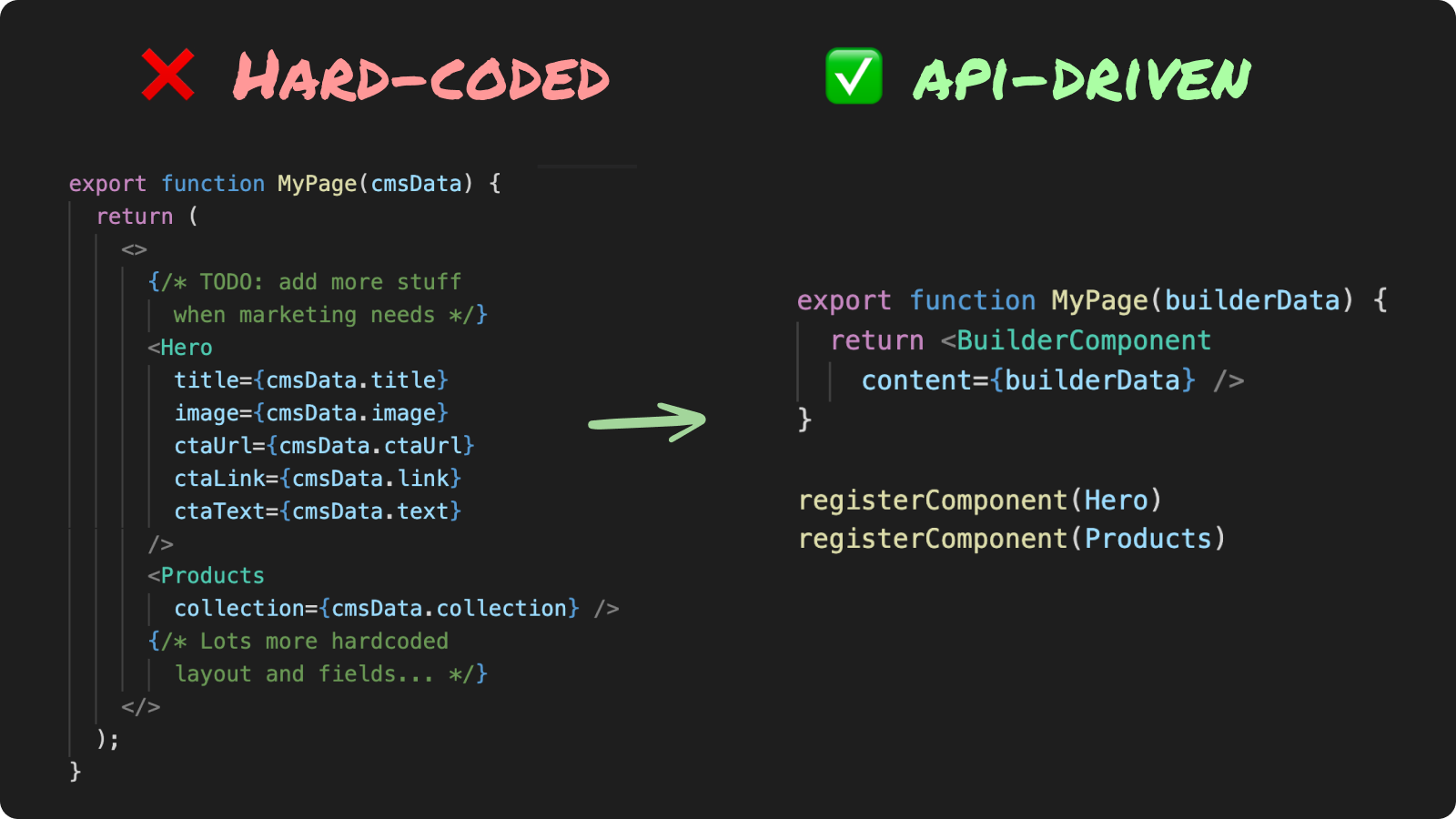
Hardcoding layouts for frequently changing content bottlenecks your team and makes releases messy
Using an API-driven UI allows you to:
- Decouple page updates from deploys
- Schedule, a/b test, and personalize via APIs
- Reduce code + increase composability
## Who uses Builder.io?

## How is the content structured?
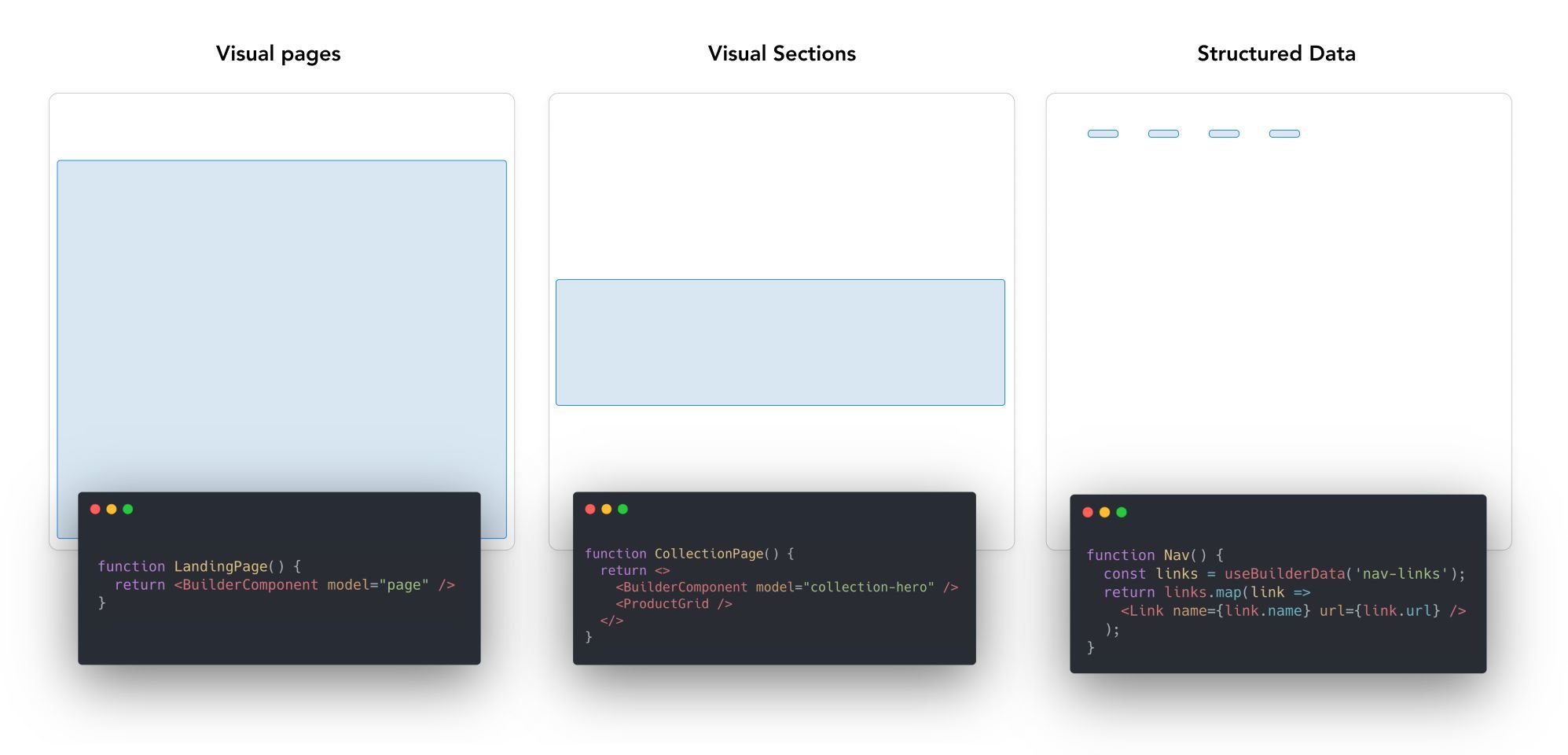
In Builder, content is structured in [models](https://www.builder.io/c/docs/guides/getting-started-with-models), and customized with [custom fields](https://www.builder.io/c/docs/custom-fields) and [targeting](https://www.builder.io/c/docs/guides/targeting-and-scheduling)
- **Builder pages** - full drag and drop control between your site's header and footer. [Try it out](https://builder.io/fiddle/fb98adf93ad5467180329fdaa9711f27)
- **Builder sections** - make a part of a page visually editable in Builder and use our [targeting and scheduling](https://www.builder.io/c/docs/guides/targeting-and-scheduling) to decide who sees what. [Try it out](https://builder.io/fiddle/81b6a689f6c74c82bbd982497cf08e34)
- **Builder data** - fetch structured data from Builder and use it anywhere in your application (e.g. menu items, structured pages). [Try it out](https://builder.io/fiddle/193e3e3128b84c80b1a9c4ba19612244)
Read more about how builder works [here](https://www.builder.io/c/docs/how-builder-works)
See [here](#structuring-your-site) for examples on how to structure a site with Builder
## Getting started
**Requirements:**
- Node v14+
- Yarn
```bash
yarn
yarn dev
```
Remember to update `shopify.config.js` with your shop's domain and Storefront API token!
## Previewing a production build
To run a local preview of your Hydrogen app in an environment similar to Oxygen, build your Hydrogen app and then run `yarn preview`:
```bash
yarn build
yarn preview
```
## Building for production
```bash
yarn build
```
Then, you can run a local `server.js` using the production build with:
```bash
yarn serve
```
### Structuring your site
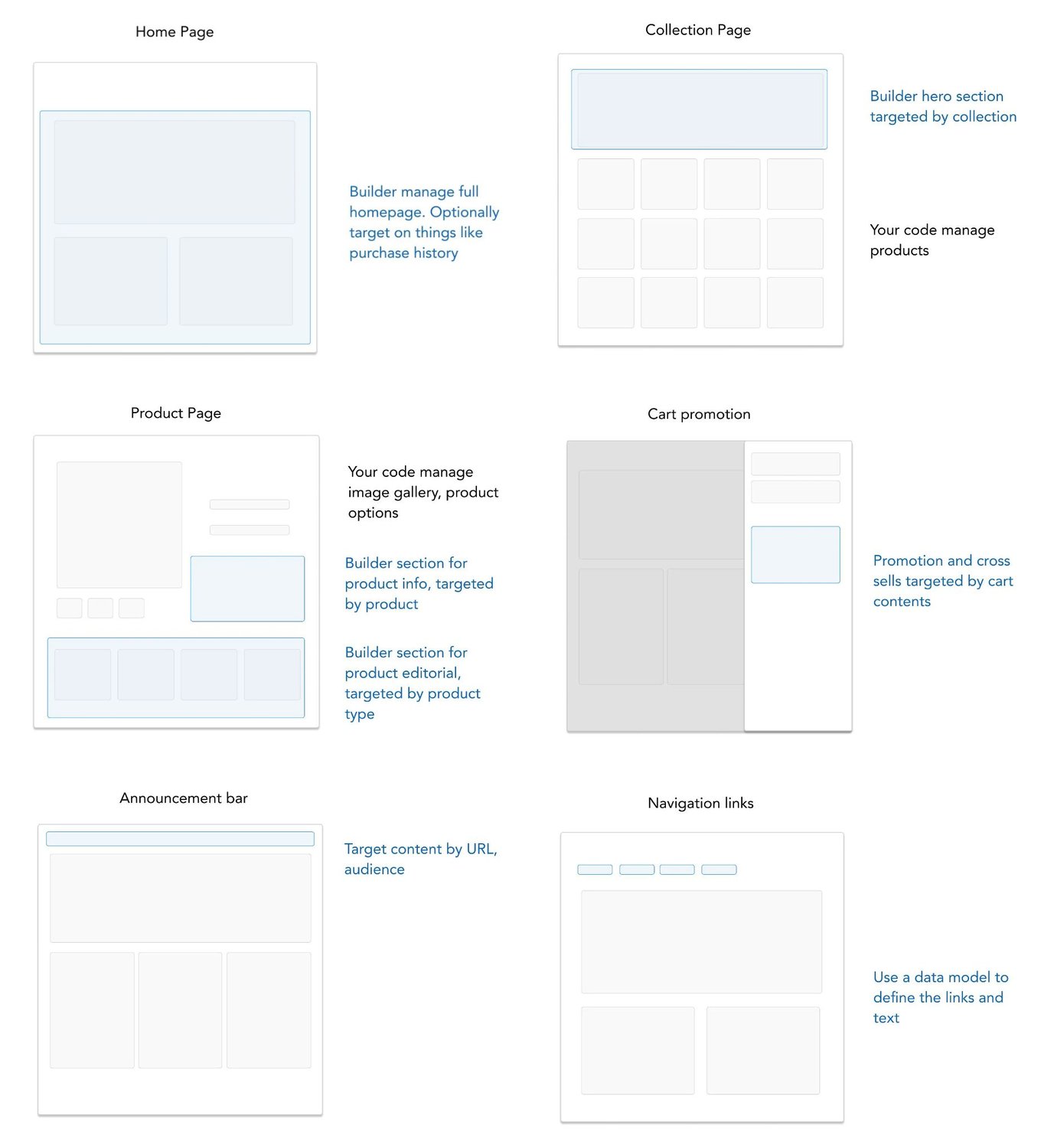
There are a lot of ways you can use Builder for your site. Some of the main questions you'll want to ask yourselves - what on your site should be in your code vs in Builder.
As a general rule, parts of your site that should be managed by non developers should probably be in Builder. Parts that are complex with a lot of code, should probably be in your codebase. Using [custom components](https://www.builder.io/c/docs/custom-react-components) in your Builder content can help you strike a good balance here as well
Here are some examples we recommend for how to structure various pages on your site, for instance for a headless commerce site:
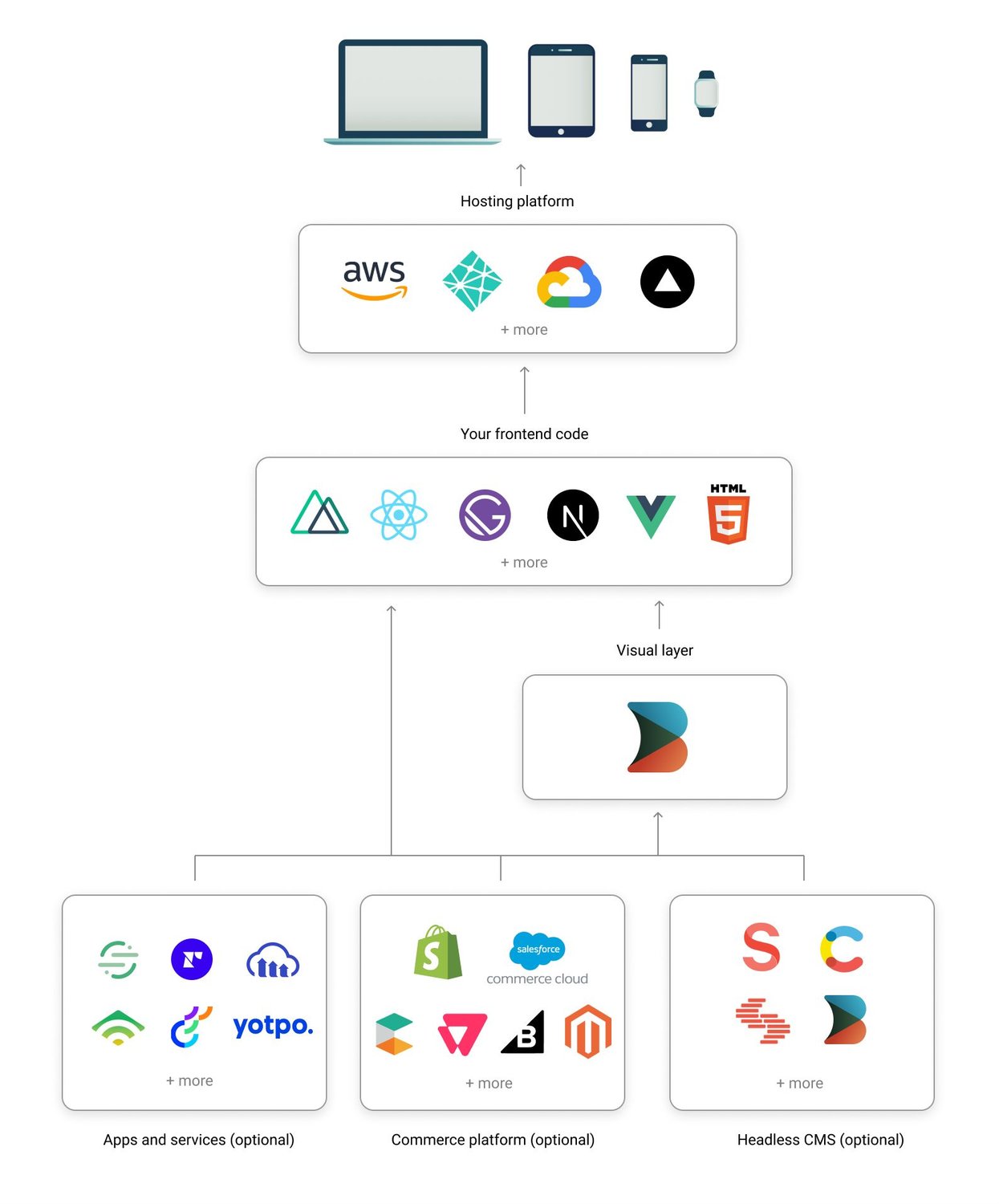
## How the Builder.io platform works
### Data models, components, SEO, and more
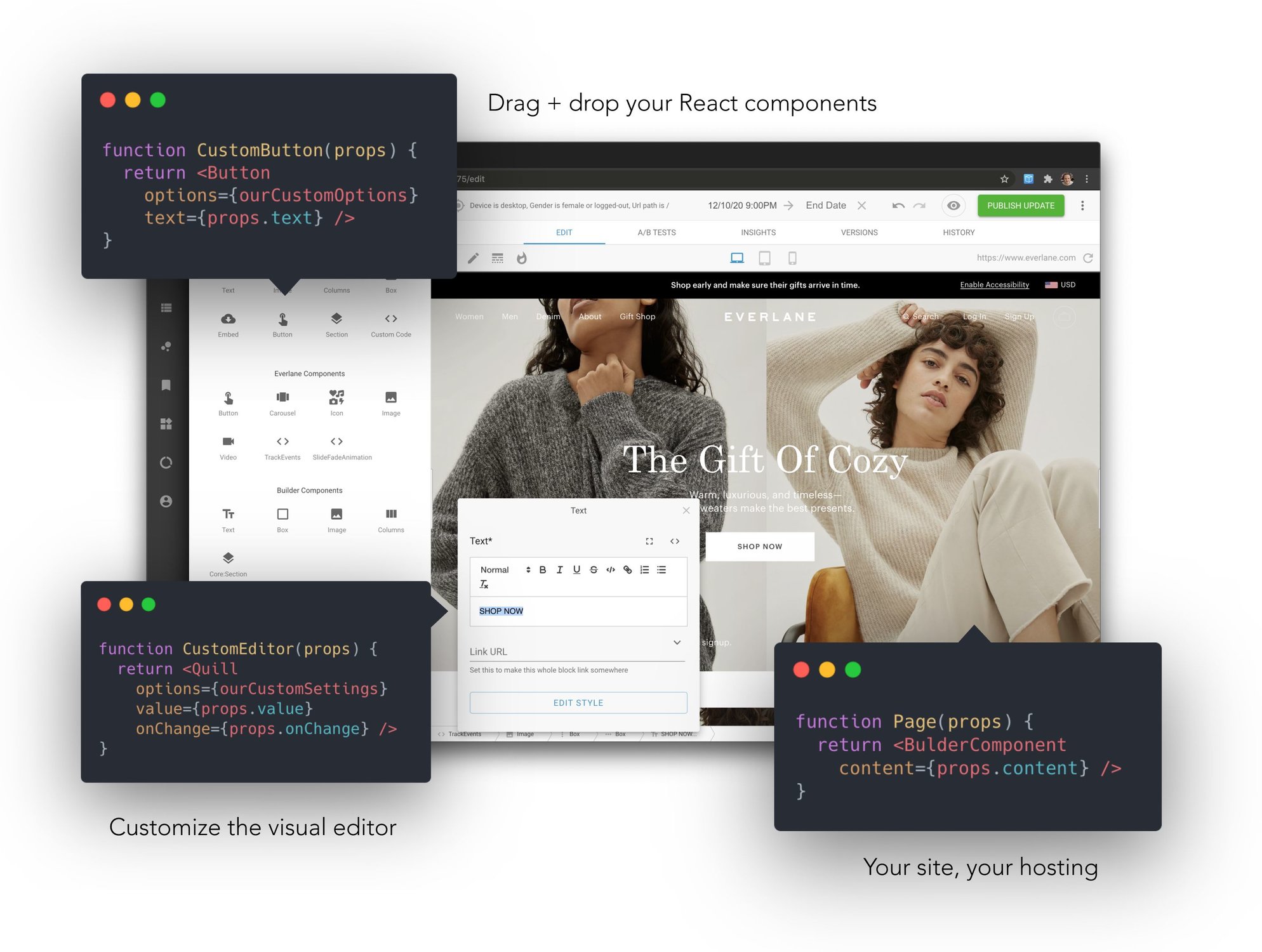
Builder.io gives you a ton more power and control than just page building. Check our guides on
- [Custom models](https://builder.io/c/docs/guides/getting-started-with-models)
- [Custom design systems in Builder.io](https://github.com/BuilderIO/builder/tree/master/examples/react-design-system)
- [SEO optimizing Builder.io content](https://builder.io/c/docs/seo)
- [Custom React components in the visual editor](https://www.builder.io/c/docs/custom-react-components)
- [Components only mode](https://www.builder.io/c/docs/guides/components-only-mode)
Additional framework support:
- [Gatsby](https://github.com/BuilderIO/builder/tree/master/examples/gatsby)
- [Next.js](https://github.com/BuilderIO/builder/tree/master/examples/next-js)
- [Angular](https://github.com/BuilderIO/builder/tree/master/packages/angular)
- [HTML API (for any framework)](https://builder.io/c/docs/html-api)
As well as some handy power features like:
- [Symbols](https://builder.io/c/docs/guides/symbols)
- [Dynamic data fetching and binding](https://builder.io/c/docs/guides/advanced-data)
- [State handling](https://builder.io/c/docs/guides/state-and-actions)
- [Content API](https://builder.io/c/docs/query-api)
- [GraphQL API](https://builder.io/c/docs/graphql-api)
- [Webhooks](https://builder.io/c/docs/webhooks)
- [Targeting and scheduling content](https://builder.io/c/docs/guides/targeting-and-scheduling)
- [Extending Builder.io with plugins](https://github.com/BuilderIO/builder/tree/master/plugins)
## Join the community!
Questions? Requests? Feedback? Chat with us in our [Discord](https://discord.gg/eAvjGf4T)!
## Troubleshooting and feedback
Problems? Requests? Open an [issue](https://github.com/BuilderIO/builder/issues). We always want to hear feedback and interesting new use cases and are happy to help.