https://github.com/buttercms/buttercms-vue-3-tutorial
Tutorial for integrating Vue 3 and ButterCMS
https://github.com/buttercms/buttercms-vue-3-tutorial
Last synced: 3 months ago
JSON representation
Tutorial for integrating Vue 3 and ButterCMS
- Host: GitHub
- URL: https://github.com/buttercms/buttercms-vue-3-tutorial
- Owner: ButterCMS
- Created: 2021-05-27T20:05:16.000Z (about 5 years ago)
- Default Branch: master
- Last Pushed: 2022-12-15T17:30:07.000Z (over 3 years ago)
- Last Synced: 2026-01-29T22:35:45.723Z (5 months ago)
- Language: Vue
- Size: 404 KB
- Stars: 0
- Watchers: 2
- Forks: 1
- Open Issues: 1
-
Metadata Files:
- Readme: README.md
Awesome Lists containing this project
README
# CMS-powered application built with Vue 3
[](https://app.netlify.com/start/deploy?repository=https://github.com/butterCMS/buttercms-vue-3-tutorial)
[Vue.js](https://v3.vuejs.org/) is a progressive framework for building user interfaces.
[ButterCMS](https://buttercms.com) is a hosted API-based CMS and blog engine that lets you build CMS-powered apps using any programming language. You can think of Butter as similar to WordPress except that you build your website in your language of choice and then plug-in the dynamic content using an API.
This projects shows how to integrate ButterCMS into Vue.js application:
- How to create page with a list of blog posts and pages for each post. Learn more about blog integration [here](https://buttercms.com/docs/api/#get-your-blog-posts).
- How to dynamically create pages using data from ButterCMS pages. Learn more about fetching single pages and pages with types [here](https://buttercms.com/docs/api/#pages).
- How to display collections items on the page. Learn more on how to query collections [here](https://buttercms.com/docs/api/#retrieve-a-collection).
- How to get all posts categories. Learn more about categories [here](https://buttercms.com/docs/api/#categories).
- How to create pages with RSS, Atom, and Sitemap feeds. Learn more [here](https://buttercms.com/docs/api/#feeds).
Link to ButterCMS API documentation is https://buttercms.com/docs/api/.
## Important Notice
This project was created as an example use case of ButterCMS and Vue.js and will not be actively maintained.
If you’re interested in exploring the best, most up-to-date way to integrate Butter into javascript frameworks like Vue, you can check out the following resources:
### Starter Projects
The following turn-key starters are fully integrated with dynamic sample content from your ButterCMS account, including main menu, pages, blog posts, categories, and tags, all with a beautiful, custom theme with already-implemented search functionality. All of the included sample content is automatically created in your account dashboard when you sign up for a free trial of ButterCMS.
- [Vue.js Starter](https://buttercms.com/starters/vuejs-starter-project/)
- [Angular Starter](https://buttercms.com/starters/angular-starter-project/)
- [React Starter](https://buttercms.com/starters/react-starter-project/)
- Or see a list of all our [currently-maintained starters](https://buttercms.com/starters/). (Over a dozen and counting!)
### Other Resources
- Check out the [official ButterCMS Docs](https://buttercms.com/docs/)
- Check out the [official ButterCMS API docs](https://buttercms.com/docs/api/)
## Set up ButterCMS account
1. Create a free account on ButterCMS - https://buttercms.com/.
2. To see the project locally you need to create this data in your account:
- Create and publish customer case study pages (page with type `customer_case_study`) with this structure:
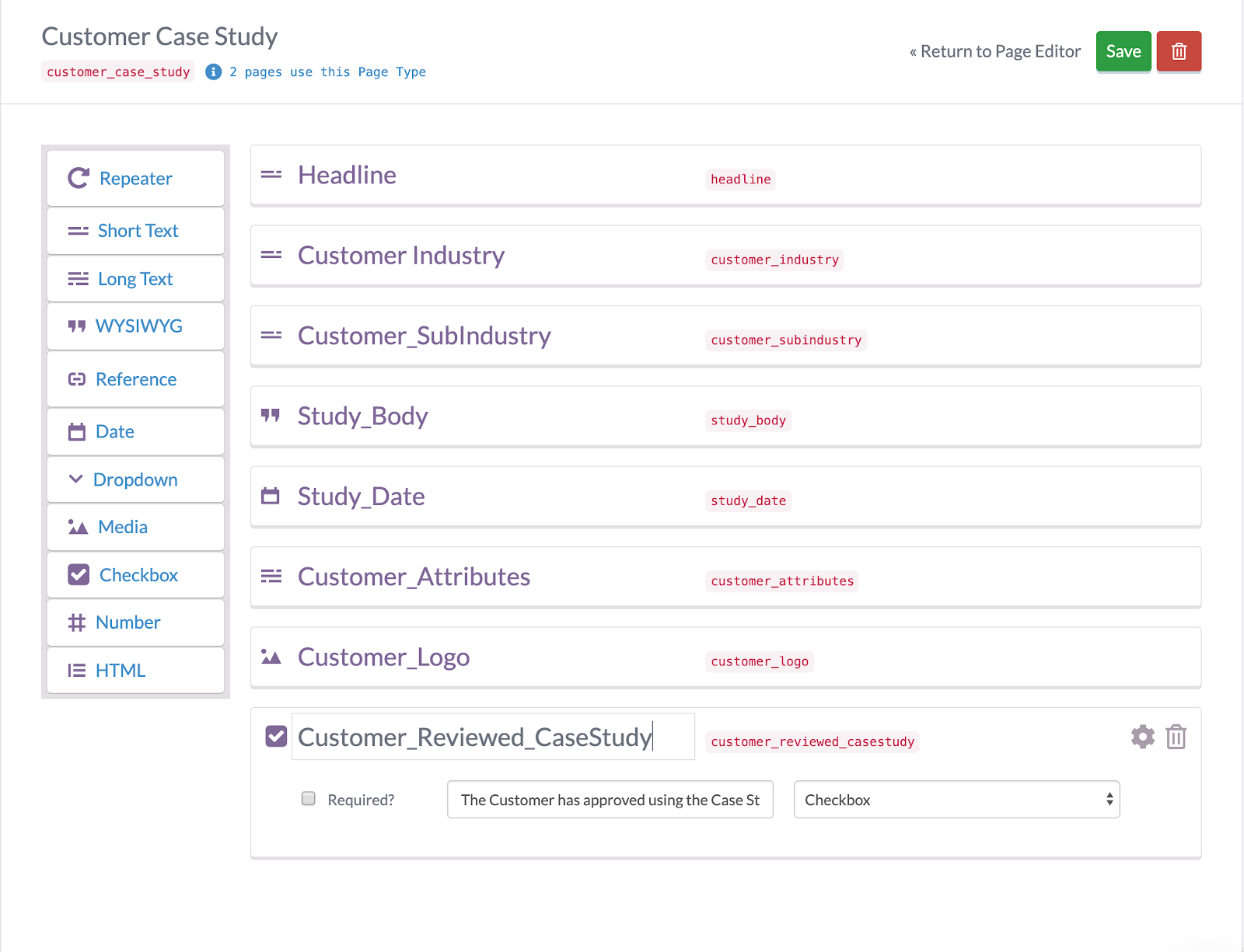
Learn more about page types [here](https://buttercms.com/docs/api-client/vuejs#PagesPageType).
- Create collection `faq_items` with this structure:

Learn more about collections [here](https://buttercms.com/docs/api-client/vuejs#Collections).
3. Find your read API token from the home page or from settings page, it will be needed later.
## Requirements
- Node >= 12.0.0
## Running project locally
1. Clone and cd into project:
```
git clone https://github.com/ButterCMS/buttercms-vue-3-tutorial.git
cd buttercms-vue-3-tutorial
```
2. Install all dependencies
```
npm install
```
or
```
yarn install
```
1. Copy `.env.example` file as `.env` and replace `VUE_APP_BUTTER_CMS_API_KEY` value with your read API token
2. Run the app in development mode
```
npm run serve
```
or
```
yarn serve
```
The application should be available at `http://localhost:8080`.
To build the project run `npm run build`.