https://github.com/buzz/volctl
Per-application volume control and OSD for Linux desktops.
https://github.com/buzz/volctl
linux-desktop osd pavucontrol python tray-icon volume
Last synced: 5 months ago
JSON representation
Per-application volume control and OSD for Linux desktops.
- Host: GitHub
- URL: https://github.com/buzz/volctl
- Owner: buzz
- License: gpl-3.0
- Created: 2014-10-09T19:20:48.000Z (almost 12 years ago)
- Default Branch: master
- Last Pushed: 2025-03-22T15:38:55.000Z (over 1 year ago)
- Last Synced: 2025-05-24T18:04:56.071Z (about 1 year ago)
- Topics: linux-desktop, osd, pavucontrol, python, tray-icon, volume
- Language: Python
- Homepage: https://buzz.github.io/volctl/
- Size: 371 KB
- Stars: 139
- Watchers: 5
- Forks: 19
- Open Issues: 7
-
Metadata Files:
- Readme: README.md
- License: LICENSE.txt
Awesome Lists containing this project
README
# volctl
Per-application volume control and OSD for Linux desktops.
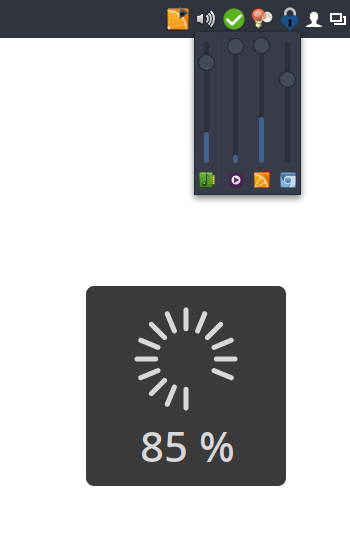
I couldn't find a simple tray icon that allows to control multiple
applications easily from the task bar. So I wrote my own.
**Bug reports and patches welcome!**
It's not meant to be an replacement for a full-featured mixer
application. If you're looking for that check out the excellent
[pavucontrol](http://freedesktop.org/software/pulseaudio/pavucontrol/).
## Features
* Runs on virtually every desktop environment (Needs to support the freedesktop system tray specs)
* Control main volumes as well as individual applications
* Mute individual applications
* Shows application icons and names
* Per-application VU meter
* Double-click opens *pavucontrol* (or custom mixer application)
* Mouse-wheel support
* On-screen volume display (OSD)
## Installation
### Manual installation
1. Clone this repository somewhere and cd into it.
1. To install: `pip install --user .`
Note: You might need to copy `data/apps.volctl.gschema.xml` to `~/.local/share/glib-2.0/schemas/` manually.
1. For the application icon to show up in the menu: `update-desktop-database ~/.local/share/applications/`
1. Compile GSettings schemas: `glib-compile-schemas ~/.local/share/glib-2.0/schemas/`
### Arch Linux
Available in AUR: [volctl](https://aur.archlinux.org/packages/volctl/)
## Status/tray icon implementation
volctl strives to achieve a high level of support across different Desktop
Environments. Unfortunately, on the Linux Desktop several tray icon
implemenations with various levels of support and capabilities co-exist.
volctl supports
- [*SNI*](https://freedesktop.org/wiki/Specifications/StatusNotifierItem/)
Supported on modern Desktop Environments, like Gnome, KDE, works also on Wayland
- [*XEmbed*](https://www.freedesktop.org/wiki/Specifications/systemtray-spec/)
(through `Gtk.StatusIcon`)
Not supported on Gnome, KDE (only through extensions/plugins). No Wayland
support.
Your Desktop Environment might support both, one or none of these standards.
Personally I use XEmbed as it allows for all important user interactions (mouse
wheel, double-click, etc.) on my current system. The default is to prefer SNI
which can be changed under the Preferences ➝ Prefer XEmbed.
*Please try for yourself which type of tray icon works best for you.*
**Note:** If you need support for SNI you have to compile and install
[statusnotifier](https://jjacky.com/statusnotifier/). Use the configure flags
`--enable-introspection` and `--enable-dbusmenu`. If you're on Arch Linux you
can use the AUR package
[statusnotifier-introspection-dbus-menu](https://aur.archlinux.org/packages/statusnotifier-introspection-dbus-menu/).
## No Wayland support ([#39](https://github.com/buzz/volctl/issues/39))
Through SNI volctl now supports tray icons under Wayland. Unfortunately it's not
possible to display the volume slider window on Wayland at the mouse pointer
position. The Wayland protocol does not allow this unless non-standard Wayland
extensions are used. The only entity that is capable of doing so is the Wayland
compositor (generally your Desktop Environment).
## Development
### Deploy dev version in Virtualenv
You can start volctl from the source tree.
```sh
$ python -m venv --system-site-packages venv
$ source venv/bin/activate
$ pip install --editable .
$ venv/bin/volctl
```
### Linting
Use pylint and flake8 for linting the sources.
```sh
$ make lint
```
Use black to auto-format the code.
```sh
$ make black
```
## License
GNU General Public License v2.0