https://github.com/byteball/odex-passive-mm
A browser trading bot to market stablecoins on Odex decentralized exchange.
https://github.com/byteball/odex-passive-mm
cryptocompare-socket obyte odex stablecoin trading-bot
Last synced: 5 months ago
JSON representation
A browser trading bot to market stablecoins on Odex decentralized exchange.
- Host: GitHub
- URL: https://github.com/byteball/odex-passive-mm
- Owner: byteball
- Created: 2020-05-13T08:16:14.000Z (about 6 years ago)
- Default Branch: master
- Last Pushed: 2020-06-12T08:46:38.000Z (about 6 years ago)
- Last Synced: 2025-07-10T10:16:03.012Z (12 months ago)
- Topics: cryptocompare-socket, obyte, odex, stablecoin, trading-bot
- Language: Vue
- Homepage:
- Size: 90.8 KB
- Stars: 0
- Watchers: 2
- Forks: 0
- Open Issues: 0
-
Metadata Files:
- Readme: README.md
Awesome Lists containing this project
README
# odex-passive-mm
This bot is a browser application that automatically sets buy and/or sell orders on an Odex exchange according to a price provided by cryptocompare API. It's typically used to market a crypto pegged stablecoin at the current fair price including a markup for the bot operator.
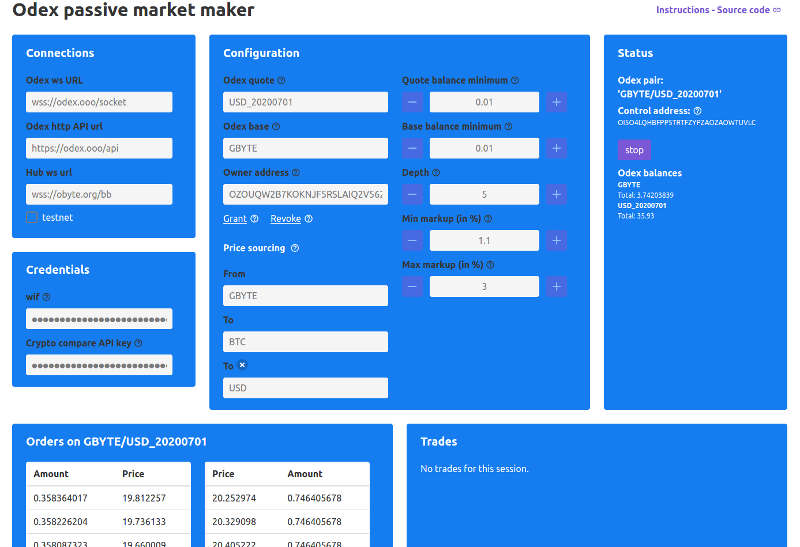
This bot and its source code are offered as is, without any guarantees of its correct operation. The bot might lose money because of bugs, unreliable network connections, and other reasons.
## Run locally (recommended)
The bot can be bundled from source and run from a local webserver. It's recomended since you can check the source code you actually run.
Install Nodejs in a version from 8 to 10.
```
git clone https://github.com/byteball/odex-passive-mm.git
```
```
cd odex-passive-mm
```
```
npm install
```
```
npm run serve
```
The bot can then be opened on your browser at address http://localhost:8080
## Run as demo
This bot is available ready to use on [passive-mm.papabyte.com](https://passive-mm.papabyte.com)
## Usage
- Create an account on [cryptocompare.com](https://min-api.cryptocompare.com/), get a free API key and copy-paste it to bot configuration
- Generate a WIF with a [command line tool](https://obytejs.com/utils/generate-wallet) or [online](https://bonustrack.github.io/obyte-paperwallet/) and paste it into the form, the control address that will be used to sign your orders should appear.
- Log into [Odex](https://odex.ooo) exchange with your Obyte GUI wallet and deposit the currencies you want to trade.
- Set your Odex account exchange as owner addess then grant your control address the right to trade on Odex account
- Choose the pair(s) used as source price. In case the pair doesn't have a direct quotation, you may use a currency (likely BTC) as pivot ex: GB->BTC->USD
- Set the minimum balances you want to keep on exchanges and your markup
- Start the bot