https://github.com/bzon/docker-jboss-liferay
https://github.com/bzon/docker-jboss-liferay
Last synced: 12 months ago
JSON representation
- Host: GitHub
- URL: https://github.com/bzon/docker-jboss-liferay
- Owner: bzon
- Created: 2016-07-12T02:56:03.000Z (almost 10 years ago)
- Default Branch: master
- Last Pushed: 2016-07-30T19:01:34.000Z (almost 10 years ago)
- Last Synced: 2025-01-22T08:28:39.073Z (over 1 year ago)
- Language: Shell
- Size: 181 KB
- Stars: 2
- Watchers: 2
- Forks: 0
- Open Issues: 0
-
Metadata Files:
- Readme: README.md
- Changelog: CHANGELOG.md
Awesome Lists containing this project
README
[](https://travis-ci.org/bzon/docker-jboss-liferay)
# Overview
A docker project for Liferay Enterprise installed on Jboss Enterprise Application Server.
## Requirement
- Your *Subscription license file* for Liferay Enterprise 6.2 e.g *your_license_file.xml*. Without this you will not be able to proceed with the Liferay startup wizard.
- Docker version 1.9 or higher.
- Docker compose 1.6 or higher.
## Quickstart Guide
This basic docker run command will spin up the Liferay container using Jboss' default H2 datasource.
docker run -d -p 9990:9990 -p 8080:8080 bzon/jboss-liferay:6.2-ee-sp12
## Advanced Guide - Running with an External Database
As of this writing, this Docker image is configured to cater MySql 5, Oracle 11g and Oracle12c databases as external datasource.
You should define your database type in the variable `JBOSS_AS_DB_DRIVER_NAME` and the only choices are:
- mysql
- oracle-11g
- oracle-12c
Note that these are hardcoded driver names that you can find in `resources/conf/standalone.xml.template`.
*NOTE:* Leave this blank and Liferay will use the default H2 database.
### Using MySQL Database
- Go to the `compose-for-mysql` directory and run `docker-compose`.
```bash
cd compose-for-mysql/
docker-compose up -d
```
- By default the docker-compose command will use the configuration from `mysql-sample.env` file.
```bash
# Sample configuration if Liferay will use a MySQL database
JVM_XMX_SIZE=4096m
JVM_XMS_SIZE=4096m
# Not editable - mysql is hardcoded as the driver name in standalone.xml
JBOSS_AS_DB_DRIVER_NAME=mysql
# Not editable - This is the configured driver class for MySQL
PORTAL_EXT_DEFAULT_DS_DRIVER_CLASS=com.mysql.jdbc.Driver
# Edit with caution
JBOSS_AS_DS_JNDI=java:jboss/LiferayMySQLPool
PORTAL_EXT_DEFAULT_DS_JNDI=java:jboss/LiferayMySQLPool
# 'liferaydb' is the service name of mysql database in the docker compose file
# These values are also the defaults in the image. See the Dockerfile for reference.
JBOSS_AS_JDBC_URL=jdbc:mysql://liferaydb:3306/lportal
JBOSS_AS_DB_HOST=liferaydb
JBOSS_AS_DB_PORT=3306
JBOSS_AS_DB_USER=lportal
JBOSS_AS_DB_PASSWORD=lportal
JBOSS_AS_DB_NAME=lportal
# Edit with your preference
JBOSS_AS_DS_POOL=LiferayMySQLPool
PORTAL_EXT_CONTEXT_ROOT=/liferay
```
### Using Oracle Database
This is an example how you can use an Oracle 12c Database instance as your datasource. The following scenario assumes that your database is on a different server.
- Configure the `oracle12c-sample.env` file.
```bash
# Sample configuration if Liferay will use an Oracle database
JVM_XMX_SIZE=4096m
JVM_XMS_SIZE=4096m
# Not editable - Oracle is hardcoded as the driver name in standalone.xml
JBOSS_AS_DB_DRIVER_NAME=oracle-12c
# Not editable - This is the configured driver class for Oracle 12c database
PORTAL_EXT_DEFAULT_DS_DRIVER_CLASS=com.oracle.ojdbc7
# Edit with caution the jboss datasource format should be 'java:jboss/'
JBOSS_AS_DS_JNDI=java:jboss/LiferayOracle12cPool
PORTAL_EXT_DEFAULT_DS_JNDI=java:jboss/LiferayOracle12cPool
# Fillup with the correct database information
# 172.31.41.107 is the remote server where the oracle database instance is running
JBOSS_AS_JDBC_URL=jdbc:oracle:thin:@172.31.41.107:1521/ORACLEDB
JBOSS_AS_DB_HOST=172.31.41.107
JBOSS_AS_DB_PORT=1521
JBOSS_AS_DB_USER=SYSTEM
JBOSS_AS_DB_PASSWORD=ORACLEPWD
JBOSS_AS_DB_NAME=ORACLEDB
# Edit with your preference
JBOSS_AS_DS_POOL=LiferayOracle12cPool
PORTAL_EXT_CONTEXT_ROOT=/liferay
```
- Run docker-compose
```bash
cd compose-for-oracle/
docker-compose up -d
```
If what you have is an Oracle 11g database, you can create your own environment file. See `oracle11g-sample.env` file then modify or create a `docker-compose.yml` file with the following content.
services:
liferayapp:
image: bzon/jboss-liferay:6.2-ee-sp12
container_name: liferay
ports:
- "8080:8080"
- "9990:9990"
env_file:
- oracle11g-sample.env
## Your Access Information
Description | Value
------------ | -------------
Liferay Application URL | *http://localhost:8080/liferay*
Jboss Management Console | *http://localhost:9990/console*
Jboss Administrator | *admin*
Jboss Administrator Password | *admin123!*
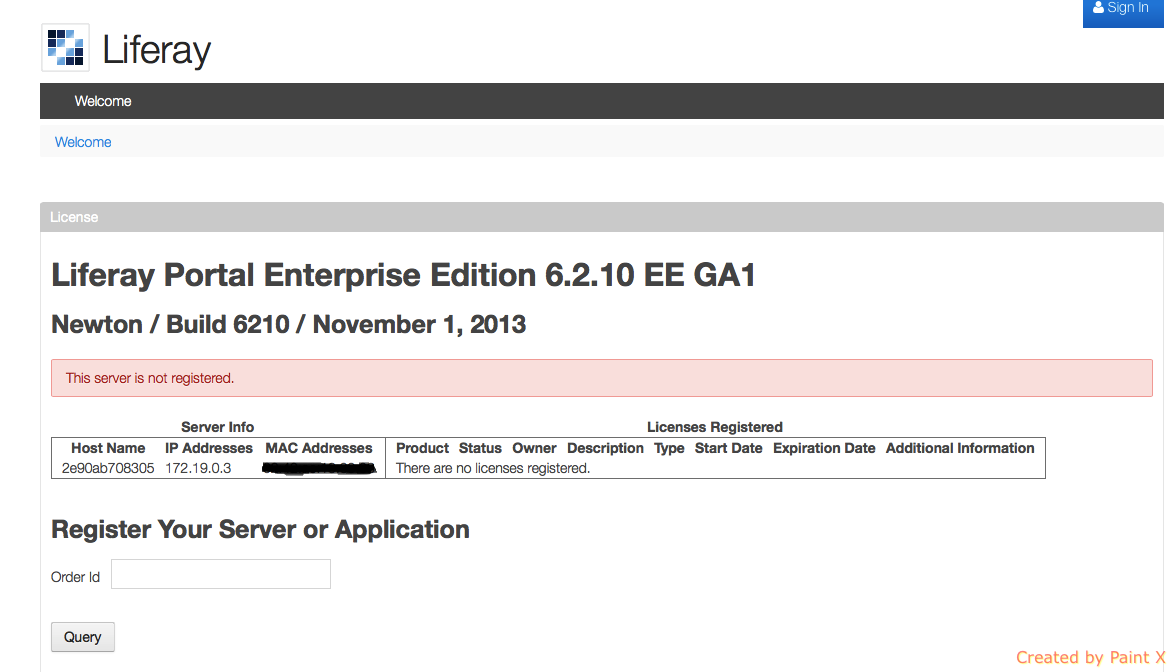
The page should display some Licensing issue and that you'll need to enter your Order ID.
## Enabling License
- Copy your license file inside the running Liferay container:
```bash
# **docker cp** will copy the license.xml as root by default
docker cp license.xml liferay:/tmp/
```
- Transfer the license file to the deploy directory as jboss user:
-
```bash
docker exec -it liferay cp /tmp/license.xml /opt/jboss/deploy/
```
- Observe the logs to see that the license file has been deployed successfully.
```bash
docker exec -it liferay cat /opt/jboss/logs/liferay.$(date +%Y-%m-%d).log
16:36:45,270 INFO [com.liferay.portal.kernel.deploy.auto.AutoDeployScanner][AutoDeployDir:204] Processing license.xml
16:36:45,276 INFO [com.liferay.portal.kernel.deploy.auto.AutoDeployScanner][LicenseAutoDeployListener:?] Copying license for /opt/jboss/deploy/license.xml
16:36:45,308 INFO [com.liferay.portal.kernel.deploy.auto.AutoDeployScanner][LicenseManager:?] Portal Development license validation passed
16:36:45,308 INFO [com.liferay.portal.kernel.deploy.auto.AutoDeployScanner][LicenseDeployer:?] License registered
```
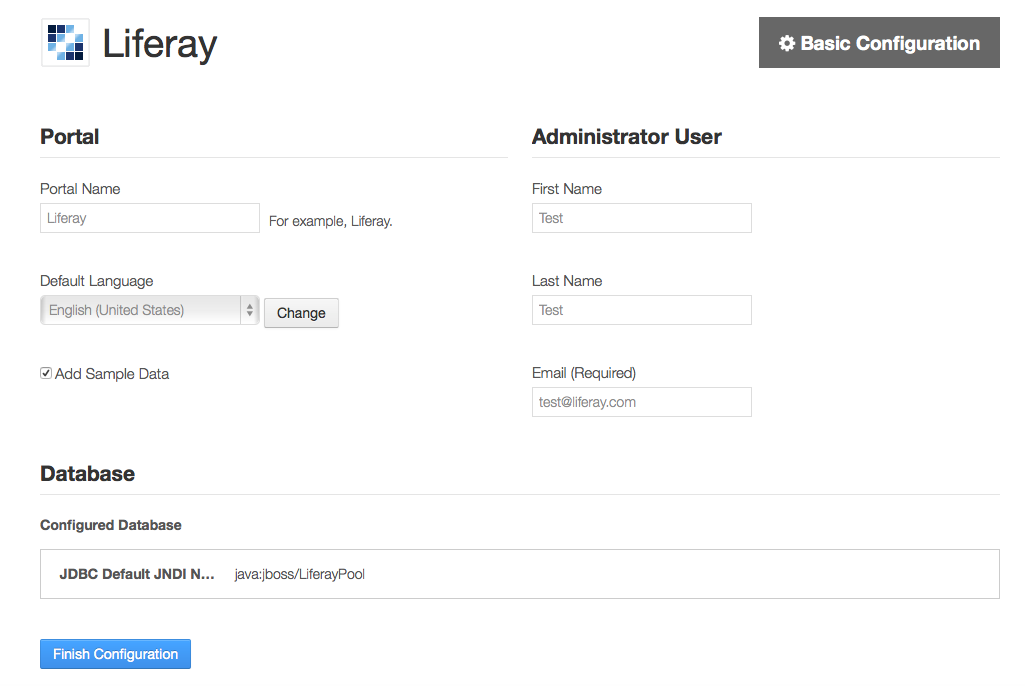
If successful, access the page again and you should now be able to proceed with the Liferay Wizard.
# Building your own Docker Image
The Dockerfile was based from following this [Liferay installation guide for Liferay 6.2 on Jboss 7 AS] (https://dev.liferay.com/discover/deployment/-/knowledge_base/6-2/installing-liferay-on-jboss-7-1).
This image will be built on top of a base Jboss image `bzon/jboss-eap:6.4.0-ga` from Docker hub. For more information about this build, please see [My Jboss EAP 6.4.0 Docker Project](https://github.com/bzon/docker-jboss/tree/master/jboss-eap-6.4).
## Requirements
Directory and Files tree.
```bash
Dockerfile
resources/
|__entrypoint.sh
|__wait-for-it.sh
|__instalers/
|__ liferay-portal-6.2-ee-sp12-20150804162203131.war
|__ liferay-portal-dependencies-6.2-ee-sp12.zip
|__ mysql-connector-java-5.1.39-bin.jar
|__ ojdbc6.jar
|__ ojdbc7.jar
|__ tomcat-juli.jar
|__conf/
|__ portal-ext.properties.template
|__ server.policy
|__ standalone.conf
|__ standalone.xml.template
|__ com.liferay.portal.module.xml
|__ com.oracle.ojdbc6.module.xml
|__ com.oracle.ojdbc7.module.xml
```
## Artifacts
All of the artifacts in this table should be present under the `resources/installers` directory.
Artifact | Download Source
------------ | -------------
liferay-portal-6.2-ee-sp12-20150804162203131.war | Liferay Subscription
liferay-portal-dependencies-6.2-ee-sp12.zip | Liferay Subscription
mysql-connector-java-5.1.39-bin.jar | http://dev.mysql.com/downloads/connector/j/
ojdbc6.jar | http://www.oracle.com/technetwork/apps-tech/jdbc-112010-090769.html/
ojdbc7.jar | http://www.oracle.com/technetwork/database/features/jdbc/jdbc-drivers-12c-download-1958347.html/
tomcat-juli.jar (optional) | http://www.java2s.com/Code/Jar/t/Downloadtomcatjulijar.htm
## Liferay and Jboss Configuration
Configuration File | Description
------------ | -------------
entrypoint.sh | Entrypoint script that orchestrates how the container will launch upon `docker run`
portal-ext.properties.template | A tokenised template of portal-ext.properties for Liferay related configurations.
server.policy | Jboss policy permission file.
standalone.conf | Jboss standalone.sh startup script's configuration for JAVA_OPTS.
standalone.xml.template | A tokenised template of Jboss standalone.sh configuration where Datasource and Liferay related stuffs are placed. This is passed as `-c standalone.xml` upon container launch by default.
com.liferay.portal.module.xml | Liferay dependencies module.xml file that corresponds with the Liferay dependencies from the Requirements table. It also contains the Jboss datasource dependency configuration for mysql.
com.oracle.ojdbc6.module.xml | Jboss datasource module.xml file that contains the dependency configuration for oracle jdbc 6 connector for Oracle 11g database.
com.oracle.ojdbc7.module.xml | Jboss datasource module.xml file that contains the dependency configuration for oracle jdbc 7 connector for Oracle 12c database.