https://github.com/c-base/ingress-table
Ingress Table NoFlo & MicroFlo setup
https://github.com/c-base/ingress-table
cbase-space-station ingress iot microflo msgflo noflo rgb-led-strips
Last synced: 3 months ago
JSON representation
Ingress Table NoFlo & MicroFlo setup
- Host: GitHub
- URL: https://github.com/c-base/ingress-table
- Owner: c-base
- License: mit
- Created: 2014-03-15T01:33:04.000Z (over 12 years ago)
- Default Branch: master
- Last Pushed: 2020-06-02T22:11:33.000Z (about 6 years ago)
- Last Synced: 2024-04-13T22:23:36.322Z (about 2 years ago)
- Topics: cbase-space-station, ingress, iot, microflo, msgflo, noflo, rgb-led-strips
- Language: CoffeeScript
- Homepage: http://bergie.iki.fi/blog/ingress-table/
- Size: 600 KB
- Stars: 39
- Watchers: 11
- Forks: 3
- Open Issues: 16
-
Metadata Files:
- Readme: README.md
- License: LICENSE
Awesome Lists containing this project
README
Ingress Table [](https://travis-ci.org/c-base/ingress-table) [](https://greenkeeper.io/)
=============
The software side of a "physical Intel map", built with [NoFlo](http://noflojs.org) and [MicroFlo](http://microflo.org). Please read the [introductory blog post](http://bergie.iki.fi/blog/ingress-table/) for more information. The actual table can be seen live at the [c-base](http://c-base.org/) space station in Berlin.
**[View source on Flowhub](https://app.flowhub.io/#github/c-base/ingress-table)**

## How does this work?
We have a NoFlo graph that periodically pulls portal status information from the data provider, and converts that to status information to be shown on the table surface.
The status information is then transmitted to a microcontroller that shows portal owners, attack notifications, etc. using the LEDs.
At c-base the table runs as part of the [c-flo](https://github.com/c-base/c-flo) IoT network, with the data fetching part running on a server machine, and the light control running inside the table itself. Messaging related to these is coordinated by [MsgFlo](https://msgflo.org).
## Starting and Stopping the Service
Clone this repository to `/opt/ingress-table` on your system, add an authorized access token as `cookie.json`, `npm install` dependencies.
Copy the systemd service files from `systemd/` folder to `/etc/systemd/system`
Reload systemd files with `sudo systemctl daemon-reload`
Start the services with:
* `sudo systemctl start ingress-data` (for the API interface part)
* `sudo systemctl start ingress-lights` (for the light control)
## Hardware
* Raspberry Pi running NoFlo
* Arduino Uno running Microflo for controlling the WS2801-based LED strand (portal lights)
* 50 individually controllable LEDs for portals (based on the WS2801 controller chip)
* 5 LED strips for streets (map background) and floor lighting
* Launchpad Tiva running MicroFlo for controlling the 5 RGB-LED strips
* USB chargers for agents running out of battery
### LED driver circuit
The RGB-LED strips we use run on 12 Volts DC and have one shared plus pole and an individual
minus pole for each color. They cannot be driven by the Tiva itself so we use an N-Channel MOSFET
to control them. We use three [IRL540N MOSFETs](http://www.irf.com/product-info/datasheets/data/irl540n.pdf) (named Q1, Q2, Q3) per RGB strip.
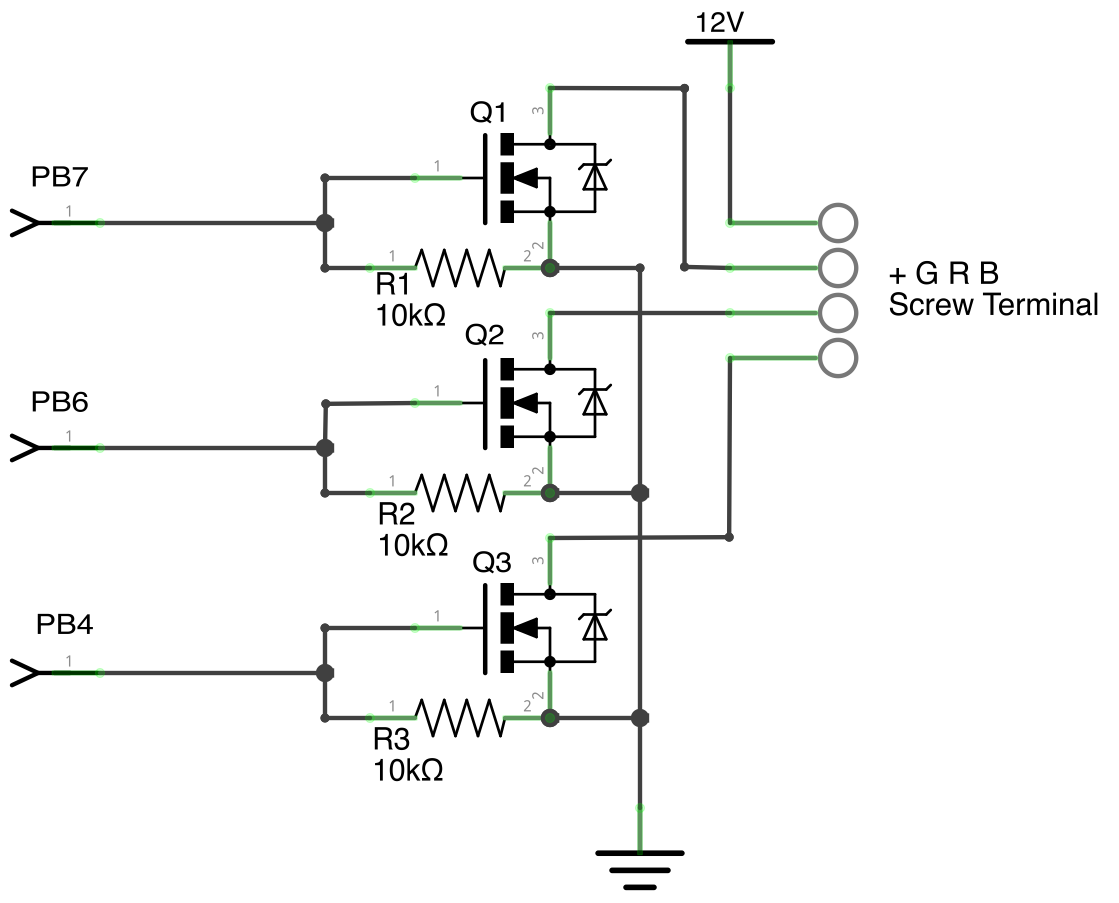
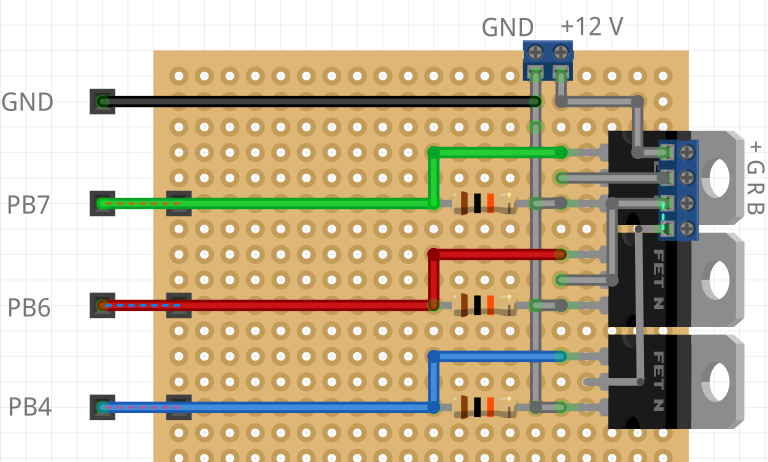
This is the circuit for one channel only, you must build this 5 times. Here is an example of how you could
put in on a perfboard:
### LED strip i/o pins
```
J2
---
PB7 Green1
PB6 Blue1
PA2 -> SSI0Clk => Portallights Clock (CKI), not used at the moment
J4
---
PF3 Red2
PC4 Green2
PC5 Blue2
PF2 Red Bottom
J3
---
PD0 Red3
PD1 Green3
PF1 Blue3
J1
---
PB4 Red1
PB5 Red4
PE4 Green4
PE5 Blue4
PA6 Green Bottom
PA7 Blue Bottom
PA5 -> SSI0Tx => Portallights Data (SDI), not used at the moment
```
**Note**: out-of-the box on the Tiva the pins PB6, PB7, PD0, PD1 can't be used. You [can disconnect the R9 and R10 resistors](http://e2e.ti.com/support/microcontrollers/tiva_arm/f/908/t/290329.aspx) to make them usable.
## Flashing and resetting the Arduino
Resetting the MCU:
stty -F /dev/ttyACM1 1200
make upload SERIALPORT=/dev/ttyACM1 BAUDRATE=57600 MODEL=leonardo GRAPH=../ingress-table/graphs/PortalLights.fbp