https://github.com/c-ehrlich/anket
Create and fill out surveys, and view statistics on responses
https://github.com/c-ehrlich/anket
Last synced: 8 months ago
JSON representation
Create and fill out surveys, and view statistics on responses
- Host: GitHub
- URL: https://github.com/c-ehrlich/anket
- Owner: c-ehrlich
- Created: 2022-03-24T15:34:00.000Z (over 4 years ago)
- Default Branch: main
- Last Pushed: 2022-06-19T21:47:10.000Z (about 4 years ago)
- Last Synced: 2024-10-05T14:41:10.777Z (over 1 year ago)
- Language: TypeScript
- Homepage: anket-surveys.vercel.app
- Size: 2.86 MB
- Stars: 1
- Watchers: 1
- Forks: 0
- Open Issues: 0
-
Metadata Files:
- Readme: README.md
Awesome Lists containing this project
README
# Anket
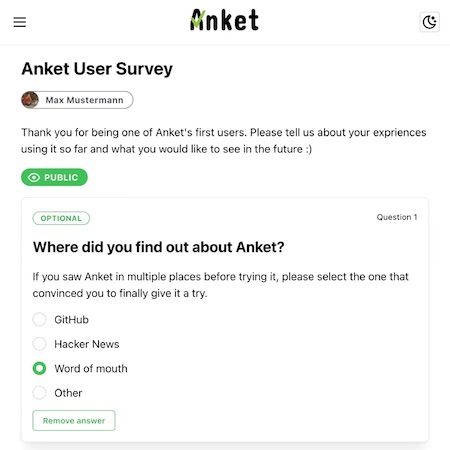
Anket is a platform for creating surveys, responding to surveys, and seeing statistics about the survey responses. It was created out of frustration with the scammyness, bad UI, and overload of unnecessary 'features' of SurveyMonkey.
You can see a sample deployment at [https://anket-surveys.vercel.app](https://anket-surveys.vercel.app).
## Table of Contents
* [Setup](#setup)
* [Development](#development)
* [Debugging](#debugging)
* [Production Database](#production-database)
* [Deploy on Vercel](#deploy-on-vercel)
* [Deploy to a Server using Docker and Github Actions](#deploy-to-a-server-using-docker-and-github-actions)
* [Features, Tech Stack, and Design Considerations](#features-tech-stack-and-design-considerations)
* [Screenshots](#screenshots)
## Setup
### Development
[Install Postgres](https://www.postgresql.org/download/) in your development environment and create a database. On MacOS you can also use [Postgres.app](https://postgresapp.com/).
Create `.env` with the single environment variable `DATABASE_URL`, which should be the URL to access a Postgres database. Use `.env.sample` for reference.
Create `.env.local` and add environment variables. Use `.env.local.sample` for reference. See the following for explanations on how to generate keys for the various authentication services:
* [Next-Auth settings](https://next-auth.js.org/configuration/options)
* [Discord OAuth](https://discord.com/developers/docs/topics/oauth2)
* [Github OAuth](https://docs.github.com/en/developers/apps/building-oauth-apps/authorizing-oauth-apps)
* [Google OAuth](https://developers.google.com/identity/protocols/oauth2)
Install dependencies:
```bash
yarn
```
Initialize the database:
```bash
npx prisma migrate dev
```
Run the development server:
```bash
yarn dev
```
Open [http://localhost:3000](http://localhost:3000) with your browser to see the website live.
### Debugging
For quick manual access to the database you can use [Prisma Studio](https://www.prisma.io/studio).
For serverside debugging it is recommended to use the custom Pino-based logger (found in `/backend/utils/logger.ts`) rather than `console.log`.
### Production Database
In development we use a local database, but for production we need a database that our deployed backend can access.
As of May 2022, a Postgres Database created in the free tier of [Amazon RDS](https://aws.amazon.com/rds/) can run Anket indefinitely, assuming storage and traffic limits are not exceeded. Other free options include [Heroku Postgres](https://www.heroku.com/postgres) and [Fly.io Postgres](https://fly.io/docs/reference/postgres/).
Of course any other Postgres instance will also work. Please see the [Postgres Documentation](https://www.postgresql.org/docs/14/admin.html) for more information on how to set up a Postgres database on any server.
### Deploy on Vercel
The easiest way to deploy Anket is to use the [Vercel Platform](https://vercel.com/). See the [Next.js deployment documentation](https://nextjs.org/docs/deployment) for more details.
The basic setup is:
* Create a Postgres database
* Create a new app in Vercel and have it track a branch of Anket's repository
* Set environment variables in Vercel
* Push to the branch that you chose in Vercel
### Deploy to a Server using Docker and Github Actions
The `vps` branch includes a `Dockerfile` and `deploy.yml`. You can use these to deploy to any private server. You lose the performance of Vercel's CDN and Serverless Functions, but it can be significantly cheaper and you are not tied to a specific hosting provider.
Make sure Docker is installed and running on your server. See the [Docker Documentation](https://docs.docker.com/engine/install/) for how to install Docker on all major Linux distributions.
Set your environment variables in Github Secrets
* `GITHUB_USERNAME` is your Github username
* You do not need to set the `GITHUB_TOKEN` variable as this is set by Github automatically on deployment
* Set all other environment variables as showin in `env.local.example`. They need to be prefaced with `APP_`. So for example `DATABASE_URL` becomes `APP_DATABASE_URL`.
Anket runs on port 3000 internally within the Docker container, but is mapped to port 3105 on the server to not conflict with other things that might be running on port 3000. If you prefer to run Anket on a different port, change this in `deploy.yml`.
Next-Auth only works over https in production, so you will need to purchase a domain and set up SSL. If you are using a VPS provider such as Digital Ocean, Hetzner, or Linode, see their documentation on how to do this.
## Features, Tech Stack, and Design Considerations
### Backend
Anket uses [Next.js](https://nextjs.org/)'s built-in backend, using [next-connect](https://github.com/hoangvvo/next-connect) for a better developer experience.
This choice was made for several reasons:
1. Being able to use the same [Zod](https://github.com/colinhacks/zod) schema and types in both the backend and frontend without requiring any kind of intermediary, thus allowing great type safety.
2. Being able to deploy with just a Postgres database and a single Vercel instance or Docker container.
3. Being able to access the same environment variables in backend and frontend.
3. Being able to use a single instance of NextAuth.js for authentication in both backend and frontend.
Next.js's default opinions on backend design include some design decisions that I consider to be disadvantages, such as:
* Suggesting controllers should be written inside of the route handler in `/pages/api/`
* Only allowing global middleware, not per-route
But using next-connect allows us to build an API with a maintainble file structure and per-route middleware. This gives us a developer experience very similar to [Express.js](https://expressjs.com/) while being able to run everything as serverless functions.
The backend file structure is organized by resource, with controllers, services, and schema each living inside separate files. This means that for example switching the database from Postgres to MongoDB should require changes in only the `.service.ts` files.
All routes that include data in POST, PUT, or PATCH requests use the `validateResource` curried function to validate the request against Zod schema. Any request that fails this validation doesn't even make it to the controller. This means we can avoid a lot of boilerplate in the controller.
### Auth
Anket uses [NextAuth.js](https://next-auth.js.org/) for authentication. This decision was made to allow production-quality authentication while requiring neither a mailserver nor having to store even hashes of user passwords. Anket currently supports Discord, Github, and Google accounts. To add other providers, all you need to do is register an OAuth app with that provider, add environment variables for that provider's ID and Secret, and add the provider in `/pages/api/auth/[...nextauth].ts` and `/pages/signin.tsx`.
### Frontend
Anket runs on [Next.js](https://nextjs.org/). Server state is maintained by [React Query](https://react-query.tanstack.com/), and requests are made using [Axios](https://axios-http.com/).
Forms are handled by [Mantine Form](https://mantine.dev/form/use-form/), which allows form validation using the same Zod schema that also validate requests on the server.
Forms are kept in sync with the server during creation (using debouncing to reduce network usage), which means users can close the browser at any time and continue on a different device without losing any input data.
UI components come from [Mantine UI](https://mantine.dev/), graphs are generated by [visx](https://airbnb.io/visx/), and animation is implemented with [Framer Motion](https://www.framer.com/motion/).
## Screenshots
Coming soon!