https://github.com/c-hidery/sfd_tool
Spreadtrum Firmware Dumper
https://github.com/c-hidery/sfd_tool
device-flash sprd spreadtrum unisoc
Last synced: 24 days ago
JSON representation
Spreadtrum Firmware Dumper
- Host: GitHub
- URL: https://github.com/c-hidery/sfd_tool
- Owner: C-Hidery
- License: gpl-3.0
- Created: 2025-09-26T10:52:59.000Z (9 months ago)
- Default Branch: master
- Last Pushed: 2026-04-24T12:24:47.000Z (about 2 months ago)
- Last Synced: 2026-04-24T14:39:06.024Z (about 2 months ago)
- Topics: device-flash, sprd, spreadtrum, unisoc
- Language: C++
- Homepage:
- Size: 2.56 MB
- Stars: 16
- Watchers: 0
- Forks: 2
- Open Issues: 0
-
Metadata Files:
- Readme: README.md
- License: LICENSE.txt
Awesome Lists containing this project
README
# SFD Tool
SFD Tool is a cross‑platform GUI and CLI tool for working with Spreadtrum/UNISOC devices.
It focuses on **safe partition backup/restore, PAC flashing, and advanced maintenance
operations**, with first‑class support for modern 64‑bit platforms.
> NOTE: This README is a high‑level English overview. The **Chinese user guide**
> in [docs/USER_GUIDE_ZH.md](docs/USER_GUIDE_ZH.md) is the canonical, most
> detailed end‑user documentation.


[中文文档](README_ZH.md)
## Introduction
This is the modified version of tool 'spreadtrum_flash'
sfd_tool is a maintenance release for spreadtrum_flash
**(This version adds GTK3 graphical interface)**
[spreadtrum_flash](https://github.com/TomKing062/spreadtrum_flash)
---
Run this before making:
``` bash
sudo apt update
# Ubuntu/Debian
sudo apt install libusb-1.0-0-dev gcc g++ libgtk-3-dev pkg-config make cmake
# Fedora/RHEL
sudo dnf install gcc-c++ gtk3-devel libusb1-devel libusb1 pkgconf-pkg-config make cmake
# macOS
brew install libusb gtk+3 pkg-config make cmake
# Android(Termux)
pkg install x11-repo
pkg install termux-api libusb clang git pkg-config gtk3 glib pango libcairo gdk-pixbuf at-spi2-core xorgproto xorg-util-macros make cmake
```
Then make:
``` bash
make
# Termux
make termux
# Locate
make locates
```
Use on Termux(No GUI):
``` bash
# Search OTG device
termux-usb -l
# example
#[
# "/dev/bus/usb/xxx/xxx"
#]
# Authorize OTG device
termux-usb -r /dev/bus/usb/xxx/xxx
# Run(example)
termux-usb -e './sfd_tool --no-gui --usb-fd' /dev/bus/usb/xxx/xxx
```
**WARN : You may must run tool as root to connect to device correctly!**
---
***Modified CLI commands:***
part_table [FILE PATH]
**This command is equivalent to the `partition_list` command.**
exec_addr [BINARY FILE] [ADDR]
**Modified, you need to provide file path and address**
exec
**Modified, you need to provide FDL1 address when you execute FDL1**
read_spec [PART NAME] [OFFSET] [SIZE] [FILE]
**Modified, equivalent to the `read_part` command, then `read_part` is equivalent to the `r`**
--no-fdl
**New option, execute it if you want to connect to device without FDL1/2(Only Sprd4 Mode).**
cptable
**New command, use it to get partition table through compatibility method(FDL2 only)**
--no-gui
**New parameter, open sfd_tool without GUI**
dis_avb_tos
**New Command, use with caution.**
--tool-mode
**New parameter, you can use some commands that DO NOT need device connection, use `exit` to exit tool**
## WARNING - DISABLE VERITY & AVB
**Command:** `dis_avb_tos` / `verity 0`
This command will **DISABLE** Android's DM-verity and AVB security verification mechanisms on your device.
## CONSEQUENCES
- Your device will have **NO system integrity protection**
- The following apps will **STOP WORKING**:
- Banking apps and Google Pay
- Apps using fingerprint/password for payments (WeChat Pay, Alipay, etc.)
- Netflix HD streaming and some DRM-protected content
- Games with anti-cheat protection (PUBG, Genshin Impact, etc.)
- Malware can easily modify your system without any warning
- Your device becomes significantly more vulnerable to data theft
## BEFORE CONTINUING
- For `dis_avb_tos` , SFD Tool has automatically backed up your `trustos` partition (see `trustos-orig.bin`)
- **Keep this backup safe** - you will need it for recovery
## TO RESTORE
For `verity 0`, Use command: `verity 1`
For `dis_avb_tos`, flash back `trustos-orig.bin`
## Features
- **Cross‑platform GUI** (GTK3)
- Tabs for Connect, Partition Operation, PAC Flash, Manual Operation,
Advanced Operation, Advanced Settings, Debug Options, Log, and About.
- **Partition backup and restore**
- Read/write individual partitions.
- Block‑size‑aware backup/restore pipeline to avoid alignment issues.
- **Restore from folder**: batch restore multiple partitions from a folder
of images (see user guide for details).
- **PAC firmware flashing**
- Inspect PAC contents and flash selected partitions.
- **Manual low‑level operations**
- Read/write by address, execute code at arbitrary addresses, etc.
- **Advanced maintenance tools**
- AVB and boot‑chain related operations.
- Other expert‑only functions for debugging and recovery.
- **CLI mode**
- Run without GUI using `--no-gui`.
- Rich command set for scripting and headless environments.
- **Internationalisation (i18n)**
- Translated UI (e.g. `zh_CN`, `en_US`), using gettext `.po`/`.mo` files.
## Supported platforms & binaries
SFD Tool is primarily tested and released for:
- **Windows 10/11 x64/x86**
- **Linux x86_64** (e.g. Debian/Ubuntu, RPM‑based distros)
- **macOS** (recent versions)
- **Termux / Android** (CLI only, via `--no-gui`)
Prebuilt binaries and packages are provided on GitHub Releases, typically including:
- Windows x64/x86 executables (LibUSB(x64) and/or SPRD(x86) driver builds).
- `.deb` packages for popular Debian/Ubuntu versions.
- `.rpm` packages for RPM‑based distributions.
- macOS `.dmg` application bundles.
For exact platforms and artifact names, refer to the latest release page and
[.github/workflows/build.yml](.github/workflows/build.yml).
## Building from source (CMake)
SFD Tool uses **CMake** as the primary build system. The legacy Makefile is
kept only for reference.
Basic out‑of‑source build (example):
```bash
cmake -S . -B build -DCMAKE_BUILD_TYPE=Release
cmake --build build -j
```
On Windows you can use a Visual Studio generator, on macOS and Linux Ninja or
Makefiles. See:
- [docs/cmake_EN.md](docs/cmake_EN.md) – English CMake/build guide.
- [docs/cmake.md](docs/cmake.md) – Chinese CMake/build guide with more
details, including per‑user config and `ui_language`.
## Running
### GUI
After building, run the GUI executable from your build directory, e.g.:
```bash
./build/sfd_tool
```
On installed systems you can start SFD Tool from your desktop environment
(menu entry created by the package) or by running `sfd_tool` from a terminal.
### CLI mode
For headless and scripted environments you can run SFD Tool in CLI mode:
```bash
sfd_tool --no-gui --help
```
This prints the full list of commands and options. Some examples:
- List partition table.
- Read a specific region to a file.
- Execute code at a given address.
- Use `--no-fdl` or similar flags for special boot modes.
For the authoritative CLI reference, see:
- Inline help: `sfd_tool --help`
- Manpage (on Linux): `man sfd-tool`
## Configuration & language
SFD Tool stores per‑user configuration (UI language, recent paths, etc.) in a
JSON config file in the user’s home directory (location varies by platform).
Key points:
- `ui_language` can be set to `auto`, `zh_CN`, `en_US`, etc.
- On first run the tool may migrate legacy config files from the project root
into the per‑user location.
See [docs/cmake.md](docs/cmake.md) for details.
## Documentation map
- **Chinese user guide (canonical for end users)**
- [docs/USER_GUIDE_ZH.md](docs/USER_GUIDE_ZH.md)
- **Project overview (English)**
- This README
- [README_ZH.md](README_ZH.md) – Chinese overview
- **Architecture & development**
- [ARCHITECTURE.md](ARCHITECTURE.md)
- **Build & configuration**
- [docs/cmake_EN.md](docs/cmake_EN.md)
- [docs/cmake.md](docs/cmake.md)
- **Release & CI (maintainers)**
- [docs/RELEASE_GUIDE_ZH.md](docs/RELEASE_GUIDE_ZH.md)
- CI workflow: [.github/workflows/build.yml](.github/workflows/build.yml)
- **Changelog**
- [docs/VERSION_LOG.md](docs/VERSION_LOG.md) – shown in the About tab.
## Safety and disclaimer
Working with device partitions and bootloaders is inherently risky. Incorrect
operations can brick a device and may lead to data loss.
- Always back up critical partitions before flashing or using advanced tools.
- Do not use functions you do not fully understand.
- Read the warnings in the user guide and on the Advanced Operation tab.
SFD Tool is distributed under the terms of the GPL. See the repository for
license details.
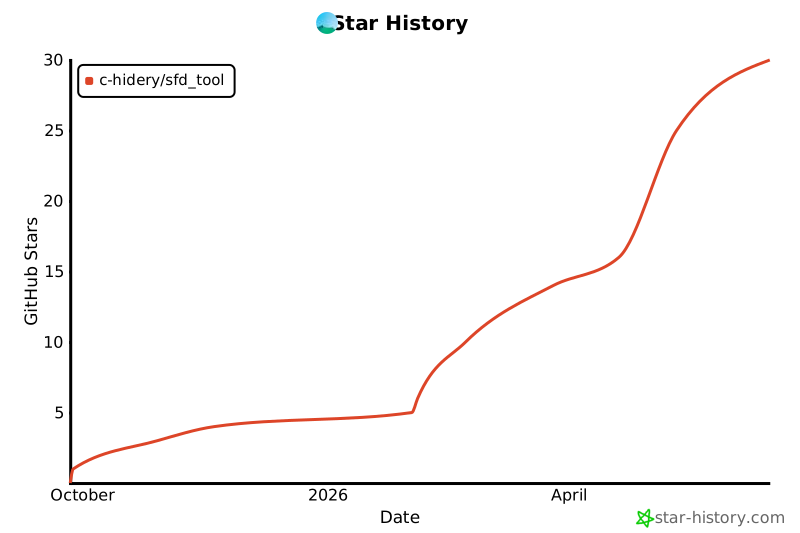
## Star History