https://github.com/caalh/owen
OWEN — Open Workflow for Engineered Neutronics: a VS Code/Cursor extension for MCNP, OpenMC, Serpent & SCONE (syntax highlighting, lattice builder, 3D preview, validation, workflow automation). A BelvoirDynamics product.
https://github.com/caalh/owen
mcnp monte-carlo neutronics nuclear openmc scone serpent vscode-extension
Last synced: 7 days ago
JSON representation
OWEN — Open Workflow for Engineered Neutronics: a VS Code/Cursor extension for MCNP, OpenMC, Serpent & SCONE (syntax highlighting, lattice builder, 3D preview, validation, workflow automation). A BelvoirDynamics product.
- Host: GitHub
- URL: https://github.com/caalh/owen
- Owner: caalh
- License: mit
- Created: 2026-06-01T22:16:42.000Z (about 1 month ago)
- Default Branch: main
- Last Pushed: 2026-06-22T23:34:22.000Z (12 days ago)
- Last Synced: 2026-06-23T00:09:43.116Z (11 days ago)
- Topics: mcnp, monte-carlo, neutronics, nuclear, openmc, scone, serpent, vscode-extension
- Language: TypeScript
- Size: 746 KB
- Stars: 1
- Watchers: 0
- Forks: 0
- Open Issues: 0
-
Metadata Files:
- Readme: README.md
- Changelog: CHANGELOG.md
- License: LICENSE
Awesome Lists containing this project
README
OWEN
Open Workspace for Engineered Neutronics
Created by Aaron W. Calhoun
The nuclear reactor modeling toolkit for VS Code & Cursor — syntax highlighting, a visual lattice builder, geometry preview, deep input validation, and workflow automation for MCNP, OpenMC, Serpent, and SCONE.


A BelvoirDynamics product · part of ReactorMC
---
OWEN brings first-class editor support for the four major Monte Carlo neutron-transport
codes to VS Code and Cursor. Write decks faster with smart snippets, catch mistakes before
you run with language-aware validation, build lattices visually, and launch solvers without
leaving your editor.
## See it in action
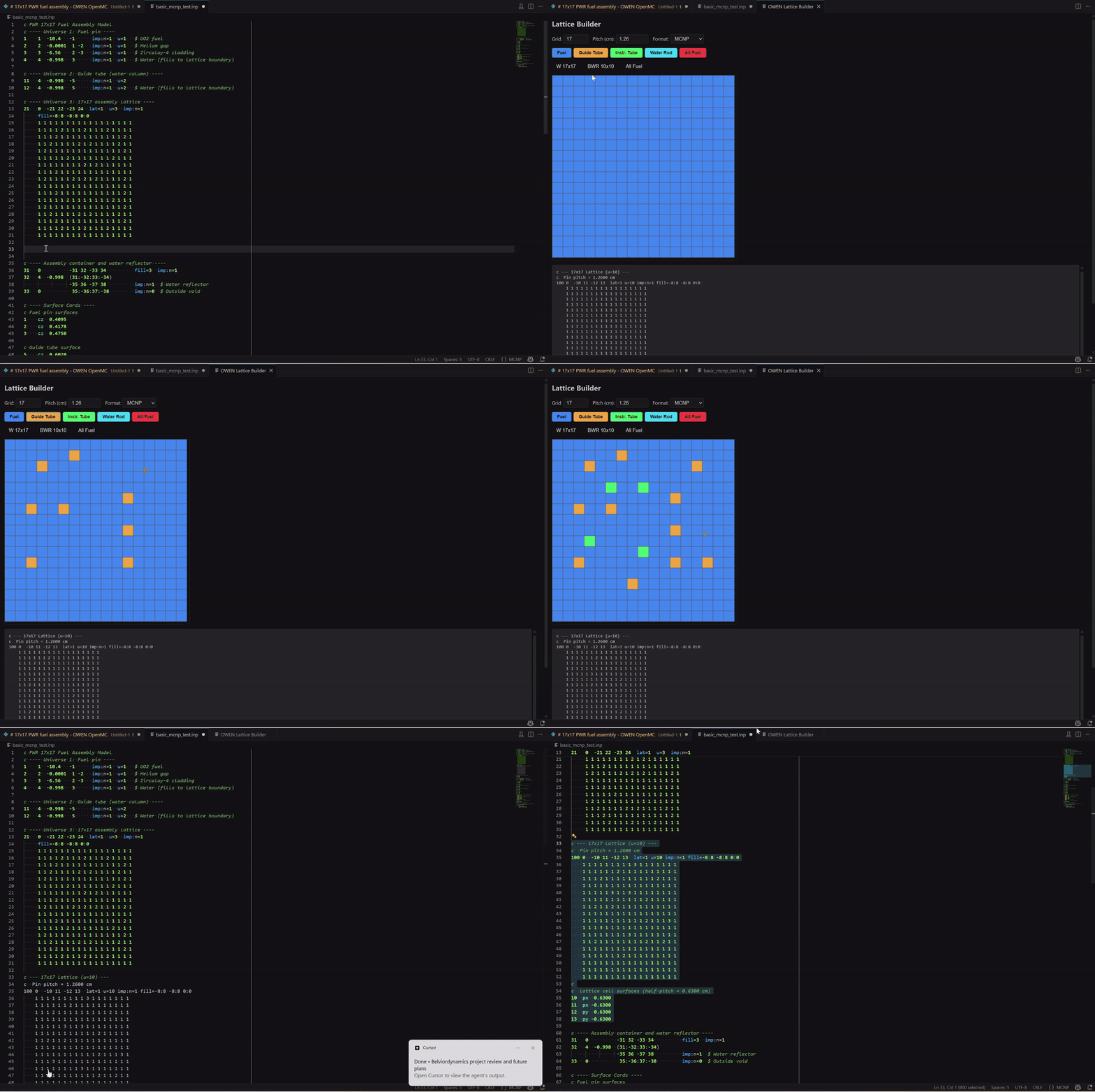
**Visual Lattice Builder → MCNP 17×17 assembly, with live syntax highlighting.** Pick fuel,
guide-tube, and instrument-tube positions on a grid and OWEN writes the lattice deck for you.
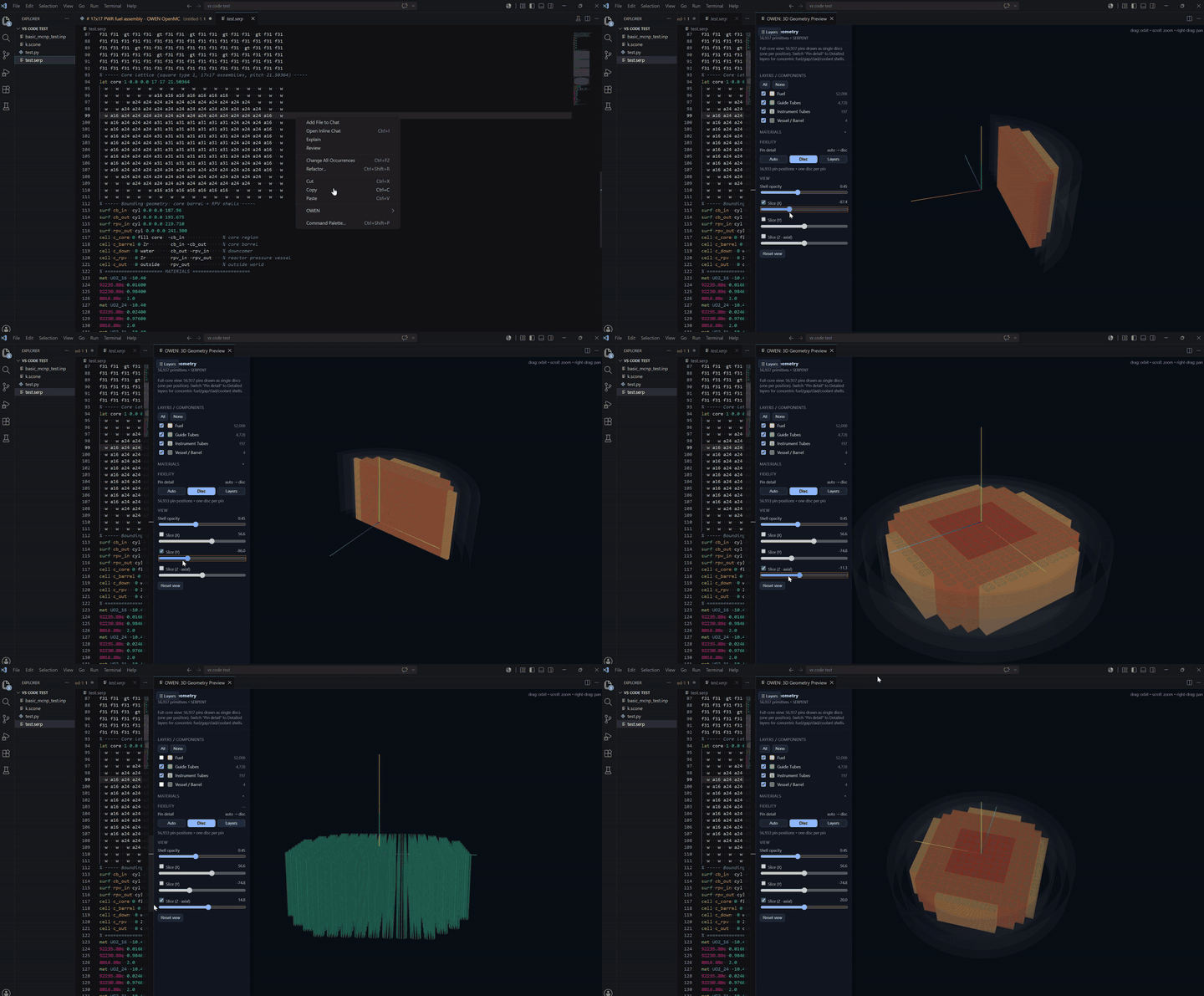
**3D geometry preview of a full Serpent core — component toggles, Disc/Layers fidelity, and
X / Y / Z slice planes.** Inspect ~56,900 pins interactively: peel away vessel and guide tubes,
switch to concentric pin layers, and slice through the core.
## Features
| Feature | Description |
|---------|-------------|
| **Syntax highlighting** | TextMate grammars for MCNP (`.i`, `.mcnp`, `.inp`), Serpent (`.serp`), and SCONE (`.scone`). OpenMC is detected from Python files that `import openmc`. |
| **Snippets** | Ready-to-edit decks: PWR pin cell, 17×17 PWR assembly, criticality array, and shielding slab for MCNP; full OpenMC pin/assembly Python scripts; SCONE fuel pin, 5×5 assembly, and shielding tutorials. |
| **Lattice Builder** | A visual grid editor that generates MCNP / OpenMC / Serpent lattice code from a few clicks. |
| **3D geometry preview** | Three.js webview rendering of MCNP `cz` cylinders, with graceful empty-states for other codes. |
| **Deep validation** | Language-aware diagnostics with codes — ZAID format, density/fraction sign conventions, `mt`/S(α,β) hydrogen checks, macrobody parameter counts (MCNP); `IndependentSource`/`RectangularPrism` API checks (OpenMC); `cuboid` vs `rect`, `trcl`, CLI `omp` (Serpent); `aceNeutronDatabase`, temperature-suffix matching, `pinUniverse` radii/fills (SCONE). |
| **Workflow automation** | One-command simulation runner that launches the right solver in a dedicated terminal. |
| **Parametric sweep** | JSON-described parameter sweeps with per-run input mutation, output capture, k-eff parsing, and a manifest + TSV summary. |
| **Material insertion (NRDP)** | Insert reactor materials from the Nuclear Reactor Data Project database — bundled snapshot with optional live refresh from reactormc.net, language-aware output. |
| **Community Library** | Browse and insert community-approved models (opt-in via `owen.community.enabled`; you supply your own Supabase backend). |
| **Tutorials** | Deep-links into the reactormc.net learning material via `OWEN: Open Tutorial`. |
## Install
**From the Marketplace** (once published):
1. Open the Extensions view (`Ctrl+Shift+X` / `Cmd+Shift+X`).
2. Search for **OWEN** and click **Install** — or install [`belvoirdynamics.owen-neutronics`](https://marketplace.visualstudio.com/items?itemName=belvoirdynamics.owen-neutronics).
**From Open VSX** (Cursor, VSCodium, etc.): install [`belvoirdynamics/owen-neutronics`](https://open-vsx.org/extension/belvoirdynamics/owen-neutronics).
**From a VSIX** (available now via [GitHub Releases](https://github.com/caalh/owen/releases/latest)):
```bash
code --install-extension owen-neutronics-0.1.0.vsix
# Cursor:
cursor --install-extension owen-neutronics-0.1.0.vsix
```
Or in the editor: Extensions view → `...` menu → **Install from VSIX…**.
## Commands
Open the Command Palette (`Ctrl+Shift+P` / `Cmd+Shift+P`) and type **OWEN**:
| Command | Description |
|---------|-------------|
| `OWEN: Open Lattice Builder` | Visual lattice grid editor |
| `OWEN: Validate Input File` | Deep MCNP / OpenMC / Serpent / SCONE checks |
| `OWEN: Run Simulation` | Launch the appropriate solver in a dedicated terminal |
| `OWEN: Run Parameter Sweep` | Generate and run a JSON-described sweep |
| `OWEN: Open 3D Geometry Preview` | Three.js webview (MCNP cylinders) |
| `OWEN: Open Tutorial` | Jump to a reactormc.net tutorial page |
| `OWEN: Insert Material from Database` | NRDP material picker, language-aware |
| `OWEN: Search Reactor Library` | Community Library browser (disabled by default) |
## Configuration
All settings live under the **OWEN** section (`Ctrl+,` → search "owen"):
| Key | Default | Notes |
|-----|---------|-------|
| `owen.mcnp.executable` | `mcnp6` | Path to the MCNP executable |
| `owen.serpent.executable` | `sss2` | Path to the Serpent executable |
| `owen.openmc.executable` | `openmc` | Non-Python OpenMC entry point only |
| `owen.openmc.pythonExecutable` | `python` | Interpreter for OpenMC model scripts |
| `owen.scone.executable` | `scone` | On Windows, SCONE typically requires WSL |
| `owen.simulation.workingDirectory` | `""` | Empty = the input file's directory |
| `owen.nrdp.live` | `true` | Live-fetch NRDP snapshots when online |
| `owen.nrdp.endpoint` | `https://reactormc.net/data` | Base URL for live NRDP JSON |
| `owen.community.enabled` | `false` | Enable the Community Library browser |
| `owen.supabase.url` | `""` | Supabase project URL (you supply this) |
| `owen.supabase.anonKey` | `""` | Supabase anon/public key (you supply this) |
> The Community Library is **off by default** and ships with **no credentials**. To use it,
> point `owen.supabase.url` / `owen.supabase.anonKey` at your own Supabase project.
## Requirements
OWEN is an editor toolkit — it does not bundle the Monte Carlo solvers. To run simulations,
install and point the settings above at your own builds of:
- **MCNP** (Los Alamos National Laboratory — export-controlled, requires a license)
- **OpenMC** (open source; run via the Python interpreter you configure)
- **Serpent** (VTT — requires a license)
- **SCONE** (University of Cambridge — open source; on Windows it typically runs under **WSL**)
Syntax highlighting, snippets, validation, the lattice builder, and geometry preview all work
without any solver installed.
## Supported languages
| Language | Highlighting | Snippets | Validation | Runner |
|----------|--------------|----------|------------|--------|
| MCNP | Yes | Yes | Yes (deep) | `mcnp6 inp=…` |
| OpenMC (Python) | Via Python ext | Yes | Yes (deep) | `python ` |
| Serpent | Yes | Yes | Yes (deep) | `sss2 ` |
| SCONE | Yes | Yes | Yes (deep) | `scone ` (WSL on Windows) |
## Related
- **[ReactorMC](https://reactormc.net)** — tutorials, the community library, and the NRDP material data that powers OWEN.
- **GROVES** — the companion desktop editor for the same input languages.
## License
[MIT](./LICENSE) © 2026 BelvoirDynamics.