https://github.com/cacti/plugin_intropage
Intropage/Dashboard for Cacti monitoring
https://github.com/cacti/plugin_intropage
cacti cacti-plugin intropage-plugin
Last synced: 12 months ago
JSON representation
Intropage/Dashboard for Cacti monitoring
- Host: GitHub
- URL: https://github.com/cacti/plugin_intropage
- Owner: Cacti
- License: lgpl-2.1
- Created: 2017-10-12T09:05:55.000Z (almost 9 years ago)
- Default Branch: develop
- Last Pushed: 2025-08-19T17:26:37.000Z (12 months ago)
- Last Synced: 2025-08-19T19:31:55.572Z (12 months ago)
- Topics: cacti, cacti-plugin, intropage-plugin
- Language: PHP
- Size: 2.5 MB
- Stars: 22
- Watchers: 12
- Forks: 10
- Open Issues: 0
-
Metadata Files:
- Readme: README.md
- Changelog: CHANGELOG.md
- License: LICENSE
Awesome Lists containing this project
README
# plugin_intropage
## Intropage/Dashboard plugin for Cacti
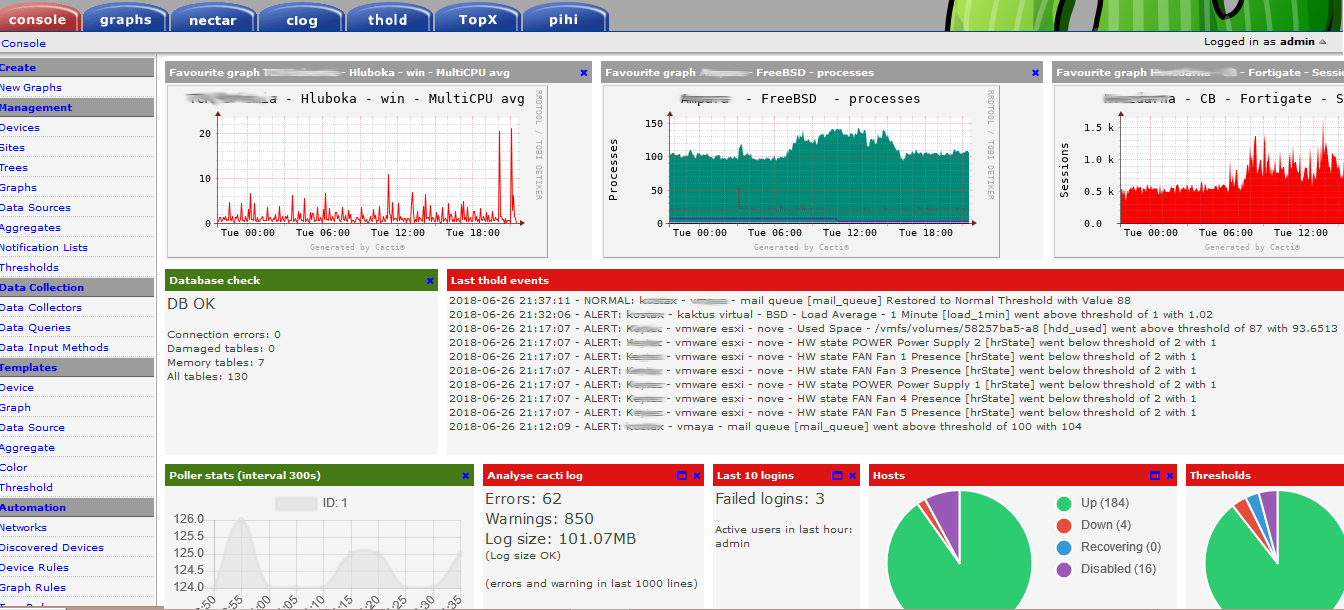
Plugin displays useful information and favourite graphs on console screen or
separated tab:
* trends
* host graph (total, down, ...)
* poller statistics
* thresholds (all, triggered, ...)
* logs analyze
* worst ping and availability
* ...
## Original Author
All thanks goes to Petr Macek (petr.macek@kostax.cz) the original author of
Intropage! He has turned over the Intropage Plugin to the broader Cacti
community for long term management. We would like to thank him for all his
contributions past, present and future.
## Screenshot
## Installation
- Copy directory intropage to plugins directory
- Check file permission (Linux/unix - readable for www server)
- Enable plugin (Console > Configuration > Plugins)
- Configure Plugin (Console > Configuration > Settings > Intropage Tab)
- Add Panel Permissions to user accounts (Console > Users > (edit) > Intropage)
## Upgrade
- Disable plugin in the console
- TGZ old intropage directory for recovery
- Remove old directory
- Recreate directory with new files
- Check file permission (Linux/unix - readable for www server)
- Enable plugin in the console
- Configure Intropage (Console > Configuration > Settings > Intropage tab)
- Add permission to users (Console > Configuration > Users > (edit) > Intropage
Tab)
More information about installation and ugrade plugins:
https://docs.cacti.net/Plugins.md
## Configuration
Console > Configuration > Users > Intropage option to provide permissions to
Panels Settings > Intropage (admin)
On Intropage/Console page add new Dashboard Panels as they become available.
The panels will not start rendering until at least one user has access to a
Panel.
## How to Add Graphs to Intropage/Dashboard?
Go to graphs, select graph, click to icon Eye. Graphs will be rendered in SVG
format only.
## How to add new Panel Libraries and Panels?
Intropage provides a 'panellib' directory where you can create new panels. You
simply need to copy one of the existing directories to a new file name, and then
ensure that you use 'unique' panel id's and create away. Each panel library
file will have a registration function where you define what panels are included
in the file and how they gather their data.
## Possible Bugs?
If you find a problem, let me know via github or
https://forums.cacti.net/viewtopic.php?f=5&t=51920
## Thanks
Tomas Macek, Peter Michael Calum, Trevor Leadley, Earendil
-----------------------------------------------
Copyright (c) 2004-2025 - The Cacti Group, Inc.