https://github.com/caglaryalcin/after-format
If you have just formatted your Windows 11 computer, you can run this script for a better Windows experience.
https://github.com/caglaryalcin/after-format
appxpackages bloatware bloatware-removal debloat debloater interactive powershell powershell-script prompt ps1 scheduled-tasks silent sysprep windows-10 windows-11 windows-scripts
Last synced: 5 months ago
JSON representation
If you have just formatted your Windows 11 computer, you can run this script for a better Windows experience.
- Host: GitHub
- URL: https://github.com/caglaryalcin/after-format
- Owner: caglaryalcin
- License: gpl-2.0
- Created: 2022-01-12T15:07:40.000Z (over 4 years ago)
- Default Branch: main
- Last Pushed: 2026-02-06T12:15:31.000Z (6 months ago)
- Last Synced: 2026-02-06T19:15:51.516Z (6 months ago)
- Topics: appxpackages, bloatware, bloatware-removal, debloat, debloater, interactive, powershell, powershell-script, prompt, ps1, scheduled-tasks, silent, sysprep, windows-10, windows-11, windows-scripts
- Language: PowerShell
- Homepage:
- Size: 43.2 MB
- Stars: 22
- Watchers: 1
- Forks: 4
- Open Issues: 0
-
Metadata Files:
- Readme: README.md
- License: LICENSE
Awesome Lists containing this project
README
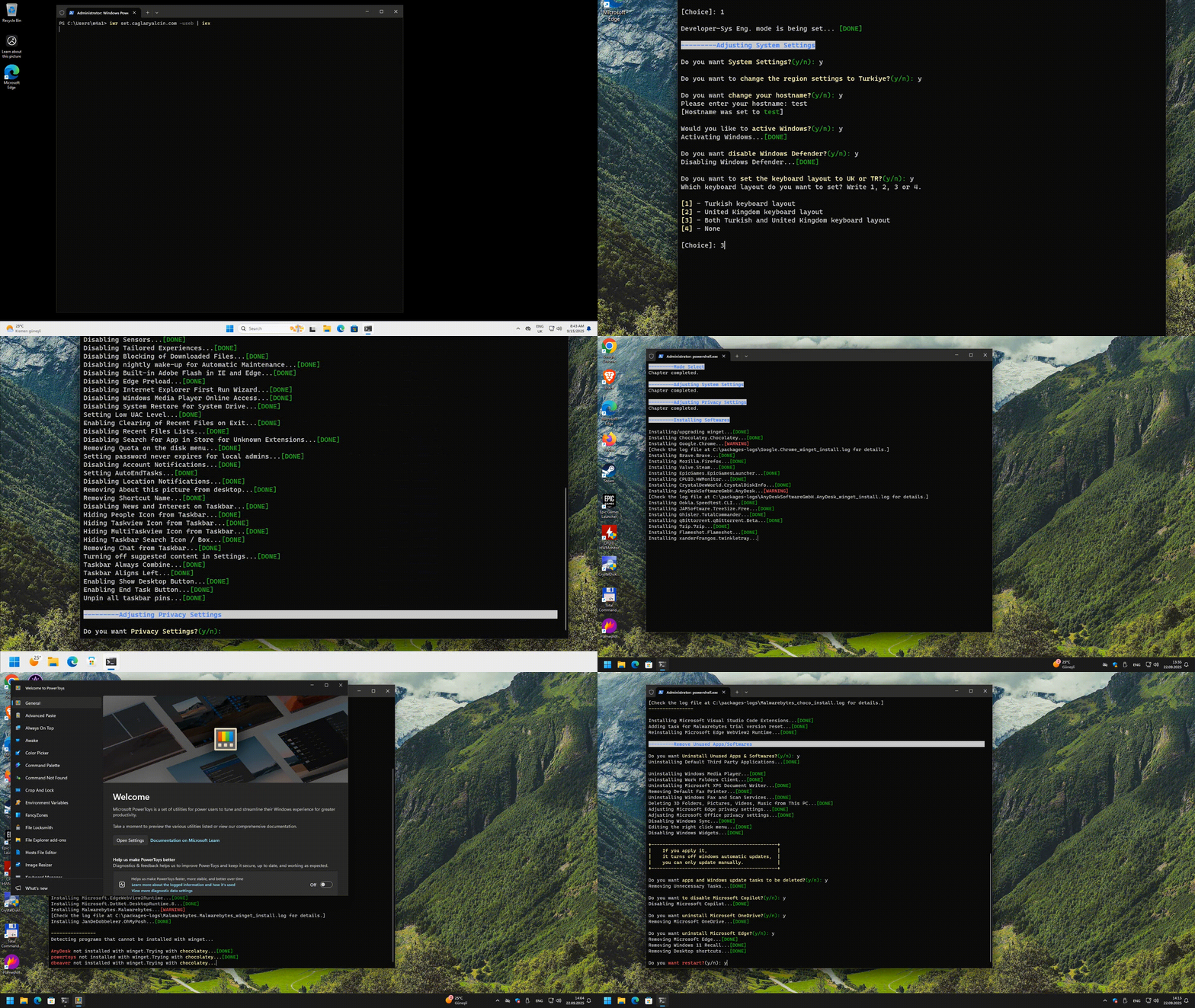
## After Format
 
If you new formatted your computer on Windows 11(all versions) you can run this script.
This script allows Windows 1x users to control data collection, privacy and security functions and does exactly the following; (Some are optional: y/n)
Mode Select
The script first asks you to select one of three modes:
**Normal**, **Game**, and **Developer-Sys Eng** Mode.
Installation and settings will be configured according to these modes.

System Settings

- It asks if you want region change to Turkiye
- It asks if you want change your hostname
- It asks if you want activating your Windows (Thanks to @massgravel for the script https://github.com/massgravel/Microsoft-Activation-Scripts)
- It asks whether you want to delay Windows updates for longer than the default period

- It asks if you want disable windows defender
- It asks if you want date format and keyboard layout
- It asks you to select all folder views in the explorer as 'Details' and set the separator settings as shown by the arrows in the picture

- Ask if you want to add a "startup" task to run at startup (recommended)
- Bringing back the old classic right-click context menu and additional buttons


- Taskbar aligns left
- Disabling snap
- Adding ohmypush to Windows Terminal (Only Dev/Sys-Eng and Normal mode)

- Disabling gallery folder
- Desktop button in taskbar is enabled
- Disabling sync your settings
- Disabling spotligt
- Disabling toast and apps notifications on lock screen
- Disabling windows media player diagnostics
- Disabling extension of windows search with bing
- Default old photo viewer
- Setting dark mode for applications
- Setting dark mode for system
- Setting control panel view to large icons
- Disabling user interface and device recognition features
- Enabling numlock after startup
- Disabling windows beep sound
- Disabling ipv6 stack
- Disabling virtual ethernet adapters
- Setting cloud flare dns
- Configuring windows explorer settings
- Expanding for file explorer
- Hiding recycle bin shortcut from desktop
- Disabling hiberfil.sys
- Disabling display and sleep mode timeouts
- Disabling updates for other microsoft products
- Disabling bing search in start menu
- Disabling smartscreen filter
- Disabling sensors
- Disabling tailored experiences
- Disabling xbox features (Only Dev/Sys-Eng and Normal mode)
- Disabling blocking of downloaded files
- Disabling nightly wake-up for automatic maintenance
- Disabling storage sense
- Disabling built-in adobe flash in ie and edge
- Disabling edge preload
- Disabling internet explorer first run wizard
- Disabling windows media player online access
- Disabling action center (notification center)
- Disabling system restore for system drive
- Setting low uac level
- Removing unnecessary tasks
- Enabling clearing of recent files on exit
- Disabling recent files lists
- Disabling search for app in store for unknown extensions
- Hiding Recently Added, Recommended Settings, Apps, Personalized Sites and Section from list from the start menu
- Stopping and disabling unnecessary services (Xbox features are being removed)
- Disabling news and interest on taskbar
- Hiding people icon from taskbar
- Hiding taskview icon from taskbar
- Hiding multitaskview icon from taskbar
- Showing small icons in taskbar
- Hiding taskbar search
- Hiding 'All' section from taskbar
- Removing chat from taskbar
- Removing widgets from taskbar
- Enabling telnet client (Only Dev/Sys-Eng and Normal mode)
- Setting automatic kill of unsaved changes when trying to log out, restart or close

- Removing Quota on the disk menu
- Setting password never expires for local admins
- Disabling Account Notifications
- Setting End task button
- Disabling Category View on the taskbar
- Enabling WSL
- Memory compression is enabled or disabled based on the amount of RAM
- Enabling launch folder Windows in a separate
- Disabling Location Notifications
- Enabling Sudo (Only Dev/Sys-Eng and Normal mode)
- Removing shortcut name
- Mapped Drives Available in the Elevated Command Prompt Are Being Enabled
- Some applications have their GPU mode set to 'performance'
- Known Windows errors are fixed

- Unpinning all start menu tiles
Privacy Settings

- Disabling telemetry
- Blocking telemetry in host file
- Disabling feedback
- Disabling activity history
- Disabling clipboard history
- Disabling user steps recorder
- Turning off text suggestions for hardware keyboard
- Disabling app launch tracking
- Disabling website access to language list
- Stopping and disabling Connected User Experiences and Telemetry service
- Disabling advertising ID
- Disabling Wi-Fi Sense
- Disabling application suggestions
- Disabling UWP apps background access
- Disabling access to voice activation from UWP apps
- Disabling access to notifications from UWP apps
- Disabling access to account info from UWP apps
- Disabling access to contacts from UWP apps
- Disabling access to calendar from UWP apps
- Disabling access to phone calls from UWP apps
- Disabling access to call history from UWP apps
- Disabling access to email from UWP apps
- Disabling access to tasks from UWP apps
- Disabling access to messaging from UWP apps
- Disabling access to radios from UWP apps
- Disabling access to other devices from UWP apps
- Disabling access to diagnostic information from UWP apps
- Disabling access to libraries and file system from UWP apps
- Disabling UWP apps swap file
- Disabling automatic maps updates
- Disabling windows update automatic restart
- Disabling windows update automatic downloads
Install Softwares

> 💡The following packages will be installed based on the answer you provide at the beginning of the script (normal, gaming, or developer).

- Chrome
- Brave
- Firefox
- Steam
- Epic Games
- HWMonitor
- CrystalDisk Info
- VirtualBox
- Signal
- VSCode (with extensions)
- Notepad
- Windows SDK
- Node.js
- Python
- Git
- AnyDesk
- Terminal
- Speedtest cli
- GitHub
- VLC
- TreeSize
- Total Commander
- Wireshark
- Deluge
- DBeaver
- Cryptomator
- Microsoft Teams
- SteelSeries
- Java
- 7zip
- Flameshot
- Twinkle Tray
- Codec Pack Mega
- Malwarebytes
- ClaudeCode
- Internet Download Manager
- Cloudflare Warp
- OpenRGB
- Tailscale
- WinFsp for Cryptomator
- NVCleanstall
- Rufus
- Regshot
- Yarn
Remove Unused apps/Softwares

- Uninstalling default third party applications
- It asks if you want disable Microsoft Copilot.
- Uninstalling windows media player
- Uninstalling work folders client
- Uninstalling microsoft XPS document writer
- Removing default fax printer
- Uninstalling windows fax and scan services
- Removing 3D folders
- Microsoft edge privacy settings are being adjusted
- It asks if you want remove unnecessary tasks
- It asks if you want uninstall windows onedrive
- It asks if you want uninstall windows edge

Startup Script

- This script adds a task named 'startup' to the task scheduler. This task does exactly the following;
> startup task > This task starts 3 minutes after the computer is turned on, runs again every 3 hours and performs the following operations.
- It does expand for file explorer ribbon
- It does removing stick keys
- f12 is disabled for snipping tool
- It does remove toggle keys
- It does remove unnecessary tasks(update and such) in task scheduler
- It does remove windows defender icon in taskbar
- Disables unnecessary applications that open on connection (It varies depending on the mode selected at the beginning)
- It does remove microsoft edge updates in task scheduler
- It does remove google chrome updates in task scheduler
- It does enable shot desktop button
- Sync windows localtime
> upgrade-packages > This task runs 3 minutes after the computer is turned on and performs the following operations.
- Updates all applications and packages with winget.
## Start the script
> [!WARNING]
> Great care went into making sure this script does not unintentionally break any OS functionality, but use at your own risk!
> [!NOTE]
> If you have 100 Mbps internet, this script takes the following amount of time depending on the modes.
**Normal**: 15min
**Gaming**: 30min
**Dev-Sys**: 60min
> [!IMPORTANT]
> Powershell must be run as admin
```powershell
iwr "set.caglaryalcin.com" -UseB | iex
```