https://github.com/calpa/urusai
Go implementation of noisy HTTP/DNS traffic generator
https://github.com/calpa/urusai
Last synced: 3 months ago
JSON representation
Go implementation of noisy HTTP/DNS traffic generator
- Host: GitHub
- URL: https://github.com/calpa/urusai
- Owner: calpa
- License: mit
- Created: 2025-03-15T12:33:40.000Z (about 1 year ago)
- Default Branch: main
- Last Pushed: 2025-10-29T04:43:45.000Z (6 months ago)
- Last Synced: 2025-10-29T06:25:49.672Z (6 months ago)
- Language: Go
- Size: 34.2 KB
- Stars: 174
- Watchers: 2
- Forks: 11
- Open Issues: 0
-
Metadata Files:
- Readme: README.md
- License: LICENSE
Awesome Lists containing this project
- awesome-go-with-stars - urusai - 10-29 | (Security / HTTP Clients)
- fucking-awesome-go - urusai - Urusai ("noisy" in Japanese) is a Go implementation of a random HTTP/DNS traffic noise generator that helps protect privacy by creating digital smokescreens while browsing. (Security / HTTP Clients)
- awesome-go - urusai - Urusai ("noisy" in Japanese) is a Go implementation of a random HTTP/DNS traffic noise generator that helps protect privacy by creating digital smokescreens while browsing. (Security / HTTP Clients)
- awesome-go-cn - urusai
README
# 🔊 Urusai
### うるさい - Your Privacy Shield in the Digital Noise
[](https://goreportcard.com/report/github.com/calpa/urusai)
[](https://opensource.org/licenses/MIT)
[](https://github.com/calpa/urusai/stargazers)
[](https://github.com/calpa/urusai/commits/main)
*A Go implementation of [noisy](https://github.com/1tayH/noisy) - Making your web traffic less valuable, one request at a time* 🛡️
## 🌟 What is Urusai?
Urusai (Japanese for 'noisy') is your digital privacy companion that generates random HTTP/DNS traffic noise in the background while you browse the web. By creating this digital smokescreen, it helps make your actual web traffic data less valuable for tracking and selling.
## ✨ Features
- 🌐 Generates random HTTP/DNS traffic by crawling websites
- ⚙️ Configurable via JSON configuration file
- 🎭 Customizable user agents, root URLs, and blacklisted URLs
- ⏱️ Adjustable crawling depth and sleep intervals
- ⏰ Optional timeout setting
## 📥 Installation
### Arch Linux (AUR)
```bash
yay -S urusai
```
### Void Linux
```bash
sudo xbps-install -S urusai
```
### 📦 Using Pre-built Binaries
The easiest way to get started is to download a pre-built binary from the [releases page](https://github.com/calpa/urusai/releases) 🚀
1. Download the appropriate binary for your platform:
- 🍎 `urusai-macos-amd64` - for macOS Intel systems
- 🍏 `urusai-macos-arm64` - for macOS Apple Silicon systems
- 🐧 `urusai-linux-amd64` - for Linux x86_64 systems
- 🪟 `urusai-windows-amd64.exe` - for Windows x86_64 systems
2. Make the binary executable (Unix-based systems only):
```bash
chmod +x urusai-*
```
3. 🚀 Run the binary:
```bash
# 🍎 On macOS (Intel)
./urusai-macos-amd64
# 🍏 On macOS (Apple Silicon)
./urusai-macos-arm64
# 🐧 On Linux
./urusai-linux-amd64
# 🪟 On Windows (using Command Prompt)
urusai-windows-amd64.exe
```
### 🛠️ Building from Source
```bash
# 💻 Clone the repository
git clone https://github.com/calpa/urusai.git
# 📁 Navigate to the project directory
cd urusai
# 💿 Build the project
go build -o urusai
```
### 🐳 Using Docker
#### 🌌 Pull from Docker Hub
```bash
# 📥 Pull the latest image
docker pull calpa/urusai:latest
# 🚀 Run the container with default configuration
docker run calpa/urusai
# ⚙️ Run with custom configuration (mount your config file)
docker run -v $(pwd)/config.json:/app/config.json calpa/urusai --config config.json
```
The Docker image is available for multiple platforms:
- 💻 linux/amd64 (x86_64)
- 🍏 linux/arm64 (Apple Silicon)
- 📱 linux/arm/v7 (32-bit ARM)
#### 💻 Build Locally
```bash
# 🏗️ Build the Docker image
docker build -t urusai .
# 🚀 Run your locally built container
docker run urusai
```
## Usage
```bash
# Run with built-in default configuration
./urusai
# Run with custom configuration file
./urusai --config config.json
# Show help
./urusai --help
```
### Command Line Arguments
- `--config`: Path to the configuration file (optional, uses built-in default configuration if not specified)
- `--log`: Logging level (default: "info")
- `--timeout`: For how long the crawler should be running, in seconds (optional, 0 means no timeout)
## ⚙️ Configuration
Urusai comes with a built-in default configuration, but you can also provide your own custom configuration file. The configuration is in JSON format with the following structure:
```jsonc
{
"max_depth": 25, // 🕳️ Maximum crawling depth
"min_sleep": 3, // 💤 Minimum sleep between requests (seconds)
"max_sleep": 6, // ⏳ Maximum sleep between requests (seconds)
"timeout": 0, // ⏰ Crawler timeout (0 = no timeout)
"root_urls": [ // 🌐 Starting points for crawling
"https://www.wikipedia.org",
"https://www.github.com"
],
"blacklisted_urls": [ // ⛔ URLs to skip
".css",
".ico",
".xml"
],
"user_agents": [ // 👨💻 Browser identities
"Mozilla/5.0 (Windows NT 10.0; Win64; x64) AppleWebKit/537.36 (KHTML, like Gecko) Chrome/91.0.4472.124 Safari/537.36"
]
}
```
## 👨💻 For Developers
### 🛠️ Development
Urusai is developed using standard Go practices. Here are some commands that will help you during development:
```bash
# 💻 Run the project directly without building
go run main.go
# 📝 Run with a specific log level
go run main.go --log debug
# ⚙️ Run with a custom configuration file
go run main.go --config config.json
# ⏰ Run with a timeout (in seconds)
go run main.go --timeout 300
```
### 🧪 Testing
Urusai includes comprehensive test coverage for all packages. The tests verify configuration loading, command-line flag parsing, and crawler functionality.
```bash
# 🎣 Run all tests
go test ./...
# 📘 Run tests with verbose output
go test -v ./...
# 📈 Run tests with coverage
go test -cover ./...
# 📋 Generate a coverage report
go test -coverprofile=coverage.out ./...
go tool cover -html=coverage.out
```
Test files include:
- 📓 `main_test.go`: Tests for command-line parsing, configuration loading, and signal handling
- 📒 `config/config_test.go`: Tests for configuration loading and validation
### 🏗️ Building
```bash
# 🛠️ Build for the current platform
go build -o urusai
# 💻 Build for a specific platform (e.g., Linux)
GOOS=linux GOARCH=amd64 go build -o urusai-linux-amd64
# 🌐 Build for multiple platforms
GOOS=darwin GOARCH=amd64 go build -o urusai-macos-amd64
GOOS=windows GOARCH=amd64 go build -o urusai-windows-amd64.exe
```
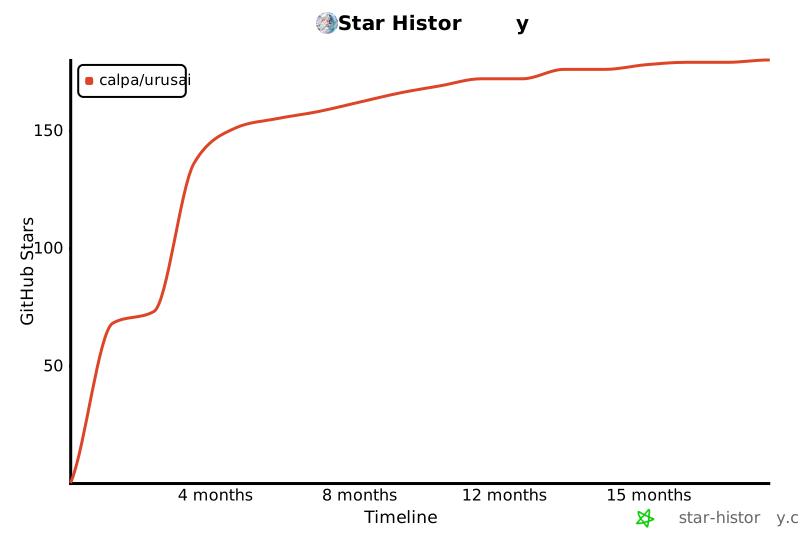
## ⭐ Star History
[](https://www.star-history.com/#calpa/urusai&Timeline)
### 🚀 Releases
Urusai uses GitHub Actions for automated releases. When a new tag with format `v*` (e.g., `v1.0.0`) is pushed to the repository, GitHub Actions will automatically:
1. 🧪 Run tests to ensure code quality
2. 🔨 Build binaries for all supported platforms (macOS Intel/ARM, Linux, Windows)
3. 📦 Create compressed archives of the binaries
4. 🎉 Create a new GitHub release with the binaries attached
To create a new release:
```bash
# 🏷️ Tag the commit
git tag v1.0.0
# 🚀 Push the tag to GitHub
git push origin v1.0.0
```
The GitHub Actions workflow will handle the rest automatically.
### 💎 Code Quality
```bash
# 🎨 Format code
go fmt ./...
# 🔍 Vet code for potential issues
go vet ./...
# ✨ Run linter (requires golint)
go install golang.org/x/lint/golint@latest
golint ./...
# 🔬 Run static analysis (requires staticcheck)
go install honnef.co/go/tools/cmd/staticcheck@latest
staticcheck ./...
```
## 📜 License
This project is licensed under the MIT License - see the [LICENSE](LICENSE) file for details. ⚖️