https://github.com/caneco/artisan-aliases
Save keystrokes and run Artisan commands your way
https://github.com/caneco/artisan-aliases
aliases artisan cli command laravel
Last synced: about 1 year ago
JSON representation
Save keystrokes and run Artisan commands your way
- Host: GitHub
- URL: https://github.com/caneco/artisan-aliases
- Owner: caneco
- License: mit
- Created: 2019-01-09T22:52:02.000Z (over 7 years ago)
- Default Branch: master
- Last Pushed: 2019-01-30T11:59:53.000Z (over 7 years ago)
- Last Synced: 2025-04-15T13:48:22.585Z (over 1 year ago)
- Topics: aliases, artisan, cli, command, laravel
- Language: PHP
- Homepage:
- Size: 82 KB
- Stars: 22
- Watchers: 1
- Forks: 1
- Open Issues: 1
-
Metadata Files:
- Readme: README.md
- License: LICENSE
Awesome Lists containing this project
README



---

# Laravel Artisan Aliases

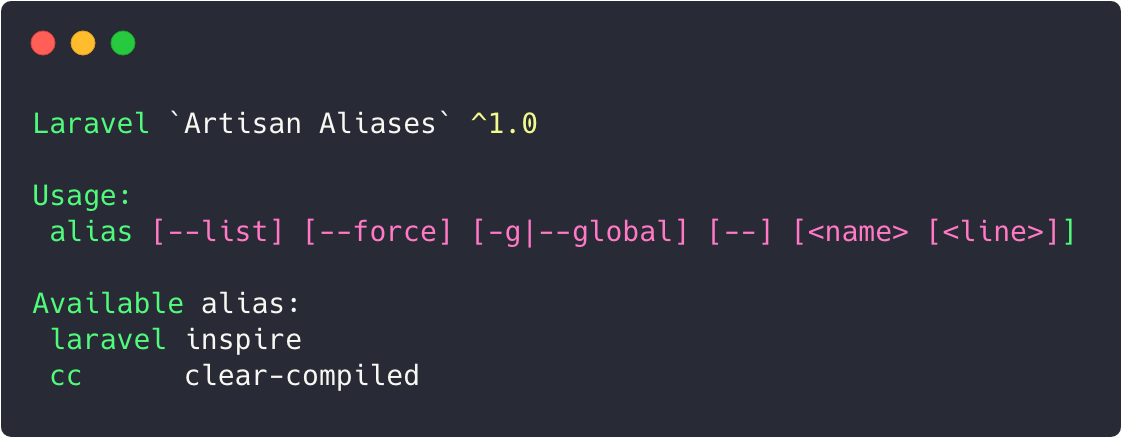
If you live in the command it's always good to save some keystrokes, specially for commands that you keep typing. This package will help you create alias for you artisan commands, and more..

## Installation

You can install the package via composer:

```

>_ composer require caneco/artisan-aliases

```

#### Registering the service provider

In Laravel 5.5 the service provider will automatically get registered. But if needed just add the service provider in `config/app.php` file:

```

'providers' => [

    // ...

    Caneco\ArtisanAliases\ArtisanAliasesServiceProvider::class,

];

```

#### Publishing the package assets

To publish the configuration file and `.laravel_alias`, execute the following command and pick this Service Provider:

```

>_ php artisan vendor:publish

 Which provider or tag's files would you like to publish?:

  [0 ] Publish files from all providers and tags listed below

  [1 ] Provider: Caneco\ArtisanAliasesExample:

  [… ] ...

```

Or do it in a single command:

```

>_ php artisan vendor:publish --provider="Caneco\ArtisanAliases\ArtisanAliasesServiceProvider"

```

When published, this is the contents of the config file:

```PHP

return [

    /*

    |--------------------------------------------------------------------------

    | Artisan Alias Master Switch

    |--------------------------------------------------------------------------

    | This option may be used to enable/disable all Artisan alias

    | defined in your local or global `.laravel_alias` file

    */

    'enabled' => env('ARTISAN_ALIAS_ENABLED', true),

    /*

    |--------------------------------------------------------------------------

    | Default Alias File

    |--------------------------------------------------------------------------

    | This option allows you to have three ways of load the list of alias. The

    | `global` option will only load the alias defined in your home directory,

    | while the `local` option, will limit the alias from the list in your

    | application. Finally, The `both` option, or anything else, will

    | load the alias from both locations.

    |

    | Supported: "global", "local", "both",

    */

    'use_only' => 'both',

];

```

## Usage

After publishing the initial files, your alias will be stored folder locally in the application directory; or globally in your home directory. And like any other bash alias file the contents will have following format:

```

laravel="inspire"

# cc="clear-compiled"

```

#### Listing existing alias

To list the current alias available you can run the following command:

```

>_ php artisan alias --list

Laravel `Artisan Aliases` 1.1.0

Usage:

 alias [-g|--global] [--] []

Available alias:

 laravel inspire

 cc      clear-compiled

```

Also, the available alias in appear on your artisan command list:

```

$ php artisan list

...

Available commands:

  alias                Create an alias of another command

  cc                   * Alias for the `clear-compiled` command

  clear-compiled       Remove the compiled class file

  down                 Put the application into maintenance mode

  ...

  inspire              Display an inspiring quote

  laravel              * Alias for the `inspire` command

  list                 Lists commands

  ...

```

#### Adding new alias

Add your alias directly in the file `.laravel_alias`, or just use the artisan command:

```

>_ php artisan alias laravel "inspire"

```

And, if you pass the `--global` option the alias will be registered instead in the `.laravel_alias` of your home directory.

```

>_ php artisan alias cc="clear-compiled" --global

```

If you dont pass the required arguments the `--list` option will be triggered, and you will be presented with the command info; usage; and list of alias available.

#### Comments

Anything after the character `#` it's considered a comment and will be not considered for execution.

```

# https://twitter.com/davidhemphill/status/1083466919964041217

migrate:make="make:migration" # DOPE

```

#### Quote surrounding

Surrounding the command with quotes are not mandatory, but if the command to be aliased has some spaces you must use them.

#### Multiple commands

An alias can have multiple commands associated by using the operators `&&` or `||`. And, just like bash, when using `&&` the sequence of the commands will terminate if one of them returns a value bigger than zero. While the `||` will continue no matter what.

```

# EXAMPLE

tables-up=notifications:table && queue:table && queue:failed-table && ...

```

#### Shell commands

If you prefix your alias with an exclamation point, will be treated as a shell command.

#### Alias*ception…*

Yes, you can also create alias of alias...

#### Artisan groups

If you set your alias with a namespace like `boot:tables` or `boot:cache`, Artisan list will group your alias toghether.

```

# EXAMPLE

boot

 boot:cache    * Alias for the `config:cache || route:cache || view:cache command`

 boot:tables   * Alias for the `cache:table || notifications:table || queue:failed-table || queue:table || session:table command`

```

## Gotchas ⚠️

- Currently, to modify or delete any alias you need to open the `.laravel_aliases` and do it manually but it's planned to have a way of doing from the terminal.

- Adding an alias with the same name as other it will result with an exception.

- Having two alias manually defined in the `.laravel_aliases` the last alias command will prevail.

- An alias with the same name as an Artisan command, the Artisan prevail.

## Supported versions

Look at the table below to find out what versions of Laravel are supported on what version of this package:

Laravel Framework | Artisan Alias

:--- | :---

`5.7.*` | `^1.0`

## Road map

Artisan Alias is stable but there is still some things that I would like to add in the package.

Here's the plan for what's coming:

- [ ] Remove an existing alias using the option `--d|delete`

- [ ] Firing a `@handle` method if alias has a `::class` reference

- [ ] Alert the user try to add an alias with `sudo` in the command **(usefull?)**

- [ ] Add comments

- [x] Allow to replace an existing alias using the option `--force`

- [x] Add tests

## Contributing

All contributions (pull requests, issues and feature requests) are welcome. Make sure to read through the [Contributing file](/caneco/artisan-alias/blob/master/CONTRIBUTING.md) first, though. See the [contributors page](/caneco/artisan-aliases/graphs/contributors) for all contributors.

## License

The MIT License (MIT). Please see [License File](/caneco/artisan-alias/blob/master/LICENSE.md) for more information.