https://github.com/caofancpu/d8gerautocode
🔥🔥🔥 🚀 重复编码老瞎忙,⚡️写来写去那几行, 🌱 不知工具在何方?🍻 八哥智能一键帮!
https://github.com/caofancpu/d8gerautocode
code-generator easter-egg idea-plugin java javaweb json-parser regex-util smart-contracts
Last synced: 9 months ago
JSON representation
🔥🔥🔥 🚀 重复编码老瞎忙,⚡️写来写去那几行, 🌱 不知工具在何方?🍻 八哥智能一键帮!
- Host: GitHub
- URL: https://github.com/caofancpu/d8gerautocode
- Owner: caofanCPU
- License: apache-2.0
- Created: 2019-12-24T04:50:57.000Z (over 6 years ago)
- Default Branch: Vip587
- Last Pushed: 2022-03-27T16:48:56.000Z (over 4 years ago)
- Last Synced: 2023-10-20T18:40:19.662Z (over 2 years ago)
- Topics: code-generator, easter-egg, idea-plugin, java, javaweb, json-parser, regex-util, smart-contracts
- Language: Java
- Homepage: https://plugins.jetbrains.com/plugin/13576-d8gerautocode
- Size: 10.9 MB
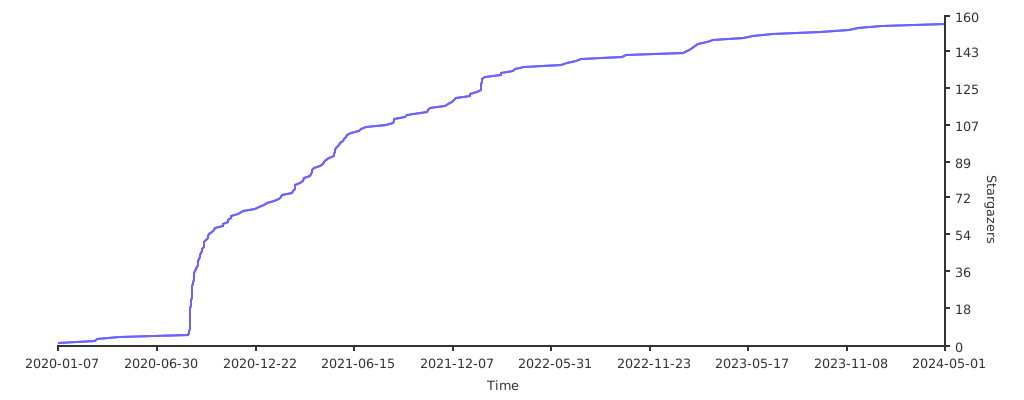
- Stars: 151
- Watchers: 4
- Forks: 52
- Open Issues: 0
-
Metadata Files:
- Readme: README.md
Awesome Lists containing this project
README
# D8gerAutoCode









[](#)
## IDEA Code Automatically Generate Plugin • `For Java Version`

> [中文说明](./README_CN.md)
## Attention
The latest version is **4.1** is approved by the official on 10th, May.
If you can't fetch it, then [click here](https://github.com/caofanCPU/D8gerAutoCode/releases/tag/4.0) to download ~~.zip~~ file.
Important: This version has been implemented [DSP(D8ger Series Plan)](https://www.processon.com/view/5f96a5f35653bb06ef1870e8).
That is, some functions have been migrated to another plugin named [LaoYouTiao](https://github.com/caofanCPU/LaoYouTiao). After testing, installing two plugins will not affect performance. So, I hope you use happy and give me a 🌟, thx!
### Preface
As JetBrains' said, I believe that you should be good use of tools will save you precious hours on your busing work.
I always wonder, "If someone else has already solved the repeating work, why do I need to repeat it again?"
Well, that's a valid question for my drive to find the repeat parts at daily work and develop this plugin to save my time.
### [Quick Start](http://www.debuggerpowerzcy.top/home/2020/03/14/D8gerAutoCode%E6%8F%92%E4%BB%B6%E4%BD%BF%E7%94%A8%E6%8C%87%E5%8D%97/)
ZN程序员福利
### Convention
- The general problem provides standard solutions
- The personalized problem only provides example solutions
### Original design intention
- Remove the fixed duplication coding for improving efficiency in development
- Provide available code templates that can be used without modification
- Support code directory configuration, only by self-guided package intelligent programming can be done in one-click
- Support user-defined configuration, you can specify which file to be generated
### Features
- ~~Camel-Underline-Uppercase-Uncapitalize-Lowercase can be converted to each other by shortcut~~ `alt` + `shift` + `cmd` + `U`
- The comments of generated codes support English(Default) | Chinese Simplified(Optional) configuration
- ~~JSON formatting and single line text conversion, supporting section and whole document, default shortcut~~ `alt`+`shift`+`cmd`+`J` | `S`
- Generating `data table definition SQL` | `Mo` | `Mapper` | `Handler`, single table addition, deletion, modification and search with paging in one click
- Under the help of SwaggerApi generating `Vo` | `Controller` with friendly document description, in addition to this, supporting `Vo` field automatic sorting
- For smart coding, you just need one shortcut default as `alt`+`shift`+`cmd`+`D`
- Supporting customer configuration, for example, specify the author who you are
- Reserve easter eggs, you can try to edit the blank file in IDEA and type `d8ger` to get the default configuration template
- ~~Reserve easter eggs, edit the blank file in IDEA and enter `nasa` to get the NASA configuration file template. This is very useful and efficient for handling multi-lines, especially SQL field naming processing.~~
- ~~Reserve easter eggs, edit the blank file in IDEA and enter `regex` to get some commonly used regular expressions. Other code Easter eggs will be added later.~~
- For automatic sorting `Vo` field , you just need one shortcut default as `alt`+`shift`+`cmd`+`O`
### Using manual(v3.0+)
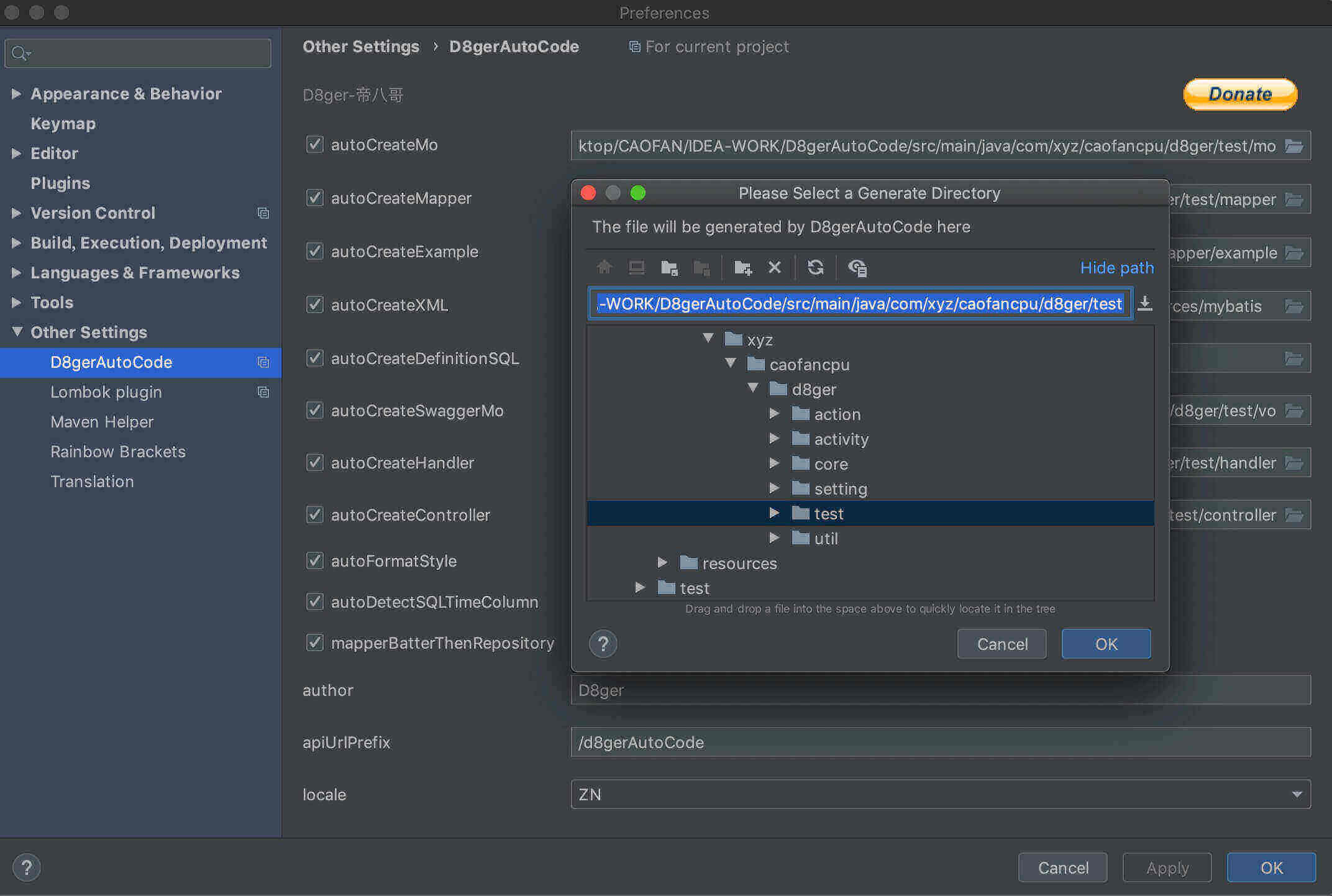
1.Open the configuration box to set the generation parameters, `Preference` --> `Other Settings` --> `D8gerAutoCode`
2.Check the file to be generated and choose the generation path, rewrite `author`、`apiUrlPrefix` and `locale`, and click the button to save your configuration.
### Using manual(under v3.0)
1. Create Model Class
2. Select the class name and press the (default) shortcut `alt`+`shift`+`cmd`+`D`
3. Under the default configuration, `D8gerAutoCode` directory and `data table SQL definitions` and **Web codes** will be generated
4. So, What you need to do:
- Under a multi-module project, configure the generated file output directory, for example, **`Mo.java`** should be moved into the `model` directory
- Add non-null constraints to **`xx.sql`** as required
- If you generated the **Controller.java** file, please note the interface returns type of **`Object`**, it should be modified to the project's uniform return type
- In the above steps the `xx.java` file will report some errors, ***don't worry***, these just require you to import packages
5. Default configuration file template for easter egg:
- In the ***`resource`*** root directory of the module where the `Model class` is located, create `d8ger.properties` property configuration file
- Type `d8ger` and click on `Tools`-> `D8ger`-> `D8gerMore`, and you will find some surprise
6. ~~Regex template for easter egg:~~
- ~~Choose any blank file, Type `regex` and click on `Tools`-> `D8ger`-> `D8gerMore`, and you will find some surprise~~
7. ~~NASA template for easter egg:~~
- ~~Choose any blank file, Type `nasa` and click on` Tools`-> `D8ger`-> `D8gerMore`, and you will get the NASA manual~~
- ~~Follow the manual, custom your config and write your own multi-lines need to be batch handled, then you will find some surprise~~
8. ~~Camel-Underline-Uppercase-Uncapitalize-Lowercase circle convert by one-click~~
- ~~Choose word text in any editing file, press `alt` + `shift` + `cmd` + `U`, you`ll find the changed word~~
- ~~If not satisfied just press the shortcut again and again util you are.~~
9. You will get the following default configuration information
- It's recommended that you change the configuration items
- `author` (you can't sign my name for the pits you dug!)
- `apiUrlPrefix` (the interface url prefix should be configured as the project interface unified URL prefix)
- generate file output directory under a multi-module project
- As for `boolean` configuration items, let you choose which files need to be generated, and specify output directory is optional
> By the way, these default shortcuts used in Mac OS, if you use Windows just take `cmd` into `ctrl`.
### How to install

- `Preference` --> `Plugins` --> `Marketplace` --> type `D8` --> install
- [IDEA official plugin library installation](https://plugins.jetbrains.com/plugin/13576-d8gerautocode)
- As for `Source installation` requires you're familiar with Gradle, I will add more details about how to develop a plugin by ***Gradle*** later
### Bug & Question
- Known issues
> Modify the `d8ger.properties` file before generating code, the configuration file does not take effect
```
Solution
0. If you upgrade version 3.0+, you won`t see it again.
1. Because the IDEA file uses the VFS mechanism, as a plug-in to use the monitoring file I think it is not cost-effective
2. I also found a reason aboub editing .properties file, sometimes it will take one or two minutes to refresh after you finished
3. So, press `cmd` + `s` to force refreshing .properties file and you will solve it.
```
> The icon of plugin shows error like this: red square with a cross

```
Solution
1.This issue is caused by Intellij IDEA of new version feature.
2.Try to upgrade the version of Intellij util 2019.3.*(greater than 2019.2.*), you'll fix it.
```
[Other issues, please come to join room](https://github.com/caofanCPU/D8gerAutoCode/issues)
### VersionRoadHistory
- 4.1
- Fix 'D8gerAutoCode' error file path parsing while in WINDOWS system. For more detail, please refer [issue2](https://github.com/caofanCPU/D8gerAutoCode/issues/2)
- 4.0(HIGH.START)
- Important note: This time the function is migrated and upgraded, the plug-in has been divided into functions, the purpose is to be full-time and dedicated, and the general functions are sinking to serve more programmers
- No.0: Each plug-in is positioned in two aspects, one is efficient coding, and the other is high-quality knowledge links to help users obtain enough useful information to improve their skills
- No.1: [LaoYouTiao](https://github.com/caofanCPU/LaoYouTiao), **Published**, located JetBrains full product plug-in, General functions, covering text parsing, numerical processing, shell script processing
- No.2: [D8gerAutoCode](https://github.com/caofanCPU/D8gerAutoCode), **Published**, located IntelliJ IDEA, auto coding
- No.3: D8gerByteSleep, Hatching, located PyCharm
- No.4: D8gerJustGo, Hatching, located GoLand
- No.5: D8gerAndison, Hatching, located Android Studio
- No.6: D8gerWebit, Hatching, located WebStorm
- No.7: RoadMap refers [DSP(D8ger Series Plan)](https://www.processon.com/view/5f96a5f35653bb06ef1870e8)
- Function migration:
- BeautifulJSON、SimplifyOneLine、BeautifulMySQL、CamelUnderlineConvert、D8gerMore are migrated into plugin named [LaoYouTiao](https://github.com/caofanCPU/LaoYouTiao)
- The shortcut keys and usage methods have not changed, only the code generation functions related to Java are retained
- 3.4
- Addition: 'OhMyZSH' easter eggs, try to type 'ohmyzsh' in the blank file in IDEA to get some useful linux commands. I'm sure you'll save much time.
- BugFix: Fix donate url(I'm waiting for your 🌟 the project on the github).
- Optimization: 'BeautifulJSON', 'SimplifyOneLine' and 'BeautifulMySQL' now supports section or whole document convert.
- 3.2
- BugFix: Fix 'BeautifulJSON' issue when parsing complex JSON string.
- Optimization: 'CamelUnderlineConvert' now supports Timestamp-LocalDateTime convert, select the text and use origin shortcut `alt` + `shift` + `cmd` + `U` to find out.
- 3.1
- BugFix:
- Fix config item `locale` problem when selected as `ZN`, and before the 3.0 version`s comment was English default.
- Fix SQL definition in x.sql file ✌️.
- Fix batch insert records in xMapper.xml file cause `id`, `createTime`, `updateTime` all should be according to the Database.
- Optimization: Config item `autoDetectSQLTimeColumn` now is more intelligent. If you checked, `createTime` and `updateTime` would be generated perfectly in there right position.
- 3.0
- Addition:
- Grand celebration for `D8gerAutoCode` getting his face! Now you can config the generated property parameters by setting GUI.
- First, Open the configuration box to set the generation parameters, `Preference` --> `Other Settings` --> `D8gerAutoCode`
- Then, Check the file to be generated and choose the generation path, rewrite `author`、`apiUrlPrefix` and `locale`, and click the button to save your configuration.
- Optimization: Support project level setting parameters for non-invasive, d8ger.properties should exist invisible.
- Adjustment: Remove the generated params by `d8ger.properties` file, replace of D8gerAutoCode setting GUI.
- 2.5
- Addition:
- Add `autoDetectSQLTimeColumn` configuration for supporting disable default generating `create_time` and `update_time` column definition in SQL.
- Add `mapperBatterThenRepository` configuration for supporting custom mapper annotation in both SpringMVC and SpringBoot.
- Add `selectOneByExample` in Mapper.java for supporting query one record.
- Add `insertSelectiveWithId` in Mapper.java for supporting insert `non null` field and `null` field will be filled with the database default value.
- Optimization: 'cause `id` is the primary key, all insert operations should exclude `id` column.
- BugFix:
- Generation `update_time` column definition remove the rare comma.
- Troubleshooting the rare dir named `D8gerAutoCode`, now you can see it only with unspecified directory configuration.
- Adjustment: Remove `ServiceInterface` and `ServiceImpl`, 'cause I think `Handler` is more suitable.
- 2.4
- Addition: One-click to beauty MySQL, isn't fragrant?
- Optimization: String parsing performance.
- Attention: Select your MySQL text, ctrl + alt + shift + `B` will back a surprise.
- 2.3
- BugFix: Json format bug.
- Addition:
- NASA easter eggs, try to type `nasa` in the blank file in IDEA to get the nasa-template.
- NASA easter eggs, multi-lines can be batch handled with the nasa-template, special for sql columns.
- Optimization:
- Optimize some regex performance.
- Support linebreak or comma as the delimiter.
- Support windows linebreak when rendering origin code.
- Attention:
- When execute auto-coding, you should be careful at the linebreak, it maybe different from your project config.
- Adjustment:
- Icons changed for align, friendly view etc.
- The manual of this plugin has been moved to my website.
- 2.1
- BugFix: add Uncapitalize, and the circle is Camel-Underline-Uppercase-Uncapitalize-Lowercase.
- Optimization: Optimize some regex performance.
- Attention: Regex easter eggs add some very useful regex search-replace skills hidden in JetBrains's IDE products. Try to learn, and you will save much time at working.
- 2.0
- BugFix: Modify method name in Controller.java.
- Addition:
- Remove repeat work of moving file into directories for smart coding.
- Camel-Underline-Uppercase-Lowercase can be converted to each other by shortcut `alt` + `shift` + `cmd` + `U`.
- Regex easter eggs, try to type `regex` in the blank file in IDEA to find it.
- Optimization: Optimize source code and improve performance.
- Attention: If the icon of plugin shows error(red square with a cross), try to upgrade the version of Intellij util 2019.3.*(greater than 2019.2.*).
- 1.24
- BugFix: Update method named `updateBatchByPrimaryKeySelective` in mapper.xml.
- Addition: Set default language English and you can config it as Chinese Simplified, as before, typing `d8ger` for the latest configuration template.
- Attention: You should configure your database connection like `allowMultiQueries=true` for supporting batchUpdate operation.
- 1.23
- BugFix: Fix required dependencies by JetBrains's suggestion for some known compatibility issues.
- Addition: Add JSON-formatter and WhiteChar-cleaner.
- Attention: Can you 🌟 the project on the github?
- 1.22
- BugFix: Fix README of style, description, picture problems.
- Enhance: Enhance profile for generating codes by using regex to replace the circle of matching string.
- Attention: Can you 🌟 the project on the github?
- 1.21
- BugFix: Fix README of style, description, picture problems.
- Addition: Add MoExample autoCoding for supporting simple sql.
- Attention: Can you 🌟 the project on the github?
- 1.20
- Completion: Auto coding for Mo/Example/Mapper/Xml/SQL/Service completed, wow!
- Attention: Can you 🌟 the project on the github?
### Contribute
- Please give me a 🌟
- Raise demand, write the repetitive problems you often handled at daily work in [issue](https://github.com/caofanCPU/D8gerAutoCode/issues)
- Invite me to sit at the 🍦 shop