https://github.com/captainerd/dahua_vto_asterisk
How to connect a VTO of Dahua to Asterisk
https://github.com/captainerd/dahua_vto_asterisk
Last synced: about 1 year ago
JSON representation
How to connect a VTO of Dahua to Asterisk
- Host: GitHub
- URL: https://github.com/captainerd/dahua_vto_asterisk
- Owner: captainerd
- Created: 2023-04-03T01:40:24.000Z (about 3 years ago)
- Default Branch: main
- Last Pushed: 2023-04-03T02:18:09.000Z (about 3 years ago)
- Last Synced: 2025-02-14T20:40:38.994Z (over 1 year ago)
- Language: JavaScript
- Size: 8.79 KB
- Stars: 0
- Watchers: 1
- Forks: 0
- Open Issues: 0
-
Metadata Files:
- Readme: README.md
Awesome Lists containing this project
README
# dahua_VTO_Asterisk
How to connect a VTO of Dahua to Asterisk
In order to be able to succesfully use DAHUA's VTH monitors AND at the same time use FreePBX / Asterisk and reach full compatibility where all VTH's works with VTO
rfid tags, etc etc.. and at the same time phones that are connected into Asterisk. You need to set VTO as a "server" ignore that asterisk exists in your
configuration and just make sure ext numbers doesn't conflict. connect all VTH's monitors etc.. directly to VTO as you normaly would.. set up everything
Then back to Asterisk you create a PJSIP Trunk and the appropiate inbound/outbound routes. In Dahua web you add your "Trunk" as a VTS with your password, for example 1011

Then you add a Trunk into Asterisk for VTO IP's in the PJSIP Advanced settings you set the following: DTMF Mode = info, contact user = Your VTS number. Message Context: 1011
eg 1011 you will use that later in inbound routes as the DID number in order to create the route.
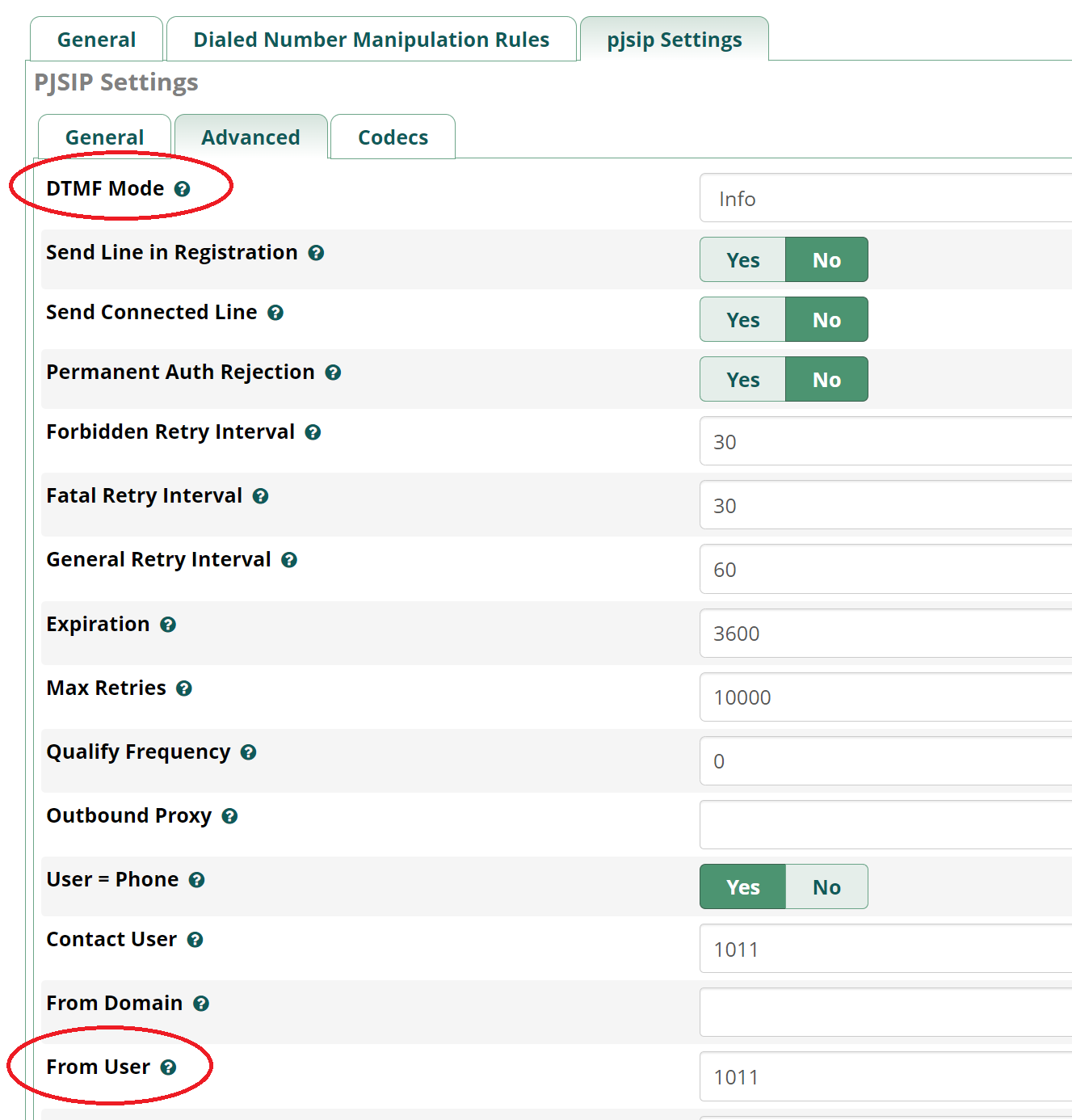

This way setting in VTO web as "Villa call no:" the Trunk no, or adding it into Group call. it will be routed through your Trunk. However you won't be able to call VTO
from Asterisk unless you run the node proxy i uploaded here, in that case your trunks ip will be the proxy's IP. this way you can both outgoing calls from asterisk to VTO
where you can talk to VTO or incoming calls from VTO To you.
You need to run "node dahua_proxy.js" proxy script as a background service or something in that case, to ensure it will always be running with asterisk. dahua_proxy.js just take cares Asterisk won't be dropping outgoing calls from your route by taking care of the compatible codec offering order.
#Secondly:
I provide you for Asterisk/FreeBPX an example of sets AGI-script + dialplan, on how to create an "unlock" phone number for asterisk,
where you call that no, and it unlocks the door.
Thats all folks.