https://github.com/carlossilva2/pytasker
Run pipelines on your own computer for better automation
https://github.com/carlossilva2/pytasker
automation cli cli-utilities easy-to-use flow python3 terminal unix windows
Last synced: 10 months ago
JSON representation
Run pipelines on your own computer for better automation
- Host: GitHub
- URL: https://github.com/carlossilva2/pytasker
- Owner: carlossilva2
- License: gpl-3.0
- Created: 2022-02-03T20:42:28.000Z (over 4 years ago)
- Default Branch: main
- Last Pushed: 2024-05-21T05:55:41.000Z (about 2 years ago)
- Last Synced: 2025-08-16T01:28:56.285Z (11 months ago)
- Topics: automation, cli, cli-utilities, easy-to-use, flow, python3, terminal, unix, windows
- Language: Python
- Homepage: https://pypi.org/project/pyTasker
- Size: 534 KB
- Stars: 8
- Watchers: 1
- Forks: 1
- Open Issues: 1
-
Metadata Files:
- Readme: README.md
- Changelog: CHANGELOG.md
- License: LICENSE
Awesome Lists containing this project
README
# Tasker

[](https://pepy.tech/project/pytasker)
[](https://pypi.org/project/pytasker)

You know [Ansible](https://github.com/ansible/ansible) right? Well, this works kind of the same way, except you create tasks to automate your local computer.
How? You're in luck. Just create an InstructionSet (you can use the CLI command `tasker create` to get started) and let your life get easier!
## Index
- [Tasker](#tasker)
- [Index](#index)
- [Installation](#installation)
- [Reference System](#reference-system)
- [Key Features](#key-features)
- [Copy Action](#copy-action)
- [Zip Action](#zip-action)
- [Delete Action](#delete-action)
- [Move Action](#move-action)
- [Input Action](#input-action)
- [Echo Action](#echo-action)
- [Request Action](#request-action)
- [Registry Action](#registry-action)
- [Custom Action](#custom-action)
- [Usage](#usage)
- [Roadmap](#roadmap)
- [Actions in Pipeline](#actions-in-pipeline)
- [General Improvements](#general-improvements)
- [Support](#support)
For more detailed information visit the [Documentation](https://cmsilva.gitbook.io/pytasker/)
## Installation
There are 2 ways of installation:
1. Via source files available at [GitHub](https://github.com/carlossilva2/pyTasker).
2. Using Pip
```console
$ pip install pyTasker
```
## Reference System
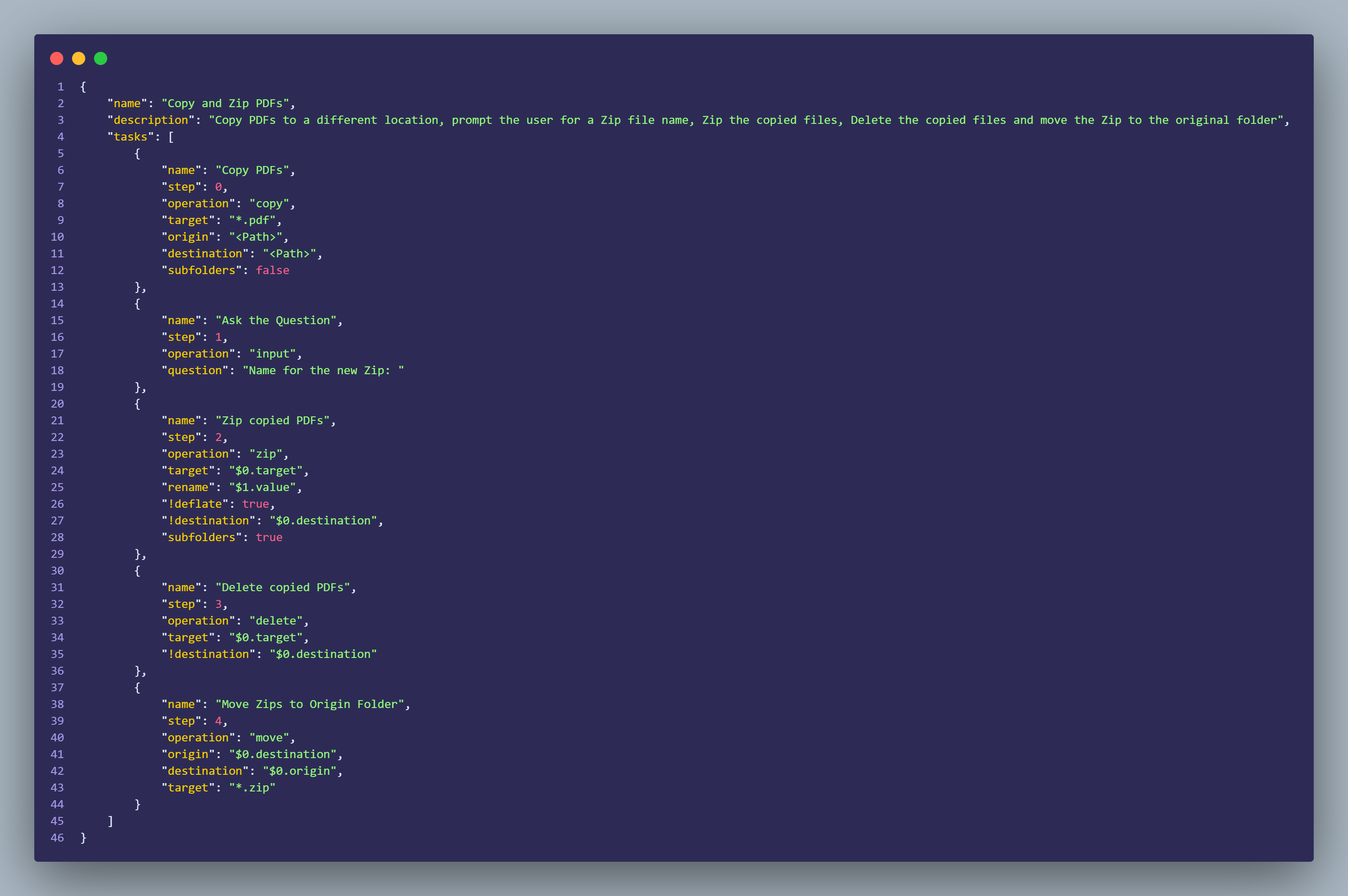
Tasker includes a reference system which allows the user to access values from a previous step and/or value, like the [Input Action](#input-action). References are a way to simplify the InstructionSets.
To get started with references simply use `$` or `$.` on a field. If no additional data is appended to the reference, like `$0`, the system will fallback to the key where reference was invoked.
Example:
```json
{
"name": "",
"step": 0,
"operation": "input",
"question": ""
},
{
"name": "",
"step": 1,
"operation": "zip",
"target": "*",
"rename": "$0.value",
"!deflate": true,
"!destination": "",
"subfolders": true
}
```
## Key Features
For extra information use `tasker -h`
### Copy Action
```json
{
"name": "",
"step": 0,
"operation": "copy",
"target": "",
"origin": "",
"destination": "",
"subfolders": false //Should Tasker also include subfolders inside main location
}
```
### Zip Action
```json
{
"name": "",
"step": 0,
"operation": "zip",
"target": "",
"rename": "",
"!destination": "",
"!deflate": false, //When Zip is created should the Folder structure be with current system Path or just the pretended folder
"subfolders": true //Should Tasker also include subfolders inside main location
}
```
### Delete Action
**Warning: This permanently deletes the file(s) from computer**
```json
{
"name": "",
"step": 0,
"operation": "delete",
"destination": "",
"target": "", //Can use location + file name/type
}
```
### Move Action
```json
{
"name": "",
"step": 0,
"operation": "move",
"origin": "", //Can use location + file name/type
"destinaton": "", //Can use location + file name/type
"target": "" //Can use location + file name/type
}
```
### Input Action
> This action stores the Answer in the `value` variable
```json
{
"name": "",
"step": 0,
"operation": "input",
"question": ""
}
```
### Echo Action
```json
{
"name": "",
"step": 0,
"operation": "input",
"value": ""
}
```
### Request Action
> This action stores the Response in the `response` variable
```json
{
"name": "",
"step": 0,
"operation": "request",
"endpoint": "",
"method": "", //Must be only 1 option
"!body": {}, //Optional parameter
"!headers": {} //Optional Parameter
}
```
### Registry Action
```json
{
"name": "",
"step": 0,
"operation": "registry",
"start_key": "",
"key": "",
"function": "",
"type": "",
"value": "",
"rename": ""
}
```
### Custom Action
> Allows the usage of Custom Extension when created via the `tasker extension -n ` command
```json
{
"name": "",
"step": 0,
"operation": "custom",
"extension_name": ""
}
```
---
> `Step` parameter is the order Tasker will pick up the tasks
> Parameters starting with "!" are optional parameters
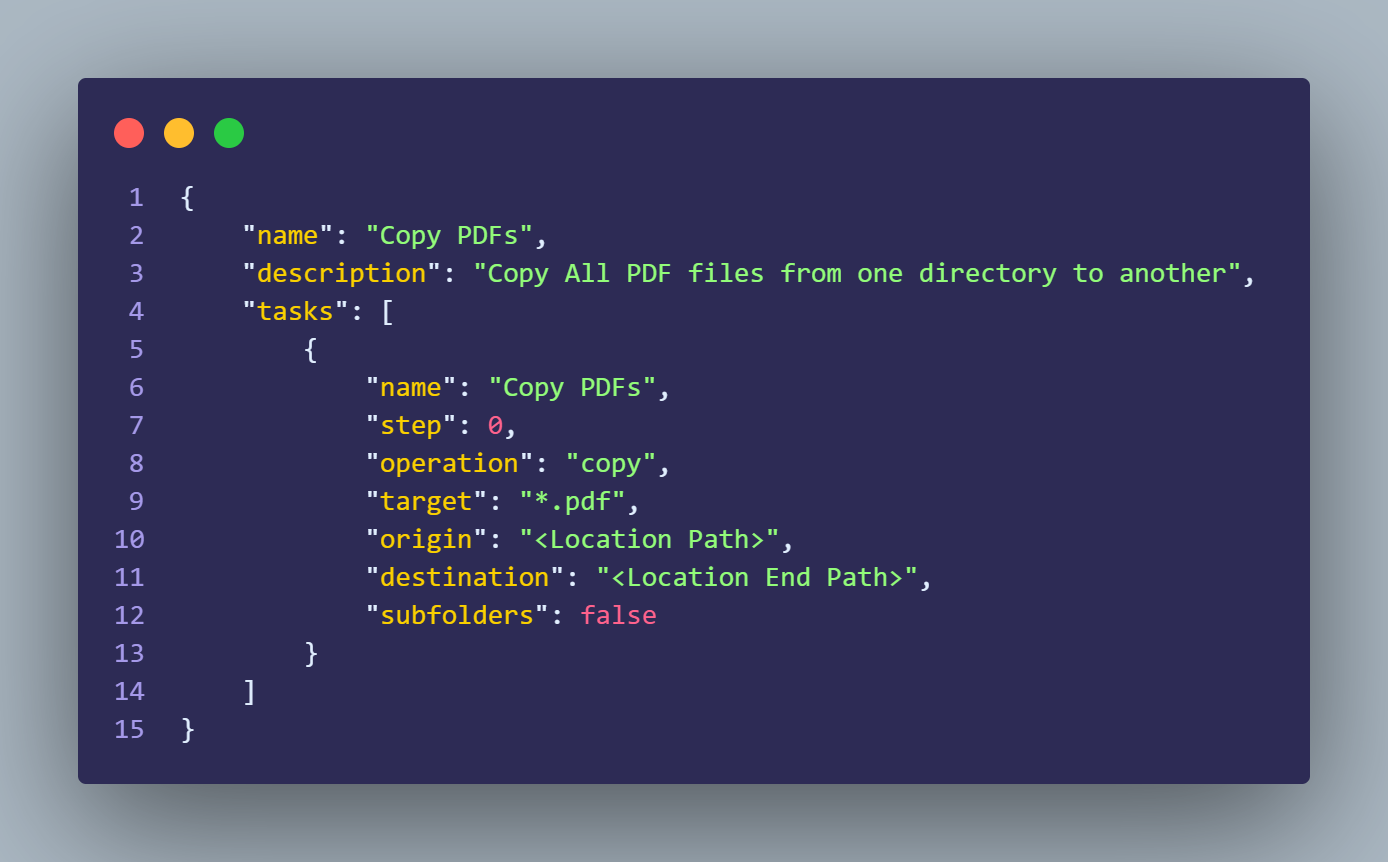
## Usage
## Roadmap
This is a project I'm working on my free time, however I have some new Actions in mind I want to implement.
### Actions in Pipeline
- ~~Input Action~~
- Command Action
- Encrypt Action
- ~~Registry Action (for Windows)~~
### General Improvements
- Change reference system
## Support
[](https://www.buymeacoffee.com/cmsilva)