https://github.com/catapulta-sh/catapulta-foundry-template
Forge template with Catapulta Chain Ops Suite
https://github.com/catapulta-sh/catapulta-foundry-template
devx web3
Last synced: about 1 year ago
JSON representation
Forge template with Catapulta Chain Ops Suite
- Host: GitHub
- URL: https://github.com/catapulta-sh/catapulta-foundry-template
- Owner: catapulta-sh
- License: unlicense
- Created: 2023-08-31T13:14:03.000Z (almost 3 years ago)
- Default Branch: master
- Last Pushed: 2025-04-30T12:14:01.000Z (about 1 year ago)
- Last Synced: 2025-05-15T06:39:18.854Z (about 1 year ago)
- Topics: devx, web3
- Language: Solidity
- Homepage: https://catapulta.sh
- Size: 133 KB
- Stars: 19
- Watchers: 1
- Forks: 5
- Open Issues: 2
-
Metadata Files:
- Readme: README.md
- License: LICENSE
Awesome Lists containing this project
README
#
Catapulta.sh Foundry Template
Template repository for getting started quickly with [Catapulta.sh](https://catapulta.sh/docs) smart contracts development platform for Foundry projects.
## Getting Started - Dev Container
Get onboarded faster using Docker with a developer environment ready to build and deploy Solidity smart contracts:
- Click here to open a Solidity environment in Cursor:
- [](https://tinyurl.com/25msv9bd)
- Click here to open a Solidity environment in VSCode:
- [](https://vscode.dev/redirect?url=vscode://ms-vscode-remote.remote-containers/cloneInVolume?url=https://github.com/catapulta-sh/catapulta-foundry-template)
Once your IDE loads the Dev Container, proceed to [Deploy your first contract with Catapulta](#deploy-your-first-contract-with-catapulta) section.
## Getting Started - Git
Requirements
- [Git](https://gist.github.com/derhuerst/1b15ff4652a867391f03)
- [Node.js](https://gist.github.com/d2s/372b5943bce17b964a79)
- [Foundry](https://book.getfoundry.sh/)
Click "Use this template" on [GitHub](https://github.com/catapulta-sh/catapulta-foundry-template) to get started quickly.
You can also git clone this repository and enter to the repository directory:
```
git clone https://github.com/catapulta-sh/catapulta-foundry-template
cd catapulta-foundry-template
```
## Deploy your first smart contracts with Catapulta
1. Install forge dependencies
```
forge install
```
2. Install catapulta via `npm`
```
npm i -g catapulta
```
3. Deploy smart contracts in Base Sepolia testnet with Catapulta, using `--sponsor` flag to request testnet gas for free.
```
catapulta script script/Deploy.s.sol --network baseSepolia --sponsor
```
> This tool will automatically create a new encrypted account named `CATAPULTA_DEPLOYER` via Foundry `cast wallet import` if you don't provide any keystore account via `--account` param.
The command will build and proceed to broadcast your deployment script to the desired network without RPC configs.
```
# Output:
Catapulta.sh 🏏 Forge script deployment (0.4.1)
================================================
Project name: Ghost Deployments
Project URL: https://catapulta.sh/project/6116272a59b37a3a4a7afb55
Deployment UUID: 592a91ad-57c8-42c6-b37e-2af0e170f31a
📀 Building artifacts...
🗜 Compressing artifacts...
📤 Uploading artifacts to the Catapulta DB...
✅ Artifacts uploaded successfully.
📡 Broadcasting deployments to Catapulta Gateway RPC:
📜 Running Foundry script: forge script scripts/DeployBasic.sol --broadcast
[...]
✅ Deployment successfully broadcasted
- Etherscan verification request sent. Check the dashboard for keeping track of verifications. If contracts are not verified in 10 minutes, contact support at Discord.
💾 Artifacts stored at:
- https://users-artifacts.s3.eu-west-1.amazonaws.com/595a911d-57c8-42c6-b37e-2af0e170f31a-deployment-artifacts/artifacts.zip
📸 Check your deployment report at:
- https://catapulta.sh/project/6416272a59b37a3a4a7afb55/op/595a91ad-57c8-42c6-b37e-2af0e170f31a
```
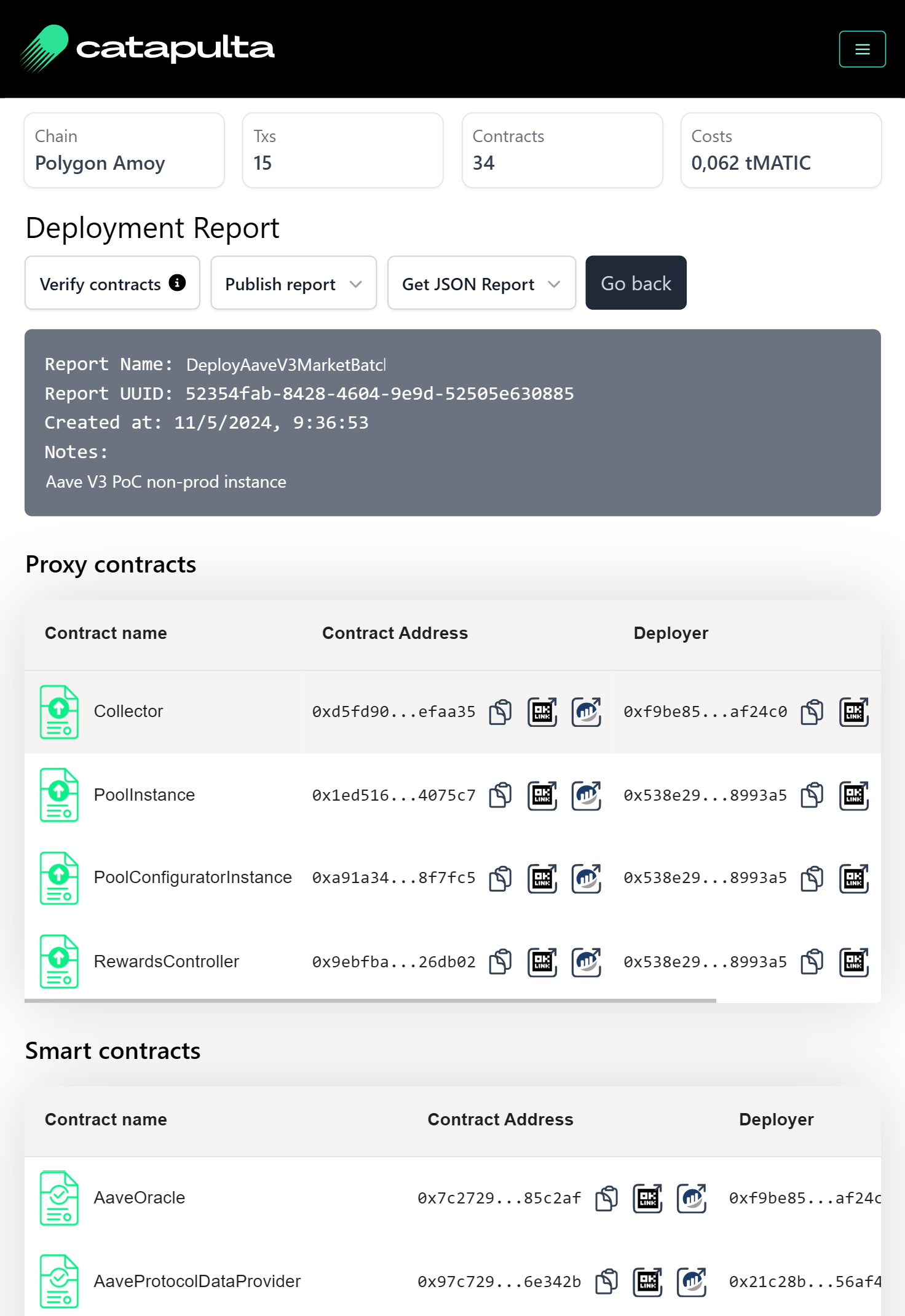
4. Check the deployment report at the Catapulta UI, and enjoy automated block explorer verification in Etherscan, Blockscout and Sourcify without any extra configs.
### Other useful commands
Import older deployments in Catapulta and trigger verification in block explorers:
```
catapulta import broadcast/[Deploy.s.sol]/[Chain ID]/run-latest.json
```
Create or view your deployer wallet address:
```
catapulta wallet
```
Sign in and open the Catapulta dashboard UI:
```
catapulta login
```
## Development
This project uses [Foundry](https://getfoundry.sh) and [Catapulta](https://catapulta.sh/docs).