https://github.com/cats-oss/unio
🔄 KeyPath based Unidirectional Input / Output framework with RxSwift.
https://github.com/cats-oss/unio
keypath mvvm rxswift unidirectional
Last synced: 10 months ago
JSON representation
🔄 KeyPath based Unidirectional Input / Output framework with RxSwift.
- Host: GitHub
- URL: https://github.com/cats-oss/unio
- Owner: cats-oss
- License: mit
- Created: 2019-03-21T15:57:01.000Z (over 7 years ago)
- Default Branch: master
- Last Pushed: 2022-02-10T09:01:37.000Z (over 4 years ago)
- Last Synced: 2024-12-13T04:38:40.630Z (over 1 year ago)
- Topics: keypath, mvvm, rxswift, unidirectional
- Language: Swift
- Homepage:
- Size: 3.65 MB
- Stars: 159
- Watchers: 4
- Forks: 7
- Open Issues: 0
-
Metadata Files:
- Readme: README.md
- License: LICENSE
Awesome Lists containing this project
README

Unidirectional Input Output framework






## Introduction
Ordinary ViewModels of MVVM might be implemented like this. There are two inputs which one is a input from outside (`func search(query:)`), another is a input relay for inside (`_search: PublishRelay`). These inputs can be together as one if it is possible to express something that can *only be received inside* and can *only input outside*.
In addition, there are two outputs which one is a observable property ( `repositories: Observable<[Repository]>`), another is a computed property (`repositoriesValue: [Repository]`). These outputs are related an inner state (`_repositories: BehaviorRelay<[Repository]>`). These outputs can be together as one if it is possible to express something that can *only be received outside* and can *only input inside*.
```swift
class SearchViewModel {
let repositories: Observable<[Repository]>
let error: Observable
var repositoriesValue: [Repository] {
return _repositories.value
}
private let _repositories = BehaviorRelay<[Repository]>(value: [])
private let _search = PublishRelay()
private let disposeBag = DisposeBag()
init() {
let apiAciton = SearchAPIAction()
self.repositories = _repositories.asObservable()
self.error = apiAction.error
apiAction.response
.bind(to: _repositories)
.disposed(by: disposeBag)
_search
.subscribe(onNext: { apiAction.execute($0) })
.disposed(by: disposeBag)
}
func search(query: String) {
_search.accept(query)
}
}
```
## About Unio
Unio is KeyPath based **Un**idirectional **I**nput / **O**utput framework that works with RxSwift.
It resolves [above issues](#introduction) by using those components.
- [Input](#input)
- [Output](#output)
- [State](#state)
- [Extra](#extra)
- [Logic](#logic)
- [UnioStream](#uniostream)
### Input
The rule of Input is having PublishRelay (or PublishSubject) properties that are defined internal scope.
```swift
struct Input: InputType {
let searchText = PublishRelay()
let buttonTap = PublishSubject()
}
```
Properties of Input are defined internal scope.
But these can only access `func accept(_:)` (or `AnyObserver`) via KeyPath if Input is wrapped with `InputWrapper`.
```swift
let input: InputWrapper
input.searchText("query") // accesses `func accept(_:)`
input.buttonTap.onNext(()) // accesses `AnyObserver`
```

### Output
The rule of Output is having BehaviorRelay (or BehaviorSubject and so on) properties that are defined internal scope.
```swift
struct Output: OutputType {
let repositories: BehaviorRelay<[GitHub.Repository]>
let isEnabled: BehaviorSubject
let error: Observable
}
```
Properties of Output are defined internal scope.
But these can only access `func asObservable()` via KeyPath if Output is wrapped with `OutputWrapper`.
```swift
let output: OutputWrapper
output.repositories
.subscribe(onNext: { print($0) })
output.isEnabled
.subscribe(onNext: { print($0) })
output.error
.subscribe(onNext: { print($0) })
```
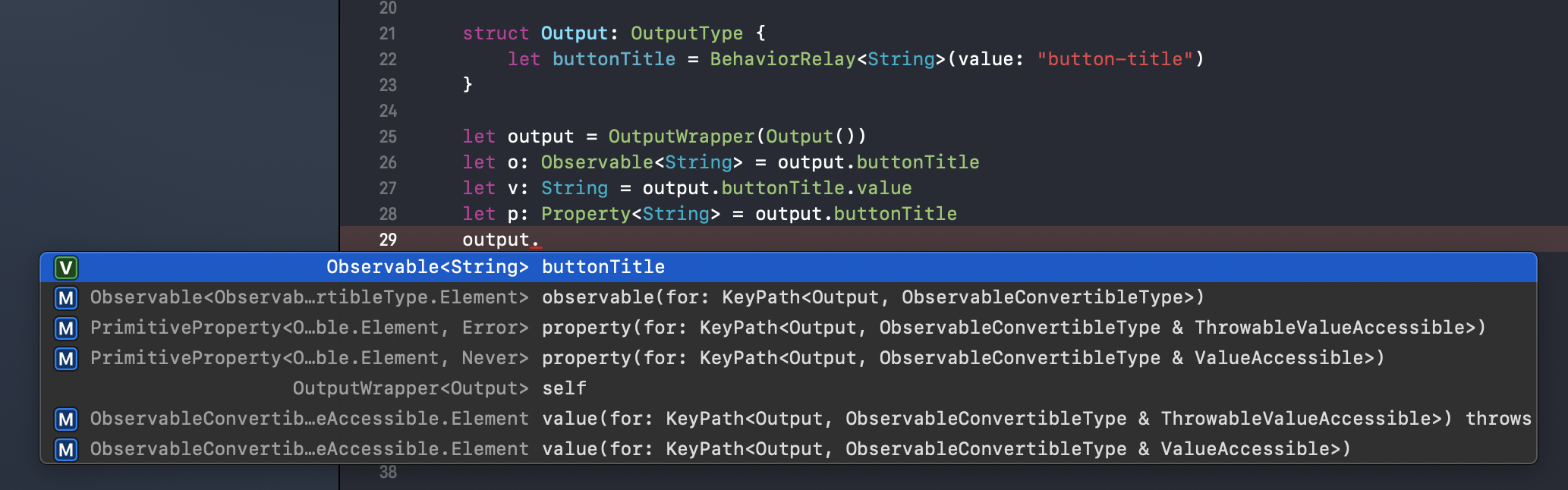
If a property is BehaviorRelay (or BehaviorSubject), be able to access value via KeyPath.
```swift
let p: Property<[GitHub.Repository]> = output.repositories
p.value
let t: ThrowableProperty = output.isEnabled
try? t.throwableValue()
```
If a property is defined as `Computed`, be able to access computed value.
```swift
struct Output: OutputType {
let isEnabled: Computed
}
var _isEnabled = false
let output = OutputWrapper(.init(isEnabled: Computed { _isEnabled }))
output.isEnabled // false
_isEnabled = true
output.isEnabled // true
```
### State
The rule of State is having inner states of [UnioStream](#uniostream).
```swift
struct State: StateType {
let repositories = BehaviorRelay<[GitHub.Repository]>(value: [])
}
```
### Extra
The rule of Extra is having other dependencies of [UnioStream](#uniostream).
```swift
struct Extra: ExtraType {
let apiStream: GitHubSearchAPIStream
}
```
### Logic
The rule of Logic is generating [Output](#output) from Dependency.
It generates [Output](#output) to call `static func bind(from:disposeBag:)`.
`static func bind(from:disposeBag:)` is called once when [UnioStream](#uniostream) is initialized.
```swift
enum Logic: LogicType {
typealias Input = GitHubSearchViewStream.Input
typealias Output = GitHubSearchViewStream.Output
typealias State = GitHubSearchViewStream.State
typealias Extra = GitHubSearchViewStream.Extra
static func bind(from dependency: Dependency, disposeBag: DisposeBag) -> Output
}
```
Connect sequences and generate [Output](#output) in `static func bind(from:disposeBag:)` to use below properties and methods.
- `dependency.state`
- `dependency.extra`
- `dependency.inputObservables` ... Returns a Observable that is property of [Input](#input).
- `disposeBag` ... Same lifecycle with UnioStream.
Here is a exmaple of implementation.
```swift
extension Logic {
static func bind(from dependency: Dependency, disposeBag: DisposeBag) -> Output {
let apiStream = dependency.extra.apiStream
dependency.inputObservables.searchText
.bind(to: apiStream.searchText)
.disposed(by: disposeBag)
let repositories = apiStream.output.searchResponse
.map { $0.items }
return Output(repositories: repositories)
}
}
```
### UnioStream
UnioStream represents ViewModels of MVVM (it can also be used as Models).
It has `input: InputWrapper` and `output: OutputWrapper`.
It automatically generates `input: InputWrapper` and `output: OutputWrapper` from instances of [Input](#input), [State](#state), [Extra](#extra) and [Logic](#logic).
```swift
typealias UnioStream = PrimitiveStream & LogicType
class PrimitiveStream {
let input: InputWrapper
let output: OutputWrapper
init(input: Logic.Input, state: Logic.State, extra: Logic.Extra)
}
```
Be able to define a subclass of UnioStream like this.
```swift
final class GitHubSearchViewStream: UnioStream {
convenience init() {
self.init(input: Input(), state: State(), extra: Extra())
}
}
```
## Usage
Here is an example.

Define GitHubSearchViewStream for searching GitHub repositories.
```swift
protocol GitHubSearchViewStreamType: AnyObject {
var input: InputWrapper { get }
var output: OutputWrapper { get }
}
final class GitHubSearchViewStream: UnioStream, GitHubSearchViewStreamType {
convenience init() {
self.init(input: Input(), state: State(), extra: Extra())
}
typealias State = NoState
struct Input: InputType {
let searchText = PublishRelay()
}
struct Output: OutputType {
let repositories: Observable<[GitHub.Repository]>
}
struct Extra: ExtraType {
let apiStream: GitHubSearchAPIStream()
}
static func bind(from dependency: Dependency, disposeBag: DisposeBag) -> Output {
let apiStream = dependency.extra.apiStream
dependency.inputObservables.searchText
.bind(to: apiStream.input.searchText)
.disposed(by: disposeBag)
let repositories = apiStream.output.searchResponse
.map { $0.items }
return Output(repositories: repositories)
}
}
```
Bind searchBar text to viewStream input. On the other hand, bind viewStream output to tableView data source.
```swift
final class GitHubSearchViewController: UIViewController {
let searchBar = UISearchBar(frame: .zero)
let tableView = UITableView(frame: .zero)
private let viewStream: GitHubSearchViewStreamType = GitHubSearchViewStream()
private let disposeBag = DisposeBag()
override func viewDidLoad() {
super.viewDidLoad()
searchBar.rx.text
.bind(to: viewStream.input.searchText)
.disposed(by: disposeBag)
viewStream.output.repositories
.bind(to: tableView.rx.items(cellIdentifier: "Cell")) {
(row, repository, cell) in
cell.textLabel?.text = repository.fullName
cell.detailTextLabel?.text = repository.htmlUrl.absoluteString
}
.disposed(by: disposeBag)
}
}
```
The documentation which does not use `KeyPath Dynamic Member Lookup` is [here](https://github.com/cats-oss/Unio/tree/0.4.1#about-unio).
#### Migration Guides
- [Unio 0.5.0 Migration Guide](./Documentation/Unio0_5_0MigrationGuide.md)
- [Unio 0.6.0 Migration Guide](./Documentation/Unio0_6_0MigrationGuide.md)
- [Unio 0.9.0 Migration Guide](./Documentation/Unio0_9_0MigrationGuide.md)
### Xcode Template
You can use Xcode Templates for Unio. Let's install with `./Tools/install-xcode-template.sh` command!


## Installation
### Carthage
If you’re using [Carthage](https://github.com/Carthage/Carthage), simply add
Unio to your `Cartfile`:
```ruby
github "cats-oss/Unio"
```
### CocoaPods
Unio is available through [CocoaPods](https://cocoapods.org). To install
it, simply add the following line to your Podfile:
```ruby
pod "Unio"
```
### Swift Package Manager
Simply add the following line to your `Package.swift`:
```
.package(url: "https://github.com/cats-oss/Unio.git", from: "version")
```
## Requirements
- Swift 5 or greater
- iOS 9.0 or greater
- tvOS 10.0 or greater
- watchOS 3.0 or greater
- macOS 10.10 or greater
- [RxSwift](https://github.com/ReactiveX/RxSwift) 6.0 or greater
## License
Unio is released under the MIT License.