https://github.com/cawabunga/layer-mask
The javascript library that breaks the page into cells around target element(s).
https://github.com/cawabunga/layer-mask
javascript lightbox mask spotlight walkthrough
Last synced: about 1 year ago
JSON representation
The javascript library that breaks the page into cells around target element(s).
- Host: GitHub
- URL: https://github.com/cawabunga/layer-mask
- Owner: cawabunga
- License: mit
- Created: 2017-10-31T15:29:23.000Z (over 8 years ago)
- Default Branch: master
- Last Pushed: 2022-12-12T15:57:51.000Z (over 3 years ago)
- Last Synced: 2024-10-16T10:32:10.379Z (over 1 year ago)
- Topics: javascript, lightbox, mask, spotlight, walkthrough
- Language: JavaScript
- Homepage:
- Size: 1.12 MB
- Stars: 1
- Watchers: 2
- Forks: 0
- Open Issues: 15
-
Metadata Files:
- Readme: README.md
- License: LICENSE
Awesome Lists containing this project
README
Layer Mask [](https://travis-ci.org/cawabunga/layer-mask) [](https://coveralls.io/r/cawabunga/layer-mask?branch=master)
===
The javascript library that breaks the page into cells around specified element(s).
### Showcase
Here are the target element is a dialog window:
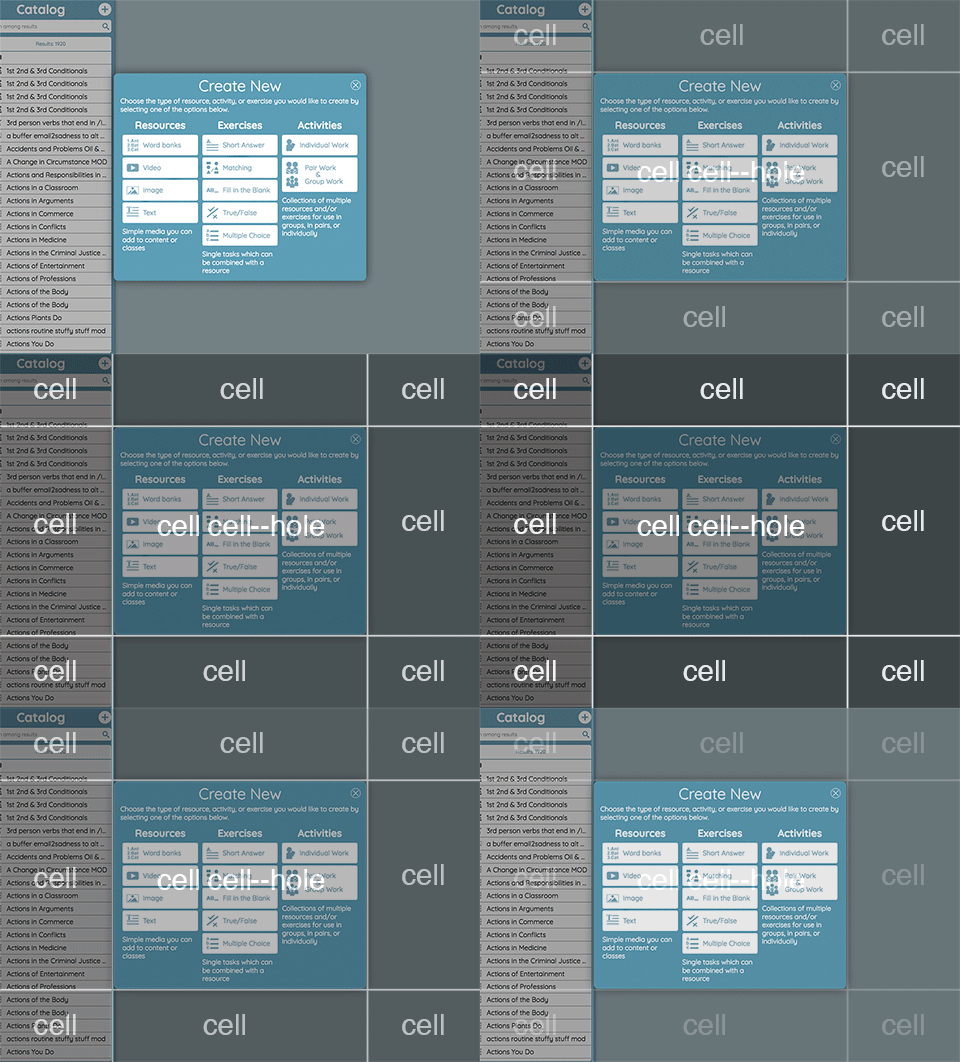
Live demo:
- [basic usage](https://cawabunga.github.io/layer-mask/)
- [demo integration](https://cawabunga.github.io/layer-mask/tour.html) with [Shepherd](https://github.com/HubSpot/shepherd)
Here are useful cases:
- allow/disallow clicking particular elements on the page (modifier: "click-through")
- creating a backdrop that highlights elements on the page (modifier: "spotlight")
### Getting Started
Install with NPM:
```sh
npm install layer-mask --save
```
Install with Yarn:
```sh
yarn add layer-mask
```
Import into your project:
```javascript
import { LayerMask, LayerMaskManager } from 'layer-mask'; // ES Import
// or
const { LayerMask, LayerMaskManager } = require('layer-mask'); // CommonJS
```
There are also small helper CSS file needs to be included `layer-mask/dist/layer-mask.css` by whatever approach that fits to your project.
### Usage
Direct usage:
```javascript
const { LayerMask } = require('layer-mask');
const myElements = document.querySelectorAll('#link-1, #link-2'); // can be passed multiple elements at one time
const layerMask = new LayerMask(myElements);
const maskElement = layerMask.createMask();
document.querySelector('body').appendChild(maskElement);
```
Using the mask manager:
```javascript
const { LayerMaskManager, LayerMask } = require('layer-mask');
const container = document.querySelector('body');
const maskManager = new LayerMaskManager(container);
const mask = new LayerMask(document.querySelectorAll('#link-1, #link-2'));
const maskElement = maskManager.revealMask(mask);
maskElement.onclick = () => {
maskManager.hideActiveMask();
};
```
### Modifiers
You can add custom CSS classes to the mask element, simply provide a `modifiers` configuration.
```javascript
const mask = new LayerMask(document.querySelectorAll('#dummy'), {
modifiers: [
// Predefined ones
'spotlight', // grays out cells around the target elements
'click-through', // prevent from clicking outside the target elements
'debug', // sames as "spotlight" but in yellow color :)
],
});
const maskEl = mask.createMask();
```
### Roadmap
- Add flow typings
- Release