https://github.com/cbartondock/prevbaseautomation
Automated generation of prevbase images for SSBB
https://github.com/cbartondock/prevbaseautomation
Last synced: 12 months ago
JSON representation
Automated generation of prevbase images for SSBB
- Host: GitHub
- URL: https://github.com/cbartondock/prevbaseautomation
- Owner: cbartondock
- Created: 2019-03-09T03:13:48.000Z (over 7 years ago)
- Default Branch: master
- Last Pushed: 2019-03-09T22:32:15.000Z (over 7 years ago)
- Last Synced: 2025-03-28T11:35:50.712Z (over 1 year ago)
- Language: Python
- Size: 4.23 MB
- Stars: 0
- Watchers: 1
- Forks: 0
- Open Issues: 0
-
Metadata Files:
- Readme: readme.md
Awesome Lists containing this project
README
# Automated prevbase manufacture for SSBB
## Directory Structure
The usage here is fairly straightforward. There are three directories: `buttons`, `inputs`, and `outputs`. You don't need to worry about `buttons` unless you want to replace the images of the gamecube buttons I have therein, in which case be my guest!
The `inputs` directory should be filled with directories that are named after the stages you want to make prevbases for, eg:
```
inputs/
battlefield/
temple/
finaldestination/
```
Each `stagename` directory should have a `subimages` directory (for alternates - this directory can have anywhere between 0 and 10 images), and a base stage image (whose name doesn't matter), eg:
```
temple/
subimages/
temple_image_name_irrelevant.png
```
Finally, the subimages directory should contain all the screenshots of alternate stages named with their button combination (buttons separated by underscore), eg:
```
subimages/
Z_X.png
L_Z_R.png
UP_Z.png
```
## Configuration File
Finally we come to the config file `config.txt`. It has several options, all of which are self explanatory (and explained via comments in the config file itself). They are
* _shear_ A decimal between -1 and 1, <0 means the top of the image
moves right, >0 means the top of the image moves left. Typically
you will want to stay between -.1 and .1 but I left it open.
* _countershear_ Sort of proud of this one. Either 0 or 1 for disabled/enabled. If enabled it shears the individual images in the opposite direction before the whole thing is sheared, so that they appear straight in the final result.
* _buttonopacity_ A decimal between 0 and 1, pretty self explanatory.
* _buttonsizeboost_ A decimal between -1 and 1, >0 increases button size, <0 decreases buttonsize. Again going that far from 0 isn't useful.
* _posterize_ An integer between 1 and 8, or any negative number if you want to disable posterize (it is disabled by default). The integer represents the number of bits you are reducing the color to, ie 1 is the most posterized and 8 the least.
* _solarize_ An integer between 1 and 256, or any negative number if you want to disable solarize (it is disabled by default). The integer represents the value above and including which colors will be inverted, ie 1 inverts the image and 256 does nothing.
* _borderwidth_ An integer between 1 and 20 or any negative number if you want to disable borders. The integer is the width in pixels of the separating borders.
## Dependencies
Unfortunately since this is a python script you need to have Python installed (I have tested this on both Python 3.5 and 3.7) and you will need the following modules:
* PIL, `pip3 install pillow`
* scipy, `pip3 install scipy`
* scikit-image, `pip3 install scikit-image`
* numpy, `pip3 install numpy`
I'm fairly certain that's it; if you run it and it tells you you're missing a module just install it as above.
## Running it
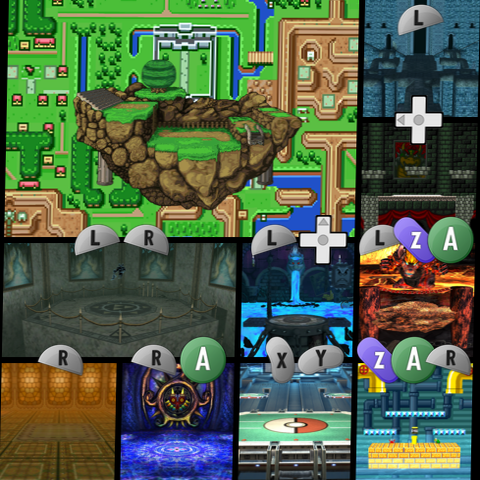
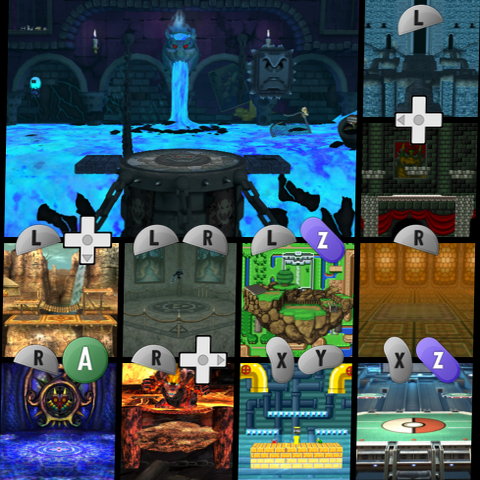
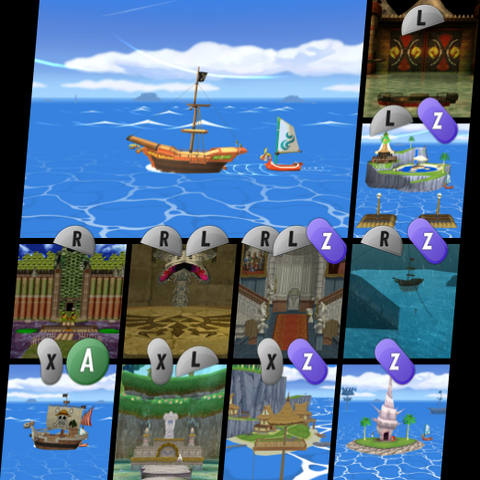
That's it! Just build the prevbases via `python prevbase_maker.py` and your files, correctly named after your stages, will be in the `outputs` directory. The program does all the thinking about layouts and where buttons should go for you, and so long as your screenshots are good it will just work. Here are a couple example outputs:
Notice how the stages themselves are tilted in the above preview for pirates. That's because countershear was disabled. Here's how it looks with countershear:
