https://github.com/cbhihe/pix_colorize
Project to colorize pictures using 3rd party Machine Learning algorithm repos available on the net.
https://github.com/cbhihe/pix_colorize
algorithmia-api angularjs bootstrap docker-container flask html python rest-api wsgi
Last synced: 3 months ago
JSON representation
Project to colorize pictures using 3rd party Machine Learning algorithm repos available on the net.
- Host: GitHub
- URL: https://github.com/cbhihe/pix_colorize
- Owner: Cbhihe
- License: other
- Created: 2017-05-15T12:36:36.000Z (about 9 years ago)
- Default Branch: main
- Last Pushed: 2022-07-03T17:14:31.000Z (almost 4 years ago)
- Last Synced: 2025-11-12T14:35:45.586Z (8 months ago)
- Topics: algorithmia-api, angularjs, bootstrap, docker-container, flask, html, python, rest-api, wsgi
- Language: HTML
- Homepage:
- Size: 2.11 MB
- Stars: 1
- Watchers: 2
- Forks: 0
- Open Issues: 0
-
Metadata Files:
- Readme: Readme.md
- License: License.md
Awesome Lists containing this project
README
## Image colorizer using Algorithmia's API
- This project uses [Algorithmia](https://algorithmia.com) to automatically colorize pictures., based on a pre-trained color model.
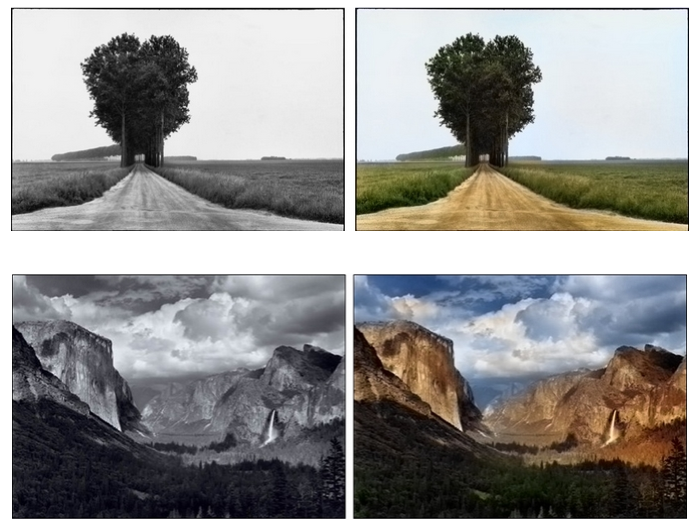
- [Flask](http://flask.pocoo.org) was chosen as backend to interact with the local server rendering the picture in your host’s favorite navigator because it is lightweight.
The frontend was build with [AngularJS](https://angularjs.org) and [Bootstrap](http://getbootstrap.com). Toni Pohl contributed most of that code, as we were both enrolled in the MIRI CS Master program at UPC in Barcelona, Spain.

### Slow start:
A step by step guide is included in this repo: see Manual.pdf
### Quick start:
#### Build a Docker image and start a container
Your project directory should contain the Dockerfile for the container to be built.
To build the Docker comtainer image just run this in your project directory:
```
docker build -t CONTAINER_NAME:CONTAINER_TAG
```
where "CONTAINER_NAME" and "CONTAINER_TAG" are chosen by user (lowercase
only); e.g. _colorize_me:dockerfile_
To start the container simply enter:
```
docker run -d -p 8080:5000 -e API_KEY=API_KEY CONTAINER_NAME:CONTAINER_TAG
```
where 5000 is the flask server (Backend)'s default communication port and
8080 is the chosen port on the container side for the GUI.
Otherwise you could simply use the pre-built `k4l4m/colorizer` image:
```
docker run -d -p 8080:5000 -e API_KEY=YOUR_API_KEY k4l4m/colorizer
```
### Short Licensing terms:
You can use the code as you please pursuant to the Licensing terms provided in this repo. In particular you can distribute the content of this repo as long as you distribute
the afore-mentioned license with it and you mention its two authors.