https://github.com/cdeck3r/drl4rest
Deep Reinforcement Learning for REST interfaces
https://github.com/cdeck3r/drl4rest
Last synced: 11 months ago
JSON representation
Deep Reinforcement Learning for REST interfaces
- Host: GitHub
- URL: https://github.com/cdeck3r/drl4rest
- Owner: cdeck3r
- License: mit
- Created: 2020-04-13T17:47:39.000Z (about 6 years ago)
- Default Branch: master
- Last Pushed: 2021-02-22T14:35:18.000Z (over 5 years ago)
- Last Synced: 2025-06-02T03:47:39.465Z (about 1 year ago)
- Language: Jupyter Notebook
- Size: 1.59 MB
- Stars: 0
- Watchers: 1
- Forks: 0
- Open Issues: 0
-
Metadata Files:
- Readme: README.md
- License: LICENSE
Awesome Lists containing this project
README
# DRL4REST
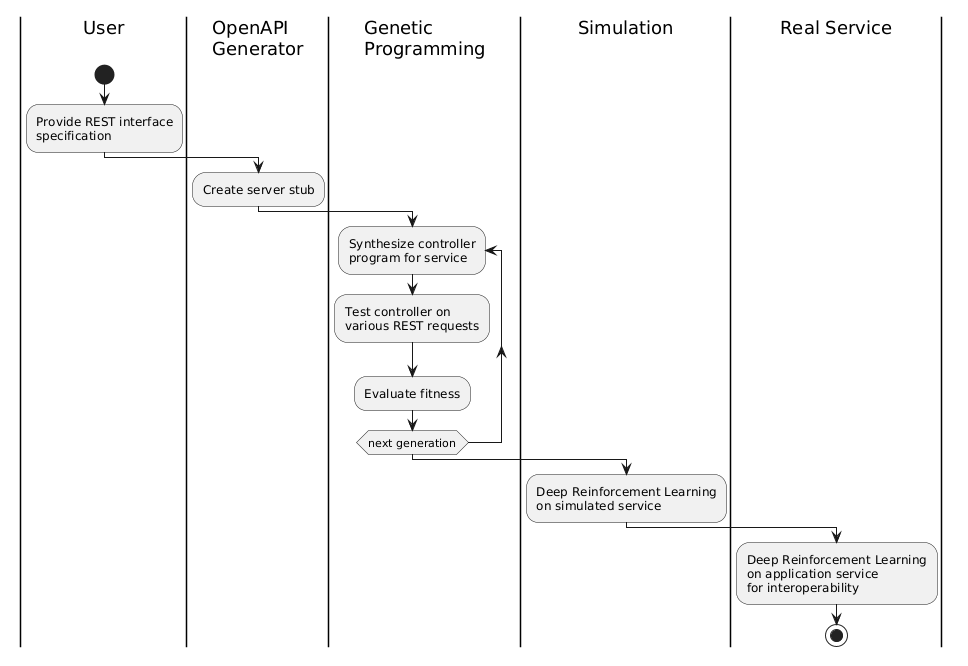
In Deep Reinforcement Learning for REST (DRL4REST) we aim for a sim-to-real approach learning REST interfaces to achieve interoperability. Latter is conceived as a rational goal-driven behavior of the service.
It works in two steps
1. Train a deep reinforcement learning (DRL) algorithm on a simulated service behavior
1. Fine-tune the DRL on the real application service to achieve interoperability
The simulated service behavior is one of many possible behaviors of the real application service. This research investigates how we can improve learning the real service when probing the space of simulated service behaviors.
Generally, we do not know the service behavior behind a REST interface, if there is only the interface specification available. As a consequence, we plug-in a simulation created by Genetic Programming (GP), which essentially results in a piece of code generating valid responses to concrete requests. In contrast to mocking approaches, GP enables more complex behaviors.
The following workflow illustrates the DRL4REST approach starting with an interface specification as input.
## Preps
Create a `.env` file in the project's root specifying global environment variables.
```
# In the container, this is the directory where the code is found
APP_ROOT=/DRL4REST
# the HOST directory containing directories to be mounted into containers
# e.g. /home/username/DRL4REST
VOL_DIR=
```
## Quickstart
Start in project's root dir. Create docker image
```bash
docker-compose build apigenerator
```
Start in project's root dir. Generate API code:
```bash
cd scripts
openapi-generator.sh
```
It generates python (client) and python-flask (server) code and places in the `openapi` directory. The default API is [CartPole-v0 version 1.0](src/cartpole/spec/OpenAPIv1.json).
Change the behavior with:
```
Usage : ./openapi-generator.sh [-h] [-a] [-n]
-a API_SPEC_URL
-n API_NAME
```
Start the python client and server. Create docker image
and spin up the `pyclient` and `pyserver` container
```bash
docker-compose up -d pyclient pyserver
```
Setup and start the server
```bash
docker exec -it pyserver /bin/bash
cd /DRL4REST/scripts
./pyserver_setup.sh
```
Check the server is running pointing your browser to http://localhost:8000/ui/
In an other terminal setup the client
```bash
docker exec -it pyclient /bin/bash
cd /DRL4REST/scripts
./pyclient_setup.sh
```
Confirm that you can successfully download the API spec from the `pyserver` container from within the `pyclient` container.
```bash
wget http://pyserver:8080/openapi.json
```
## Genetic Programming
Generally, we do not know the service behavior behind a REST interface, if there is only the interface specification available. As a consequence, we plug-in a simulation, which is essentially a piece of code generating valid responses to concrete requests.
Genetic Programming (GP) creates the program behind the REST interface. When a client sends a request to the REST interface, the created program generates a reply sent back to the client. For GP we use the python [DEAP](https://github.com/deap/deap) framework. It is installed in a jupyter-scipy docker image.
Spin up the jupyscipy container
```bash
docker-compose up -d jupyscipy
```
Point your browser to http://localhost:8008 and test an example GP by loading and running the [`gp_test.ipynb`](notebooks/gp_test.ipynb). It will find a regression function from data. A [tree graph](notebooks/graph.png) represents the regression function found by GP.
The notebook [`gp_cartpole_server.ipynb`](notebooks/gp_cartpole_server.ipynb) shows the GP approach applied to the [cartpole](https://en.wikipedia.org/wiki/Inverted_pendulum) example.
The following tree graph displays the program found by GP for an idempotent REST behavior when calling `GET /api/v1/cart`.

## Unit Testing using tox
We rely on standard python `unittest` framework and need to control the testcase collection. The reason is to avoid the execution of testcases from base classes generated by the OpenAPI generator. The standard `unittest` discover mechanism collects testcases from base classes. As a consequence, `pytest` cannot be used since it utilizes the standard `unittest` discover mechanism. The `unittest` framework also plays nicely with jupyter notebooks. This makes it easy to take testcases from the notebook for module testing as the development progresses.
Each testcase has its own `.py` file which compiles a testsuite. Latter avoids the unintended execution of testcases from base classes.
We use [tox](https://tox.readthedocs.io/en/latest/) for test automation. The directory `src/cartpole` contains the `tox.ini` configuring the test environment. Please validate the `PROJECT_DIR` environment variable. The current tox config runs _all_ testcases from the `tests` sub-directory. Simply call
```bash
tox
```
## Development IDE
Add a `.gitconfig` file in the project's root with the following content.
```
[user]
name =
email =
[credential]
helper = cache
```
Spin up vscode container
```bash
docker-compose up -d vscode
```
Point your browser to it: https://127.0.0.1:8080
The vscode docker image comes pre-installed with following extentions especially for working with shell scripts.
* [shfmt](https://github.com/mvdan/sh)
* [shellchecker](https://github.com/koalaman/shellcheck)
The shellchecker runs on-the-fly and provides quick fixes for better coding quality of shell scripts. The shfmt tool reformats the shell script. Use `shift + alt + f` to reformat the script.
## Dev Notes
This sections lists some notes on development practises.
### UML Diagrams
A good practise is the documentation of concepts and ideas using UML diagrams. These diagrams can be referenced in markdown files as well as in jupyter notebooks. The following practise sources from https://stackoverflow.com/a/32771815
1. Go to http://plantuml.com/plantuml/form and create an UML diagram using [plantuml](https://plantuml.com/). The website immediately renders the diagram.
1. Copy the content from the form into a separate file, e.g. `mydiagram.uml`, and upload it with into your github repo, e.g. `github.com///mydiagram.uml`.
1. Return to http://plantuml.com/plantuml/form remove all content from the input form and just include the link to the UML file on github, e.g. `!includeurl https://raw.githubusercontent.com///master/mydiagram.uml`. You should see the rendered diagram.
1. Copy the image URL from the `View as PNG` link below the input form. This URL is stable.
1. Reference the image in your markdown file by `![image text]()`
Note, the cool feature: Changing the diagram source file, i.e. `mydiagram.uml` on github, will result in a new rendered diagram image.