https://github.com/cdervis/vscode-pi
VS Code extension for the pi agent.
https://github.com/cdervis/vscode-pi
ai ai-agents assistant coding-agent developer-tools local-ai local-ai-agents pi pi-agent vscode vscode-extension
Last synced: 23 days ago
JSON representation
VS Code extension for the pi agent.
- Host: GitHub
- URL: https://github.com/cdervis/vscode-pi
- Owner: cdervis
- Created: 2026-04-14T20:11:56.000Z (29 days ago)
- Default Branch: main
- Last Pushed: 2026-04-16T21:58:36.000Z (27 days ago)
- Last Synced: 2026-04-18T00:03:42.852Z (26 days ago)
- Topics: ai, ai-agents, assistant, coding-agent, developer-tools, local-ai, local-ai-agents, pi, pi-agent, vscode, vscode-extension
- Homepage: https://vscode-pi.dev
- Size: 1.3 MB
- Stars: 2
- Watchers: 1
- Forks: 0
- Open Issues: 1
-
Metadata Files:
- Readme: README.md
Awesome Lists containing this project
README
# pi Agent for VS Code
## Run your local pi coding agent directly inside VS Code.
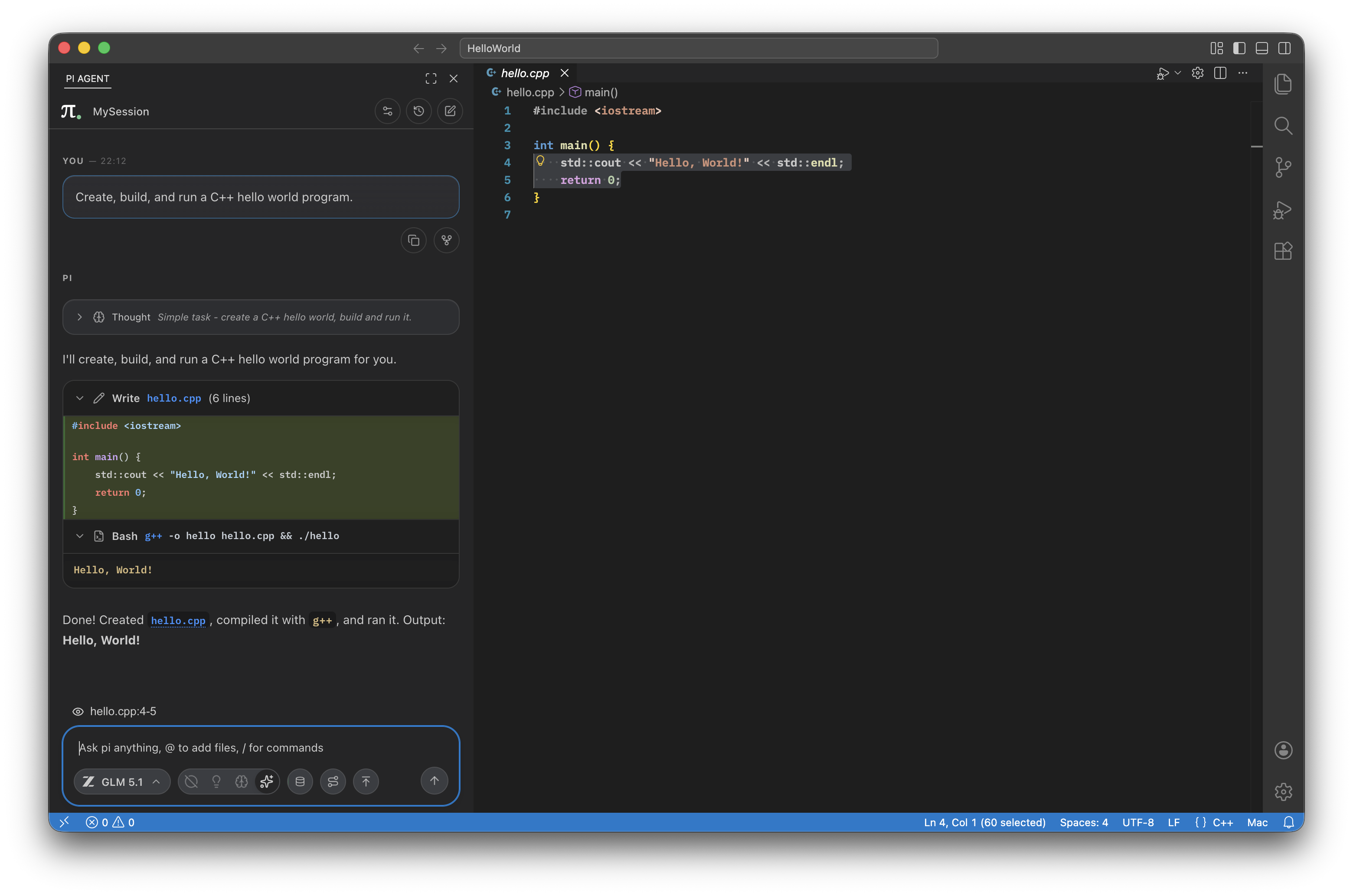





This is a sidebar extension that launches your installed [pi](https://pi.dev) binary in RPC mode and turns it into a VS Code-native chat workflow. It adds streaming transcript rendering, tool output UI, session restore/history, model switching, and file context-aware prompts.
All while staying lightweight and true to pi's minimalism-focused philosophy.
Tested on macOS, Linux, and Windows.
## Features
- Sidebar chat built for long-running coding sessions
- Streaming markdown answers with syntax highlighting
- Rich tool rendering for read, write, edit, bash, images, and subagents
- Including interactive Mermaid diagrams
- Message queuing and steering
- Supports your pi prompts and skills, e.g. "/commit"
- Session manager with search, rename, delete, and forking
- `@` file and folder mentions from the current workspace
- Easy-to-use model selector and thinking-level controls
- Context window tracking and manual compaction
- Smart merging of tool blocks
## Requirements
- VS Code or VSCodium
- A local `pi` installation available on `PATH` or `pi.binaryPath` setting
- A configured pi agent directory with at least one provider/model in `models.json`
If you don't have pi installed, the extension can install it for you using npm.
This requires you to have npm installed and available in your environment.
It can also create a basic `auth.json` file, but having a preconfigured pi installation is preferred. The onboarding process of the extension is a work-in-progress.
## Getting Started
1. Install pi: `npm install -g @mariozechner/pi-coding-agent`
2. Install this extension.
3. [Configure pi](https://github.com/cdervis/vscode-pi#readme) to your liking.
4. Open the `PI AGENT` view in the activity bar and start a chat.
## Notes
- This is a prerelease version, please [report any feedback and issues](https://github.com/cdervis/vscode-pi) to help improve it!
- The extension is a UI layer built on top of pi. Live pi state remains the source of truth.
## Troubleshooting
### pi is not detected
- Make sure `pi` is installed and available on your shell `PATH`.
- If it is installed somewhere custom, set `pi.binaryPath` to the absolute path.
- If the extension reports an incompatible version, update your local `pi` install first.
### Sessions or history look wrong
- Check `pi.agentDir`. The extension uses the resolved agent directory for both runtime startup and session-history file access.
- If you switch agent directories, restart the extension host or run the pi restart action so the running process and file-backed history stay aligned.
### Models are missing
- Confirm your pi agent directory contains a valid `models.json`.
- Make sure your provider configuration and API keys are set where pi expects them.
### Provider requests fail
- Re-check the provider credentials stored in your pi config or VS Code-backed secrets.
- After updating a key, restart pi from the extension so the spawned process picks up the new environment.
> **Unofficial extension**. This project is community-built and is not affiliated with or endorsed by the [pi agent](https://pi.dev) project.