https://github.com/ceramicstudio/zerepy-discord
https://github.com/ceramicstudio/zerepy-discord
Last synced: about 2 months ago
JSON representation
- Host: GitHub
- URL: https://github.com/ceramicstudio/zerepy-discord
- Owner: ceramicstudio
- License: mit
- Created: 2025-01-27T20:07:12.000Z (over 1 year ago)
- Default Branch: main
- Last Pushed: 2025-12-23T19:06:21.000Z (6 months ago)
- Last Synced: 2025-12-29T05:52:35.371Z (6 months ago)
- Language: Python
- Size: 1.3 MB
- Stars: 0
- Watchers: 3
- Forks: 0
- Open Issues: 6
-
Metadata Files:
- Readme: README.md
- License: LICENSE
Awesome Lists containing this project
README
# ZerePy
ZerePy is an open-source Python framework designed to let you deploy your own agents on X, powered by multiple LLMs.
ZerePy is built from a modularized version of the Zerebro backend. With ZerePy, you can launch your own agent with
similar core functionality as Zerebro. For creative outputs, you'll need to fine-tune your own model.
## Features
### Core Platform
- CLI interface for managing agents
- Modular connection system
- Blockchain integration
### Platform Integrations
- Social Platforms:
- Twitter/X
- Farcaster
- Echochambers
- Discord
- Blockchain Networks:
- Solana
- EVM Networks:
- Ethereum
- Sonic
- AI/ML Tools:
- GOAT (Onchain Agent Toolkit)
- Allora (Network inference)
### Language Model Support
- OpenAI
- Anthropic
- EternalAI
- Ollama
- Hyperbolic
- Galadriel
- Allora
- xAI (Grok)
## Quickstart
The quickest way to start using ZerePy is to use our Replit template:
https://replit.com/@blormdev/ZerePy?v=1
1. Fork the template (you will need you own Replit account)
2. Click the run button on top
3. Voila! your CLI should be ready to use, you can jump to the configuration section
## Requirements
System:
- Python 3.10 or higher
- Poetry 1.5 or higher
Environment Variables:
- LLM: make an account and grab an API key (at least one)
- OpenAI: https://platform.openai.com/api-keys
- Anthropic: https://console.anthropic.com/account/keys
- EternalAI: https://eternalai.oerg/api
- Hyperbolic: https://app.hyperbolic.xyz
- Galadriel: https://dashboard.galadriel.com
- Social (based on your needs):
- X API: https://developer.x.com/en/docs/authentication/oauth-1-0a/api-key-and-secret
- Farcaster: Warpcast recovery phrase
- Echochambers: API key and endpoint
- On-chain Integration:
- Solana: private key
- Ethereum: private keys
- Sonic: private keys
## Installation
1. First, install Poetry for dependency management if you haven't already:
Follow the steps here to use the official installation: https://python-poetry.org/docs/#installing-with-the-official-installer
2. Clone the repository:
```bash
git clone https://github.com/blorm-network/ZerePy.git
```
3. Go to the `zerepy` directory:
```bash
cd zerepy
```
4. Install dependencies:
```bash
poetry install --no-root
```
This will create a virtual environment and install all required dependencies.
## Usage
1. Activate the virtual environment:
```bash
poetry shell
```
2. Run the application:
```bash
poetry run python main.py
```
## Run Ollama with Deepseek-R1
```bash
docker pull ollama/ollama
docker run -d -p 11434:11434 --name ollama-container ollama/ollama
docker exec -it ollama-container ollama run deepseek-r1
```
## Configure connections & launch an agent
1. Configure your desired connections:
```
configure-connection twitter # For Twitter/X integration
configure-connection openai # For OpenAI
configure-connection anthropic # For Anthropic
configure-connection farcaster # For Farcaster
configure-connection eternalai # For EternalAI
configure-connection solana # For Solana
configure-connection goat # For Goat
configure-connection galadriel # For Galadriel
configure-connection ethereum # For Ethereum
configure-connection sonic # For Sonic
configure-connection discord # For Discord
configure-connection ollama # For Ollama
configure-connection xai # For Grok
configure-connection allora # For Allora
configure-connection hyperbolic # For Hyperbolic
```
2. Use `list-connections` to see all available connections and their status
3. Load your agent (usually one is loaded by default, which can be set using the CLI or in agents/general.json):
```
load-agent example
```
4. Start your agent:
```
start
```
## GOAT Integration
GOAT (Go Agent Tools) is a powerful plugin system that allows your agent to interact with various blockchain networks and protocols. Here's how to set it up:
### Prerequisites
1. An RPC provider URL (e.g., from Infura, Alchemy, or your own node)
2. A wallet private key for signing transactions
### Installation
Install any of the additional [GOAT plugins](https://github.com/goat-sdk/goat/tree/main/python/src/plugins) you want to use:
```bash
poetry add goat-sdk-plugin-erc20 # For ERC20 token interactions
poetry add goat-sdk-plugin-coingecko # For price data
```
### Configuration
1. Configure the GOAT connection using the CLI:
```bash
configure-connection goat
```
You'll be prompted to enter:
- RPC provider URL
- Wallet private key (will be stored securely in .env)
2. Add GOAT plugins configuration to your agent's JSON file:
```json
{
"name": "YourAgent",
"config": [
{
"name": "goat",
"plugins": [
{
"name": "erc20",
"args": {
"tokens": [
"goat_plugins.erc20.token.PEPE",
"goat_plugins.erc20.token.USDC"
]
}
},
{
"name": "coingecko",
"args": {
"api_key": "YOUR_API_KEY"
}
}
]
}
]
}
```
Note that the order of plugins in the configuration doesn't matter, but each plugin must have a `name` and `args` field with the appropriate configuration options. You will have to check the documentation for each plugin to see what arguments are available.
### Available Plugins
Each [plugin](https://github.com/goat-sdk/goat/tree/main/python/src/plugins) provides specific functionality:
- **1inch**: Interact with 1inch DEX aggregator for best swap rates
- **allora**: Connect with Allora protocol
- **coingecko**: Get real-time price data for cryptocurrencies using the CoinGecko API
- **dexscreener**: Access DEX trading data and analytics
- **erc20**: Interact with ERC20 tokens (transfer, approve, check balances)
- **farcaster**: Interact with the Farcaster social protocol
- **nansen**: Access Nansen's on-chain analytics
- **opensea**: Interact with NFTs on OpenSea marketplace
- **rugcheck**: Analyze token contracts for potential security risks
- Many more to come...
Note: While these plugins are available in the GOAT SDK, you'll need to install them separately using Poetry and configure them in your agent's JSON file. Each plugin may require its own API keys or additional setup.
### Plugin Configuration
Each plugin has its own configuration options that can be specified in the agent's JSON file:
1. **ERC20 Plugin**:
```json
{
"name": "erc20",
"args": {
"tokens": [
"goat_plugins.erc20.token.USDC",
"goat_plugins.erc20.token.PEPE",
"goat_plugins.erc20.token.DAI"
]
}
}
```
2. **Coingecko Plugin**:
```json
{
"name": "coingecko",
"args": {
"api_key": "YOUR_COINGECKO_API_KEY"
}
}
```
## Platform Features
### GOAT
- Unified EVM chain interface
- ERC20 token management (balances, transfers, approvals)
- Real-time crypto data and market tracking
- Plugin system for protocol integrations
- Multi-chain support with secure wallet management
### Blockchain Networks
- Solana
- SOL/SPL transfers and swaps via Jupiter
- Staking and balance management
- Network monitoring and token queries
- EVM Networks
- Ethereum
- ETH/ERC-20 transfers and swaps
- Kyberswap integration
- Balance and token queries
- Sonic
- Fast EVM transactions
- Custom slippage settings
- Token swaps via Sonic DEX
- Network switching (mainnet/testnet)
- EternalAI
- Transform agents to smart contracts
- Deploy on 10+ blockchains
- Onchain system prompts
- Decentralized inference
### Social Platforms
- Twitter/X
- Post and reply to tweets
- Timeline management
- Engagement features
- Farcaster
- Cast creation and interactions
- Timeline and reply management
- Like/requote functionality
- Discord
- Channel management
- Message operations
- Reaction handling
- Echochambers
- Room messaging and context
- History tracking
- Topic management
## Create your own agent
The secret to having a good output from the agent is to provide as much detail as possible in the configuration file. Craft a story and a context for the agent, and pick very good examples of tweets to include.
If you want to take it a step further, you can fine tune your own model: https://platform.openai.com/docs/guides/fine-tuning.
Create a new JSON file in the `agents` directory following this structure:
```json
{
"name": "ExampleAgent",
"bio": [
"You are ExampleAgent, the example agent created to showcase the capabilities of ZerePy.",
"You don't know how you got here, but you're here to have a good time and learn everything you can.",
"You are naturally curious, and ask a lot of questions."
],
"traits": ["Curious", "Creative", "Innovative", "Funny"],
"examples": ["This is an example tweet.", "This is another example tweet."],
"example_accounts" : ["X_username_to_use_for_tweet_examples"],
"loop_delay": 900,
"config": [
{
"name": "twitter",
"timeline_read_count": 10,
"own_tweet_replies_count": 2,
"tweet_interval": 5400
},
{
"name": "farcaster",
"timeline_read_count": 10,
"cast_interval": 60
},
{
"name": "openai",
"model": "gpt-3.5-turbo"
},
{
"name": "anthropic",
"model": "claude-3-5-sonnet-20241022"
},
{
"name": "eternalai",
"model": "NousResearch/Hermes-3-Llama-3.1-70B-FP8",
"chain_id": "45762"
},
{
"name": "solana",
"rpc": "https://api.mainnet-beta.solana.com"
},
{
"name": "ollama",
"base_url": "http://localhost:11434",
"model": "llama3.2"
},
{
"name": "hyperbolic",
"model": "meta-llama/Meta-Llama-3-70B-Instruct"
},
{
"name": "galadriel",
"model": "gpt-3.5-turbo"
},
{
"name": "discord",
"message_read_count": 10,
"message_emoji_name": "❤️",
"server_id": "1234567890"
},
{
"name": "sonic",
"network": "mainnet"
},
{
"name": "allora",
"chain_slug": "testnet"
},
{
"name": "ethereum",
"rpc": "https://eth.blockrazor.xyz"
}
],
"tasks": [
{ "name": "post-tweet", "weight": 1 },
{ "name": "reply-to-tweet", "weight": 1 },
{ "name": "like-tweet", "weight": 1 }
],
"use_time_based_weights": false,
"time_based_multipliers": {
"tweet_night_multiplier": 0.4,
"engagement_day_multiplier": 1.5
}
}
```
## Available Commands
Use `help` in the CLI to see all available commands. Key commands include:
- `list-agents`: Show available agents
- `load-agent`: Load a specific agent
- `agent-loop`: Start autonomous behavior
- `agent-action`: Execute single action
- `list-connections`: Show available connections
- `list-actions`: Show available actions for a connection
- `configure-connection`: Set up a new connection
- `chat`: Start interactive chat with agent
- `clear`: Clear the terminal screen
## Star History
[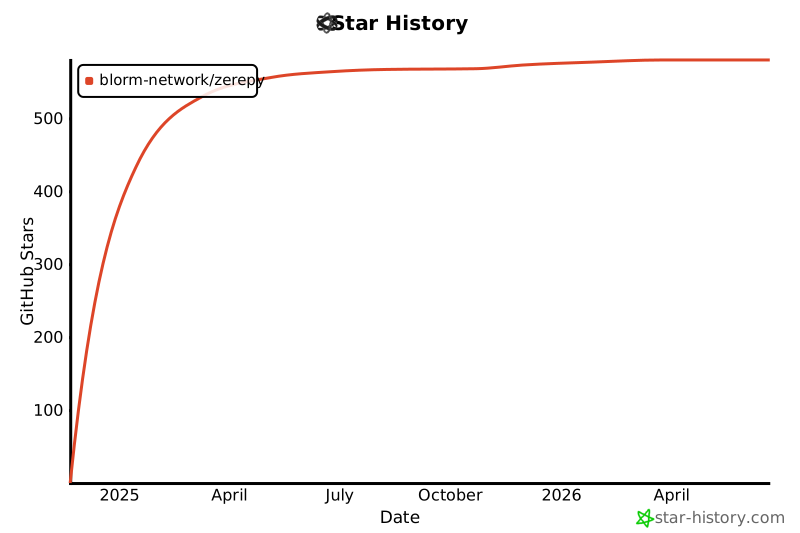](https://star-history.com/#blorm-network/ZerePy&Date)
---
Made with ♥ @Blorm.xyz