https://github.com/ceynri/request-hedging
Request hedging policy in the frontend.
https://github.com/ceynri/request-hedging
frontend grpc hedging npm pnpm request typescript
Last synced: about 1 month ago
JSON representation
Request hedging policy in the frontend.
- Host: GitHub
- URL: https://github.com/ceynri/request-hedging
- Owner: ceynri
- Created: 2024-02-08T16:25:49.000Z (over 2 years ago)
- Default Branch: main
- Last Pushed: 2024-04-09T04:20:55.000Z (about 2 years ago)
- Last Synced: 2025-05-12T02:51:58.492Z (about 1 year ago)
- Topics: frontend, grpc, hedging, npm, pnpm, request, typescript
- Language: TypeScript
- Homepage:
- Size: 55.7 KB
- Stars: 0
- Watchers: 1
- Forks: 0
- Open Issues: 1
-
Metadata Files:
- Readme: README.md
Awesome Lists containing this project
README
# request-hedging
Request hedging policy in the frontend.
Not requestor, just hedging policy logic implementation.
## Introduction
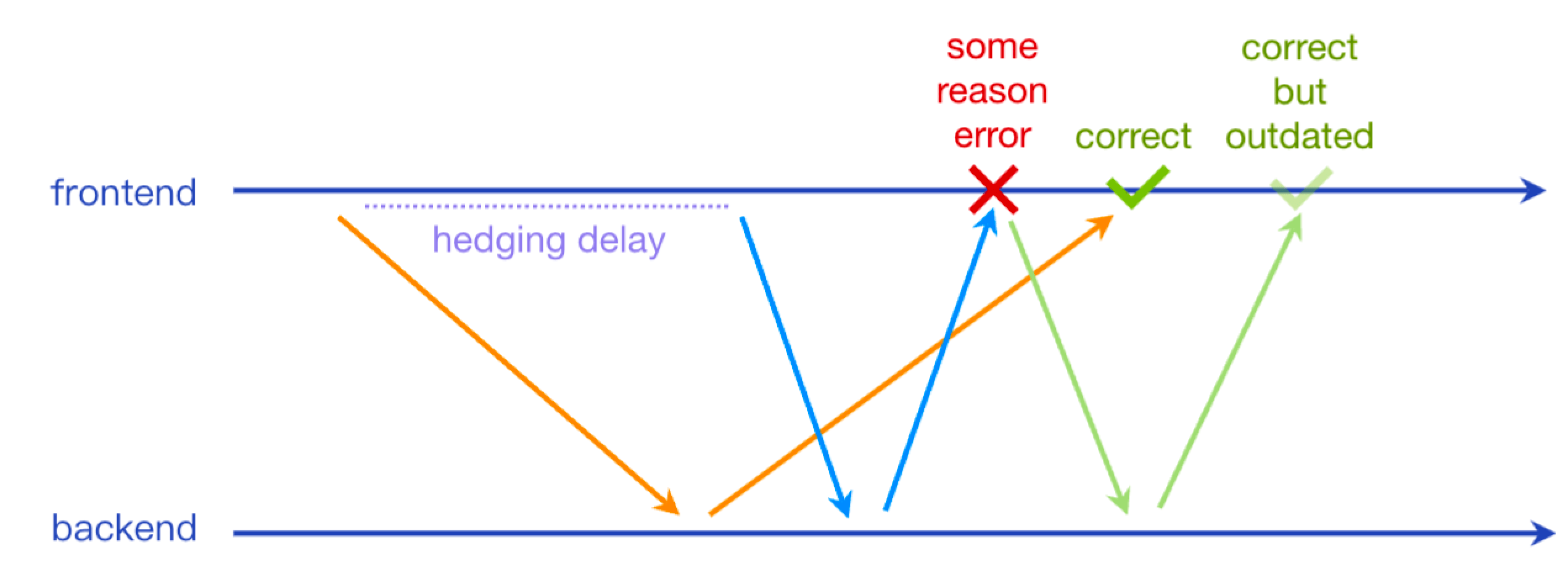
Hedging policy can be regarded as an aggressive retry policy. A complete request may send multiple identical requests until one of them returns successfully. We don't need to wait for the previous request to time out before sending a new hedging request, which makes the hedging policy have a better optimization effect for long-tail requests.
> Hedging policy in the backend:
>
> - [gRPC Retry Design](https://github.com/grpc/proposal/blob/master/A6-client-retries.md#hedging-policy)
> - [gRPC Request Hedging](https://grpc.io/docs/guides/request-hedging/)
> - [The Tail At Scale](https://research.google/pubs/pub40801/)
## Getting started
```sh
npm install request-hedging
# or yarn/pnpm...
```
## Use Cases
Single request hedging:
```ts
import { hedging } from 'request-hedging';
const result = await hedging(() => fetch('https://example.com/apis/getData'), {
maxAttempts: 3, // Up to three times attempted (not required)
});
```
Multiple requests hedging:
```ts
import { hedging } from 'request-hedging';
const result = await hedging([
() => fetch('https://example.com/apis/getData'),
() => fetch('https://example.com/backup-apis/getData'),
]);
```
Use `useHedging`:
```ts
import { useHedging } from 'request-hedging';
const hedging = useHedging({
maxAttempts: 3,
hedgingDelay: 500,
});
const result1 = await hedging(() => fetch('https://example.com/apis/getData'));
const result2 = await hedging([
() => fetch('https://example.com/apis/getData'),
() => fetch('https://example.com/backup-apis/getData'),
], { maxAttempts: 2 });
```
## Options
| name | type | default value |
| -------------- | ------------------------------------------ | ---------------------------------- |
| maxAttempts | `number` | `Math.max(this.targets.length, 2)` |
| hedgingDelay | `number` (ms) | `1000` |
| timeout | `number` (ms) | `Infinity` |
| retryableError | `boolean \| ((error: unknown) => boolean)` | `true` |
---
## Local Dev
- node >= 18
- pnpm >= 9
```sh
# request-hedging repo
pnpm i
pnpm dev
# Another repo
pnpm link /path/to/request-hedging
```