https://github.com/chamerling/one-more-gitlab-cli
One more GitLab CLI
https://github.com/chamerling/one-more-gitlab-cli
cli gitlab
Last synced: 3 months ago
JSON representation
One more GitLab CLI
- Host: GitHub
- URL: https://github.com/chamerling/one-more-gitlab-cli
- Owner: chamerling
- License: mit
- Created: 2017-07-25T18:04:44.000Z (almost 9 years ago)
- Default Branch: master
- Last Pushed: 2017-07-28T14:54:48.000Z (almost 9 years ago)
- Last Synced: 2025-09-28T09:52:14.304Z (10 months ago)
- Topics: cli, gitlab
- Language: JavaScript
- Size: 148 KB
- Stars: 3
- Watchers: 2
- Forks: 0
- Open Issues: 4
-
Metadata Files:
- Readme: README.md
- License: LICENSE
Awesome Lists containing this project
README
# one-more-gitlab-cli
[](https://travis-ci.org/chamerling/one-more-gitlab-cli)
One more [GitLab](https://about.gitlab.com/) CLI, because other ones do not fit my needs...
[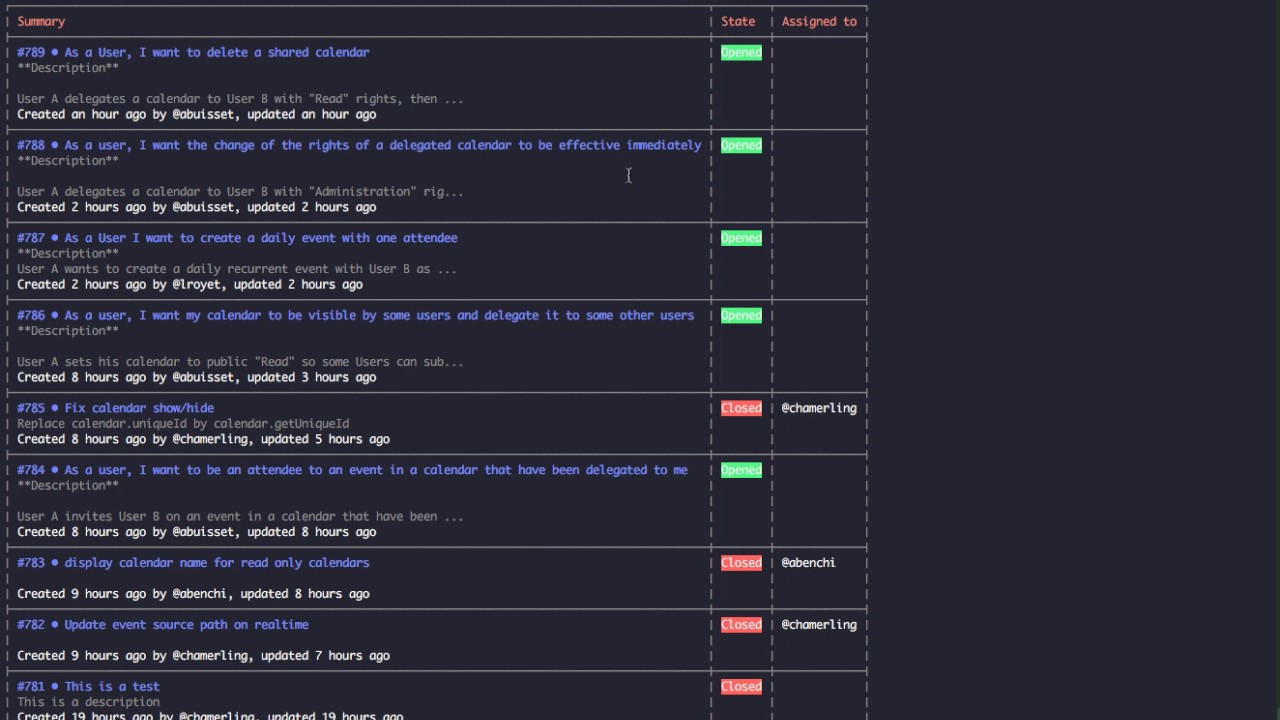](https://www.youtube.com/watch?v=nF5iwqwIlgg)
⚠️ Currently works on API v3, v4 supposed to be easy to do soon [https://docs.gitlab.com/ee/api/v3_to_v4.html#api-v3-to-api-v4](https://docs.gitlab.com/ee/api/v3_to_v4.html#api-v3-to-api-v4).
## Use
### Install
```
npm install --global one-more-gitlab-cli
#or
yarn add global one-more-gitlab-cli
```
### Use
For now, it just focuses on issues and merge requests, more resources support to come...
```
gitlab --help
```
```
Usage: gitlab [options]
Commands:
issue Issues Management
mr Merge Requests Management
Options:
--help Show help [boolean]
--version Show version number [boolean]
Examples:
bin/gitlab issue --help show help of the issue command
for more information, go to https://chamerling.github.io/one-more-gitlab-cli
```
## Commands
Note: In all the commands below, you can specify the GitLab project to launch the command against using `--name`. If not specified, the cli will look at the current project from git origin and will use it has project name.
### Issues
#### Create
- Create an issue in the `my-project` project
```
gitlab issue create --name my-project --title 'This is my issue title' --d 'This is the issue description'
```
#### Get a single issue
Get the issue `#735` of the `my-project` project.
```
gitlab issue get --name my-project --id 735
```
#### List
- List last issues in the `my-project` project
```
gitlab issue list --name linagora.esn.calendar
```
- Search issues in the `my-project` project related to `spinner`
```
gitlab issue list --name linagora.esn.calendar --search spinner
```
### Merge Requests
#### List
List last merge requests in the `my-project` project
```
gitlab mr list --name linagora.esn.calendar --state opened
```
- `state` can be `opened`, `closed`, `merged` and `all`. Defaults to `opened`.
#### Get a single MR
Get the merge request `#735` of the `my-project` project.
```
gitlab mr get --name my-project --id 735
```
## Configure
You can configure the CLI globally or locally per project. To authenticate the user, it uses a gitlab token you can find on your gitlab profile account (https://your-server-url/profile/account). Just copy/paste the `Private Token`.
### Global configuration
```
git config --global gitlab.url "http://your-server-url"
git config --global gitlab.token "your-token"
```
### Local configuration
**WARN: Not implemented for now!**
In the repository of your choice:
```
git config gitlab.url "http://your-server-url"
git config gitlab.token "your-token"
```
## Release
```
grunt release
```
## License
MIT