https://github.com/champi-dev/example-flask-celery-redis
https://github.com/champi-dev/example-flask-celery-redis
Last synced: 4 months ago
JSON representation
- Host: GitHub
- URL: https://github.com/champi-dev/example-flask-celery-redis
- Owner: champi-dev
- License: mit
- Created: 2020-01-31T21:28:32.000Z (over 6 years ago)
- Default Branch: master
- Last Pushed: 2023-02-02T06:42:49.000Z (over 3 years ago)
- Last Synced: 2025-10-10T02:59:10.538Z (9 months ago)
- Language: HTML
- Size: 15.6 KB
- Stars: 2
- Watchers: 1
- Forks: 0
- Open Issues: 3
-
Metadata Files:
- Readme: README.md
- License: LICENSE
Awesome Lists containing this project
README
Using Celery with Flask
=======================
This repository contains the example code for my blog article [Using Celery with Flask](http://blog.miguelgrinberg.com/post/using-celery-with-flask).
The application provides two examples of background tasks using Celery:
- Example 1 sends emails asynchronously.
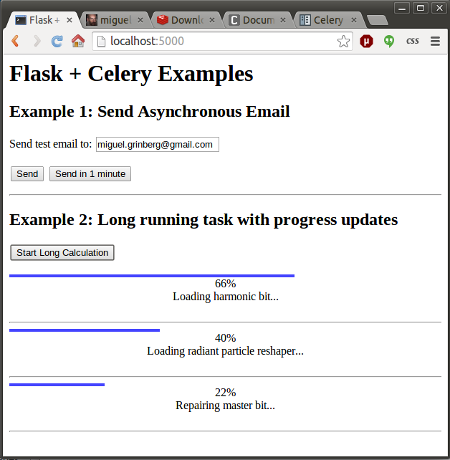
- Example 2 launches one or more asynchronous jobs and shows progress updates in the web page.
Here is a screenshot of this application:
Quick Setup
-----------
1. Clone this repository.
2. Create a virtualenv and install the requirements.
3. Open a second terminal window and start a local Redis server (if you are on Linux or Mac, execute `run-redis.sh` to install and launch a private copy).
4. Open a third terminal window. Set two environment variables `MAIL_USERNAME` and `MAIL_PASSWORD` to a valid Gmail account credentials (these will be used to send test emails). Then start a Celery worker: `venv/bin/celery worker -A app.celery --loglevel=info`.
5. Start the Flask application on your original terminal window: `venv/bin/python app.py`.
6. Go to `http://localhost:5000/` and enjoy this application!
For details on how this all works, see my article [Using Celery with Flask](http://blog.miguelgrinberg.com/post/using-celery-with-flask).