https://github.com/chandler767/fusionpanel
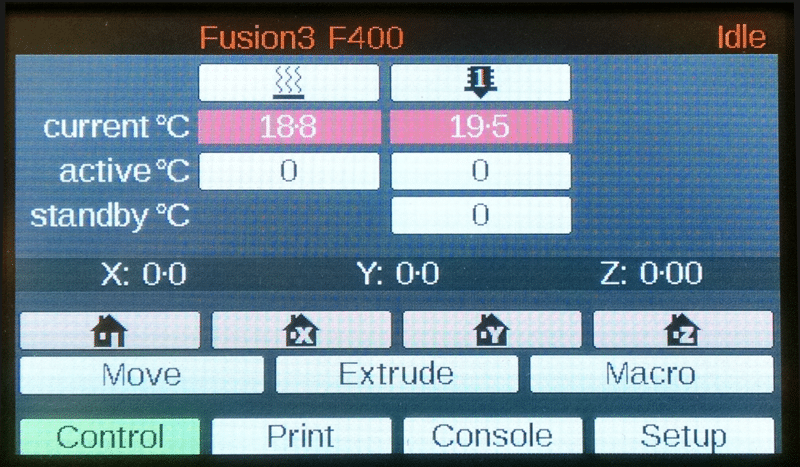
For v2 and v3 PanelDue control panels. This is a modified version of the PanelDueFirmware for the PanelDue 3D printer user interface board and has been modified for use only with the F400 3D Printer.
https://github.com/chandler767/fusionpanel
3d-printing arduino board c cpp eclipse firmware paneldue-control-panels touchscreen
Last synced: 3 months ago
JSON representation
For v2 and v3 PanelDue control panels. This is a modified version of the PanelDueFirmware for the PanelDue 3D printer user interface board and has been modified for use only with the F400 3D Printer.
- Host: GitHub
- URL: https://github.com/chandler767/fusionpanel
- Owner: chandler767
- Created: 2017-11-07T20:55:28.000Z (over 8 years ago)
- Default Branch: master
- Last Pushed: 2018-01-30T01:25:28.000Z (over 8 years ago)
- Last Synced: 2025-01-23T04:11:10.016Z (over 1 year ago)
- Topics: 3d-printing, arduino, board, c, cpp, eclipse, firmware, paneldue-control-panels, touchscreen
- Language: C
- Homepage: https://fusion3design.com
- Size: 3.15 MB
- Stars: 1
- Watchers: 2
- Forks: 0
- Open Issues: 0
-
Metadata Files:
- Readme: Readme.md
Awesome Lists containing this project
README
# FusionPanel
This source code is only for **v2 and v3 PanelDue control panels**.
This is a modified version of the [PanelDueFirmware](https://github.com/dc42/PanelDueFirmware) for the PanelDue 3D printer user interface board and has been modified for use only with the [F400 3D Printer](http://fusion3design.com).
Version 1 of FusionPanel for v1 PanelDue control panels can be found here: https://github.com/chandler767/FusionPanel-OLD
# Changes
This firmware is based off of version 1.17 of the PanelDueFirmware and it has been modified to be used with the [F400 3D Printer](http://fusion3design.com).
# Build Instructions
1. Download [Arduino version 1.5.8](https://www.arduino.cc/download_handler.php?f=/arduino-1.5.8-windows.zip) and install it into folder C:/Arduino-1.5.8.
2. Download and install Eclipse Oxygen for C/C++ Developers, from http://www.eclipse.org/downloads/eclipse-packages/.
3. In Eclipse create new workspace C:/Eclipse/FusionPanel. Then exit Eclipse.
4. Download this github project as a zip file and unzip it into C:/Eclipse/FusionPanel.
5. Load Eclipse and tell it to import the FusionPanel project.
6. Configure the path to the tools in the project under C/C++ Build -> Settings -> Cross Settings.
* Ensure it contains: C:\Arduino-1.5.8\hardware\tools\gcc-arm-none-eabi-4.8.3-2014q1\bin
* Ensure there is a copy of make on your PATH. If not then add: C:\Arduino-1.5.8\hardware\arduino\sam\system\CMSIS\Examples\cmsis_example\gcc_arm
7. Set the build target to **release-v3-4.3** to build for a v3 PanelDue.
* You may encounter a resource error on the first and second builds. The missing resources will automatically be created and then you will be able to build.
* You will get several 'defined but not used' warnings from labels and buttons that have been disabled for the F400. This is normal.
# Firmware Upload Instructions
Instructions for flashing the firmware binary via USB are at: http://miscsolutions.wordpress.com/paneldue/
(see section "Testing the board and updating the firmware").
# Support
For support [contact Fusion3 directly](https://fusion3design.com/contact_support/).
# Acknowledgements
* For the original version of PanelDue and PanelDueFirmware - [David Crocker](https://miscsolutions.wordpress.com/).
* Modified by [Chandler Mayo](http://ChandlerMayo.com). Follow me on [Twitter](https://twitter.com/MayoChandler).