https://github.com/chandumaram/dual-listbox
Dual-list box for Angular, forked from cm-angular-dual-listbox
https://github.com/chandumaram/dual-listbox
angular angular16 cm-angular-dual-listbox dual-list dual-list-box dual-listbox
Last synced: about 1 year ago
JSON representation
Dual-list box for Angular, forked from cm-angular-dual-listbox
- Host: GitHub
- URL: https://github.com/chandumaram/dual-listbox
- Owner: chandumaram
- License: mit
- Created: 2022-07-20T13:48:42.000Z (almost 4 years ago)
- Default Branch: master
- Last Pushed: 2024-03-21T08:09:39.000Z (over 2 years ago)
- Last Synced: 2024-11-11T03:26:42.731Z (over 1 year ago)
- Topics: angular, angular16, cm-angular-dual-listbox, dual-list, dual-list-box, dual-listbox
- Language: TypeScript
- Homepage: https://www.npmjs.com/package/cm-angular-dual-listbox
- Size: 741 KB
- Stars: 2
- Watchers: 1
- Forks: 0
- Open Issues: 0
-
Metadata Files:
- Readme: README.md
- License: LICENSE
Awesome Lists containing this project
README
# Angular Dual-Listbox (v14, v15 and v16)
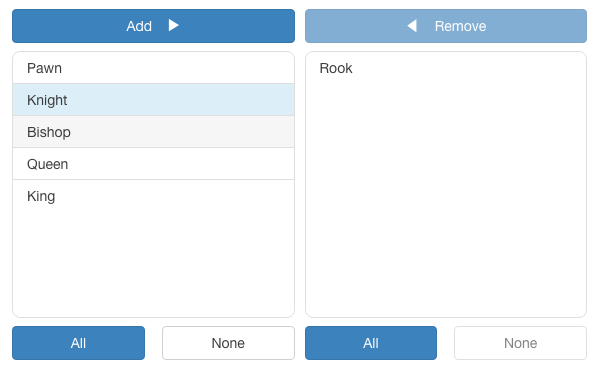
The **angular-dual-listbox** is an Angular component that provides two lists controls side-by-side that allows items in one list to be selected and moved* to the other list via drag-and-drop and/or a button-based interface.
The component supports multiple select options from the list, programatic setting of list sources, and layout with direction and button formatting.
## Table of Contents
* [Version](#Version)
* [Usage](#usage)
* [Inputs](#inputs)
* [Outputs](#outputs)
* [Final Usage](#final-usage)
## Version
| Angular | angular-dual-listbox |
|---|---|
|`16`|`3.0.0`|
|`15`|`2.1.1`|
|`14`|`1.0.0`|
## Usege
### Installation
```
$ npm i cm-angular-dual-listbox
```
### `app.module.ts`
```js
import { NgModule } from '@angular/core';
import { BrowserModule } from '@angular/platform-browser';
import { CmAngularDualListboxModule } from 'cm-angular-dual-listbox';
import { AppRoutingModule } from './app-routing.module';
import { AppComponent } from './app.component';
@NgModule({
declarations: [
AppComponent
],
imports: [
BrowserModule,
AppRoutingModule,
CmAngularDualListboxModule
],
providers: [],
bootstrap: [AppComponent]
})
export class AppModule { }
```
### `app.component.html`:
```html
```
### `app.component.ts`:
```js
export class AppComponent {
employeeImage = "assets/employee.png";
source: any[] = [
{id:1, name:"one"},
{id:2, name:"two"},
{id:3, name:"three"},
{id:4, name:"four"},
{id:5, name:"five"},
{id:6, name:"six"}
];
confirmed: any[] = [];
format = {
add: 'Add',
remove: 'Remove',
all: 'All',
none: 'None',
direction: CmAngularDualListboxComponent.LTR,
draggable: true
};
}
```
## Inputs
| Name | Description
|---|---|
|`key`| The unique identifier field of each object in the `source` and `destination` arrays, default is ``_id``. (Note: with a source of an array of strings, each string is its own id.)
|`display`| The field of each object for displaying the object each the lists, default is ``_name``. Or, a function that returns a string that can be used for displaying an object. (Note: with a source of an array of strings, each string is its own display.)
|`height`| The height of the lists, default is ``100px``.
|`format`| A format object, default is ``{ add: 'Add', remove: 'Remove', all: 'All', none: 'None', direction: 'left-to-right', draggable: true, locale: undefined }``
|`filter`| A boolean whether or not to display a filter for the lists, default is ``false``.
|`sort`| A boolean whether or not to keep the lists sorted, default is ``false``.
|`compare`| A compare function to be used for sorting the lists. Note if sort is not set and compare is set, then sort will be set ``true``.
|`source`| The source array of objects or strings for the list. (This is the universal, master list of all possible objects.)
|`destination`| The destination array of objects or strings selected from the source. Note, the ``destination`` array can have prexisting elements.
|`disabled`| The dual-list is disabled, default is ``false``.
## Outputs
|Name | Description
|---|---|
|`destinationChange`| An event triggered when the destination array changes.
## Final Usage
```html
```
## License
MIT
## Author
- Maram Chandrasekhar Reddy [@chandumaram](https://github.com/chandumaram)