https://github.com/charlescreativecontent/argo-agents
Blog post on how to deploy argo agents on aws eks
https://github.com/charlescreativecontent/argo-agents
Last synced: 3 months ago
JSON representation
Blog post on how to deploy argo agents on aws eks
- Host: GitHub
- URL: https://github.com/charlescreativecontent/argo-agents
- Owner: CharlesCreativeContent
- Created: 2024-07-23T11:09:00.000Z (almost 2 years ago)
- Default Branch: main
- Last Pushed: 2024-07-23T14:32:46.000Z (almost 2 years ago)
- Last Synced: 2025-05-08T04:54:55.185Z (about 1 year ago)
- Size: 376 KB
- Stars: 2
- Watchers: 1
- Forks: 0
- Open Issues: 0
-
Metadata Files:
- Readme: README.md
Awesome Lists containing this project
README
# Streamlining Amazon EKS with Akuity Agent - [View Post](https://github.com/CharlesCreativeContent/argo-agents/blob/main/c69c2c2a-bc33-4457-a20e-45ecb1067dd0.png?raw=true)

Managing Kubernetes clusters on Amazon EKS can be challenging, particularly when it comes to achieving efficient continuous deployment and managing applications at scale. The complexity of ensuring seamless operations, updates, and security often overwhelms even seasoned DevOps teams. This is where Akuity steps in, offering a streamlined solution with its EKS add-on, making cluster management more efficient and secure.
## Technical Value of Akuity Agents
Akuity Agents offer significant benefits for Amazon EKS users. They provide seamless integration with the Akuity platform, enabling comprehensive management of Argo CD instances directly within EKS. This integration facilitates better automation, security, and scalability for your Kubernetes clusters. Key features include:
- **Simplified Deployment:** Automate and streamline application deployment with Argo CD integration.
- **Enhanced Security:** Secure your deployments with managed secrets and policies.
- **Scalability:** Effortlessly manage and scale your Kubernetes clusters with robust tools and integrations.
- **Reduced Complexity:** Simplify cluster management through a single platform, reducing the learning curve and operational overhead.
## How to Install and Use Akuity Agents on Amazon EKS
Installing Akuity Agents on Amazon EKS is straightforward. Here's a step-by-step guide:
### Prerequisites:
- An [Akuity Platform](https://akuity.cloud/) account with an Argo CD instance
- An AWS EKS cluster
- Subscription to the Akuity Agent EKS add-on
- kubectl installed
- AWS CLI installed (optional)
> [!IMPORTANT]
> During EKS add-on installation, images must be pulled only from the EKS repository. This can’t be changed by the user.
### Steps to Install:
> [!NOTE]
> Refer to [documentation](https://docs.akuity.io/tutorials/eks-addon-agent-install/#create-the-akuity-namespace) for more details
1. **Add an EKS Cluster to Argo CD:**
- Navigate to Argo CD → your instance → Clusters.
- Click + Connect a cluster and input your Cluster Name.
- Expand the "Advanced settings" and select the "Addons" tab.
- Click + Add for EKS Add-on and then Connect Cluster.
This will take you to an Install Akuity Agent pop-up screen. Make sure you are on the "EKS" tab and then select which way you want to install the Add-on you can pick the AWS console or the CLI.
2. **Create the akuity Namespace:**
```bash
kubectl create namespace akuity
```
Install via AWS Console:
- Go to the EKS cluster in the AWS console.
- Navigate to the add-ons tab and select Get more add-ons.
- Find and select Akuity Agent and follow the prompts to complete the installation.
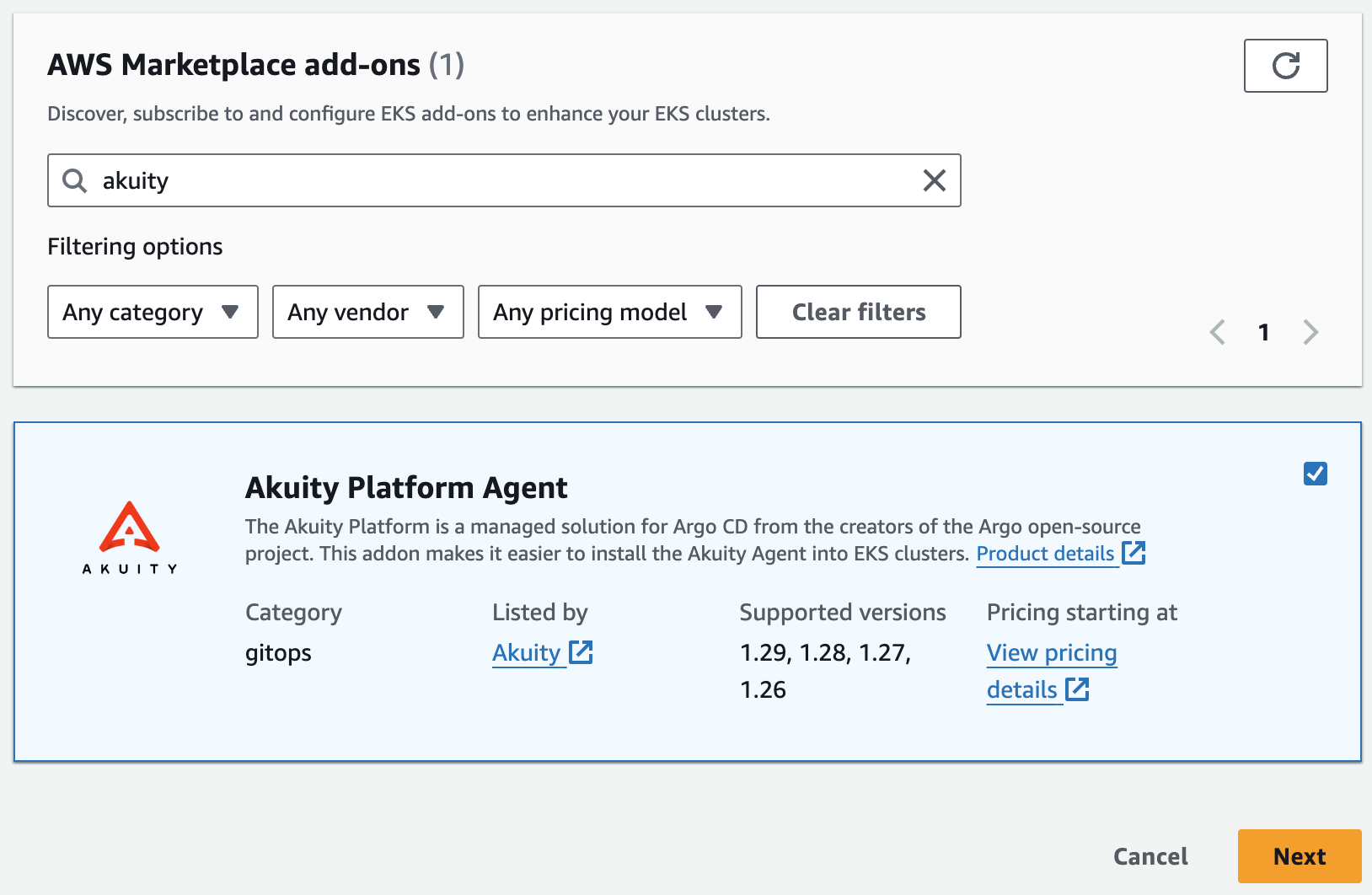
- Go to the Akuity Platform's Cluster page and copy the JSON from Step 1.
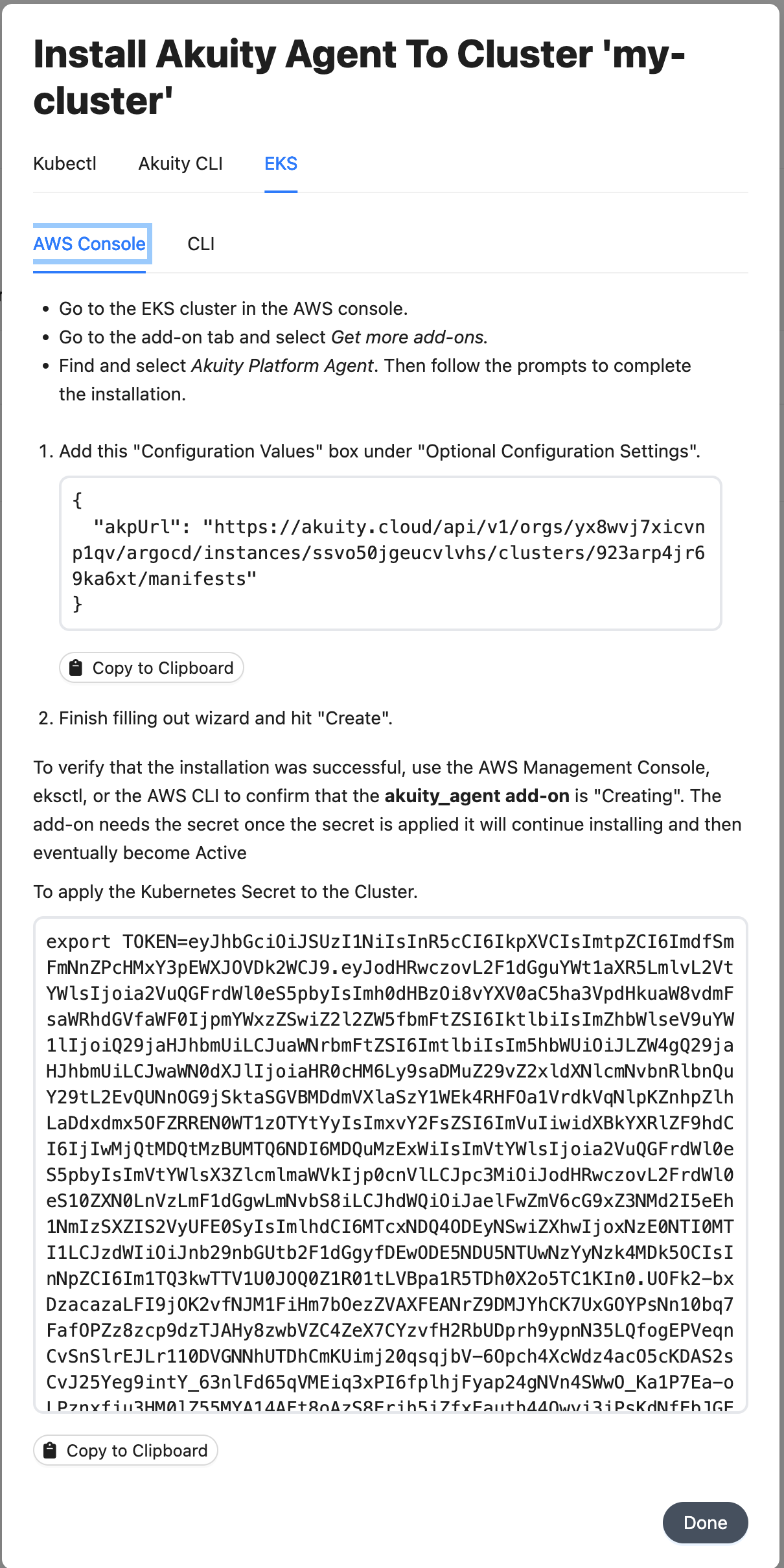
- It will look something like this.
```json
{
"akpUrl": "https://akuity.cloud/api/v1/orgs/yx8wvj7x/argocd/instances/ssvo50jge/clusters/923arp4j/manifests"
}
```
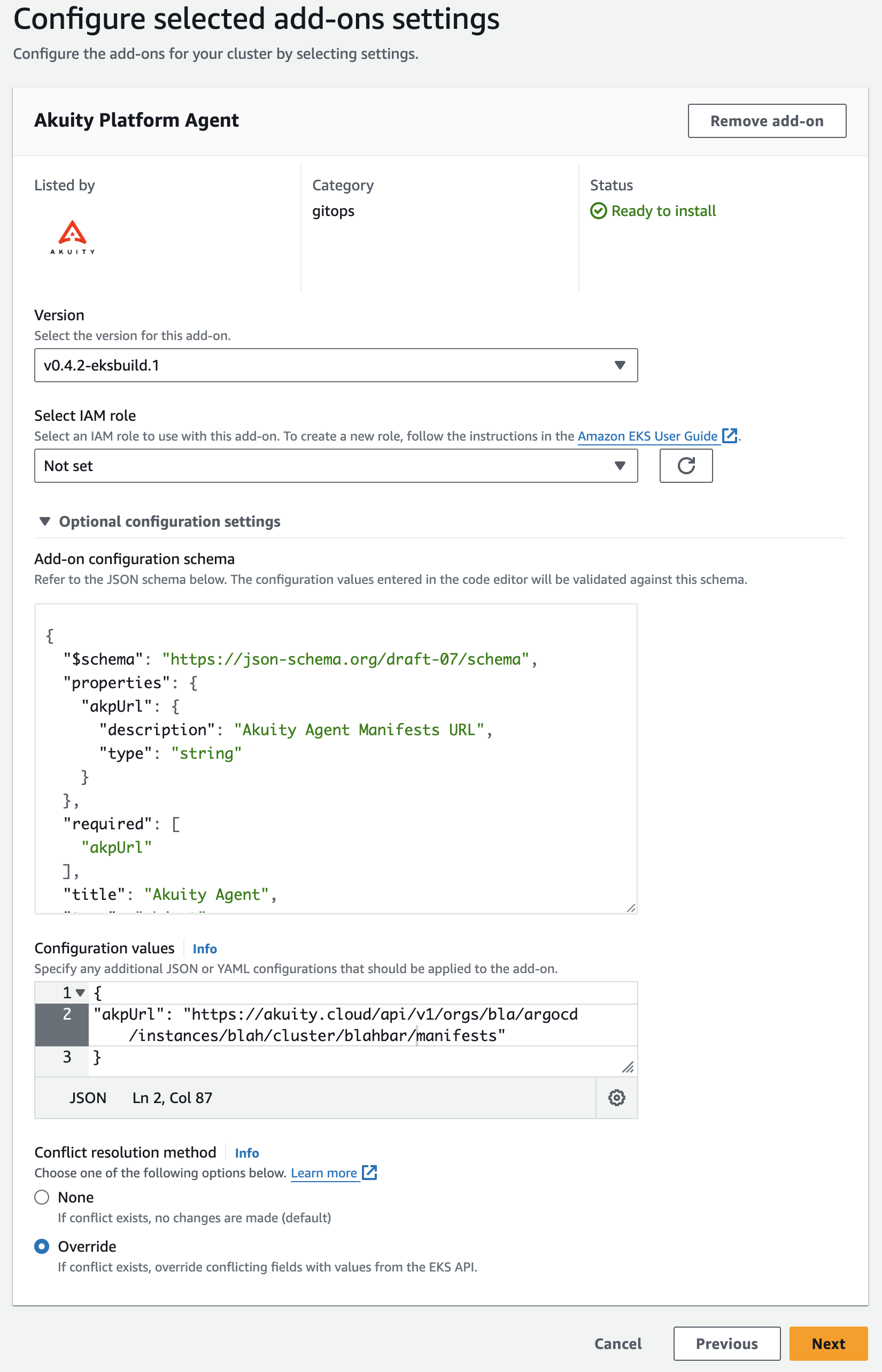
- Select the latest version
- Expand the "Optional configuration settings"
- Copy the JSON from above into the "Configuration values" box
- Select the "Override" radio button and then hit "Next"
- If everything looks good, click the "Create" button.
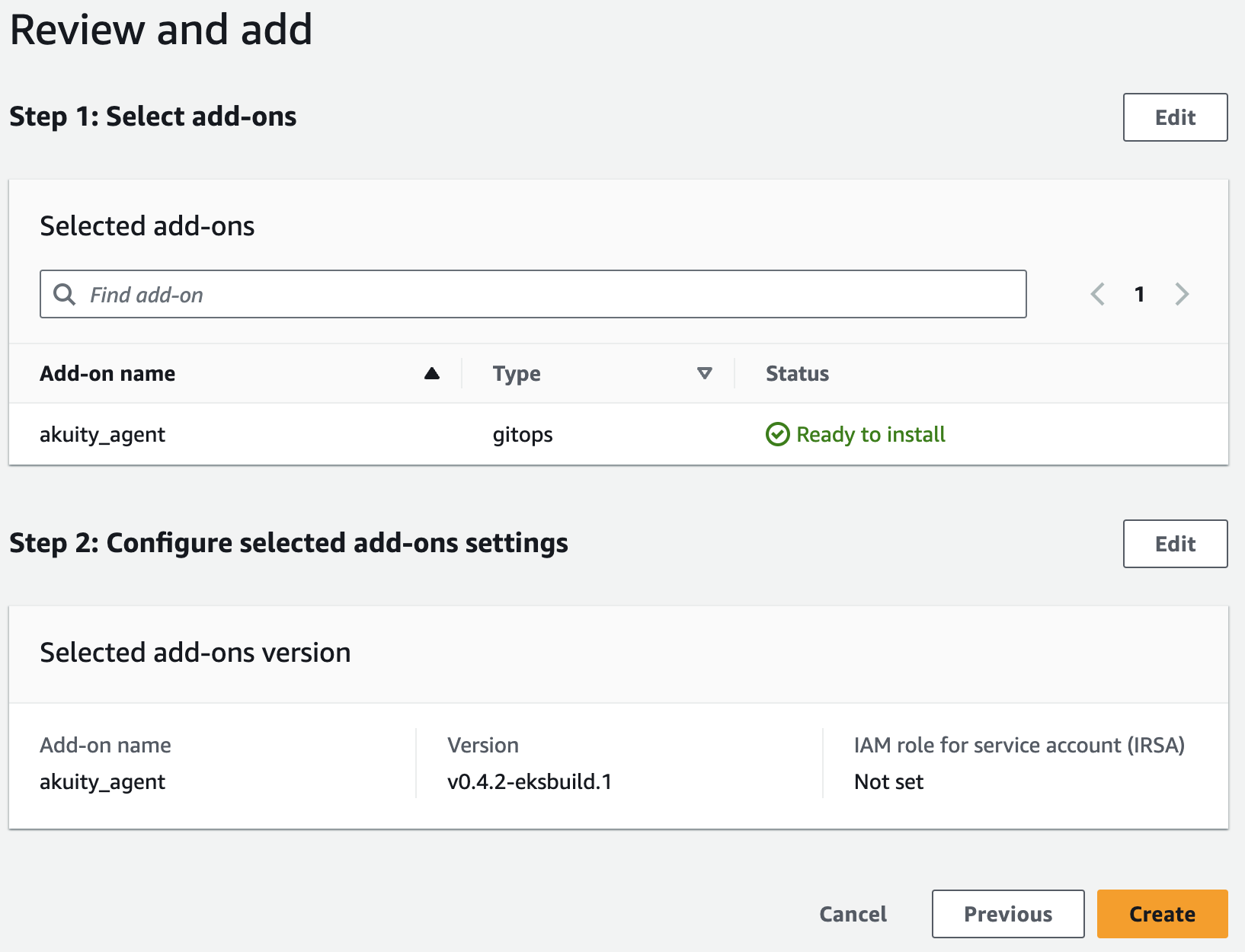
Install via CLI:
- **Install the Akuity Agent add-on**
- In the Install Akuity Agent pop-up screen, enter your EKS cluster name
- Click "Copy to Clipboard" on step 2.
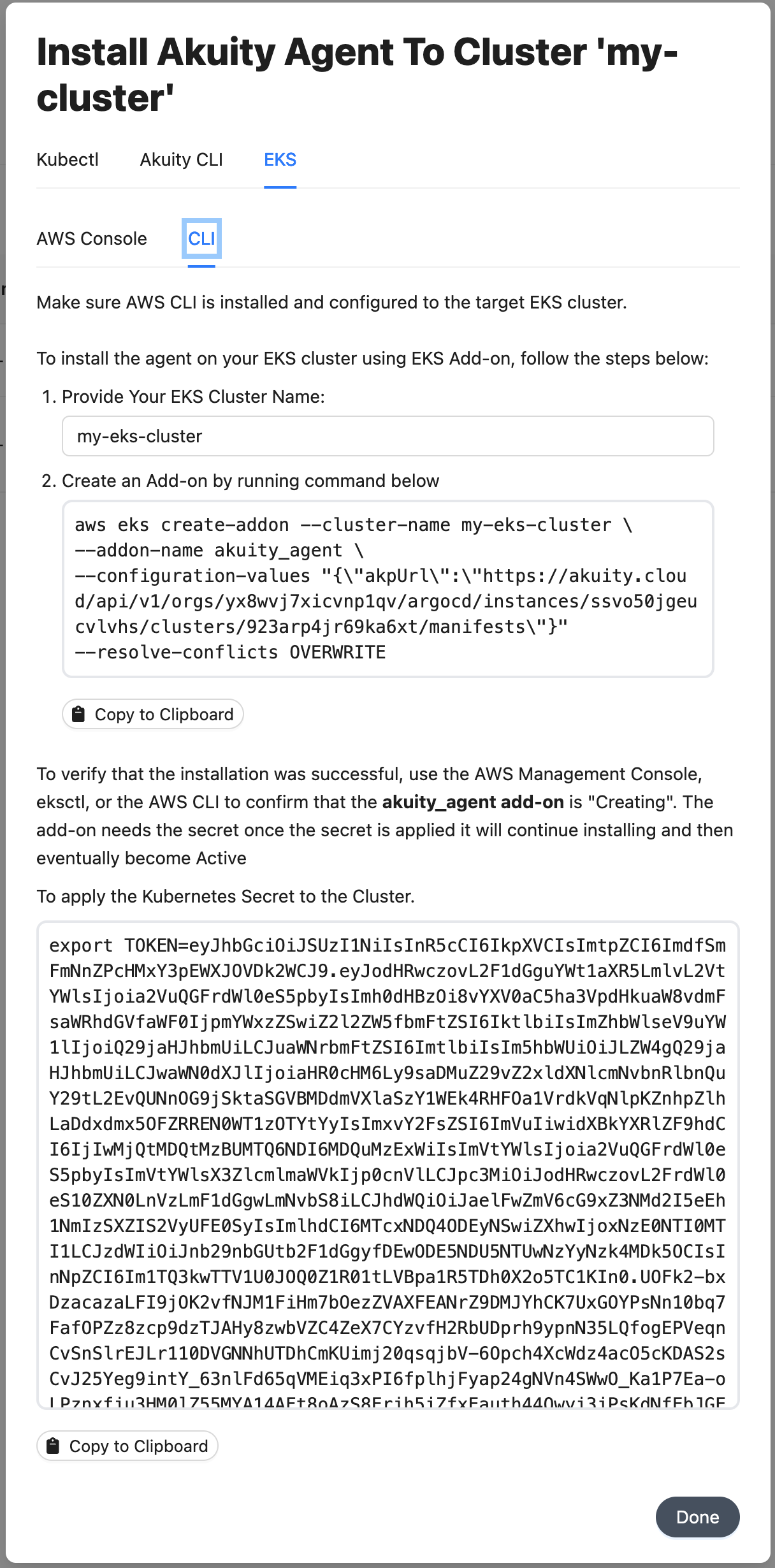
- Run the command in your terminal to apply the agent manifest.
It will look something like this
```bash
export AKP_API_URL=""
aws eks create-addon --cluster-name my-cluster --addon-name akuity_agent \
--configuration-values "{\"akpUrl\":\"$AKP_API_URL\"}" --resolve-conflicts OVERWRITE
```
3. **Create API Token Secret:**
```bash
export TOKEN=
kubectl create secret generic akuity-platform-api-token -n akuity --from-literal=AKP_TOKEN="$TOKEN"
```
4. **Verify Installation:**
```bash
aws eks describe-addon --addon-name akuity_agent --region --cluster-name
```
5. **Clean Up:**
```bash
kubectl delete secret akuity-platform-api-token -n akuity
```
### Ready to streamline your Kubernetes management?
Using Akuity Agents on Amazon EKS simplifies the management and deployment of applications, enhances security, and scales operations efficiently.
By integrating with Argo CD and providing robust automation tools, Akuity empowers DevOps teams to focus on innovation rather than infrastructure management.
Ready to streamline your EKS management?
[Start your free trial](https://akuity.io/) and transform your DevOps workflow with [Akuity on Amazon EKS](https://docs.akuity.io/tutorials/eks-addon-agent-install/)!