https://github.com/chartbrew/strapi-plugin-chartbrew
The official Strapi plugin that integrates Chartbrew charts in the Strapi dashboard
https://github.com/chartbrew/strapi-plugin-chartbrew
Last synced: 10 months ago
JSON representation
The official Strapi plugin that integrates Chartbrew charts in the Strapi dashboard
- Host: GitHub
- URL: https://github.com/chartbrew/strapi-plugin-chartbrew
- Owner: chartbrew
- License: mit
- Created: 2022-06-04T07:21:20.000Z (about 4 years ago)
- Default Branch: master
- Last Pushed: 2025-04-29T16:10:42.000Z (about 1 year ago)
- Last Synced: 2025-08-15T08:13:08.758Z (10 months ago)
- Language: JavaScript
- Homepage: https://chartbrew.com
- Size: 1.74 MB
- Stars: 22
- Watchers: 2
- Forks: 5
- Open Issues: 6
-
Metadata Files:
- Readme: README.md
- License: LICENSE
Awesome Lists containing this project
README


Chartbrew plugin for Strapi
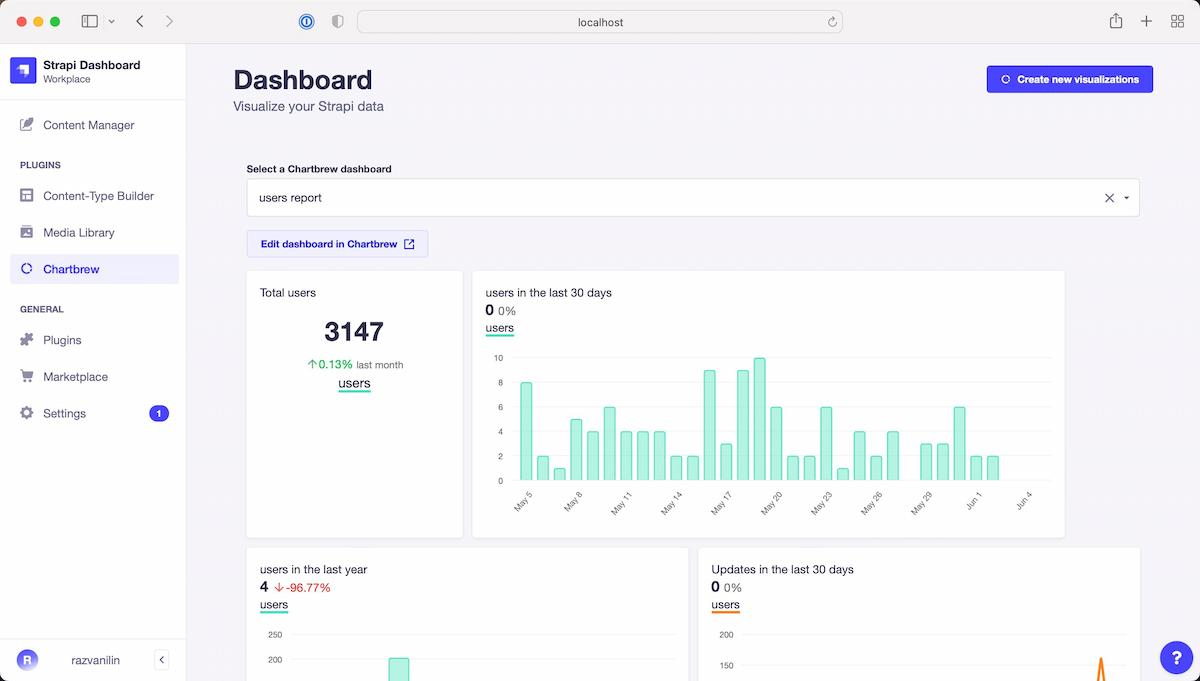
This is the official Chartbrew plugin for Strapi. Chartbrew is an open-source web application that can connect directly to Strapi and other data sources and use the data to create beautiful charts. It features a chart builder, editable dashboards, embedable charts, query & requests editor, and team capabilities.
## ✨ Plugin features
* Explore your Chartbrew dashboards directly on Strapi
* Multi-dashboard support, can switch between them
* Create dashboards from your collection types from the Strapi interface
* Add charts to existing dashboards straight from Strapi
* The charts are kept up-to-date automatically (you can set an update schedule on Chartbrew)
## 📦 Plugin versions
* If you are using Strapi v5 and Chartbrew v4, use version `3+`
* If you are using Strapi v5 and Chartbrew v3, use version `2.x.x`
* If you are using Strapi v4, use version `1.x.x`
## 👋 Get started with Chartbrew
To use this plugin, you will need to have a Chartbrew account, or self-host the platform.
### Chartbrew account
Chartbrew is offered as a managed service in exchange for a monthly subscription. This is the fastest way to get started and create visualizations in Strapi. Follow the instructions below to get started:
1. [Create a new account here](https://app.chartbrew.com/signup)
2. [Follow this tutorial](https://chartbrew.com/blog/how-to-create-api-keys-in-chartbrew/) to get a Chartbrew API Key to use for Strapi
### Self-hosting
Chartbrew is 100% open-source and can be self-hosted. Check out some links to get you started:
* 😺 [Chartbrew GitHub](https://github.com/chartbrew/chartbrew)
* 📔 [Chartbrew docs](https://docs.chartbrew.com)
* 🐳 [Get started with the Chartbrew Docker image](https://docs.chartbrew.com/deployment/#run-the-application-with-docker)
* 🚀 [Deploy Chartbrew on Heroku & Vercel](https://chartbrew.com/blog/how-to-deploy-chartbrew-on-heroku-and-vercel/)
## 🔧 Plugin Installation
Navigate to the root of your Strapi folder and run the installation commands below.
With `npm`:
```
npm install --save @chartbrew/plugin-strapi
```
With `yarn`:
```
yarn add @chartbrew/plugin-strapi
```
Add the following attribute in the `config/plugins.js` file:
```
chartbrew: true
```
Or if you do not have the `plugins.js` file yet, add the file with the following contents:
```
module.exports = () => ({
chartbrew: true,
});
```
And finally, run the build command:
```
npm run build
```
Or if you are using `yarn`:
```
yarn build
```
## ⚙️ Plugin settings
In order for the plugin to work properly, it needs the right credentials to authenticate with Chartbrew.
The plugin can also create charts straight from Strapi, but this needs access to Strapi through an API token.
Follow the instructions below to learn how to configure the plugin.
### Chartbrew connection
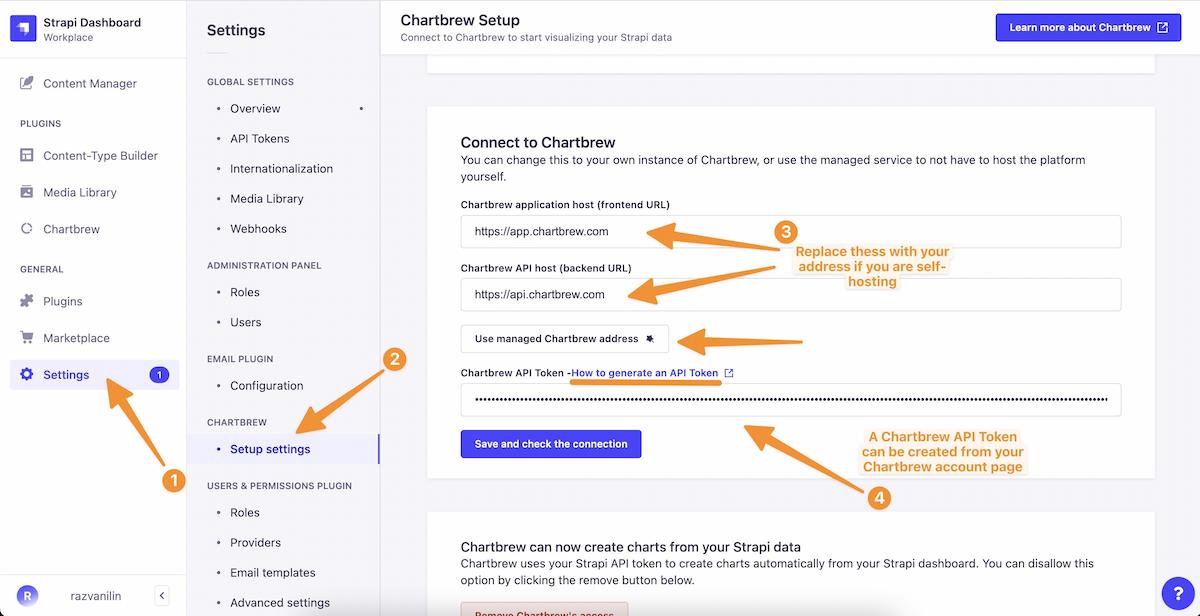
If you self-host Chartbrew, you will have to enter the frontend and backend addresses. The default values are:
* Frontend: `http://localhost:4018`
* Backend: `http://localhost:4019`
If you want to use the plugin with a managed service account at [chartbrew.com](https://chartbrew.com), click on the **Use managed Chartbrew address** button as shown below:
### Cannot authenticate with Chartbrew
[**Read more here**](https://github.com/chartbrew/strapi-plugin-chartbrew/issues/13)
If you run both Strapi and Chartbrew on `localhost` or on a non-secure connection (http), you will need to tweak the Strapi security settings. To do this, open the `config/middlewares.js` file and add the following attribute:
```
module.exports = [
...
{
name: 'strapi::security',
config: {
contentSecurityPolicy: {
useDefaults: true,
directives: {
'connect-src': ["'self'", 'http:', 'https:'],
upgradeInsecureRequests: null,
},
},
},
},
...
];
```
And don't forget to build the Strapi project again:
```
# npm
npm run build
# yarn
yarn build
```
### Create charts from Strapi
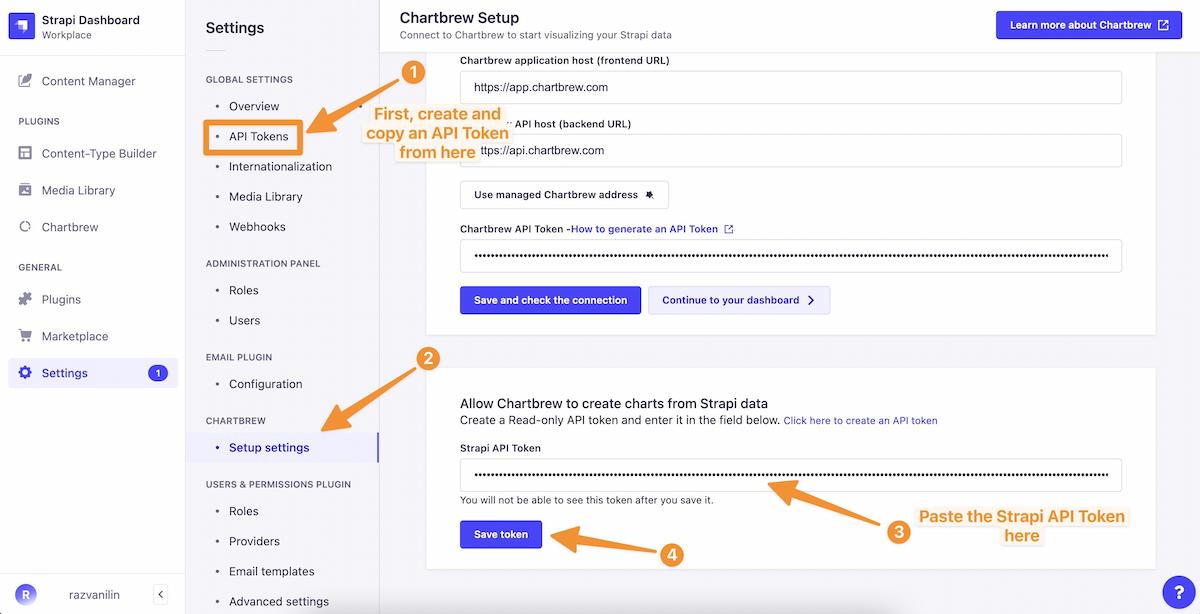
You can create charts directly from your Strapi dashboards. To do this, you will need to create a Strapi API Token and add it in the Chartbrew settings page.
## ⚠️ Dependencies
* Strapi v5+