https://github.com/chavarera/cinfo
Cinfo is an python based tool to gather system related information
https://github.com/chavarera/cinfo
cinfo computer hardware-information information-gathering-tools networking python system-information
Last synced: about 1 year ago
JSON representation
Cinfo is an python based tool to gather system related information
- Host: GitHub
- URL: https://github.com/chavarera/cinfo
- Owner: chavarera
- License: mit
- Created: 2019-06-30T04:55:31.000Z (almost 7 years ago)
- Default Branch: master
- Last Pushed: 2021-08-09T20:50:34.000Z (almost 5 years ago)
- Last Synced: 2025-03-30T01:39:04.313Z (about 1 year ago)
- Topics: cinfo, computer, hardware-information, information-gathering-tools, networking, python, system-information
- Language: Python
- Size: 10.4 MB
- Stars: 7
- Watchers: 1
- Forks: 9
- Open Issues: 8
-
Metadata Files:
- Readme: README.md
- License: LICENSE
- Code of conduct: CODE_OF_CONDUCT.md
Awesome Lists containing this project
README
# CInfo (Computer Information)
[Join slack channel for more discussion & Help ](https://join.slack.com/t/cinfo-group/shared_invite/enQtODU3Nzc2OTUwMjk1LTQxNzdhNmI1MjJkMjYxMjM2OTIyOTMwYzkyMDZhMDU2OGE5ZDliMWEwZWVmN2Q4ZmMzOTQ0NThmMjMwZmU4OTk)
[](https://www.python.org/)

[](https://github.com/chavarera/Cinfo)
## Table of Contents
- [About](#About)
- [Prerequisite](#Prerequisite)
- [Install](#install)
- [Contributors](#Contributors)
- [Help](#Help)
- [License](#license)
## About
CInfo Gathers Following Information
```
System Information | Network Information
Software Information | Storage Information
Hardware Information | File Information
Ports Information | Device Information
Services Information
```
and help you to export into Different File format.
### Prerequisites
What things you need
```
Python version : 3.x
Operating : Windows,Linux
```
### Install
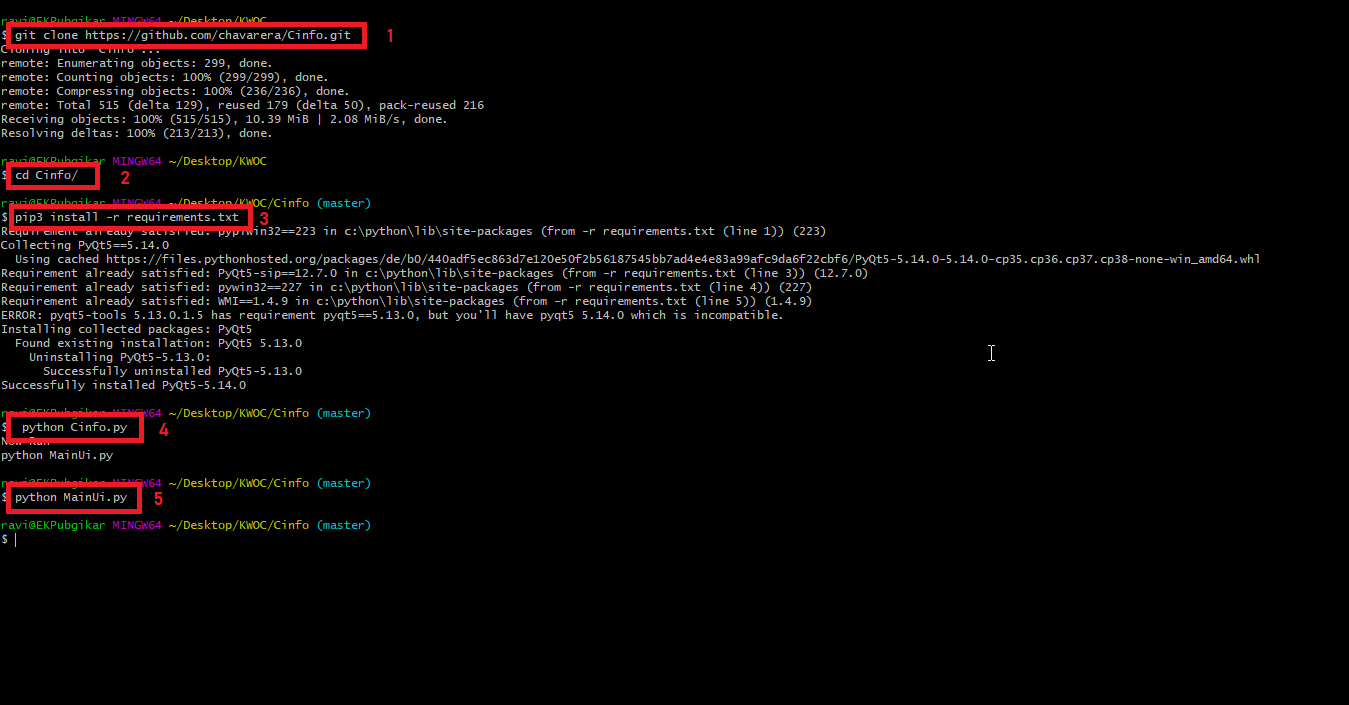
**Step 1.** Clone Cinfo Repository https://github.com/chavarera/Cinfo.git
```
git clone https://github.com/chavarera/Cinfo.git
```
**Step 2.** Change Directory
```
cd Cinfo/
```
**Step 3.** Install Required Packages
```
pip3 install -r requirements.txt
```
**Step 4.** Now run the program by following command in any operating system of your choice :
```
Windows : python Cinfo.py
Linux : python3 Cinfo.py
```
above scripts Generate System Information.
**Step 5.** Now Run GUI
```
python MainUi.py
```
All Installation steps (Tried in Windows)
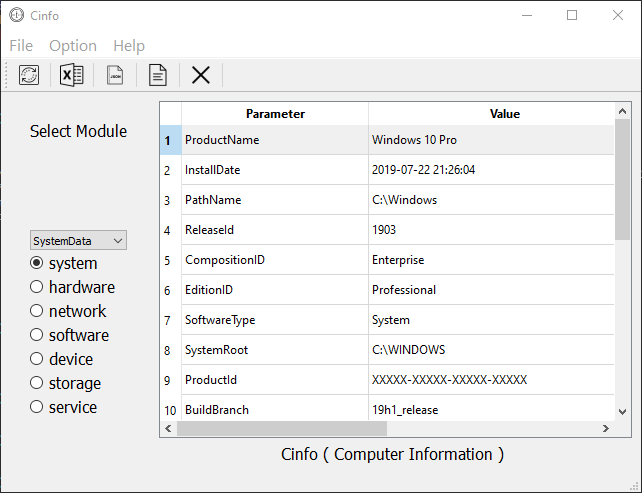
**Step 6.** Select Module from Left Checkboxes and Submodules
Output Window
## Contributors

Ravi Chavare
📖

Deepak Chauhan
📖
## Help
[Code of conduct](CODE_OF_CONDUCT.md)
## License
[](LICENSE)
This project is licensed under the MIT License - see the [LICENSE.md](LICENSE) file for details