https://github.com/cheind/dest
:panda_face: One Millisecond Deformable Shape Tracking Library (DEST)
https://github.com/cheind/dest
face-alignment face-detector machine-learning vision
Last synced: about 1 year ago
JSON representation
:panda_face: One Millisecond Deformable Shape Tracking Library (DEST)
- Host: GitHub
- URL: https://github.com/cheind/dest
- Owner: cheind
- License: bsd-3-clause
- Created: 2015-12-20T16:44:36.000Z (over 10 years ago)
- Default Branch: master
- Last Pushed: 2016-12-29T16:10:36.000Z (over 9 years ago)
- Last Synced: 2025-05-20T09:06:25.136Z (about 1 year ago)
- Topics: face-alignment, face-detector, machine-learning, vision
- Language: C++
- Homepage:
- Size: 1.58 MB
- Stars: 291
- Watchers: 27
- Forks: 108
- Open Issues: 4
-
Metadata Files:
- Readme: README.md
- License: LICENSE
Awesome Lists containing this project
README
## About this library
**Deformable Shape Tracking (DEST)** is a C++ library providing high performance 2D shape tracking leveraging
machine learning methods. The video below shows the real-time capabilities of **DEST** in annotating video sequences
/ still images with facial landmarks.
[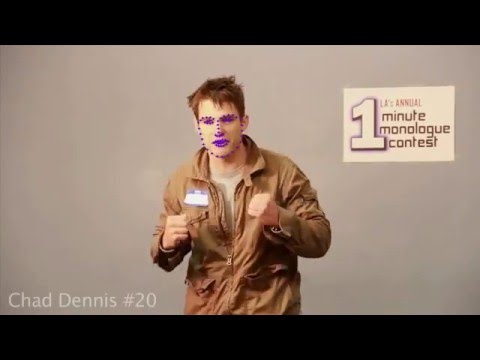](https://youtu.be/Hewjc0oyqPQ)
This **DEST** tracker was previously trained on thousands of training samples from available face databases.
**DEST** features
- A generic framework for learning arbitrary shape transformations.
- A lightning fast landmark alignment module.
- State of the art performance and accuracy.
- Pre-trained trackers for a quick start.
- Cross platform minimal disk footprint serialization.
- Built in support for [IMM](http://www.imm.dtu.dk/~aam/datasets/datasets.html) and [ibug](http://ibug.doc.ic.ac.uk/resources/facial-point-annotations/) annotated face database import.
## Using DEST
Using involves the following steps. First include **DEST**
```cpp
#include
```
Next, load a trained tracker from disk
```cpp
dest::core::Tracker t;
t.load("destcv.bin");
```
Note that each [release](https://github.com/cheind/dest/releases) contains pre-trained tracker files. Assuming that our goal is to align face landmarks, we also need a face detector to provide a coarse estimate (rectangle) of the face area. **DEST** includes a convenience wrapper for OpenCV based face detection
```cpp
#include
//...
dest::face::FaceDetector fd;
fd.loadClassifiers("classifier_frontalface.xml");
```
OpenCV uses Viola Jones algorithm for face detection. This algorithm requires a training phase. You can find application ready files in OpenCV or [here](etc/cv/). Use the face detector to find a face in the given image.
```cpp
dest::core::Rect r;
fd.detectSingleFace(img, r);
```
Here `img` is either `dest::core::Image` or `cv::Mat`. Once we have a rough estimate of the face location, we need to find a shape normalizing transform. By default the following is used
```cpp
dest::core::Rect ur = dest::core::unitRectangle();
dest::core::ShapeTransform shapeToImage;
shapeToImage = dest::core::estimateSimilarityTransform(ur, r);
```
Finally, invoke the tracker to get the face landmarks
```cpp
dest::core::Shape s = t.predict(img, shapeToImage);
```
The shape `s` contains the landmark locations in columns (x,y) for the given image. The number of landmarks depends on the data used during training.
Note, you need to use same shape normalization procedure during tracking as in training. This also holds true for the way rough
estimates (face detector in this example) are generated.
## Building from source
**DEST** requires the following pre-requisites
- [CMake](www.cmake.org) - for generating cross platform build files
- [Eigen 3.x](http://eigen.tuxfamily.org) - for linear algebra calculations
Optionally, you need
- [OpenCV 2.x / 3.x](www.opencv.org) - for image processing related functions
- A compiler with [OpenMP](https://en.wikipedia.org/wiki/OpenMP) capabilities.
To build follow these steps
1. Fork or download a [release](https://github.com/cheind/dest/releases) of this repository. We recommend releases as those include pre-trained trackers.
1. Point CMake to the source directory.
1. Click CMake Configure and select your toolchain.
1. Specify `DEST_EIGEN_DIR`.
1. Select `DEST_WITH_OPENCV` if required. When selected you will be asked to specify `OpenCV_DIR` next time you run Configure. Set OpenCV_DIR to the directory containing the file `OpenCVConfig.cmake`.
1. Select `DEST_WITH_OPENMP` if required.
1. Select `DEST_VERBOSE` if verbose logging is required.
1. Click CMake Generate.
1. Open generated solution and build `ALL_BUILD`.
#### When is OpenCV is required?
OpenCV is required during training and when running the demo samples. **DEST** comes with its own Eigen based image type, OpenCV is mainly used for convenience functions such as image loading and rendering.
#### Any other dependencies?
Yes, those are inline [included](ext/) and are header only. **DEST** makes use of Google flatbuffers for serialization, tinydir for enumerating files and TCLAP for command line parsing.
#### Supported platforms
Although **Deformable Shape Tracking** should build across multiple platforms and architectures, tests are carried out on these systems
- Windows 8/10 MSVC10 / MSVC12 x64
- OS X 10.10 XCode 7.x x64
If the build should fail for a specific platform, don't hesitate to create an [issue](https://github.com/cheind/dest/issues).
## Using the tools
**DEST** comes with a set of handy tools to train and evaluate and trackers. The tools below require OpenCV support. Make sure to enable it before building the library.
#### dest_align
`dest_align` is a command line tool to test a previously trained tracker on sample images. It shows intermediate steps and is thus best used for debugging. Its main application is the face alignment.
To run `dest_align` on a single image type
```
> dest_align -t destcv.bin -d classifier_frontalface.xml image.png
```
Here `destcv.bin` is a pre-trained tracker file and `classifier_frontalface.xml` contains trained HAAR classifiers for
face detection. When run, you should see an image with annotated landmarks. This is the initial situation before alignment.
Use any key to cycle through cascades.
Type `dest_align --help` for detailed help.
#### dest_track_video
`dest_track_video` is a command line tool to track faces over multiple frames.
```
> dest_track_video -t destcv.bin -d classifier_frontalface.xml video.avi
```
This tool can also handle camera input. Specify a numeric device id, such as `0`, to open a physical device.
**DEST** requires a rough estimate (global similarity transform) of the target shape. Here we use an OpenCV
face detector for exactly this job. It works great but has the drawback of being slow compared to
`dest::core::Tracker`. For this reason `dest_track_video` supports a `--detect-rate` parameter.
If set to 1, the face detector will be invoked in all frames. Setting it to bigger values will run the face detector
only every n-th frame. Between detection frames, the tool tracks the face through to simulation a face detector
based on the previous tracking results.
Type `dest_track_video --help` for detailed help.
#### dest_train
`dest_train` allows you to train your own tracker. This step requires a training database. **DEST**
comes with a set of importers for common face databases. You can use your own
database as well: all you need to train are images, landmarks and initial estimates
(usually rectangles) to provide a rough estimate of the shape.
To train a tracker using a supported database format type
```
> dest_train --rectangles rectangles.csv --load-mirrowed --load-max-size 640 directory
```
Here `directory` is the directory containing the shape database. `rectangles.csv`
provide estimates of rough shape location and size. `dest_train` makes no assumption on
how those are generated, but make sure that you use the same method during training and
running the tracker later on. In case you want to go with OpenCV face detector rectangles,
you can use `dest_generate_rects_viola_jones` to generate the rectangles. The IO format for
`rectangles.csv` is documented at `dest::io::importRectangles`.
Type `dest_train --help` for detailed help.
#### dest_evaluate
`dest_evaluate` can is a tool used to evaluate a previously trained tracker. It loads a
test database and and computes tracker statistics. These statistics include the mean Euclidean
distance between target and estimated shape landmarks normalized by the inter-ocular distance
when the loaded database contains faces. Here is how you invoke it
```
> dest_evaluate --rectangles rectangles.csv -t destcv.bin database
```
When using
- a pre-trained tracker from our [release]([release](https://github.com/cheind/dest/releases)
- on the [ibug annotated HELEN](http://ibug.doc.ic.ac.uk/download/annotations/helen.zip) test database
- using OpenCV Viola Jones estimated face rectangles
you should see roughly the following output
```
Loading ibug database. Found 330 candidate entries.
Successfully loaded 330 entries from database.
Average normalized error: 0.0451457
```
#### dest_gen_rects
`dest_gen_rects` is a utility to generate face rectangles for a training
database using OpenCVs Viola Jones algorithm. These rectangles can be fed into `dest_train`
for learning. Note, if your application comes with a face detector built in, you may want
to use your face detector to generate these rectangles.
Type `dest_gen_rects --help` for detailed help.
## References
1. Kazemi, Vahid, and Josephine Sullivan. "One millisecond face alignment with an ensemble of regression trees." Computer Vision and Pattern Recognition (CVPR), 2014 IEEE Conference on. IEEE, 2014.
1. Viola, Paul, and Michael J. Jones. "Robust real-time face detection." International journal of computer vision 57.2 (2004): 137-154.
1. Chrysos, Grigoris, et al. "Offline deformable face tracking in arbitrary videos." Proceedings of the IEEE International Conference on Computer Vision Workshops. 2015.
1. Gower, John C. "Generalized procrustes analysis." Psychometrika 40.1 (1975): 33-51.
# License
**DEST** is licensed under 'three-clause' BSD license.
```
Copyright (c) 2015/2016, Christoph Heindl
All rights reserved.
Redistribution and use in source and binary forms, with or without modification,
are permitted provided that the following conditions are met:
1. Redistributions of source code must retain the above copyright notice, this
list of conditions and the following disclaimer.
2. Redistributions in binary form must reproduce the above copyright notice,
this list of conditions and the following disclaimer in the documentation and/or
other materials provided with the distribution.
3. Neither the name of the copyright holder nor the names of its contributors
may be used to endorse or promote products derived from this software without
specific prior written permission.
THIS SOFTWARE IS PROVIDED BY THE COPYRIGHT HOLDERS AND CONTRIBUTORS "AS IS" AND
ANY EXPRESS OR IMPLIED WARRANTIES, INCLUDING, BUT NOT LIMITED TO, THE IMPLIED
WARRANTIES OF MERCHANTABILITY AND FITNESS FOR A PARTICULAR PURPOSE ARE
DISCLAIMED. IN NO EVENT SHALL THE COPYRIGHT HOLDER OR CONTRIBUTORS BE LIABLE FOR
ANY DIRECT, INDIRECT, INCIDENTAL, SPECIAL, EXEMPLARY, OR CONSEQUENTIAL DAMAGES
(INCLUDING, BUT NOT LIMITED TO, PROCUREMENT OF SUBSTITUTE GOODS OR SERVICES;
LOSS OF USE, DATA, OR PROFITS; OR BUSINESS INTERRUPTION) HOWEVER CAUSED AND ON
ANY THEORY OF LIABILITY, WHETHER IN CONTRACT, STRICT LIABILITY, OR TORT
(INCLUDING NEGLIGENCE OR OTHERWISE) ARISING IN ANY WAY OUT OF THE USE OF THIS
SOFTWARE, EVEN IF ADVISED OF THE POSSIBILITY OF SUCH DAMAGE.
```
**DEST** uses third party libraries that are distributed under their [own terms](ext/).