https://github.com/chemodun/xmldiffandpatch
https://github.com/chemodun/xmldiffandpatch
Last synced: about 1 month ago
JSON representation
- Host: GitHub
- URL: https://github.com/chemodun/xmldiffandpatch
- Owner: chemodun
- License: other
- Created: 2026-05-15T14:49:22.000Z (about 2 months ago)
- Default Branch: main
- Last Pushed: 2026-05-26T11:06:29.000Z (about 1 month ago)
- Last Synced: 2026-05-26T12:30:17.780Z (about 1 month ago)
- Language: TypeScript
- Size: 17.7 MB
- Stars: 0
- Watchers: 0
- Forks: 0
- Open Issues: 0
-
Metadata Files:
- Readme: README.md
- Changelog: CHANGELOG.md
- License: LICENSE
Awesome Lists containing this project
README
# XML Diff and Patch
A VS Code extension that automatically generates and applies **RFC 5261-compatible** XML patch files using XPath selectors, watching modified XML files and producing diffs on save.
Originally developed for modding **X4: Foundations** (which uses RFC 5261 XML patches for game-data mods), the extension is fully generic and works with any XML workflow that follows the RFC 5261 patch format.
## Features
- **Auto-diff on save**: Save a modified XML file and a diff is generated against the original (vanilla) version automatically.
- **Auto-patch on save**: Save a diff file and it is applied to the original to regenerate the modified file.
- **Multiple folder pairs**: Configure any number of `modifiedFolder`/`diffFolder` pairs under a single `originalFolder`, each with an optional `pathPrefix`.
- **Glob pattern support**: All folder paths accept `*`, `?`, and `**` glob wildcards so a single config entry can cover multiple mod directories.
- **Explorer context menu**: Right-click XML files or folders for *Reset to Original*, *Reconstruct from Diff*, and *Regenerate Diff* commands.
- **Watch modes**: `onSave`, `onTheFly` (debounced filesystem watcher), or `contextMenuOnly`.
- **Settings sidebar**: A dedicated explorer panel lets you add, edit, and remove folder pairs per scope (User / Workspace / Folder) without editing JSON directly.
- **XSD validation**: Optionally validate generated diff files against a schema, with configurable fail behavior.
- **Empty diff handling**: Choose to write, delete, warn, or warn-and-delete when a save produces no diff operations.
- **Orphan cleanup**: Regenerating a diff folder removes diff files that no longer have a corresponding modified file.
## Requirements
Set `xmlDiffAndPatch.originalFolder` to the path containing the baseline XML files, then add at least one entry to `xmlDiffAndPatch.folderPairs`.
### Minimal workspace settings example
```json
{
"xmlDiffAndPatch.originalFolder": "C:/Games/X4 Foundations/data",
"xmlDiffAndPatch.folderPairs": [
{
"modifiedFolder": "${workspaceFolder}/src",
"diffFolder": "${workspaceFolder}/diff",
"pathPrefix": "libraries"
}
]
}
```
- `originalFolder`: Path to the vanilla/baseline XML files. Always required.
- `folderPairs`: Array of pairs to process. Each pair needs `modifiedFolder` and `diffFolder`; `pathPrefix` is optional (see below).
- Use `"."` to refer to the workspace folder itself.
- `modifiedFolder` and `diffFolder` must not point to the same directory.
- `originalFolder`, `modifiedFolder`, and `diffFolder` support glob patterns (`*`, `?`, `**`). `pathPrefix` does **not** support globs: it must be a plain file-system path segment.
### How folder pairs work
Each pair in `folderPairs` defines one diff/patch cycle:
| Field | Glob | Description |
| --- | --- | --- |
| `modifiedFolder` | ✅ | Folder containing your modified XML files. |
| `diffFolder` | ✅ | Folder where generated diff files are written (or read from for patching). |
| `pathPrefix` | ❌ | Optional sub-path **inserted between `originalFolder` and the file's relative path** when locating the baseline file. Must be a plain OS path segment (e.g. `libraries` or `assets\xml`). Leave empty if your modified files sit directly under `originalFolder`. |
#### Path resolution
When a **modified** file is saved:
```text
original → originalFolder / [pathPrefix /]
output → diffFolder /
```
When a **diff** file is saved (`reflectDiffToModified = true`):
```text
original → originalFolder / [pathPrefix /]
output → modifiedFolder /
```
`relPath` is always the file's path relative to the source watch folder (`modifiedFolder` or `diffFolder`). `pathPrefix` only affects where the baseline file is looked up: it does not alter the output path.
For example, if `originalFolder` is `C:\X4\data`, `pathPrefix` is `libraries`, and you save `{modifiedFolder}\ships\ship_xl.xml` (relPath = `ships\ship_xl.xml`), the extension looks up `C:\X4\data\libraries\ships\ship_xl.xml` as the baseline and writes the diff to `{diffFolder}\ships\ship_xl.xml`.
#### Glob matching
A glob in `modifiedFolder` or `diffFolder` *multiplies* the pair: each expanded directory becomes a separate watcher instance. The two expansion lists are matched by a **capture key** — the path segment(s) covered by the wildcards, with the static prefix before the first wildcard and the literal suffix after the last wildcard both stripped before comparison. Only entries whose capture keys appear on both sides are activated; unmatched entries are each skipped with a per-entry warning.
**Symmetric case** — the most common pattern, where the same wildcard produces matching results on both sides:
```json
{ "modifiedFolder": "mods/*/src", "diffFolder": "mods/*/diff" }
```
```
mods/*/src → [mods/modA/src, mods/modB/src ] capture keys: modA, modB
mods/*/diff → [mods/modA/diff, mods/modB/diff] capture keys: modA, modB
Activated: modA/src ↔ modA/diff, modB/src ↔ modB/diff
```
**Asymmetric case** — the two sides expand to a different number of directories:
```json
{ "modifiedFolder": "**/aiscripts.modified", "diffFolder": "**/aiscripts" }
```
The capture key for both patterns is the *parent* directory (the segment matched by `**`). If `aiscripts.modified` exists under 4 parent folders but `aiscripts` only under 2, only the 2 matching parents are activated; the other 2 `aiscripts.modified` folders are each skipped with a warning. Both sides do **not** need to expand to the same count.
`originalFolder` also accepts globs: when multiple directories match, the first alphabetical result is used and a warning is logged for the rest.
Multiple pairs share the same `originalFolder` (and all other scalar settings). This lets you handle several mod directories in one workspace configuration.
## Context Menu Commands
Right-click any XML file or folder in the Explorer to access the **XML Diff and Patch** submenu. All three commands are also available from the Command Palette (uses the active editor's file when no selection is made). Selecting a folder processes all XML files within it recursively.
| Command | Select from | What it does |
| --- | --- | --- |
| **Reset to Original** | `modifiedFolder` | Copies the baseline file (`originalFolder/[pathPrefix/]relPath`) over the modified file, discarding local changes. |
| **Reconstruct from Diff** | `modifiedFolder` | Applies the existing diff file (`diffFolder/relPath`) to the baseline and writes the result back to `modifiedFolder/relPath`. Useful to re-sync the modified file after manually editing a diff. |
| **Regenerate Diff** | either folder | Re-diffs `modifiedFolder/relPath` against the baseline and writes the result to `diffFolder/relPath`. When invoked on a **folder** selected from `modifiedFolder`, also removes orphan diff files (diffs that have no corresponding modified file). |
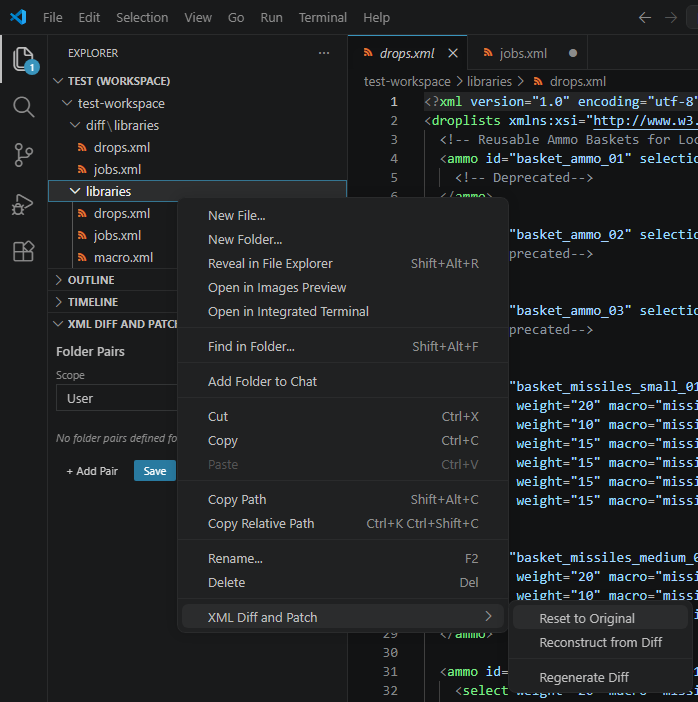
After each run a notification reports how many files were processed, how many were skipped (no matching original or wrong folder role), and how many orphan diffs were deleted.
## Extension Settings
All settings are under the `xmlDiffAndPatch` namespace.
### Editing Folder Pairs
`folderPairs` is an array of objects, which VS Code's built-in settings UI does not support editing directly. There are two ways to manage them:
#### Option 1: Settings Sidebar Panel (recommended)
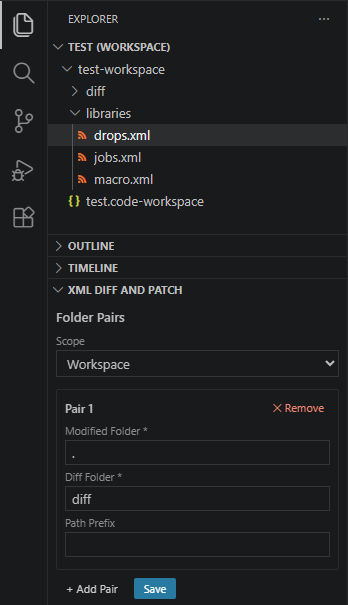
Open the *XML Diff and Patch* panel in the Explorer sidebar. It shows your folder pairs grouped by scope (User or Workspace). Use the **Add pair** button to create a new entry, fill in the fields, and click **Save**. Existing pairs can be edited in-place or removed with the **✕** button.
#### Option 2: Edit `settings.json` directly
Open the relevant `settings.json` (e.g. *Preferences: Open Workspace Settings (JSON)*) and add or edit the `xmlDiffAndPatch.folderPairs` array manually:
```json
"xmlDiffAndPatch.folderPairs": [
{
"modifiedFolder": "path/to/modified",
"diffFolder": "path/to/diff",
"pathPrefix": "optional/sub/path"
}
]
```
| Setting | Default | Description |
| --- | --- | --- |
| `originalFolder` | `""` | Path to the vanilla/baseline XML folder. Required. |
| `folderPairs` | `[]` | Array of `{ modifiedFolder, diffFolder, pathPrefix? }` objects. |
| `watchMode` | `"onSave"` | `onSave`: trigger on explicit save; `onTheFly`: trigger on any FS change (debounced); `contextMenuOnly`: disable auto-watching. |
| `debounceMs` | `500` | Debounce delay in ms for `onTheFly` mode. |
| `reflectDiffToModified` | `true` | When a diff file is saved, apply it to the original to regenerate the modified file. |
| `passOtherFiles` | `true` | Copy files not found in `originalFolder` as-is to the output folder. |
| `emptyDiffBehavior` | `"delete"` | Action when diff produces no operations: `write`, `delete`, `warn`, or `warnDelete`. |
| `onlyFullPath` | `false` | Always emit absolute XPath (no `//` shorthand). |
| `useAllAttributes` | `false` | Include all attributes in XPath predicates, not just disambiguating ones. |
| `ignoreDiffInAttribute` | `""` | Attribute name to ignore when comparing elements (e.g. `"version"`). Leave empty to compare all attributes. |
| `compactPath` | `false` | Compact XPath mode: skip adding attributes to a path step when the element name alone is unique; when it is not unique, prefer following child elements instead of adding attributes. |
| `qualifiedPath` | `false` | Qualified XPath mode: always include at least the first attribute in every path step, even when the element name is already unique on its own. |
| `xsdPath` | `"./diff.xsd"` | Path to an XSD schema for validating generated diff files. Relative paths resolve from workspace root. |
| `validationFailBehavior` | `"warn"` | On schema validation failure: `warn` (write anyway), `error` (skip write), or `off` (disable validation). |
| `allowDoubles` | `false` | Skip duplicate-element guard when applying `` operations during patch. |
| `debug` | `false` | Enable verbose debug logging in the output channel. |
## Troubleshooting
### Output channel
All extension activity is logged to the **XML Diff and Patch** output channel. Open it via *View → Output* and select **XML Diff and Patch** from the dropdown. The channel shows which folder pairs were resolved, which files were processed, and any warnings or errors.
### Enable debug logging
Set `xmlDiffAndPatch.debug` to `true` in your settings to enable verbose logging. Debug output includes the resolved paths for every file event, XPath generation steps, and raw diff operations: useful for diagnosing unexpected diffs or missing output files.
```json
"xmlDiffAndPatch.debug": true
```
Remember to set it back to `false` (or remove it) once you are done: debug mode is noisy.
### Common issues
| Symptom | Likely cause | Fix |
| --- | --- | --- |
| Nothing happens on save | `watchMode` is `contextMenuOnly`, or no valid folder pair matched the saved file | Check the Output channel for "not configured" or pair-skipped warnings; verify `originalFolder` and `folderPairs` are set. |
| *"XML Diff+Patch: not configured"* status bar warning | `originalFolder` is empty or `folderPairs` is empty/invalid | Add at least one valid folder pair via the Settings sidebar or `settings.json`. |
| Folder pair skipped with a warning | Glob patterns in `modifiedFolder` and `diffFolder` expanded to a different number of directories | Ensure both globs match the same count of directories; check the Output channel for the expanded lists. |
| File reported as skipped by a context menu command | The selected file is not inside the required watch folder for that command (see [Context Menu Commands](#context-menu-commands)) | Select the file from the correct folder role (`modifiedFolder` or `diffFolder`). |
| Baseline file not found | `pathPrefix` is wrong, or `originalFolder` does not contain the expected sub-path | Enable debug logging and check the resolved `original →` path printed in the Output channel. |
| XSD validation errors | Generated diff does not conform to the schema at `xsdPath` | Review the diff file and the schema; set `validationFailBehavior` to `"warn"` to write the file anyway while investigating. |
## X4: Foundations Usage
X4: Foundations uses RFC 5261 XML patches to allow mods to modify game data without replacing entire files. This extension automates the diff/patch cycle:
1. Set `originalFolder` to the extracted X4 game-data folder.
2. Add a folder pair pointing at your mod's source XML and the diff output directory.
3. Edit and save your modified XML: the extension writes the RFC 5261 patch automatically.
4. Include the diff files in your mod package.
## Demo
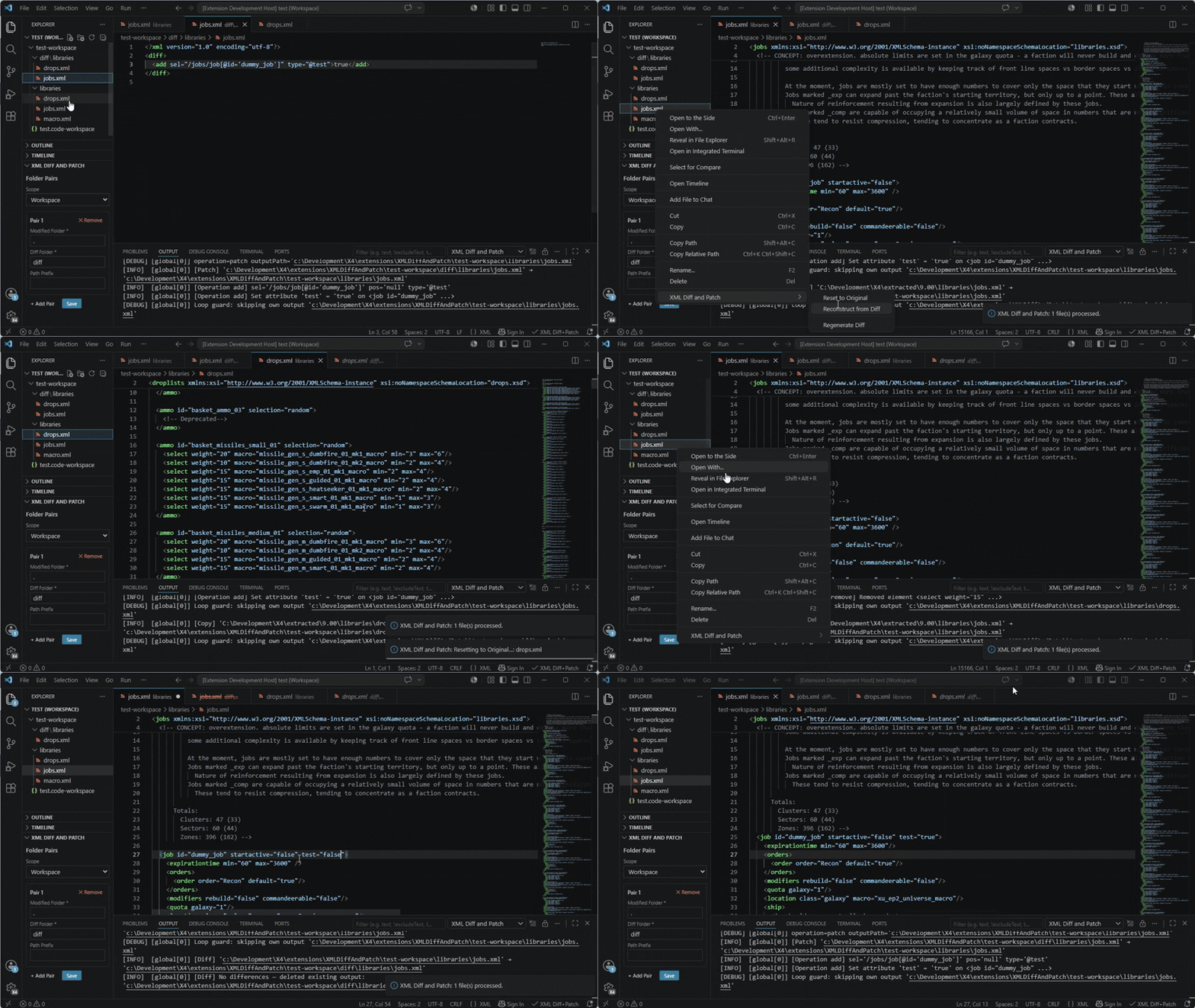
[YouTube short demo video](https://www.youtube.com/watch?v=t2Q3lh5tmRc)
## License
This project is licensed under the Apache License 2.0 - see the [LICENSE](LICENSE) file for details.
## Credits
- [Egosoft](https://www.egosoft.com) - for the game itself (In fact - for the series of games)!
- Members of the [x4_modding discord channel](https://discord.com/channels/337098290917146624/502057640877228042) - for their answers, support, ideas, and inspiration!
## Changelog
### [0.7.2] - 2026-05-27
- Fixed
- `ignoreDiffInAttribute` can now be set via the VS Code settings UI. Previously, an incorrect type definition (`["string", "null"]`) prevented the settings editor from rendering a text input for it; it required manual `settings.json` editing. Now typed as `string` with an empty-string default (empty = disabled).
- Added
- `compactPath` and `qualifiedPath` settings are now visible and editable in the VS Code settings UI. They already existed in the extension logic but were missing from the manifest, so the settings editor did not show them.
- Removed
- `showDiffEditorOnSave` setting removed. It was never implemented and had no effect.
### [0.7.1] - 2026-05-27
- Fixed
- XML files with a UTF-8 BOM are now handled correctly. A BOM before the `