https://github.com/chenckang/react-json-pretty
A react component for prettifying JSON in browser
https://github.com/chenckang/react-json-pretty
Last synced: 6 months ago
JSON representation
A react component for prettifying JSON in browser
- Host: GitHub
- URL: https://github.com/chenckang/react-json-pretty
- Owner: chenckang
- License: mit
- Created: 2015-12-29T07:50:22.000Z (over 10 years ago)
- Default Branch: master
- Last Pushed: 2022-11-14T23:42:33.000Z (over 3 years ago)
- Last Synced: 2025-09-29T08:32:57.246Z (10 months ago)
- Language: JavaScript
- Homepage:
- Size: 8.85 MB
- Stars: 159
- Watchers: 1
- Forks: 24
- Open Issues: 7
-
Metadata Files:
- Readme: README.md
- Changelog: CHANGELOG.md
- License: LICENSE
Awesome Lists containing this project
- stargazer - chenckang/react-json-pretty - A react component for prettifying JSON in browser \[*MIT License*\] (⭐️160) (JavaScript)
README
# React JSON Pretty
[](https://badge.fury.io/js/react-json-pretty)
[](https://www.npmjs.com/package/react-json-pretty)
[](https://travis-ci.org/chenckang/react-json-pretty)

## Introduction
This is a lightweight and tiny react component that helps you to format and prettify the JSON data.
## Install
```bash
npm install --save react-json-pretty
```
## Usage
### Basic
The usage is quite simple, assuming that you already have an application using React. If you don't, visit [Facebook React](https://reactjs.org/) to create one or take a look at the [example](https://github.com/chenckang/react-json-pretty/tree/master/example) provided.
Firstly, you need to require the react-json-pretty:
```javascript
var JSONPretty = require('react-json-pretty');
```
Or use the es2015 syntax with the help of tools like babel:
```javascript
import JSONPretty from 'react-json-pretty';
```
Next, use it in your React component:
```jsx
```
Where the property `data` is the JSON string or just a plain JavaScript object.
Lastly, you can add themes stated below.
***Note: if `yourData` is not a plain object, use `circular-json` or other similar tools to preprocess it before being passed to `JSONPretty`.***
### Themes
#### Use themes with css-loader and webpack
And also you can import the style to the document, here is an example of using webpack loaders(`style!css`) to load style, You can visit [webpack](https://webpack.js.org/) to get more details:
```javascript
require('react-json-pretty/themes/monikai.css');
```
Or
```javascript
import 'react-json-pretty/themes/monikai.css';
```
#### Use themes with `theme` property
If you don't want to use css, `theme` property is also available. Properties of `theme` will be used as `style` property of the target DOM element.
```jsx
var JSONPrettyMon = require('react-json-pretty/dist/monikai');
```
Visit the [example](https://github.com/chenckang/react-json-pretty/tree/master/example) to get some details.
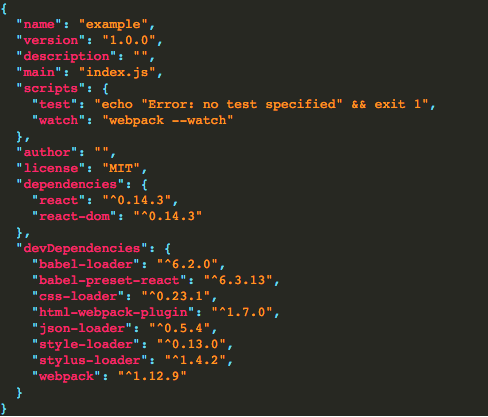
The preview is as below:
### Custom style
#### Using ***type***Style property
This can make control the extra styles of the specific type of value:
```
mainStyle?: string;
keyStyle?: string;
valueStyle?: string;
booleanStyle?: string;
stringStyle?: string;
errorStyle: string;
```
For example: set padding of the main area and the font size the normal value
```jsx
```
## Others
### Error
Use `onJSONPrettyError` function property to get `JSON.parse` errors.
```jsx
console.error(e)}>
```
### Formation
Actually, react-json-pretty is based on `JSON.stringify(value[, replacer[, space]])`. However, `JSON.stringify(value[, replacer[, space]])` has some optional parameters additionally such as `replacer` and `space`. This is also available in `react-json-pretty`.
Here is an example:
```jsx
```
***Note: The default value for property `replacer` is `null`,and `space` is `2`.***
You can visit the [example](https://github.com/chenckang/react-json-pretty/tree/master/example) to see the details.
### Custom `themeClassName`
Your can also define your custome `themeClassName`, the default value is `__json-pretty__`.
***Note: this may lead to the usage of default themes provided with css being invalid.***
```jsx
// The final className will be 'custom-json-pretty'
```
### Custom Themes
There are some default themes provided including `"Adventure Time"`, `acai` and `1337`, to provide users more ready-made options.
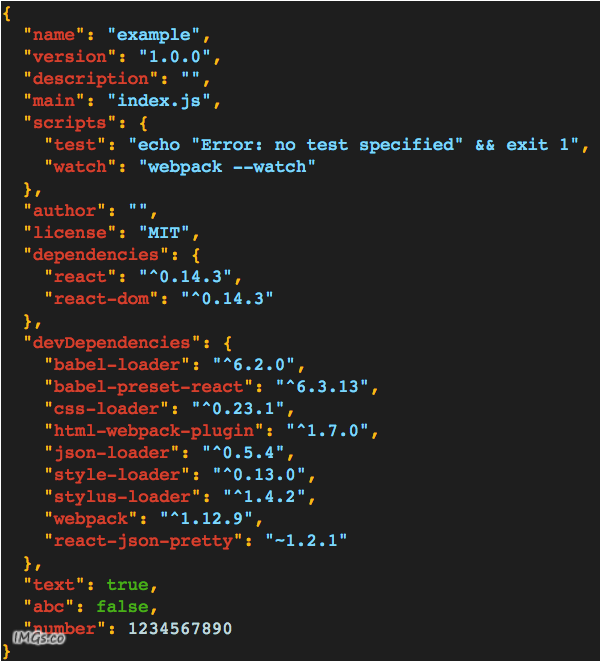
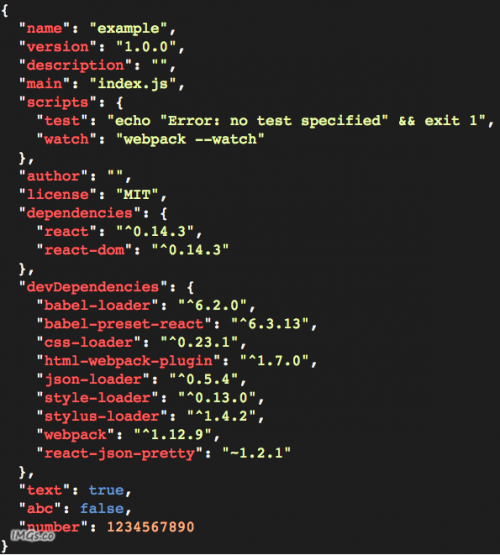

All the css theme files are placed in the `themes` folder.
It is also prossible to define a custom theme
#### Using `themes` property
Here is the property schema:
```
{
main?: string,
error?: string,
key?: string,
string?: string,
value?: string,
boolean?: string'
}
```
For example:
```js
{
main: 'line-height:1.3;color:#66d9ef;background:#272822;overflow:auto;',
error: 'line-height:1.3;color:#66d9ef;background:#272822;overflow:auto;',
key: 'color:#f92672;',
string: 'color:#fd971f;',
value: 'color:#a6e22e;',
boolean: 'color:#ac81fe;',
}
```
#### Using css file
For example the `monokai.styl`:
```
.__json-pretty__
line-height 1.3
color rgba(248,248,242,1)
background #1e1e1e
overflow auto
.__json-key__
color rgba(255,94,94,1)
.__json-value__
color rgba(253,176,130,1)
.__json-string__
color rgba(233,253,172,1)
.__json-boolean__
color rgba(102,153,204,1)
.__json-pretty-error__
line-height 1.3
color rgba(248,248,242,1)
background #1e1e1e
overflow auto
```
## License
MIT (http://www.opensource.org/licenses/mit-license.php)