https://github.com/chenhg5/cc-connect
Bridge local AI coding agents (Claude Code, Cursor, Gemini CLI, Codex) to messaging platforms (Feishu/Lark, DingTalk, Slack, Telegram, Discord, LINE, WeChat Work). Chat with your AI dev assistant from anywhere — no public IP required for most platforms.
https://github.com/chenhg5/cc-connect
Last synced: 4 months ago
JSON representation
Bridge local AI coding agents (Claude Code, Cursor, Gemini CLI, Codex) to messaging platforms (Feishu/Lark, DingTalk, Slack, Telegram, Discord, LINE, WeChat Work). Chat with your AI dev assistant from anywhere — no public IP required for most platforms.
- Host: GitHub
- URL: https://github.com/chenhg5/cc-connect
- Owner: chenhg5
- Created: 2026-02-28T02:39:39.000Z (5 months ago)
- Default Branch: main
- Last Pushed: 2026-02-28T08:45:17.000Z (5 months ago)
- Last Synced: 2026-02-28T13:55:58.065Z (5 months ago)
- Language: Go
- Homepage:
- Size: 77.1 KB
- Stars: 1
- Watchers: 0
- Forks: 0
- Open Issues: 0
-
Metadata Files:
- Readme: README.md
Awesome Lists containing this project
- awesome-claude-code-and-skills - chenhg5/cc-connect - connect?style=flat-square) (Productivity Tools / MCP Servers & Integrations)
- awesome-agent-cli - cc-connect - connect?style=flat-square&label=) | Go | ![community][community] ![bridge][bridge] | Bridge agents to Feishu, DingTalk, Slack, Telegram, Discord. | (Agent Bridges)
- awesome-ChatGPT-repositories - cc-connect - Bridge local AI coding agents (Claude Code, Cursor, Gemini CLI, Codex) to messaging platforms (Feishu/Lark, DingTalk, Slack, Telegram, Discord, LINE, WeChat Work). Chat with your AI dev assistant from anywhere — no public IP required for most platforms. (CLIs / Usage)
- awesome-ai-200 - chenhg5/cc-connect
README








## ❤️ Sponsor
> Want to appear here? Contact: chg80333@gmail.com | WeChat: mongorz
Sponsors
[](https://platform.minimax.io/subscribe/token-plan?code=lqYrKBvjke&source=link)
MiniMax-M2.7 is a next-generation large language model designed for autonomous evolution and real-world productivity. Unlike traditional models, M2.7 actively participates in its own improvement through agent teams, dynamic tool use, and reinforcement learning loops. It delivers strong performance in software engineering (56.22% on SWE-Pro, 55.6% on VIBE-Pro, 57.0% on Terminal Bench 2) and excels in complex office workflows, achieving a leading 1495 ELO on GDPval-AA. With high-fidelity editing across Word, Excel, and PowerPoint, and a 97% adherence rate across 40+ complex skills, M2.7 sets a new standard for building AI-native workflows and organizations.
[Click here](https://platform.minimax.io/subscribe/token-plan?code=lqYrKBvjke&source=link) to get an exclusive 12% off the MiniMax Token Plan + voucher for cc-connect users!
---

Thanks to AIGoCode for sponsoring this project! AIGoCode is an all-in-one platform that integrates Claude Code, Codex, and the latest Gemini models, providing you with stable, efficient, and highly cost-effective AI coding services. The platform offers flexible subscription plans, zero risk of account suspension, direct access with no VPN required, and lightning-fast responses. AIGoCode has prepared a special benefit for cc-connect users: if you register via this link, you'll receive an extra 10% bonus credit on your first top-up!

Thanks to DMXAPI for sponsoring this project! DMXAPI provides global large model API services to 200+ enterprise users. One API key for all global models. Features include: instant invoicing, unlimited concurrency, starting from $0.15, 24/7 technical support. GPT/Claude/Gemini all at 32% off, domestic models 20-50% off, Claude Code exclusive models at 66% off! Register via this link.

Thanks to Shengsuanyun for sponsoring this project! Shengsuanyun is a super factory dedicated to serving AI Native Teams, an industrial-grade AI task parallel execution platform, and a model marketplace that aggregates and supplies computing power from domestic and international LLM and image/video multimedia models such as Claude, Chatgpt, and Gemini. It guarantees no reverse engineering or data manipulation, boasts a 99.7% SLA availability across the entire site, and its monitoring interface is consistently green. Furthermore, it offers an enterprise-grade customized gateway for refined cost and access control, featuring intelligent routing, security protection, and BYOK enterprise-provided key hosting. The platform is billed on a pay-as-you-go basis and with a tokens plan (coming soon), and invoices are available. New users who register using this link will receive 10 yuan in model power and a 10% bonus on their first deposit.

Thanks to AICodeMirror for sponsoring this project! AICodeMirror provides official high-stability relay services for Claude Code / Codex / Gemini CLI, with enterprise-grade concurrency, fast invoicing, and 24/7 dedicated technical support. Claude Code / Codex / Gemini official channels at 38% / 2% / 9% of original price, with extra discounts on top-ups! AICodeMirror offers special benefits for CC users: register via this link to enjoy 20% off your first top-up, and enterprise customers can get up to 25% off!

Thanks to Code0 for sponsoring this project! Code0 is an AI model aggregation API relay service for Chinese developers, compatible with OpenAI / Anthropic / Gemini protocols. One key for all mainstream models, stable support for Claude Code, Codex, Gemini CLI, cc-connect and more. Fixed exchange rate: ¥1.5 CNY = $1 USD API credit, transparent pricing, domestic direct connection, ready to use. Register via this link.

Thanks to claudeapi.com for sponsoring this project! claudeapi is a high-quality direct Claude connection service for mid-to-high-end users. It is fully integrated with Anthropic's official first-party Keys and AWS Bedrock official channels — no reverse engineering, no intelligence degradation, no stitching. It fully preserves the official capabilities, long context, and tool-calling performance of Opus / Sonnet / Haiku. Designed specifically for Claude Code power users, Agent developers, and enterprise teams, it focuses on out-of-the-box usability and enterprise-grade stability. Invoicing and team onboarding are supported. Register via this link.
---
Control your local AI agents from any chat app. Anywhere, anytime.
cc-connect bridges AI agents running on your machine to the messaging platforms you already use.
Code review, research, automation, data analysis — anything an AI agent can do,
now accessible from your phone, tablet, or any device with a chat app.

## 🆕 What's New (beta)
> These highlights are in **beta / pre-release** builds — install [`cc-connect@beta`](https://www.npmjs.com/package/cc-connect?activeTab=versions) or grab a [pre-release](https://github.com/chenhg5/cc-connect/releases) binary. They are **not** in the default **stable** release yet; details may change before promotion to stable.
- **Personal WeChat** — Chat with your local agent from **Weixin (personal)** via ilink long-polling; QR `weixin setup`, CDN media, no public IP. *[Setup → `docs/weixin.md`](docs/weixin.md)*
- **Auto-compress** — When the session estimate blows past your threshold, cc-connect can trim context so long threads keep working instead of silently falling over.
- **Friendlier `--continue`** — Fork-on-continue so your bridge session doesn’t inherit a half-finished CLI terminal session by accident.
- **Cron with boundaries** — Run jobs in a **fresh session** each time and cap **per-job timeouts** so runaway tasks don’t wedge the bot.
- **Richer platforms** — e.g. **Discord** `@everyone` / `@here`, **Telegram** voice-style replies, **Feishu** fixes for reply threading and async dispatch.
## 🧩 Platform feature snapshot
High-level view of what each **built-in platform** can do in cc-connect. Inspired by [OpenClaw China’s feature matrix](https://github.com/BytePioneer-AI/openclaw-china#功能支持) — handy for comparing channels at a glance.
**Legend**
| Symbol | Meaning |
|--------|---------|
| ✅ | Works in **stable** cc-connect with typical configuration |
| ✅(beta) | **Beta / pre-release only** — the **Weixin (personal)** column: install [`cc-connect@beta`](https://www.npmjs.com/package/cc-connect?activeTab=versions) or a [pre-release binary](https://github.com/chenhg5/cc-connect/releases); **not** in the default stable npm build yet |
| ⚠️ | Partial, needs extra config (e.g. speech / ASR), or limited by the vendor app or API |
| ❌ | Not supported or not applicable in practice |
† **QQ (NapCat / OneBot)** — unofficial self-hosted bridge; behaviour depends on your NapCat / network setup.
| Capability | Feishu | DingTalk | Telegram | Slack | Discord | LINE | WeCom | Weibo | **Weixin**
*(personal)* | QQ† | QQ Bot |
|------------|:------:|:--------:|:--------:|:-----:|:-------:|:----:|:-----:|:-----:|:-------------------------:|:---:|:------:|
| Text & slash commands | ✅ | ✅ | ✅ | ✅ | ✅ | ✅ | ✅ | ✅ | ✅(beta) | ✅ | ✅ |
| Markdown / cards | ✅ | ✅ | ✅ | ✅ | ✅ | ⚠️ | ⚠️ | ❌ | ✅(beta) | ✅ | ✅ |
| Streaming / chunked replies | ✅ | ✅ | ✅ | ✅ | ✅ | ✅ | ✅ | ✅ | ✅(beta) | ✅ | ✅ |
| Images & files | ✅ | ✅ | ✅ | ✅ | ✅ | ⚠️ | ✅ | ❌ | ✅(beta) | ✅ | ✅ |
| Voice / STT / TTS | ⚠️ | ⚠️ | ✅ | ⚠️ | ⚠️ | ❌ | ⚠️ | ❌ | ✅(beta) | ⚠️ | ⚠️ |
| Private (DM) | ✅ | ✅ | ✅ | ✅ | ✅ | ✅ | ✅ | ✅ | ✅(beta) | ✅ | ✅ |
| Group / channel | ✅ | ✅ | ✅ | ✅ | ✅ | ⚠️ | ✅ | ❌ | ✅(beta) | ✅ | ✅ |
> **Weixin column:** every **✅(beta)** means “available only when you run a **beta / pre-release** build,” not a statement that the feature is incomplete — the whole **personal WeChat (ilink)** channel is still **pre-stable**.
> **WeCom:** Webhook mode needs a **public URL**; long-connection / WS style setups often do not.
> **Voice row:** many platforms need `[speech]` / TTS providers enabled in `config.toml`; values are a best-effort summary.
> Per-platform setup: [Platform setup guides](#-platform-setup-guides) below.
## ✨ Why cc-connect?
### 🤖 Universal Agent Support
**7 AI Agents** — Claude Code, Codex, Cursor Agent, Qoder CLI, Gemini CLI, OpenCode, iFlow CLI. Use whichever fits your workflow, or all of them at once.
### 📱 Platform Flexibility
**11 Chat Platforms** — Feishu, DingTalk, Slack, Telegram, Discord, WeChat Work, Weibo, LINE, QQ, QQ Bot (Official), plus **Weixin (personal ilink)** for **personal WeChat**. *Personal WeChat is **beta / pre-release only*** — install [`cc-connect@beta`](https://www.npmjs.com/package/cc-connect?activeTab=versions) or a [GitHub pre-release](https://github.com/chenhg5/cc-connect/releases) binary; the default **stable** npm package does **not** ship the `weixin` platform yet. Most platforms need **zero public IP**.
### 🔄 Multi-Agent Orchestration
**Multi-Bot Relay** — Bind multiple bots in a group chat and let them communicate with each other. Ask Claude, get insights from Gemini — all in one conversation.
### 🎮 Complete Chat Control
**Full Control from Chat** — Switch models (`/model`), tune reasoning (`/reasoning`), change permission modes (`/mode`), manage sessions, all via slash commands.
**Directory Switching in Chat** — Change where the next session starts with `/dir ` (and `/cd ` as a compatibility alias), plus quick history jump via `/dir ` / `/dir -`.
### 🧠 Persistent Memory
**Agent Memory** — Read and write agent instruction files (`/memory`) without touching the terminal.
### ⏰ Intelligent Scheduling
**Scheduled Tasks** — Set up cron jobs in natural language. *"Every day at 6am, summarize GitHub trending"* just works.
### 🎤 Multimodal Support
**Voice & Images** — Send voice messages or screenshots; cc-connect handles STT/TTS and multimodal forwarding.
### 📦 Multi-Project Architecture
**Multi-Project** — One process, multiple projects, each with its own agent + platform combo.
### 🌍 Multilingual Interface
**5 Languages** — Native support for English, Chinese (Simplified & Traditional), Japanese, and Spanish. Built-in i18n ensures everyone feels at home.


Left:Lark | Telegram | Right:Wechat
## 🚀 Quick Start
### 🤖 Install & Configure via AI Agent (Recommended)
> **The easiest way** — Send this to Claude Code or any AI coding agent, and it will handle the entire installation and configuration for you:
```bash
Follow https://raw.githubusercontent.com/chenhg5/cc-connect/refs/heads/main/INSTALL.md to install and configure cc-connect.
```
### 📦 Manual Install
**Via npm:**
```bash
# Stable version
npm install -g cc-connect
# Beta version (more features, may be unstable)
npm install -g cc-connect@beta
```
> **Personal WeChat (Weixin ilink):** only available in **beta / pre-release** builds (`cc-connect@beta` or a prerelease asset under [Releases](https://github.com/chenhg5/cc-connect/releases)). **Stable** `npm install -g cc-connect` does **not** include this platform until it graduates from beta.
**Download binary from [GitHub Releases](https://github.com/chenhg5/cc-connect/releases):**
```bash
# Linux amd64 - Stable
curl -L -o cc-connect https://github.com/chenhg5/cc-connect/releases/latest/download/cc-connect-linux-amd64
chmod +x cc-connect
sudo mv cc-connect /usr/local/bin/
# Beta version (from pre-release)
curl -L -o cc-connect https://github.com/chenhg5/cc-connect/releases/download/v1.x.x-beta/cc-connect-linux-amd64
```
**Build from source (requires Go 1.22+):**
```bash
git clone https://github.com/chenhg5/cc-connect.git
cd cc-connect
make build
```
### ⚙️ Configure
```bash
mkdir -p ~/.cc-connect
cp config.example.toml ~/.cc-connect/config.toml
vim ~/.cc-connect/config.toml
```
Set `admin_from = "alice,bob"` in a project to allow those user IDs to run privileged commands such as `/dir` and `/shell`.
When a user runs `/dir reset`, cc-connect restores the configured `work_dir` and clears the persisted override stored under `data_dir/projects/.state.json`.
### ▶️ Run
```bash
./cc-connect
```
### 🔄 Upgrade
```bash
# npm
npm install -g cc-connect
# Binary self-update
cc-connect update # Stable
cc-connect update --pre # Beta (includes pre-releases)
```
## 📊 Support Matrix
| Component | Type | Status |
|-----------|------|--------|
| Agent | Claude Code | ✅ Supported |
| Agent | Codex (OpenAI) | ✅ Supported |
| Agent | Cursor Agent | ✅ Supported |
| Agent | Gemini CLI (Google) | ✅ Supported |
| Agent | Qoder CLI | ✅ Supported |
| Agent | OpenCode (Crush) | ✅ Supported |
| Agent | iFlow CLI | ✅ Supported |
| Agent | Goose (Block) | 🔜 Planned |
| Agent | Aider | 🔜 Planned |
| Platform | Feishu (Lark) | ✅ WebSocket — no public IP needed |
| Platform | DingTalk | ✅ Stream — no public IP needed |
| Platform | Telegram | ✅ Long Polling — no public IP needed |
| Platform | Slack | ✅ Socket Mode — no public IP needed |
| Platform | Discord | ✅ Gateway — no public IP needed |
| Platform | Weibo | ✅ WebSocket — no public IP needed |
| Platform | LINE | ✅ Webhook — public URL required |
| Platform | WeChat Work | ✅ WebSocket / Webhook |
| Platform | Weixin (personal, ilink) | ✅(beta)— HTTP long polling — no public IP needed |
| Platform | QQ (NapCat/OneBot) | ✅ WebSocket — Beta |
| Platform | QQ Bot (Official) | ✅ WebSocket — no public IP needed |
## 📖 Platform Setup Guides
| Platform | Guide | Connection | Public IP? |
|----------|-------|------------|------------|
| Feishu (Lark) | [docs/feishu.md](docs/feishu.md) | WebSocket | No |
| DingTalk | [docs/dingtalk.md](docs/dingtalk.md) | Stream | No |
| Telegram | [docs/telegram.md](docs/telegram.md) | Long Polling | No |
| Slack | [docs/slack.md](docs/slack.md) | Socket Mode | No |
| Discord | [docs/discord.md](docs/discord.md) | Gateway | No |
| Weibo | [docs/weibo.md](docs/weibo.md) | WebSocket | No |
| WeChat Work | [docs/wecom.md](docs/wecom.md) | WebSocket / Webhook | No (WS) / Yes (Webhook) |
| Weixin (personal) | [docs/weixin.md](docs/weixin.md) | HTTP long polling (ilink) — **beta only** | No |
| QQ / QQ Bot | [docs/qq.md](docs/qq.md) | WebSocket | No |
## 🎯 Key Features
### 💬 Session Management
```
/new [name] Start a new session
/list List all sessions
/switch Switch session
/current Show current session
/dir [path|reset] Show, switch, or reset work directory
```
Project configs can also rotate to a fresh session automatically after long inactivity:
```toml
[[projects]]
reset_on_idle_mins = 60
```
### 🛡️ OS-User Isolation (`run_as_user`)
On Linux/macOS, a project can spawn its agent under a different Unix
user for OS-level file-system isolation from the supervisor user that
runs cc-connect. Currently supported by Claude Code.
```toml
[[projects]]
name = "claude-sandboxed"
run_as_user = "partseeker-coder"
run_as_env = ["PGSSLROOTCERT"]
```
The target user needs passwordless sudo from the supervisor, no sudo
of its own, read+write on `work_dir`, and its own `~/.claude/settings.json`
with whatever credentials the agent uses. If you authenticate via
`claude.ai` OAuth, symlink the target user's `~/.claude/.credentials.json`
to the supervisor's copy so token refresh stays in sync — see the
[environment propagation checklist](./docs/usage.md#environment-propagation-what-moves-into-the-target-users-home)
for details. See
[`docs/usage.md`](./docs/usage.md#running-agents-as-a-different-unix-user-run_as_user)
for the full setup.
Before starting cc-connect, audit the setup with:
```bash
cc-connect doctor user-isolation
```
This runs three go/no-go preflight gates and an isolation probe that
reports what the target user can and cannot read. cc-connect refuses to
start if any gate fails or if the probe detects a cross-user leak.
---
### 🔐 Permission Modes
```
/mode Show available modes
/mode yolo # Auto-approve all tools
/mode default # Ask for each tool
```
### 🔄 Provider Management
```
/provider list List providers
/provider switch Switch API provider at runtime
```
### 🤖 Model Selection
```
/model List available models (format: alias - model)
/model switch Switch to model by alias
```
### 📂 Work Directory
```
/dir Show current work directory and history
/dir Switch to a path (relative or absolute)
/dir Switch from history
/dir - Switch to previous directory
/cd Compatibility alias for /dir
```
### ⏰ Scheduled Tasks
```bash
/cron add 0 6 * * * Summarize GitHub trending
```
### 📎 Agent Attachment Send-Back
When an agent generates a local screenshot, chart, PDF, bundle, or other file, it can send that attachment back to the current chat.
First release supports:
- Feishu
- Telegram
If your agent does not natively inject the system prompt, run this once in chat after upgrading:
```text
/bind setup
```
or:
```text
/cron setup
```
This refreshes the cc-connect instructions in the project memory file so the agent knows how to send attachments back.
You can control this feature globally in `config.toml`:
```toml
attachment_send = "on" # default: "on"; set to "off" to block image/file send-back
```
This switch is independent from the agent's `/mode`. It only controls `cc-connect send --image/--file`.
Examples:
```bash
cc-connect send --image /absolute/path/to/chart.png
cc-connect send --file /absolute/path/to/report.pdf
cc-connect send --file /absolute/path/to/report.pdf --image /absolute/path/to/chart.png
```
Notes:
- Absolute paths are the safest option.
- `--image` and `--file` can both be repeated.
- `attachment_send = "off"` disables only attachment send-back; ordinary text replies still work.
- This command is for generated attachments, not ordinary text replies.
📖 **Full documentation:** [docs/usage.md](docs/usage.md)
## 📚 Documentation
- [Usage Guide](docs/usage.md) — Complete feature documentation
- [INSTALL.md](INSTALL.md) — AI-agent-friendly installation guide
- [config.example.toml](config.example.toml) — Configuration template
- [CONTRIBUTING.md](CONTRIBUTING.md) — How to report issues and contribute pull requests
## 👥 Community
- [Discord](https://discord.gg/kHpwgaM4kq)
- [Telegram](https://t.me/+odGNDhCjbjdmMmZl)
## ☕ Support the Project
If cc-connect has been helpful to you, consider buying us a coffee! Your support helps us:
- 🛠️ Maintain and improve the project
- 📚 Write better documentation and tutorials
- 🐛 Fix bugs and add new features faster
- ☕ Keep the developers caffeinated
### How to Donate
**Buy Me a Coffee**: [https://buymeacoffee.com/cg33](https://buymeacoffee.com/cg33)
**WeChat Pay / Alipay**:
| WeChat Pay | Alipay |
|:----------:|:------:|
|  |
|  |
|
### Thank You, Donors! 🎉
We're grateful to everyone who has supported this project. Leave your GitHub username in the donation message if you'd like to be recognized here!
## 🤝 Commercial Cooperation
We accept the following commercial collaborations:
- **Enterprise Customization**: Custom deployment for internal AI tooling (Feishu, DingTalk, WeChat Work, Slack, etc.)
- **Technical Consulting**: AI agent integration and architecture design
- **Outsourcing Projects**: AI-related system development
**Contact**: **Email**: chg80333@gmail.com | **WeChat**: mongorz | [Telegram](https://t.me/+odGNDhCjbjdmMmZl) | [Discord](https://discord.gg/kHpwgaM4kq)
## 🙏 Contributors

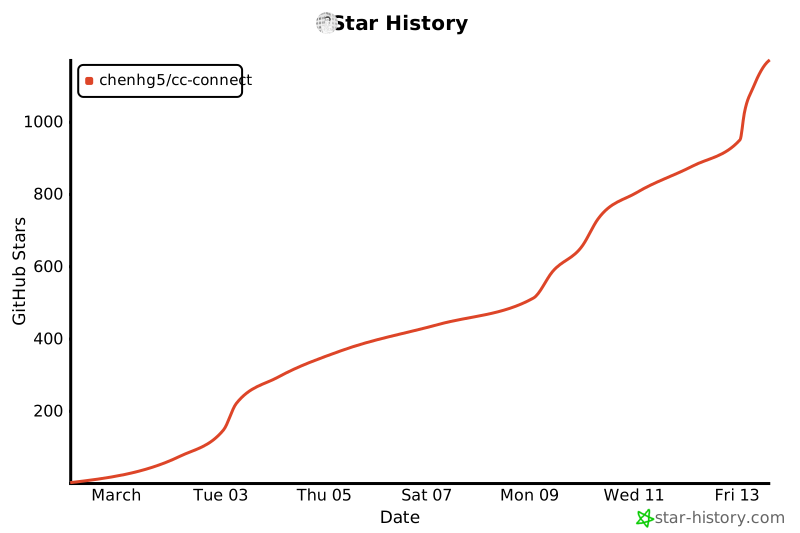
## ⭐ Star History
## 📄 License
MIT License
Built with ❤️ by the cc-connect community