https://github.com/chenxingqiang/claude-code-open
🚀 Claude CLI jailbreak using Moonshot API to bypass organization restrictions. Complete tutorial from installation to setup.
https://github.com/chenxingqiang/claude-code-open
claude claude-code
Last synced: about 1 month ago
JSON representation
🚀 Claude CLI jailbreak using Moonshot API to bypass organization restrictions. Complete tutorial from installation to setup.
- Host: GitHub
- URL: https://github.com/chenxingqiang/claude-code-open
- Owner: chenxingqiang
- License: mit
- Created: 2025-08-09T07:44:39.000Z (11 months ago)
- Default Branch: main
- Last Pushed: 2025-08-09T13:44:56.000Z (11 months ago)
- Last Synced: 2025-09-12T07:46:01.120Z (10 months ago)
- Topics: claude, claude-code
- Language: JavaScript
- Homepage:
- Size: 1.64 MB
- Stars: 1
- Watchers: 0
- Forks: 0
- Open Issues: 0
-
Metadata Files:
- Readme: README.md
- License: LICENSE
Awesome Lists containing this project
README
# 🧠 Claude LLM Gateway - Intelligent Multi-LLM API Gateway
**Intelligent Multi-Model API Gateway - Unified Interface for 36+ Large Language Models**
[](https://www.npmjs.com/package/claude-llm-gateway)
[](https://opensource.org/licenses/MIT)
[](https://nodejs.org/)
Claude LLM Gateway is an intelligent API gateway that provides a unified multi-model LLM interface for Claude Code and other applications. It features intelligent model selection, cost optimization, load balancing, and failover capabilities.
## ✨ Key Features
- 🧠 **Intelligent Model Selection** - Auto-select optimal models based on task types
- 🌍 **36+ Model Support** - OpenAI, Anthropic, Google, Meta, DeepSeek, and more
- 🔄 **Bilingual Interface** - Complete Chinese/English internationalization
- 💰 **Cost Optimization** - Smart routing to reduce API call costs
- 📊 **Real-time Monitoring** - Web interface for all provider status monitoring
- 🛡️ **Failover Protection** - Automatic switching to available backup models
- 🔐 **Secure Gateway** - API key management and access control
---
## 📋 Table of Contents
1. [🚀 Quick Start](#-quick-start)
2. [📦 Installation](#-installation)
3. [⚙️ Configuration](#-configuration)
4. [🌐 Web Interface](#-web-interface)
5. [🛠️ CLI Commands](#-cli-commands)
6. [🔧 API Usage](#-api-usage)
7. [🌍 Supported Models](#-supported-models)
8. [📊 Intelligent Selection](#-intelligent-selection)
9. [🔐 Security Configuration](#-security-configuration)
10. [📝 Troubleshooting](#-troubleshooting)
---
## 🚀 Quick Start
### System Requirements
- **Node.js** v16+ - [Download here](https://nodejs.org/)
- **npm** v7+ (comes with Node.js)
- **Supported OS**: macOS, Linux, Windows
### One-Click Installation
```bash
# Install globally via NPM
npm install -g claude-llm-gateway
# Start immediately
npx claude-llm-gateway start --port 8765
```
🎉 **Done!** Open your browser and visit http://localhost:8765
---
## 📦 Installation
### Method 1: Global Installation (Recommended)
```bash
# Install globally
npm install -g claude-llm-gateway
# Start service
claude-llm-gateway start --port 8765
# Run in background
claude-llm-gateway start --port 8765 --daemon
```
### Method 2: Local Project Installation
```bash
# Add to project dependencies
npm install claude-llm-gateway
# Run with npx
npx claude-llm-gateway start --port 8765
```
### Method 3: Build from Source
```bash
# Clone repository
git clone https://github.com/chenxingqiang/claude-code-jailbreak.git
cd claude-code-jailbreak/claude-llm-gateway
# Install dependencies
npm install
# Start development mode
npm run dev
```
## ⚙️ Configuration
### Environment Variable Setup
Create a `.env` file or set environment variables:
```bash
# OpenAI
OPENAI_API_KEY=sk-your-openai-key
# Anthropic Claude
ANTHROPIC_API_KEY=sk-ant-your-anthropic-key
# Google Gemini
GOOGLE_API_KEY=your-google-api-key
# DeepSeek (Recommended, large free quota)
DEEPSEEK_API_KEY=sk-your-deepseek-key
# Other optional configurations
GROQ_API_KEY=gsk_your-groq-key
MISTRAL_API_KEY=your-mistral-key
MOONSHOT_API_KEY=sk-your-moonshot-key
```
### Quick Configuration Template
```bash
# Copy environment variable template
cp env.example .env
# Edit configuration file
nano .env
```
**🔒 Security Tips**:
- Never commit API keys to Git repositories
- Use environment variables for sensitive information
- Rotate API keys regularly
---
## 🌐 Web Interface
After starting the service, you can access the management interface in two ways:
### 🚀 Method 1: Integrated Web Interface (Default)
```bash
claude-llm-gateway start --port 8765
# Visit: http://localhost:8765
```
### 🌟 Method 2: Dedicated Web Server (Recommended)
```bash
# Start Gateway API service
claude-llm-gateway start --port 8765 --daemon
# Start dedicated Web UI server
cd claude-llm-gateway && npm run web
# Visit: http://localhost:9000
# Or start both services together
npm run both
```
**🎯 Benefits of Method 2:**
- **Better Performance**: Web UI and API separated
- **Independent Scaling**: Scale web and API separately
- **Enhanced Security**: API and UI can run on different networks
- **Development Friendly**: Hot reload for UI development
### Interface Overview
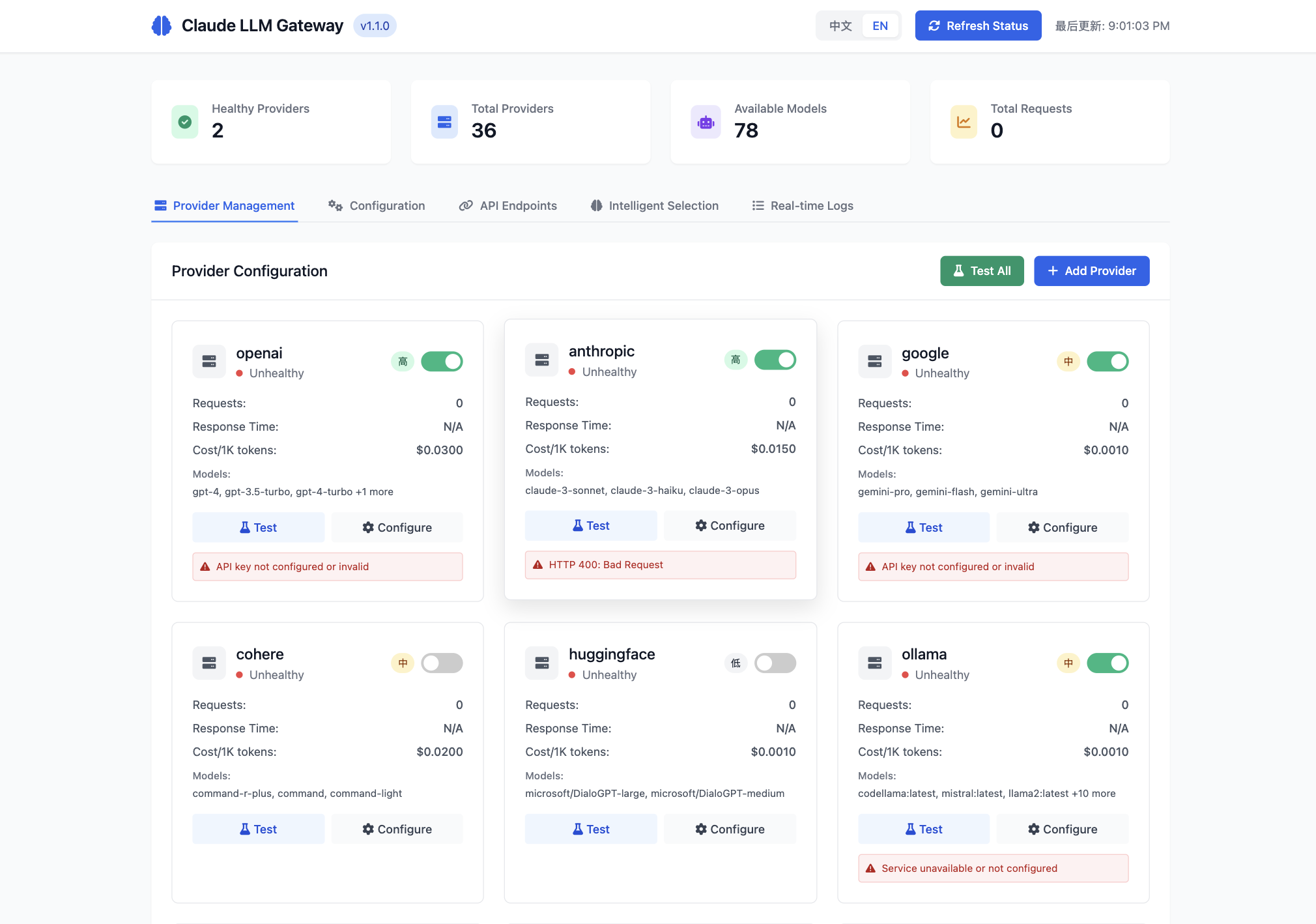
The Claude LLM Gateway features a comprehensive web management interface with multiple functional tabs:
#### 📊 Main Dashboard

The main dashboard provides real-time status overview with provider health monitoring and system statistics.
#### 🔝 Top Status Bar
- **Language Toggle**: One-click Chinese/English switching
- **Refresh Status**: Manually refresh all provider statuses
- **Last Updated**: Display data update timestamp
#### 📊 Status Overview
- **Healthy Providers**: Number of currently available models (shown as 2 in the image)
- **Total Providers**: Total supported provider count (36)
- **Available Models**: Total number of available models (78)
- **Total Requests**: Request statistics
#### 📝 Main Tabs
**1. Provider Management** (as shown in image)
- View real-time status of all LLM providers
- Green toggle indicates enabled, red dot indicates unhealthy
- Display request count, response time, cost information for each provider
- Supported model lists (e.g., OpenAI's gpt-4, gpt-3.5-turbo, etc.)
**2. Configuration**
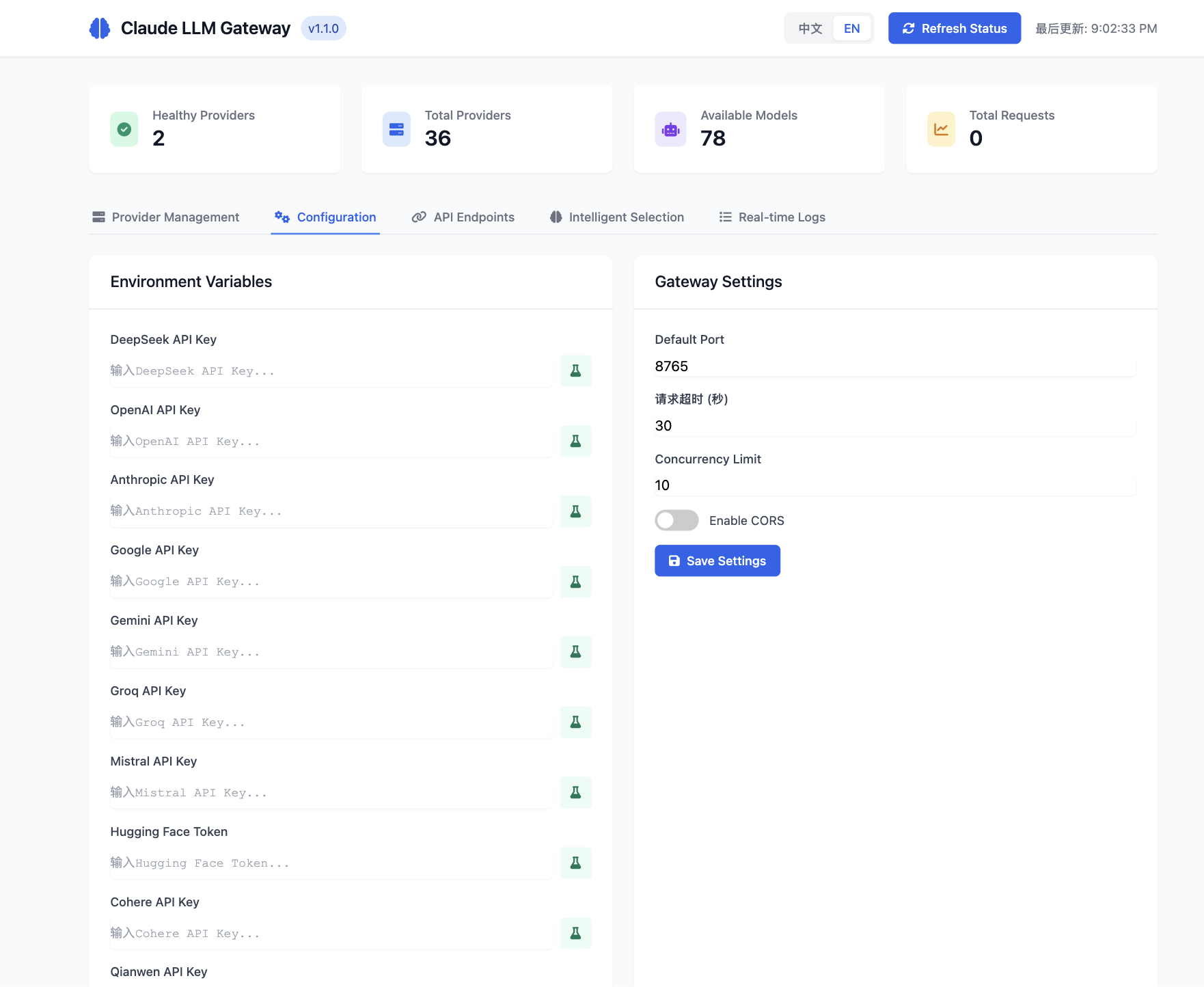
- Environment variable configuration with secure API key management
- Real-time gateway settings adjustment
- Provider-specific configuration options
**3. API Endpoints**
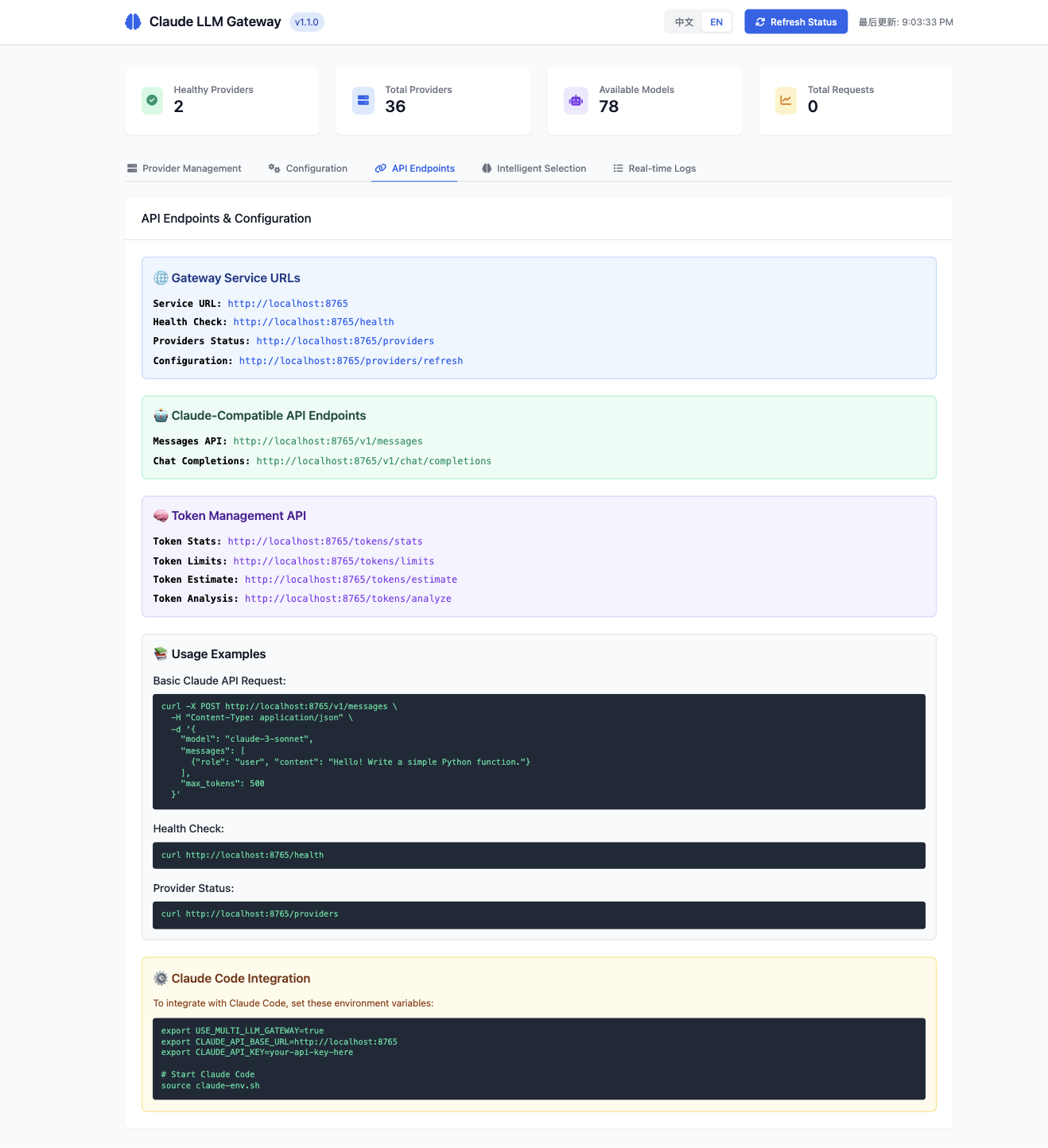
- Complete API documentation with live examples
- Claude-compatible endpoints with usage instructions
- Token management API references
- Health check and provider status interfaces
**4. Intelligent Selection**
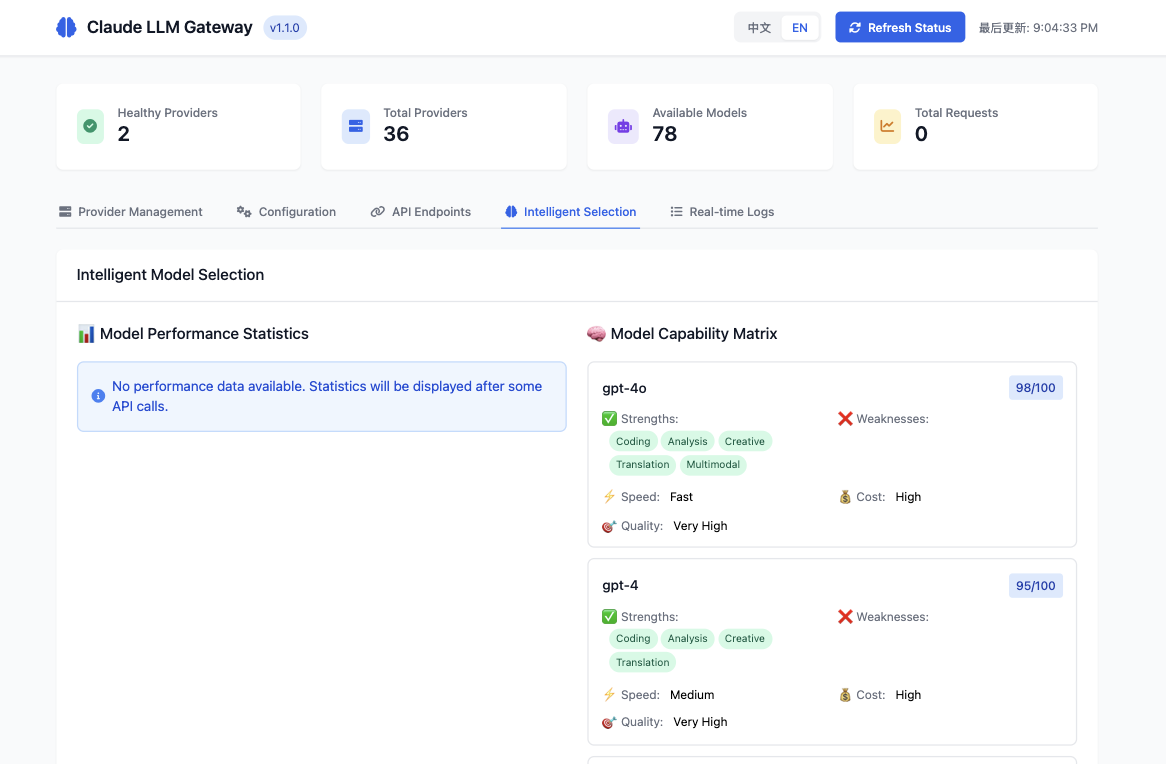
- Comprehensive model capability matrix with detailed statistics
- Performance analytics and optimization insights
- Task-based intelligent selection strategies
- Real-time model comparison and recommendations
**5. Real-time Logs**
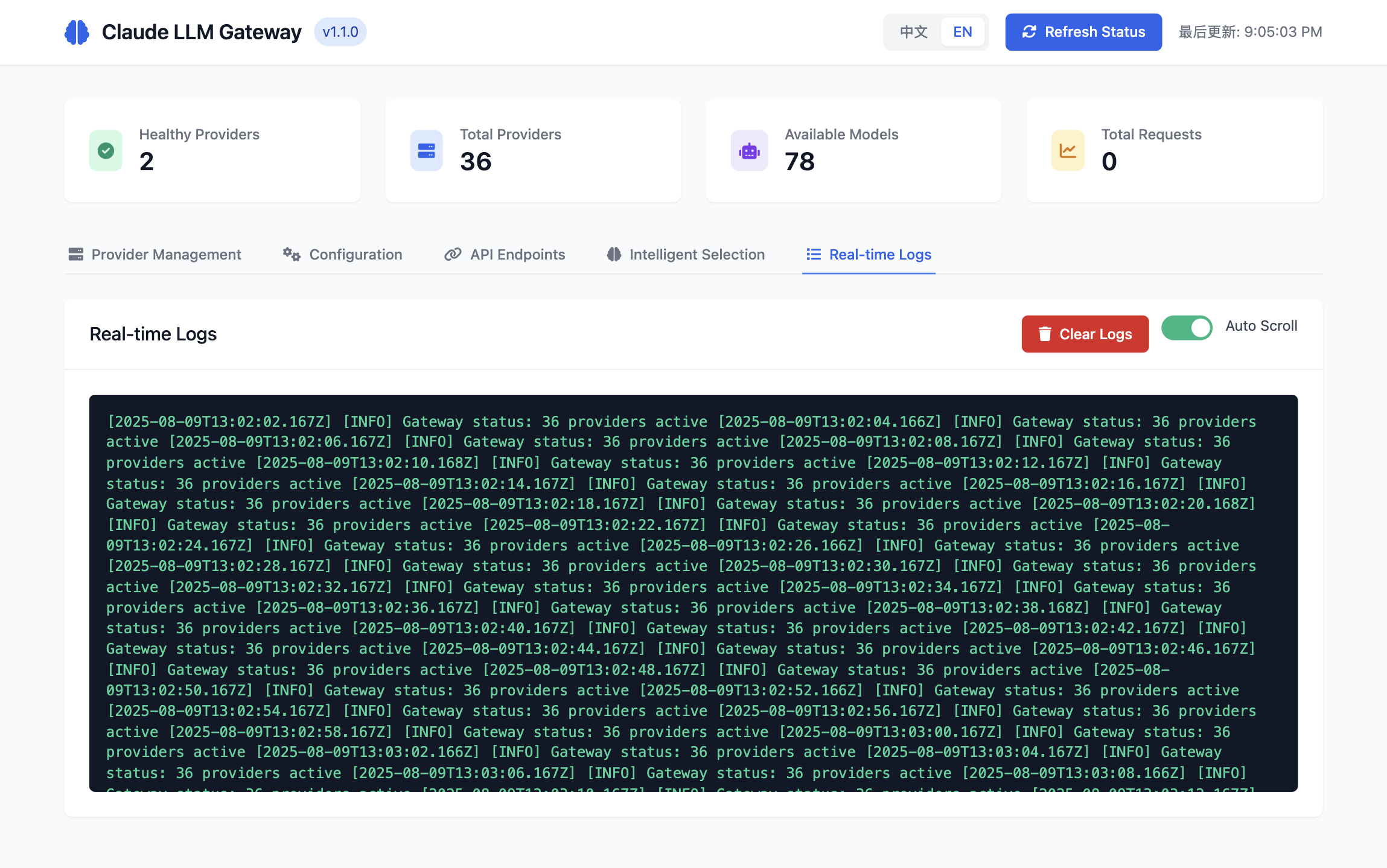
- Live system activity monitoring with auto-scroll
- Detailed request/response logging
- Provider health status updates
- System diagnostic information
#### 🎛️ Provider Card Operations
Each provider card contains:
- **Status Indicator**: Healthy/unhealthy status
- **Enable Toggle**: One-click enable/disable provider
- **Test Button**: Test provider connection
- **Configure Button**: Quick jump to configuration page
- **Error Messages**: Display specific error information (e.g., "API key not configured")
---
## 🛠️ CLI Commands
### Basic Commands
```bash
# Start service
claude-llm-gateway start [options]
# Run in background (daemon mode)
claude-llm-gateway start --daemon
# Stop service
claude-llm-gateway stop
# Check status
claude-llm-gateway status
# Show help
claude-llm-gateway --help
```
### Web Server Commands
```bash
# Start dedicated web server (port 9000)
cd claude-llm-gateway && npm run web
# Start web server in development mode
npm run web:dev
# Start both API gateway and web server
npm run both
```
### Startup Options
```bash
# Specify port (default: 8765)
claude-llm-gateway start --port 3000
# Specify host (default: localhost)
claude-llm-gateway start --host 0.0.0.0
# Run in background (daemon mode)
claude-llm-gateway start --daemon
# Combined usage
claude-llm-gateway start --port 8765 --host 0.0.0.0 --daemon
```
### Status Management
```bash
# View detailed status
claude-llm-gateway status
# Check all provider statuses
curl http://localhost:8765/providers
# Health check
curl http://localhost:8765/health
```
---
## 🔧 API Usage
### Claude-Compatible Interface
Claude LLM Gateway provides fully compatible Claude API interfaces:
```bash
# Claude Messages API
curl -X POST http://localhost:8765/v1/messages \
-H "Content-Type: application/json" \
-H "x-api-key: your-api-key" \
-d '{
"model": "claude-3-sonnet-20240229",
"max_tokens": 1024,
"messages": [
{
"role": "user",
"content": "Hello, world!"
}
]
}'
```
### OpenAI-Compatible Interface
Also supports OpenAI ChatGPT interface format:
```bash
# OpenAI Chat Completions API
curl -X POST http://localhost:8765/v1/chat/completions \
-H "Content-Type: application/json" \
-H "Authorization: Bearer your-api-key" \
-d '{
"model": "gpt-4",
"messages": [
{
"role": "user",
"content": "Hello, world!"
}
]
}'
```
### Intelligent Routing
When no model is specified, the gateway automatically selects the optimal model:
```bash
curl -X POST http://localhost:8765/v1/messages \
-H "Content-Type: application/json" \
-d '{
"max_tokens": 1024,
"messages": [
{
"role": "user",
"content": "Write a Python function to calculate Fibonacci numbers"
}
]
}'
```
### Node.js SDK Usage
```javascript
const { ClaudeLLMGateway } = require('claude-llm-gateway');
// Create gateway instance
const gateway = new ClaudeLLMGateway();
// Start service
await gateway.start(8765);
// Use built-in client
const response = await gateway.chat({
messages: [
{ role: 'user', content: 'Hello!' }
]
});
console.log(response.content);
```
---
## 🌍 Supported Models
### OpenAI Models
- **GPT-4o** (gpt-4o) - Latest multimodal model
- **GPT-4 Turbo** (gpt-4-turbo) - High-performance version
- **GPT-4** (gpt-4) - Classic version
- **GPT-4o Mini** (gpt-4o-mini) - Lightweight version
- **GPT-3.5 Turbo** (gpt-3.5-turbo) - Fast response
### Anthropic Models
- **Claude 3 Opus** (claude-3-opus) - Strongest reasoning capabilities
- **Claude 3.5 Sonnet** (claude-3.5-sonnet) - Balanced performance
- **Claude 3 Sonnet** (claude-3-sonnet) - Standard version
- **Claude 3 Haiku** (claude-3-haiku) - Fast response
### Google Models
- **Gemini Ultra** (gemini-ultra) - Flagship model
- **Gemini 1.5 Pro** (gemini-1.5-pro) - Long context
- **Gemini Pro** (gemini-pro) - Standard version
### Meta Models
- **Llama 3.1 405B** (llama-3.1-405b) - Ultra-large model
- **Llama 3.1 70B** (llama-3.1-70b) - High performance
- **Llama 3.1 8B** (llama-3.1-8b) - Lightweight
### Chinese-Optimized Models
- **DeepSeek V3** (deepseek-v3) - Chinese programming
- **DeepSeek Chat** (deepseek-chat) - Chinese conversation
- **DeepSeek Coder** (deepseek-coder) - Code generation
- **Qianwen Max** (qianwen-max) - Alibaba's large model
- **GLM-4** (zhipu-glm-4) - Zhipu AI
- **Moonshot V1** (moonshot-v1) - Dark Side of the Moon
### Other Models
- **Mistral Large** (mistral-large) - European AI
- **Groq Models** - Ultra-fast inference
- **Cohere Command R+** - Enterprise-grade
- **Grok-1** (grok-1) - xAI humor model
**Total**: 30+ model providers, 78+ available models
---
## 📊 Intelligent Selection
### Task Type Detection
The gateway can automatically detect task types and select optimal models:
#### 🔧 Programming Tasks
```
Input: "Write a Python function to calculate prime numbers"
Recommended: DeepSeek Coder, GPT-4, Claude 3.5 Sonnet
Reason: Strong code generation capabilities, accurate syntax
```
#### 📝 Creative Tasks
```
Input: "Write an article about AI"
Recommended: Claude 3 Opus, GPT-4, Gemini Pro
Reason: Strong creative abilities, natural writing style
```
#### 🔍 Analysis Tasks
```
Input: "Analyze the trends in this data report"
Recommended: Claude 3 Opus, GPT-4 Turbo, Gemini Ultra
Reason: Strong logical reasoning, deep analysis
```
#### 💬 Conversation Tasks
```
Input: "Hello, please introduce yourself"
Recommended: GPT-3.5 Turbo, Claude 3 Haiku, DeepSeek Chat
Reason: Fast response, low cost, natural conversation
```
### Cost Optimization Strategies
- **Intelligent Downgrading**: Automatically use lower-cost models for simple tasks
- **Parallel Requests**: Send requests to multiple providers simultaneously, choose fastest response
- **Failover**: Automatically switch to backup models when primary models are unavailable
- **Load Balancing**: Distribute requests based on provider response time and success rate
## 🔐 Security Configuration
### API Key Management
```bash
# Recommended: Use environment variables
export OPENAI_API_KEY="sk-your-key"
# Avoid: Hard-coding in code
# const apiKey = "sk-your-key" ❌
```
### Access Control
```bash
# Restrict access sources
claude-llm-gateway start --host 127.0.0.1 # Local access only
# Production environment
claude-llm-gateway start --host 0.0.0.0 # Allow external access
```
### Security Measures
- ✅ **CORS Configuration**: Prevent cross-origin attacks
- ✅ **Rate Limiting**: Prevent API abuse
- ✅ **Helmet Security Headers**: Enhanced security
- ✅ **Input Validation**: Prevent injection attacks
- ✅ **Error Handling**: No sensitive information leakage
---
## 📝 Troubleshooting
### Common Issues
**Q: Port already in use error on startup**
```bash
# Check port usage
lsof -i :8765
# Use different port
claude-llm-gateway start --port 8766
```
**Q: Invalid API key error**
```bash
# Check environment variables
echo $OPENAI_API_KEY
# Reset key
export OPENAI_API_KEY="sk-your-new-key"
```
**Q: Cannot connect to a provider**
```bash
# Check network connection
curl -I https://api.openai.com
# View detailed errors
claude-llm-gateway start --verbose
```
**Q: Intelligent selection not working**
```bash
# View model capability configuration
curl http://localhost:8765/model-stats
# Check provider status
curl http://localhost:8765/providers
```
### Debug Mode
```bash
# Enable detailed logging
export LOG_LEVEL=debug
claude-llm-gateway start
# View real-time logs
tail -f logs/gateway.log
```
### Performance Optimization
```bash
# Increase concurrent connections
export MAX_CONNECTIONS=100
# Enable caching
export ENABLE_CACHE=true
# Set timeout
export REQUEST_TIMEOUT=30000
```
---
## 🤝 Contributing
Welcome to contribute code! Please follow these steps:
1. **Fork the repository**
2. **Create feature branch**: `git checkout -b feature/amazing-feature`
3. **Commit changes**: `git commit -m 'Add amazing feature'`
4. **Push branch**: `git push origin feature/amazing-feature`
5. **Create Pull Request**
### Development Environment
```bash
# Clone repository
git clone https://github.com/chenxingqiang/claude-code-jailbreak.git
cd claude-code-jailbreak/claude-llm-gateway
# Install dependencies
npm install
# Run tests
npm test
# Start development mode
npm run dev
```
---
## 📄 License
This project is licensed under the [MIT License](LICENSE)
---
## 🌟 Star History
If this project helps you, please give us a ⭐!
[](https://star-history.com/#chenxingqiang/claude-code-jailbreak&Date)
---
## 📞 Support & Contact
- 📁 **GitHub**: [claude-code-jailbreak](https://github.com/chenxingqiang/claude-code-jailbreak)
- 📦 **NPM**: [claude-llm-gateway](https://www.npmjs.com/package/claude-llm-gateway)
- 🐛 **Issues**: [GitHub Issues](https://github.com/chenxingqiang/claude-code-jailbreak/issues)
- 💬 **Discussions**: [GitHub Discussions](https://github.com/chenxingqiang/claude-code-jailbreak/discussions)
---
**🎯 Making AI model selection simple and intelligent!**