https://github.com/chicio/whichlocale
An iOS app used to show how iOS manages locale selection for an app. This is the example app for my blog post "Which Locale? Decoding the Madness Behind iOS Localization and Language Preferences"
https://github.com/chicio/whichlocale
Last synced: over 1 year ago
JSON representation
An iOS app used to show how iOS manages locale selection for an app. This is the example app for my blog post "Which Locale? Decoding the Madness Behind iOS Localization and Language Preferences"
- Host: GitHub
- URL: https://github.com/chicio/whichlocale
- Owner: chicio
- License: mit
- Created: 2025-03-14T22:49:26.000Z (over 1 year ago)
- Default Branch: main
- Last Pushed: 2025-03-14T23:07:16.000Z (over 1 year ago)
- Last Synced: 2025-03-14T23:29:09.749Z (over 1 year ago)
- Language: Swift
- Size: 0 Bytes
- Stars: 0
- Watchers: 1
- Forks: 0
- Open Issues: 0
-
Metadata Files:
- Readme: README.md
- License: LICENSE.md
Awesome Lists containing this project
README
# Which Locale?
[](https://raw.githubusercontent.com/chicio/WhichLocale/main/LICENSE.md)
An iOS app used to show how iOS manages locale selection for an app. This is the example app for my blog post "Which Locale? Decoding the Madness Behind iOS Localization and Language Preferences"
## Description
This repository contains an example app created to show the details of how iOS selection the user locale based on user system settings and the
localizations available in the app bundle.
> We conducted several experiments to understand the logic behind the values stored in this user default, only to be
astonished by the results: none of the returned values was matching our expection in terms of locale with respect to the
ones we defined in our apps.
That’s when we realized we needed to gain a deeper understanding of how iOS determines a user’s locale.
This marked the beginning of our journey down the rabbit hole of iOS localization wolrd. Along the way, we learned a lot
about how iOS selects a locale for apps with multiple locale defined in its bundle.
Join us on this wild ride and avoid falling into the same traps we did when dealing with iOS locale madness!...
Click [here](https://www.fabrizioduroni.it/blog/post/2025/03/17/locale-ios-app-device "ios locale how does it work") to read the post.
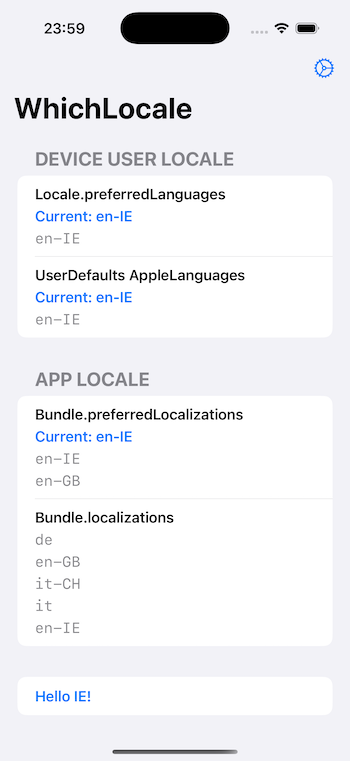
NB.: I suggest to try the app on a physical device to avoid any false positive/unwanted behaviour in the simulator.