https://github.com/choate-robotics/bayesiangame
A computer challenge to test understanding of Bayesian updating.
https://github.com/choate-robotics/bayesiangame
bayesian-methods processing robotics-algorithms robotics-programming
Last synced: 11 months ago
JSON representation
A computer challenge to test understanding of Bayesian updating.
- Host: GitHub
- URL: https://github.com/choate-robotics/bayesiangame
- Owner: Choate-Robotics
- License: mit
- Created: 2019-04-24T02:46:39.000Z (about 7 years ago)
- Default Branch: master
- Last Pushed: 2019-04-29T16:34:06.000Z (about 7 years ago)
- Last Synced: 2025-01-21T06:11:32.577Z (over 1 year ago)
- Topics: bayesian-methods, processing, robotics-algorithms, robotics-programming
- Language: Processing
- Size: 127 KB
- Stars: 0
- Watchers: 3
- Forks: 1
- Open Issues: 0
-
Metadata Files:
- Readme: README.md
- License: LICENSE
Awesome Lists containing this project
README
# BayesianGame
Processing sketches to simulate creating maps from noisy information channels.
For more information about how to succeed. **Click on the picture below to see a YouTube about how to make a Bayesian estimator**.
[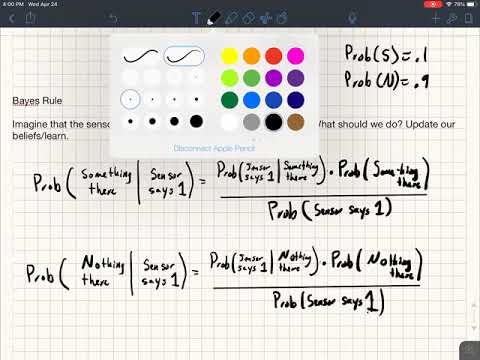](https://www.youtube.com/watch?v=dHnxM7jMw6Y)
In this Processing sketch, we create a Field that has a number randomly
positioned boxes that may overlap. The Field is displayed on the left half
of the display. There is also an MyMap object that is displayed on
the right hand side of the display. The MyMap object a grid that displays the
likelihood of there being an object in corresponding region of the Field.
Initially the all areas of the MyMap object are set to a 20% chance of there
being an object. There is a Sensor object that
looks at random positions in the Field and reports that it findings to the
MyMap object by calling its ```update``` method. The
Sensor object is prone to error with the following issues:
| Error type | Error strength|
|------------|---------------|
|Error on positive sighting| 20% of the time falsely reports nothing|
|Error on negative sighting| 10% of the time falsely reports something|
|Error on coordinates| Coordinates are wrong in both the x and y directions by a random error with standard deviation 5|
Using this information your challenge is to rewrite the ```update``` function within the ```MyMap``` class. **Do not change other files other than the MyMap
file, and you will likely only need to work within the ```update``` function. Though you can add more class variables and helper functions the MyMap class if you like.
The function currently there is the one that
takes the information raw and sets the corresponding part of the map to the
information from the sensor. The code for that is given by:
```
void update(int myx, int myy, float value) {
/* THIS IS WHERE YOU PUT CODE.
update takes in an x coordinate, a y coordinate, and a value that
is either 0.0 or 1.0. Your job is to update the map array. The array
contains a triple array of boxes that represent square 12x12 regions of
the field. E.g. map[3][2][1] is the probability that there IS SOMETHING THERE
(because the third coordinate is 1) in the region defined by x coordinates
between 36 and 48 (because the first coordinate is 3) and y coordinates
between 24 and 36 (because the second coordinate is 2).
*/
int newX, newY;
newX=myx/gridsize;
newY=myy/gridsize;
// If value=0 then 1-0 is 1, and 100 percent.
myMap[newX][newY][0]=(int)(1-value);
myMap[newX][newY][1]=(int)(value);
}
```
DESCRIPTION OF VARIABLES IN ```MyMap```:
|Variable| Description|
|--------|------------|
|myx | the x-coordinate where the sensor has evaluated (prone to some error)|
|myy | the x-coordinate where the sensor has evaluated (prone to some error)|
|value | either 0 or 1. 0 means the sensor has not sensed a white object. 1 means it has.|
|gridsize| the size of the squares that make up the map|
|myWidth| the number of columns in the map.|
|myHeight| the number of rows in the map.|
|offx| a variable that is used to determine where to draw the map. *You should not need to use this variable.*|
|offy| a variable that is used to determine where to draw the map. *You should not need to use this variable.*|
After three minutes of this code your map may look something like this.

The goal is to use Bayesian updating to create a more faithful representation. For instance, one code that implemented a bayesian approach
was able to get these results after 3 minutes.
