https://github.com/chrisreedio/socialment
Socialite OAuth Support for Filament
https://github.com/chrisreedio/socialment
auth authen filament filamentphp laravel oauth oauth2 socialite
Last synced: 9 months ago
JSON representation
Socialite OAuth Support for Filament
- Host: GitHub
- URL: https://github.com/chrisreedio/socialment
- Owner: chrisreedio
- License: mit
- Created: 2023-08-25T07:47:16.000Z (almost 3 years ago)
- Default Branch: 4.x
- Last Pushed: 2025-08-20T20:41:08.000Z (11 months ago)
- Last Synced: 2025-08-20T22:20:48.304Z (11 months ago)
- Topics: auth, authen, filament, filamentphp, laravel, oauth, oauth2, socialite
- Language: PHP
- Homepage:
- Size: 187 KB
- Stars: 100
- Watchers: 2
- Forks: 14
- Open Issues: 7
-
Metadata Files:
- Readme: README.md
- Changelog: CHANGELOG.md
- Contributing: .github/CONTRIBUTING.md
- Funding: .github/FUNDING.yml
- License: LICENSE.md
- Security: .github/SECURITY.md
Awesome Lists containing this project
README
# Socialment - Socialite OAuth Support for Filament
[](https://packagist.org/packages/chrisreedio/socialment)



[](https://packagist.org/packages/chrisreedio/socialment)
## Table of Contents
- [About](#about)
- [Installation](#installation)
- [Basic Setup](#basic-setup)
- [Provider Configuration](#provider-configuration)
- [Advanced Configuration](#advanced-configuration)
- [Customization](#customization)
- [SPA Authentication](#spa-authentication)
- [Testing](#testing)
- [Contributing](#contributing)
---
## About
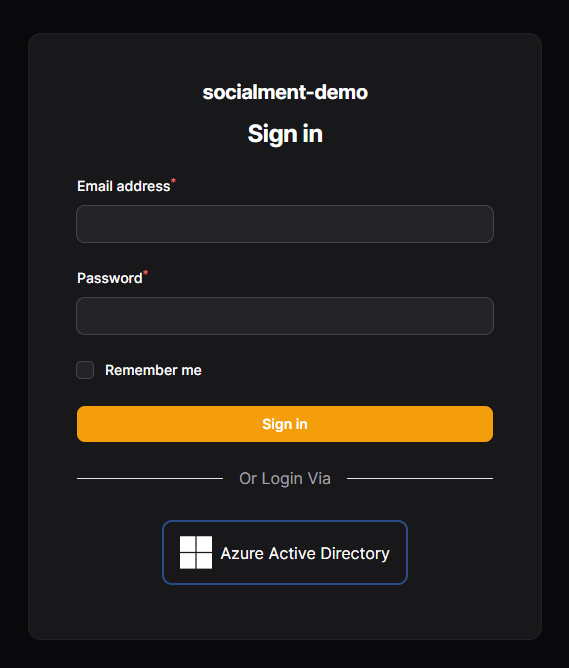
Bring up-to-date and simple Socialite support to your Filament admin panel with this plugin. Adds OAuth buttons to your login page.
**✨ Key Features:**
- 🔐 Easy OAuth integration with Filament panels
- 🎨 Customizable provider buttons with icons
- 🔗 Supports all Laravel Socialite providers
- 🎯 Per-panel provider configuration
- 🔧 Extensible with custom login hooks
- 📱 Experimental SPA authentication support
**Perfect for:** Laravel and Filament users seeking straightforward OAuth integration.
> [!WARNING]
> **Socialment v4 is currently in beta.** Please report any issues you encounter.
>
> ⚠️ Caution is advised if you choose to use this package in production.
>
> 📋 Socialment v3 support is still available on the [3.x branch](https://github.com/chrisreedio/socialment/tree/3.x).
### Demo
🎮 **Demo Project:** [ChrisReedIO/Socialment-Demo](https://github.com/chrisreedio/socialment-demo)
*Not yet updated to v4.*
### References
This package extends [Laravel Socialite](https://laravel.com/docs/master/socialite). Socialite currently supports authentication via Facebook, Twitter, LinkedIn, Google, GitHub, GitLab, and Bitbucket out of the box.
📚 **Useful Links:**
- [Socialite Documentation](https://laravel.com/docs/master/socialite)
- [Socialite Providers Community](https://socialiteproviders.com/) - Additional provider packages
---
## Installation
Install the package via Composer:
```bash
composer require chrisreedio/socialment
```
## Basic Setup
### 1. Run Installation Command
Perform the initial setup:
```bash
php artisan socialment:install
```
### 2. Add Styling Support
Edit your panel's custom `theme.css` and add:
```css
@source '../../../../vendor/chrisreedio/socialment/resources';
```
> [!IMPORTANT]
> **Don't skip this step!** Without it, the plugin styling won't be applied.
>
> If you don't have a custom theme, you should create one before adding the source.
>
> To learn more about creating a custom theme, see the [Filament documentation](https://filamentphp.com/docs/4.x/styling/overview#creating-a-custom-theme).
### 3. Panel Configuration
Include the plugin in your panel configuration:
```php
// In your PanelProvider (e.g., app/Providers/Filament/AdminPanelProvider.php)
$panel
->plugins([
// ... Other Plugins
\ChrisReedIO\Socialment\SocialmentPlugin::make(),
])
```
---
## Provider Configuration
### Overview
You need to configure OAuth providers in two places:
1. **Laravel Socialite** - Install provider packages and configure credentials
2. **Socialment** - Register providers with your Filament panel
### Step 1: Install & Configure Socialite Provider
Choose from [stock providers](https://laravel.com/docs/master/socialite) or [community providers](https://socialiteproviders.com/).
**Example: GitHub (Stock Provider)**
Add to `config/services.php`:
```php
'github' => [
'client_id' => env('GITHUB_CLIENT_ID'),
'client_secret' => env('GITHUB_CLIENT_SECRET'),
'redirect' => env('GITHUB_REDIRECT_URI'),
],
```
**Example: Azure Active Directory (Community Provider)**
Install the provider package:
```bash
composer require socialiteproviders/microsoft-azure
```
Add to `config/services.php`:
```php
'azure' => [
'client_id' => env('AZURE_CLIENT_ID'),
'client_secret' => env('AZURE_CLIENT_SECRET'),
'redirect' => env('AZURE_REDIRECT_URI'),
'tenant' => env('AZURE_TENANT_ID'),
'proxy' => env('PROXY'), // optional
],
```
Add to `app/Providers/EventServiceProvider.php`:
```php
protected $listen = [
// ... other listeners
\SocialiteProviders\Manager\SocialiteWasCalled::class => [
// ... other providers
\SocialiteProviders\Azure\AzureExtendSocialite::class.'@handle',
],
];
```
### Step 2: Register with Socialment
Add providers to your panel configuration:
```php
$panel->plugins([
\ChrisReedIO\Socialment\SocialmentPlugin::make()
->registerProvider('github', 'fab-github', 'GitHub')
->registerProvider('azure', 'fab-microsoft', 'Azure Active Directory'),
]);
```
**Parameters:**
- `provider_name` - Matches your `config/services.php` key
- `icon` - Font Awesome brand icon ([search icons](https://fontawesome.com/search?o=r&f=brands))
- `label` - Display name for the button
### OAuth Redirect URLs
> [!NOTE]
> **URL Pattern:** `https://yourdomain.com/login/{provider}/callback`
>
> **Examples:**
> - GitHub: `https://yourdomain.com/login/github/callback`
> - Azure: `https://yourdomain.com/login/azure/callback`
---
## Advanced Configuration
### Visibility Control
Control when OAuth buttons appear:
```php
$panel->plugins([
\ChrisReedIO\Socialment\SocialmentPlugin::make()
->visible(fn () => config('app.env') !== 'production')
]);
```
### Custom Login Route
Set a custom route for failed logins:
```php
$panel->plugins([
\ChrisReedIO\Socialment\SocialmentPlugin::make()
->loginRoute('filament.staff.auth.login')
// Or use a closure
->loginRoute(fn () => SomeFunctionToGetTheRouteName())
]);
```
### Login Hooks
Add custom logic before/after login:
```php
// In a service provider's boot() method
use ChrisReedIO\Socialment\Models\ConnectedAccount;
use ChrisReedIO\Socialment\Facades\Socialment;
use ChrisReedIO\Socialment\Exceptions\AbortedLoginException;
public function boot(): void
{
// Pre-login hook
Socialment::preLogin(function (ConnectedAccount $connectedAccount) {
// Custom pre-login logic here
Log::info('User about to login', ['provider' => $connectedAccount->provider]);
});
// Post-login hook
Socialment::postLogin(function (ConnectedAccount $connectedAccount) {
Log::info('User logged in with ' . $connectedAccount->provider . ' account', [
'user' => $connectedAccount->user->email,
]);
});
}
```
#### Pre-login Hook: External Service Access Control
Use the pre-login hook to verify user access via an external service before allowing authentication:
```php
use ChrisReedIO\Socialment\Models\ConnectedAccount;
use ChrisReedIO\Socialment\Facades\Socialment;
use ChrisReedIO\Socialment\Exceptions\AbortedLoginException;
use Illuminate\Support\Facades\Http;
public function boot(): void
{
// Check to see of the use has sufficient permissions to access the application.
Socialment::preLogin(function (ConnectedAccount $connectedAccount) { // Sets up a hook on the 'plugin' itself
// Handle custom post login logic here.
$groups = (new GraphConnector($connectedAccount->token))
->users()->groups($connectedAccount->provider_user_id);
// Grab the results from the lazy collection
$groupNames = collect($groups->pluck('displayName')->all());
// Filter the list of system roles by the groups the user is a member of in Azure AD
$roles = Role::all()->filter(fn ($role) => $groupNames->contains($role->sso_group));
// Sync the user's roles with the filtered list
$connectedAccount->user->roles()->sync($roles);
// If the user has no roles, abort the login
if ($connectedAccount->user->roles->isEmpty()) {
throw new AbortedLoginException('You are not authorized to access this application.');
}
});
}
```
### Configuration File
Publish and customize the config:
```bash
php artisan vendor:publish --tag="socialment-config"
```
**Key config options:**
```php
return [
'view' => [
'prompt' => 'Or Login Via', // Text above provider buttons
'providers-list' => 'socialment::providers-list', // Custom view
],
'models' => [
'user' => '\\App\\Models\\User', // Custom user model
],
];
```
---
## Customization
### Custom Views
Publish and customize the views:
```bash
php artisan vendor:publish --tag="socialment-views"
```
Views will be copied to `resources/views/vendor/socialment/`.
### Font Awesome Icons
This package uses [Blade Font Awesome](https://github.com/owenvoke/blade-fontawesome) by [Owen Voke](https://github.com/owenvoke).
Search for brand icons on the [Font Awesome Website](https://fontawesome.com/search?o=r&f=brands).
---
## SPA Authentication
> [!CAUTION]
> **🧪 Experimental Feature**
>
> This feature is still in development and highly experimental. Expect breaking changes and bugs. Use at your own risk.
>
> This feature may be spun off into a separate package in the future.
### Overview
Enable shared authentication between your Filament backend and Single Page Application frontend. Both must be hosted on the same domain.
### Setup Steps
**1. Add SPA routes** to `routes/web.php`:
```php
// Pass your SPA route prefix (default: 'spa')
Route::spaAuth('dashboard');
Route::middleware('auth:sanctum')
->prefix('dashboard')
->as('dashboard.')
->group(function () {
// Your SPA API routes
});
```
**2. Update CORS configuration** in `config/cors.php`:
```php
'paths' => [
// ... Other Paths
'spa/*', // Or your custom prefix
],
'supports_credentials' => true,
```
**3. Set environment variables:**
```dotenv
SANCTUM_STATEFUL_DOMAINS="https://frontend.localhost:3000,https://backend.localhost"
SESSION_DOMAIN=".localhost"
SESSION_SECURE_COOKIE=true
SPA_URL="https://frontend.localhost:3000"
```
**Key points:**
- `SESSION_DOMAIN` should start with a period (`.localhost`)
- `SPA_URL` points to your frontend application
- Both frontend and backend must share the same root domain
### SPA Configuration
Update the config file:
```php
'spa' => [
'home' => env('SPA_URL', 'http://localhost:3000'),
'responses' => [
// Custom JsonResource for API responses
// 'me' => \App\Http\Resources\UserResponse::class,
],
],
```
---
## Testing
> [!NOTE]
> Tests have yet to be written for this package. They are on the TODO list. PRs welcome!
```bash
composer test
```
---
## Changelog
Please see [CHANGELOG](CHANGELOG.md) for more information on what has changed recently.
## Contributing
Please see [CONTRIBUTING](.github/CONTRIBUTING.md) for details.
## Security Vulnerabilities
Please review [our security policy](../../security/policy) on how to report security vulnerabilities.
## Credits
- [Chris Reed](https://github.com/chrisreedio)
- [All Contributors](../../contributors)
## License
The MIT License (MIT). Please see [License File](LICENSE.md) for more information.