https://github.com/chrisweb/nextjs_mdx-js-loader_windows_reproduction
https://github.com/chrisweb/nextjs_mdx-js-loader_windows_reproduction
Last synced: 2 months ago
JSON representation
- Host: GitHub
- URL: https://github.com/chrisweb/nextjs_mdx-js-loader_windows_reproduction
- Owner: chrisweb
- Created: 2025-01-06T19:14:28.000Z (over 1 year ago)
- Default Branch: main
- Last Pushed: 2025-05-02T08:38:24.000Z (about 1 year ago)
- Last Synced: 2025-10-04T03:04:26.375Z (9 months ago)
- Language: CSS
- Size: 220 KB
- Stars: 0
- Watchers: 1
- Forks: 0
- Open Issues: 0
-
Metadata Files:
- Readme: README.md
Awesome Lists containing this project
README
# reproduction repository: next.js mdx js loader bug on windows
* the repository is a reproduction for the [next.js issues #74564](https://github.com/vercel/next.js/issues/74564)
* I have suggested a fix in the [next.js PR #74565](https://github.com/vercel/next.js/pull/74565#issuecomment-2844513895)
## installation
First clone this repository, and then install the [dependencies](package.json):
```bash
npm i
```
## development
Then start the development server:
```bash
npm run dev
```
Open [http://localhost:3000](http://localhost:3000) with your browser.
## reproduction
After installing the dependencies and launching the dev server, have a look at your terminal output, (if on windows) you should see the following error:
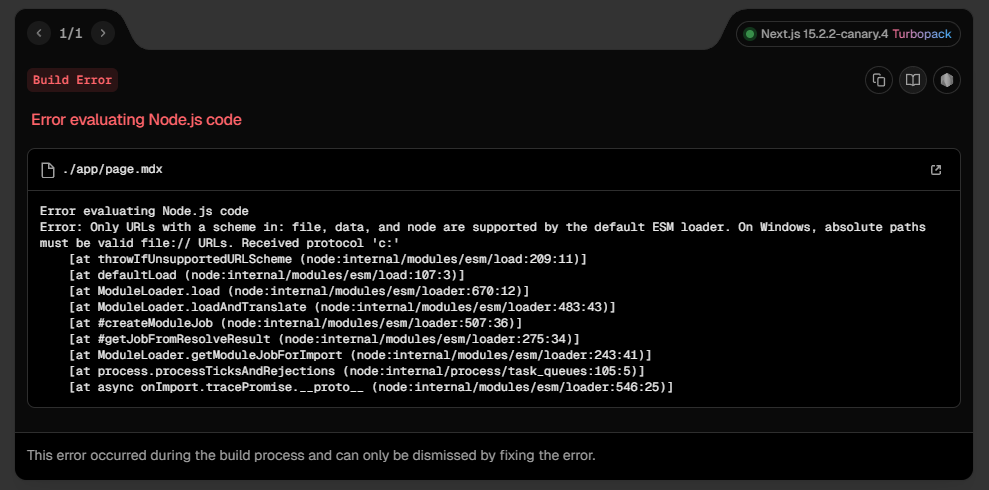
```shell
Error: Only URLs with a scheme in: file, data, and node are supported by the default ESM loader. On Windows, absolute paths must be valid file:// URLs. Received protocol 'c:'
```
## project setup history
created the project using the CNA command:
`npx create-next-app@canary`
added some dependencies:
`npm i @next/mdx@canary @mdx-js/loader@latest rehype-slug@latest --save-exact`