https://github.com/cinoss/cupl
Easily manage Cucumber Gherkin files using PlantUML activity diagrams
https://github.com/cinoss/cupl
activity-diagram bdd cucumber gherkin plantuml
Last synced: 12 months ago
JSON representation
Easily manage Cucumber Gherkin files using PlantUML activity diagrams
- Host: GitHub
- URL: https://github.com/cinoss/cupl
- Owner: cinoss
- Created: 2020-04-05T03:44:56.000Z (about 6 years ago)
- Default Branch: master
- Last Pushed: 2023-07-18T21:35:09.000Z (almost 3 years ago)
- Last Synced: 2025-06-04T10:56:26.375Z (about 1 year ago)
- Topics: activity-diagram, bdd, cucumber, gherkin, plantuml
- Language: TypeScript
- Homepage: https://cinoss.github.io/cupl/
- Size: 471 KB
- Stars: 34
- Watchers: 3
- Forks: 5
- Open Issues: 17
-
Metadata Files:
- Readme: README.md
Awesome Lists containing this project
README
# Cupl
A CLI tool for automatic **CU**cumber gherkin feature files generation from **PL**antuml activity diagram.
[](https://npmjs.org/package/cupl)
[](https://circleci.com/gh/cinoss/cupl/tree/master)
[](https://codecov.io/gh/cinoss/cupl)
[](https://npmjs.org/package/cupl)
[](https://github.com/cinoss/cupl/blob/master/package.json)
[](https://oclif.io)
Cupl will help you transform `.puml` file of this diagram.
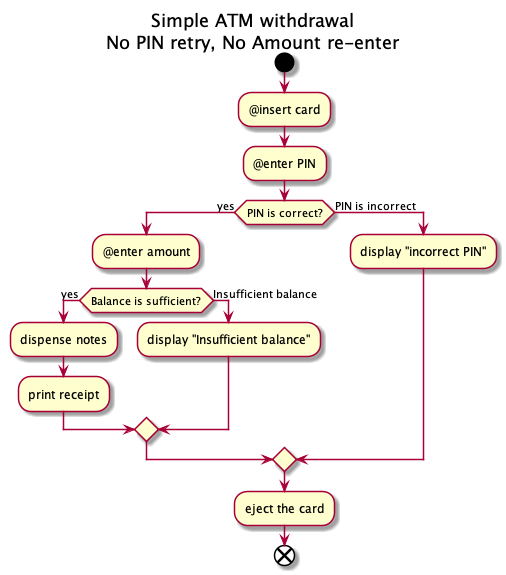
Into this Gherkin feature description
```gherkin
Feature: Simple ATM withdrawal
No PIN retry, No Amount re-enter
Scenario: Successful transaction
Given Entered Correct PIN number
And Balance is sufficient
When enter amount
Then dispense notes
And print receipt
And eject the card
@important
Scenario: Not enough money
Given Entered Correct PIN number
And Insufficient balance
When enter amount
Then display "Insufficient balance"
And eject the card
Scenario Outline: PIN is incorrect
Given User's PIN is
When insert card
And User enters
Then display "incorrect PIN"
And eject the card
Examples:
| pin | input |
| 123456 | 325212 |
| 123456 | |
```
- [Cupl](#cupl)
- [Usage](#usage)
- [Conventions](#conventions)
- [Basic](#basic)
- [Install globally](#install-globally)
- [Syntax Support](#syntax-support)
- [Gherkin](#gherkin)
- [PlantUML Activity Diagram (New Syntax)](#plantuml-activity-diagram-new-syntax)
# Usage
## Conventions
- User/Core activity must start with `@` symbol, these will go to `When` steps of Gherkin file.
- If condition must be a statement that end with `?`, the question mark will be drop while parsing.
> :x: `is PIN correct?`
> :white_check_mark: `PIN is correct?`
- Else branch must be descriptive.
> :x: `no`
> :x: `false`
> :white_check_mark: `PIN is incorrect`
- Activity must not contain (!), if it ends with !, the activity will be consider as an `Given`.
## Basic
1. create a `.puml` file and run
```sh-session
$ npx cupl FILE.puml
Feature: ...
...
```
2. a `.cupl.json` file will be generated to allow you to
- Rename `Scenario` ( by `name` field).
- Rename rename steps ( by `alias` dictionary) and insert parameters.
- Rename add `@tag` to `Scenario` and steps (by `tags` field - array of strings).
- Rename change Gherkin dialect.
- Provide examples.
Example:
```json
{
"$schema": "https://raw.githubusercontent.com/cinoss/cupl/master/src/config.schema.json",
"global": {
"alias": {
"PIN is correct": "Entered Correct PIN number"
},
"dialect": "en"
},
"paths": {
"PIN is correct|Balance is sufficient": {
"name": "Successful transaction"
},
"PIN is correct|Insufficient balance": {
"name": "Not enough money",
"tags": ["important"]
},
"PIN is incorrect": {
"alias": {
"PIN is incorrect": "User's PIN is ",
"enter PIN": "User enters "
},
"examples": [
["pin", "input"],
["123456", "325212"],
["123456", ""]
]
}
}
}
```
3. Run `cupl` again with `-w` flag to generate a file.
```sh-session
$ npx cupl -w FILE.puml
Feature: ...
...
Generated [FILE].feature successfully!
```
## Install globally
```sh-session
$ npm install -g cupl
$ cupl FILE
running command...
...
```
# Syntax Support
## Gherkin
- [x] Feature
- [x] Example (or Scenario)
- [x] Given, When, Then, And, But for steps (or \*)
- [x] Tags
- [x] Examples
- [ ] Background
- [ ] Scenario Outline (or Scenario Template)
- [ ] Data Tables
- [ ] Rule
- [ ] Doc Strings
- [ ] Comments
## PlantUML Activity Diagram (New Syntax)
- [x] `start`, `stop`, `end`
- [x] `if`, `elseif`, `endif`
- [x] `title`, `end title`
- [x] `note`, `end note`
- [x] SDL (`|`, `<`, `>`, `/`, `]`, `}`)
- [ ] `repeat`, `repeat while`, `backward`, `while`, `end while`
- [ ] `fork`, `end fork`
- [ ] Colors
- [ ] Arrow
- [ ] Connector
- [ ] Grouping
- [ ] Swimlanes
- [ ] Detach