https://github.com/cipher982/llm-benchmarks
Benchmarking LLM Inference Speeds
https://github.com/cipher982/llm-benchmarks
Last synced: 3 months ago
JSON representation
Benchmarking LLM Inference Speeds
- Host: GitHub
- URL: https://github.com/cipher982/llm-benchmarks
- Owner: cipher982
- License: mit
- Created: 2023-05-23T17:08:19.000Z (about 3 years ago)
- Default Branch: main
- Last Pushed: 2026-03-03T17:35:11.000Z (4 months ago)
- Last Synced: 2026-03-03T21:26:32.026Z (4 months ago)
- Language: Python
- Homepage: https://llm-benchmarks.com
- Size: 8.82 MB
- Stars: 13
- Watchers: 1
- Forks: 0
- Open Issues: 4
-
Metadata Files:
- Readme: README.md
- License: LICENSE
- Agents: AGENTS.md
Awesome Lists containing this project
README

# LLM Benchmarks
### 🌐 Live at: [llm-benchmarks.com](https://llm-benchmarks.com)
[](https://stats.uptimerobot.com/m797914664-fefc15fb1a5bba071a8a5c91)
[](https://stats.uptimerobot.com/m797914664-fefc15fb1a5bba071a8a5c91)
[](https://www.python.org/downloads/)
[](https://www.docker.com/)
[](https://www.mongodb.com/)
[](https://developer.nvidia.com/cuda-toolkit)
[](https://github.com/vllm-project/vllm)
[](https://huggingface.co/docs/transformers/index)
[](LICENSE)
A comprehensive framework for benchmarking LLM inference speeds across various models and frameworks.
## Overview
This project provides tools to benchmark Large Language Model (LLM) inference speeds across different frameworks, model sizes, and quantization methods. The benchmarks are designed to run both locally and in cloud environments, with results displayed on a dashboard at [llm-benchmarks.com](https://llm-benchmarks.com).
The system uses Docker with various frameworks (vLLM, Transformers, Text-Generation-Inference, llama-cpp) to automate benchmarks and upload results to a MongoDB database. Most frameworks fetch models from the HuggingFace Hub and cache them for on-demand loading, with the exception of llama-cpp/GGUF which requires specially compiled model formats.
## Repository Structure
- **`/api`**: Core benchmarking logic and API clients for different frameworks
- **`/cloud`**: Configuration and Docker setup for cloud-based benchmarks (OpenAI, Anthropic, etc.)
- **`/local`**: Configuration and Docker setup for local benchmarks (Hugging Face, vLLM, GGUF)
- **`/local/huggingface`**: Transformers and Text-Generation-Inference benchmarks
- **`/local/vllm`**: vLLM benchmarks
- **`/local/gguf`**: GGUF/llama-cpp benchmarks
- **`/scripts`**: Utility scripts and notebooks
- **`/static`**: Static assets like benchmark result images
- **`models_config.yaml`**: Configuration for model groups used in benchmarks
## Getting Started
### Prerequisites
- Docker and Docker Compose
- NVIDIA GPU with CUDA support
- Python 3.9+
- MongoDB (optional, for result storage)
### Setup
1. Clone the repository:
```bash
git clone https://github.com/cipher982/llm-benchmarks.git
cd llm-benchmarks
```
2. Set up environment variables:
```bash
# Copy and edit .env file
cp .env.example .env
```
3. Edit the `.env` file with your configuration:
- Set `HF_HUB_CACHE` to your Hugging Face model cache directory
- Configure MongoDB connection (`MONGODB_URI`, `MONGODB_DB`, `MONGODB_COLLECTION_CLOUD`, etc.)
- Set API keys for cloud providers (`OPENAI_API_KEY`, `ANTHROPIC_API_KEY`, `GROQ_API_KEY`, `CEREBRAS_API_KEY`, etc.)
### Running Benchmarks
#### Local Benchmarks
1. Start the local benchmark containers:
```bash
cd local
docker compose -f docker-compose.local.yml up --build
```
2. Run benchmarks for specific frameworks:
- Hugging Face Transformers:
```bash
python api/run_hf.py --framework transformers --limit 5 --max-size-billion 10 --run-always
```
- Hugging Face Text-Generation-Inference:
```bash
python api/run_hf.py --framework hf-tgi --limit 5 --max-size-billion 10 --run-always
```
- vLLM:
```bash
python api/run_vllm.py --framework vllm --limit 5 --max-size-billion 10 --run-always
```
- GGUF/llama-cpp:
```bash
python api/run_gguf.py --limit 5 --run-always --log-level DEBUG
```
#### Cloud Benchmarks
There is no HTTP API required for scheduled runs. A headless scheduler runs providers in-process and writes results directly to MongoDB.
1. Start the scheduler container (from repo root):
```bash
DOCKER_BUILDKIT=1 docker compose up --build
```
- Configure frequency via env vars in `.env`:
- `FRESH_MINUTES` (default 30): skip models with a run newer than this window
- `SLEEP_SECONDS` (default 1800): sleep between cycles
2. Optional: run a one-off benchmark locally without Docker:
```bash
python api/bench_headless.py --providers openai --limit 5 --fresh-minutes 30
# Or run all configured providers
python api/bench_headless.py --providers all
# Run only Cerebras once you have set CEREBRAS_API_KEY
python api/bench_headless.py --providers cerebras --limit 5
```
## Viewing Results
Results can be viewed in two ways:
1. **Dashboard**: Visit [llm-benchmarks.com](https://llm-benchmarks.com) to see the latest benchmark results
2. **MongoDB**: Cloud results are stored in `MONGODB_COLLECTION_CLOUD`; errors in `MONGODB_COLLECTION_ERRORS`
### Do self-hosted benchmarks upload to llm-benchmarks.com?
No. When you run the project locally (as of September 26, 2025) the scheduler only writes to the MongoDB instance configured in your `.env`. The public site uses a separate, access-controlled database; your runs will appear there only if you intentionally point `MONGODB_URI` at that shared database and have credentials to write to it. This keeps local experiments private by default.
## Benchmark Results
The benchmarks measure inference speed across different models, quantization methods, and output token counts. Results indicate that even the slowest performing combinations still handily beat GPT-4 and almost always match or beat GPT-3.5, sometimes significantly.
### Framework Comparisons
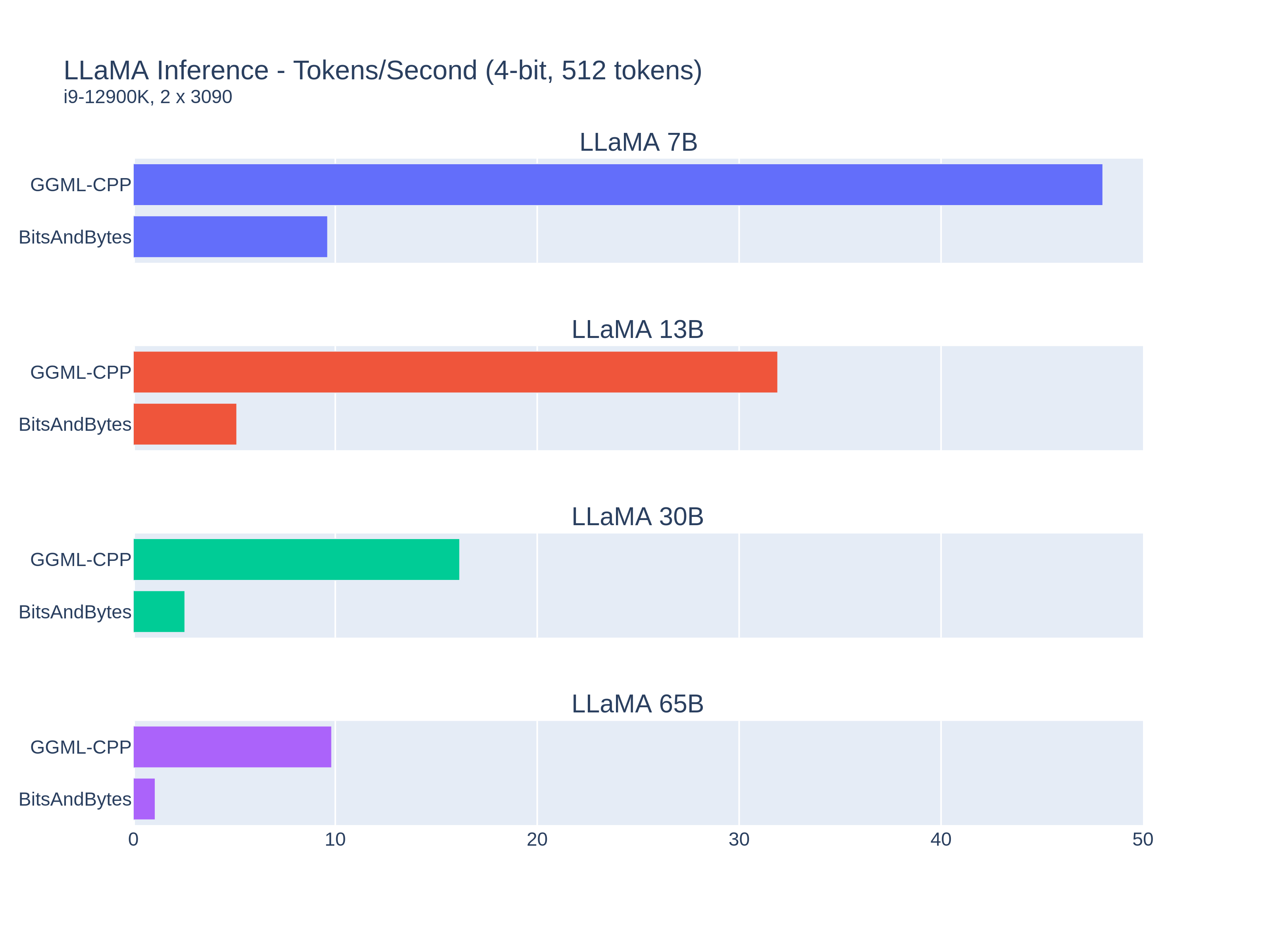
Different frameworks show significant performance variations. For example, GGML with cuBLAS significantly outperforms Hugging Face Transformers with BitsAndBytes quantization:
### Model Size and Quantization Impact
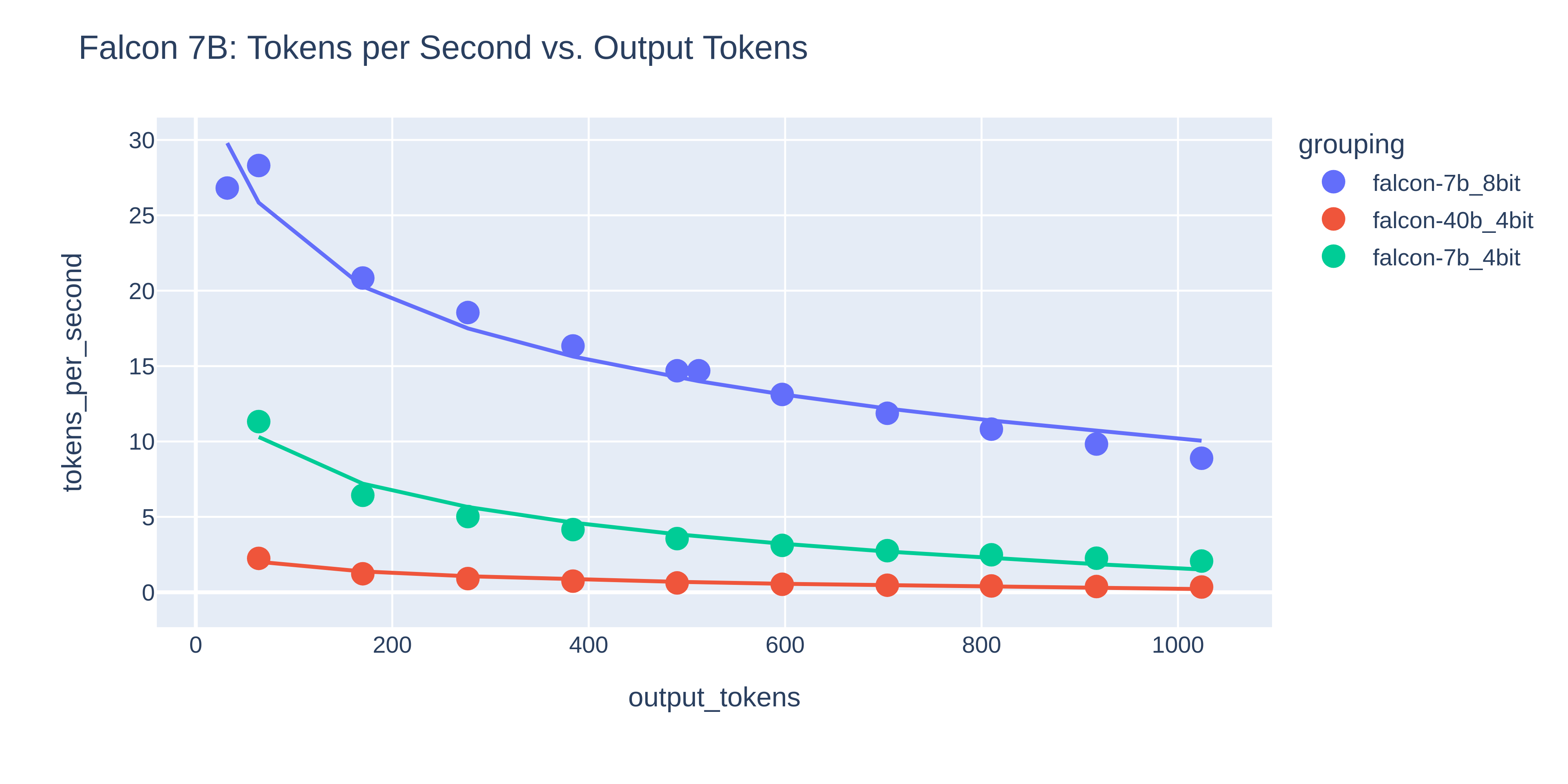
Benchmarks show how model size and quantization affect inference speed:
#### LLaMA Models

#### Dolly-2 Models

#### Falcon Models
## Hardware Considerations
Benchmarks have been run on various GPUs including:
- NVIDIA RTX 3090
- NVIDIA A10
- NVIDIA A100
- NVIDIA H100
The H100 consistently delivers the fastest performance but at a higher cost (~$2.40/hour). Surprisingly, the A10 performed below expectations despite its higher tensor core count, possibly due to memory bandwidth limitations.
## Managing Models
Models are stored in MongoDB and loaded dynamically by the scheduler. To add new models to the system, use the model management tools in the parent directory (`../manage-models.sh`).
## Contributing
Contributions are welcome! To add new models or frameworks:
1. Fork the repository
2. Create a feature branch
3. Add your implementation
4. Submit a pull request
For more details, see the individual README files in the `/local` and `/cloud` directories.
## License
This project is licensed under the MIT License - see the LICENSE file for details.