https://github.com/cisco-open/stated
Stated is a REPL and library for embedding JSONata expressions into JSON or YAML
https://github.com/cisco-open/stated
config json jsonata state state-management state-store yaml
Last synced: over 1 year ago
JSON representation
Stated is a REPL and library for embedding JSONata expressions into JSON or YAML
- Host: GitHub
- URL: https://github.com/cisco-open/stated
- Owner: cisco-open
- License: apache-2.0
- Created: 2023-07-12T22:01:39.000Z (about 3 years ago)
- Default Branch: main
- Last Pushed: 2024-05-22T06:49:08.000Z (about 2 years ago)
- Last Synced: 2024-05-22T23:23:13.280Z (about 2 years ago)
- Topics: config, json, jsonata, state, state-management, state-store, yaml
- Language: JavaScript
- Homepage: https://github.com/cisco-open/stated
- Size: 2.3 MB
- Stars: 14
- Watchers: 5
- Forks: 4
- Open Issues: 3
-
Metadata Files:
- Readme: README.md
- Contributing: CONTRIBUTING.md
- License: LICENSE
- Codeowners: .github/CODEOWNERS
Awesome Lists containing this project
README
# Stated
* [Stated](#stated)
* [Licensing and documentation](#licensing-and-documentation)
* [API docs](#api-docs)
* [Testing](#testing)
* [Intro](#intro)
* [Motivation](#motivation)
* [Getting Started](#getting-started)
* [Installation](#installation)
* [Running](#running)
* [REPL Mode](#repl-mode)
* [Oneshot mode](#oneshot-mode)
* [stated-js lib](#stated-js-lib)
* [API documentation](#api-documentation)
* [Basic usage](#basic-usage)
* [Stated-js package.json exports](#stated-js-packagejson-exports)
* [Node.js based projects](#nodejs-based-projects)
* [REPL Commands](#repl-commands)
* [.open](#open)
* [All commands](#all-commands)
* [.out](#out)
* [.color](#color)
* [.log](#log)
* [.set](#set-)
* [REPL command arguments](#repl-command-arguments)
* [--options](#--options)
* [strict](#strict)
* [--xf](#--xf)
* [--ctx](#--ctx)
* [Language & Syntax](#language--syntax)
* [Expressions and Variables](#expressions-and-variables)
* [Dollars-Moustache](#dollars-moustache)
* [Dollars-Variables](#dollars-variables)
* [Temporary Expressions](#temporary-expressions)
* [References](#references)
* [Expression Scope](#expression-scope)
* [Rerooting Expressions](#rerooting-expressions)
* [Tags](#tags)
* [Generative Templates](#generative-templates)
* [Reactive Behavior](#reactive-behavior)
* [SVG command](#svg-command)
* [YAML](#yaml)
* [Setting Values in the stated REPL](#setting-values-in-the-stated-repl)
* [Expression Scope](#expression-scope-1)
* [Rerooting Expressions](#rerooting-expressions-1)
* [DAG](#dag)
* [visualizing the plan with .svg command](#visualizing-the-plan-with-svg-command)
* [Concurrency](#concurrency)
* [Serialized Mutations](#serialized-mutations)
* [Atomic State Updates](#atomic-state-updates)
* [Multi Version Concurrency Control (MVCC) and $forked](#multi-version-concurrency-control-mvcc-and-forked)
* [YAML](#yaml-1)
* [Complex Data Processing](#complex-data-processing)
* [Functions](#functions)
* [JSONata built-in](#jsonata-built-in)
* [Stated functions](#stated-functions)
* [$timeout](#timeout)
* [$interval](#interval)
* [$fetch](#fetch)
* [$import](#import)
* [Importing bits of other templates](#importing-bits-of-other-templates)
* [Setting up local imports with --importPath](#setting-up-local-imports-with---importpath)
* [Import Javascript ES modules](#import-javascript-es-modules)
* [The __init sidecar function](#the-__init-sidecar-function)
* [$open](#open-1)
* [$set](#set)
* [$debounce](#debounce)
* [$defer](#defer)
* [$rateLimit](#ratelimit)
* [Custom Functions](#custom-functions)
* [Simple Custom Function Example](#simple-custom-function-example)
* [More Complex Function Example](#more-complex-function-example)
* [Error Handling](#error-handling)
* [The error object](#the-error-object)
* [Error Reporting](#error-reporting)
* [$errorReport function](#errorreport-function)
* [TemplateProcessor Snapshots](#templateprocessor-snapshots)
* [Understanding Plans](#understanding-plans)
* [Planning](#planning)
* [MetaInfo Graph](#metainfo-graph)
* [DFS Tree Traversal](#dfs-tree-traversal)
# Licensing and documentation
Stated is a cisco-open, Apache 2 Licensed, Open Source project at https://github.com/cisco-open/stated, our github
main page.
# API docs
If you would like to see a table of contents and developer API docs, jump over to our API docs page which is
generated in CI and [published here](https://cisco-open.github.io/stated/index.html). Most developers will need to
interact with the TemplateProcessor. It's [API Docs are here](https://cisco-open.github.io/stated/classes/TemplateProcessor.default.html)
# Testing
Are the examples in this README
correct/reliable? Every markdown codeblock in this readme is
[tested on every commit](https://github.com/cisco-open/stated/blob/main/README.test.js).
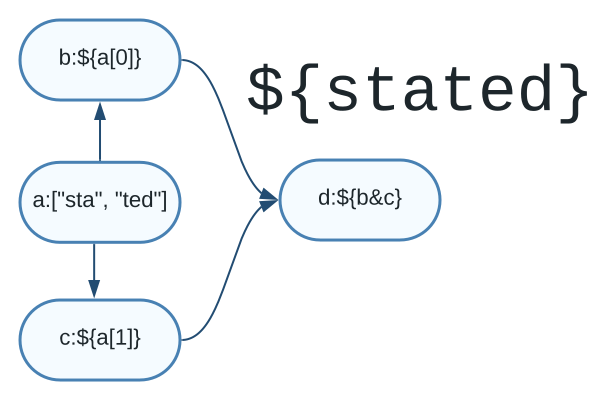
# Intro
Stated is an engine of reactive state (a State Daemon). State is expressed as JSON or YAML. Rules for evolving state are
written via embedded [JSONata](http://docs.jsonata.org/) expressions in classic shell variable syntax `${}`.
```shell
cat examples/hello.json
{
"to": "world",
"msg": "${'hello ' & to}"
}
```
You can use stated as a 'one shot' template processor that computes all bound states once. If we run the template above
through stated, we see the `${}` expression has been evaluated:
```shell
stated example/hello.json
{
"to": "world",
"msg": "hello world"
}
```
Variables can be passed in:
```shell
cat example/helloVar.json
{
"msg": "${'hello ' & $TO}"
}
stated example/helloVar.json --ctx.TO=world
{
"msg": "hello world"
}
```
The more interesting use of Stated is an engine of reactive state. Load a template in the REPL, `.set` a value
and watch the state evolve.
```json
stated
> .init -f example/hello.json
{
"to": "world",
"msg": "${'hello ' & to}"
}
> .set /to "Joshua"
{
"to": "Joshua",
"msg": "hello Joshua"
}
> .set /to "David Lightman"
{
"to": "David Lightman",
"msg": "hello David Lightman"
}
```
Stated templates can contain expressions, reusable functions, and can even use JS timeouts and intervals. Let's see
a template that increments a counter every 10 ms, forever, as long it is running in the Stated
engine. We will use the `--tail` command to tail the `count` variable until it reaches 100, then
automatically disconnect the tail.
```json ["data = 100"]
cat example/infiniteCount.json
{
"count": 0,
"counter": "${ $setInterval(function(){$set('/count', count+1)}, 10) }",
}
stated
> .init -f example/infiniteCount.json --tail "/count until $=100"
Started tailing... Press Ctrl+C to stop.
100
```
Stated is written in JS, and runs in the browser and in Node. Stated's REPL extends the Node.js REPL and allows you to
interact with running templates. Stated uses asynchronous event loop I/O and can be used to orchestrate complex workflows:
```json
> .init -f example/homeworlds.json
{
"lukePersonUrl": "${ $fetch('https://swapi.tech/api/people/?name=luke').json().**.url}",
"lukePersonDetails": "${ $fetch(lukePersonUrl).json().result[0]}",
"lukeHomeworldURL": "${ lukePersonDetails.**.homeworld }",
"homeworldDetails": "${ $fetch(lukeHomeworldURL).json() }",
"homeworldName": "${ homeworldDetails.**.name }"
}
> .out /homeworldName
"Tatooine"
```
Unlike an ordinary program, Stated templates can be kept "alive" indefinitely. A change to any of the independent fields
causes change propagation throughout the DAG. Stated includes a node REPL, `stated.ts`, for testing Stated json templates, and a JS library for embedding stated
in applications. A typical REPL session consists of loading a template with the `init` command, viewing the computed
output with the `.out` command and then setting values with the `.set` command and observing the changed output.
```json [false, false, "a=87 and e=42"]
falken$ stated
> .init -f "example/ex08.json"
{
"a": "${c}",
"b": "${d+1+e}",
"c": "${b+1}",
"d": "${e+1}",
"e": 1
}
> .out
{
"a": 5,
"b": 4,
"c": 5,
"d": 2,
"e": 1
}
> .set /e 42
{
"a": 87,
"b": 86,
"c": 87,
"d": 43,
"e": 42
}
```
Stated templates are modular and can be imported from a URL:
```json
> .init -f "example/ex18.json"
{
"noradCommander": "${ norad.commanderDetails }",
"norad": "${ $import('https://raw.githubusercontent.com/geoffhendrey/jsonataplay/main/norad.json')}"
}
> .out
{
"noradCommander": {
"fullName": "Jack Beringer",
"salutation": "General Jack Beringer",
"systemsUnderCommand": 4
},
"norad": {
"commanderDetails": {
"fullName": "Jack Beringer",
"salutation": "General Jack Beringer",
"systemsUnderCommand": 4
},
"organization": "NORAD",
"location": "Cheyenne Mountain Complex, Colorado",
"commander": {
"firstName": "Jack",
"lastName": "Beringer",
"rank": "General"
},
"purpose": "Provide aerospace warning, air sovereignty, and defense for North America",
"systems": [
"Ballistic Missile Early Warning System (BMEWS)",
"North Warning System (NWS)",
"Space-Based Infrared System (SBIRS)",
"Cheyenne Mountain Complex"
]
}
}
```
# Motivation
Consider this ordinary program:
```js
let a=1;
let b=a;
a=42;
console.log(b); //prints out 1
```
In an ordinary sequential program the value of `b` is not affected by changes to the value of `a`
at any point after the value of `b` has been assigned. But there are many situations where we
do NOT want a sequential program execution Instead, we actually want `b` to change when `a` changes. Broadly, these cases fall under the rubric
of "reactive" or "state driven" applications. When we try to build reactive applications
upon a sequential execution model we are forced to code the data flow graph ourselves and things become
very complex quickly. How could we make `b` change any time `a` changes in a sequential world? Perhaps naively like this?
```js
let a=1;
let b=a;
function setA(val){
a=val;
b=a;
}
```
...or perhaps more generally like this:
```js
let data = {
a: 1,
b: 1
};
let handler = {
set: function(target, property, value) {
if (property === 'a') {
target.b = value; // When 'a' changes, also change 'b'
}
target[property] = value;
return true; // The set operation was successful
}
};
let proxy = new Proxy(data, handler);
proxy.a = 2; // Setting a new value for 'a'
console.log(proxy.a); // Outputs: 2
console.log(proxy.b); // Outputs: 2
```
Every "coding" approach requires us to understand and implement code for propagating data dependencies. Stated solves
for this by natively parsing and understanding dependencies.
```json
{
"a": 1,
"b$": "a"
}
```
`b$` is now declared to be continuously dependent upon `a` and reactive to any changes in `a`. This greatly
simplifies the development of systems that *are* naturally reactive or dependency heavy, such as:
* dynamic/continuous reactive UI state
* lambda-like computations
* workflows
* configuration file
# Getting Started
## Installation
To install the `stated-js` package, you can use yarn or npm. Open your terminal and run one of the following commands:
Using Yarn:
```shell
yarn global add stated-js
````
Using Npm:
```shell
npm install -g stated-js
````
## Running
### REPL Mode
To use the Stated REPL (Read-Eval-Print Loop) it is recommended to have at least version 19.2 or higher of node.js. The
Stated REPL is built on [Node REPL](https://nodejs.org/api/repl.html#repl).
You can start the REPL by running the `stated` command in your terminal:
```shell
stated
```
The REPL will launch, allowing you to interact with the stated-js library. For example you can enter this command in the
REPL:
```bash
> .init -f "example/ex01.json"
```
### Oneshot mode
in oneshot mode, stated.ts simply computes the output template and exits. This is useful when you do not intend to
change any if the fields after the initial output render
```bash
falken$ stated example/ex01.json
{
"to": "world",
"msg": "hello world"
}
```
# stated-js lib
## API documentation
API documentation is generated in CI and published to the project github page at https://cisco-open.github.io/stated/
## Basic usage
Much more detailed progammer usage can be found by perusing https://cisco-open.github.io/stated/classes/TemplateProcessor.default.html
To use the stated-js library in your own projects, you can require it as a dependency.
Here's an example of how you can import it into your JavaScript file:
```js
import TemplateProcessor from 'stated-js'
async function tryIt() {
const tp = new TemplateProcessor({
"a": "aaa",
"b": "${a}"
});
await tp.initialize();
await tp.setData("/a", 42);
console.log(JSON.stringify(tp.output));
// console will print...
// {
// "a": 42,
// "b": 42
// }
}
tryIt().catch(err => console.error(err));
```
#### Stated-js package.json exports
The distribution of stated-js exports two different webpacks, one for ES Module (ie "import") which is in `./dist/bundle.mjs`,
and one for Common JS (ie "require") which is in `./dist/bundle-common-js.cjs`. Using `import` or `require` in your JS
code from a project with a package.json will automatically choose the correct dist target. Both the ES and Common JS
exports are designed for use in the browser. Here is an excerpt of package.json showing exactly what is exported.
```json
"exports": {
".": {
"import": "./dist/bundle.mjs",
"require": "./dist/bundle-common-js.cjs"
},
"./dist/src/TemplateProcessor.js": "./dist/src/TemplateProcessor.js",
"./dist/src/CliCore.js": "./dist/src/CliCore.js",
"./dist/src/StatedREPL.js": "./dist/src/StatedREPL.js"
}
```
#### Node.js based projects
If you are building for a Node.js environment you should not use the webpacked exports for `import` or `require`.
Instead, use the 'raw' `TemplateProcessor.js`, `CliCore.js`, and `StatedREPL.js`. Write your import statement like this
for Node.js :
```js
import TemplateProcessor from 'stated-js/dist/src/TemplateProcessor.js';
```
When you run Node.js, you must pass `--experimental-vm-modules` flag to the Node.js runtime. This is due to the
fact that stated-js is written using ES Module syntax.
# REPL Commands
REPL commands can be used once you start the REPL by running `stated` from your prompt. All examples in this
doc assume your working directory is the stated git repo's root folder.
## .open
Stated provides a set of REPL commands to interact with the system. The `.open` command is the easiest way to get started
opening an example template:

## All commands
| Command | Description | flags & args | Example |
|------------|----------------------------------------------------------------------|----------------------------------------------------------------------------------------------------------------------------------------------------------------------------------------------------|------------------------------------------------------------------------------------------------------------------------------------------------------------------------------------------------|
| `.open` | Interactive command to open a template (defaults to examples folder) | | `.open` |
| `.cd` | Change directory (then use .open command) | | `.cd ..` |
| `.init` | Initialize the template from a JSON file. | • `-f `
• `--tags=`
•`--options=`
• `--xf=`
• `--importPath=`
• `--tail "" --ctx.=val` | `.init -f "example/hello.json" --tags=FOO,BAR --xf=~/falken/myEnv.json --options={"strict":{"refs":true}} --importPath=~/falken/mytemplates --tail "/ until msg='hello world'" --ctx.TO=world` |
| `.set` | Set data to a JSON pointer path. | ` ` | `.set /to "jsonata"` |
| `.from` | Show the dependents of a given JSON pointer. | `` | `.from /a` |
| `.to` | Show the dependencies of a given JSON pointer. | `` | `.to /b` |
| `.in` | Show the input template. | `None` | `.in` |
| `.out` | Show the current state of the template. | `[]` | `.out`
`.out /data/accounts` |
| `.state` | Show the current state of the template metadata. | `None` | `.state` |
| `.plan` | Show the execution plan for rendering the template. | `None` | `.plan` |
| `.note` | Show a separator line with a comment in the REPL output. | `` | `.note "Example 8"` |
| `.log` | Set the logging level | `[silent, error, warn, info, verbose, debug]` | `.log silent` |
| `.color` | Enable Colors | `[on,off]` | `.color on` |
| `.tail` | Tail part of the document for changes | ` (until )?` | `.tail /`
`.tail "/ until foo='bar'"` |
| `.svg` | Serve an SVG diagram of the DAG | `--port ` (defaults to 4242) | `.svg --port 3000` |
| `.restore` | Restore from a snapshot | • `-f `
• `--tags=`
• `--xf=`
• `--importPath=`
• `--tail ""` | `.restore -f "example/restoreSnapshot.json" --tail "/count until $=10"` |
## .out
The stated repl lets you experiment with templates. The simplest thing to do in the REPL is load a json file. The REPL
parses the input, builds an execution plan, and executes the result. To see the result you have to use the `.out`
```json
> .init -f "example/ex09.json"
{
"a": [
0,
1,
"${ $[0] + $[1] }"
]
}
> .out
{
"a": [
0,
1,
1
]
}
```
## .color
You can set terminal colors for enhanced readability from a terminal
```json
> .note color does not appear in this markdown file
"============================================================="
> .color on
> .init -f "example/ex01.json"
{
"a": 42,
"b": "${a}",
"c": "${'the answer is: '& b}"
}
```
## .log
the `.log` command can set the log level to `[silent, error, warn, info, verbose, debug]`. Enabling high
log levels like debug can help you track down problems with expressions.
```json
> .log debug
{
"log level": "debug"
}
```
```shell
.init -f "example/errors.json"
arguments: {"_":[],"f":"example/errors.json","filepath":"example/errors.json","tags":[],"oneshot":false,"options":{}}
verbose: initializing...
debug: tags: {}
verbose: evaluating template...
error: Error evaluating expression at /b
error: The right side of the "+" operator must evaluate to a number {"code":"T2002","position":3,"stack":"Error\n at evaluateNumericExpression (/Users/ghendrey/proj/jsonataexperiments/node_modules/jsonata/jsonata.js:4122:25)\n at evaluateBinary (/Users/ghendrey/proj/jsonataexperiments/node_modules/jsonata/jsonata.js:3900:30)\n at async evaluate (/Users/ghendrey/proj/jsonataexperiments/node_modules/jsonata/jsonata.js:3490:26)\n at async Object.evaluate (/Users/ghendrey/proj/jsonataexperiments/node_modules/jsonata/jsonata.js:5558:26)\n at async TemplateProcessor._evaluateExprNode (file:///Users/ghendrey/proj/jsonataexperiments/src/TemplateProcessor.ts:637:25)\n at async TemplateProcessor._evaluateExpression (file:///Users/ghendrey/proj/jsonataexperiments/src/TemplateProcessor.ts:556:28)\n at async TemplateProcessor.evaluateJsonPointersInOrder (file:///Users/ghendrey/proj/jsonataexperiments/src/TemplateProcessor.ts:515:31)\n at async TemplateProcessor.evaluateDependencies (file:///Users/ghendrey/proj/jsonataexperiments/src/TemplateProcessor.ts:358:16)\n at async TemplateProcessor.evaluate (file:///Users/ghendrey/proj/jsonataexperiments/src/TemplateProcessor.ts:123:9)\n at async TemplateProcessor.initialize (file:///Users/ghendrey/proj/jsonataexperiments/src/TemplateProcessor.ts:113:9)","token":"+","value":" is not a string"}
debug: Expression: a + ' is not a string'
debug: Target: {
"a": 42,
"b": "${a + ' is not a string'}"
}
debug: Result: null
verbose: _evaluateExpression at /b completed in 13 ms.
verbose: evaluation complete in 13 ms...
verbose: initialization complete...
{
"a": 42,
"b": "${a + ' is not a string'}"
}
```
## .set
The stated REPL also allows you to dynamically set values in your templates, further aiding in debugging and development.
In the example below `.set /a/0 100` sets a[0] to 100. The syntax of `/a/0` is [RFC-6901 JSON Pointer](https://datatracker.ietf.org/doc/html/rfc6901).
```json
> .init -f "example/ex09.json"
{
"a": [
0,
1,
"${ $[0] + $[1] }"
]
}
> .set /a/0 100
{
"a": [
100,
1,
101
]
}
```
## REPL command arguments
### --options
The cli and REPL both support `--options` which can be provided as arguments to other commands
Options can also be used in oneshot mode. Note the use of backslashes to escape quotes in the JSON on the CLI
```shell
falken$ stated --options={\"strict\":{\"refs\":true}} example/strictref.json
error: /z does not exist, referenced from /c (strict.refs option enabled)
{
a: 42,
b: 42,
c: {
error: {
name: 'strict.refs',
message: '/z does not exist, referenced from /c (strict.refs option enabled)'
}
}
}
```
#### strict
The `strict` option currently supports the `refs` property. Setting `{"strict":{"refs":true}}` will cause templates
to throw an Exception when references in the template cannot be resolved. Reference checking is only performed against
the template itself; it is not performed agains variables that are injected into the execution context by the TemplateProcessor
library.
```json
> .log silent
{
"log level": "silent"
}
> .init -f "example/strictref.json" --options={"strict":{"refs":true}}
{
"a": 42,
"b": "${a}",
"c": "${z}"
}
> .out
{
"a": 42,
"b": 42,
"c": {
"error": {
"name": "strict.refs",
"message": "/z does not exist, referenced from /c (strict.refs option enabled)"
}
}
}
```
### --xf
The `--xf` argument can be used to provide a context file. Context is used
to provide [JSONata Bindings](https://docs.jsonata.org/embedding-extending#expressionevaluateinput-bindings-callback)
```shell
> .note here is a regular json file
"============================================================="
> .init -f "example/env.json"
{
"env": {
"name": "Dr. Stephen Falken",
"addr": "Goose Island, OR, USA"
}
}
> .note let's use it as context to a stated template
"============================================================="
> .init -f "example/useEnv.json" --xf=example/env.json
{
"name": "${$env.name}",
"address": "${$env.addr}"
}
> .out
{
"name": "Dr. Stephen Falken",
"address": "Goose Island, OR, USA"
}
```
### --ctx
The `--ctx` argument can be used to inject context variables into the template. Variables with a sinle `$` like `$foo`
refer to the JSONata Context. You can inject variables into the context using `--ctx.=val`.
```shell
> .init -f example/ctx.json --ctx.name david --ctx.games.choice1=chess --ctx.games.choice2 "global thermonuclear war"
{
"msg": "${'Hello, ' & $name & ', how about a nice game of ' & $games.choice1}",
"games": "${$games}"
}
> .out
{
"msg": "Hello, david, how about a nice game of chess",
"games": {
"choice1": "chess",
"choice2": "global thermonuclear war"
}
}
```
# Language & Syntax
## Expressions and Variables
What makes a Stated template different from an ordinary JSON file? JSONata Expressions of course! Stated analyzes the
Abstract Syntax Tree of every JSONata expression in the file, and learns what _references_ are made by each expression
to other fields of the document. The _references_ of an expression become the _dependencies_ of the field, which are
used to build a DAG. The DAG allows Stated to know what expressions to compute if any fields of the document change.
Fields of the document are changed either via the REPL `.set` function, or by calling the equivalent library function.
Many classes of _reactive_ application need to maintain state, and need to propagate state changes through the _dependees_
of a particular field (a _dependee_ of foo is a field that _depends_ on foo). Stated can be used as state store for
reactive applications.
## Dollars-Moustache
returning to our `example/hello.json`, the `msg` field is a simple example of a dollars-moustache.
Stated allows JSONata _expressions_ to be embedded in a JSON document using `${<...JSONata here...>}` syntax. The `${}`
tells stated that a field such as `msg` is not an ordinary string field, but rather a JSONata expression that has to be
evaluated in order to _compute_ the value of the field.
```json
falken$ cat example/hello.json
{
"to": "world",
"msg": "${'hello ' & to}"
}
```
## Dollars-Variables
There is also a more concise alternative to `${}`. The field can simply be named with a trailing
dollars sign.
```json
{
"to": "world",
"msg$": "'hello ' & to"
}
```
However the `foo$` style can only be used when the expression is being assigned to a field. It won't work for array
elements like this, where there is no field name. For array elements the `${}` must be used:
```json
[1, 2, "${$[0]+$[1]}"]
```
## Temporary Expressions
The `!` symbol is used mark fields as temporary. The `!` can be used both as a prefix to the expression, and as a suffix
to a key. Temporary fields are removed from the output.
Notice how /b and /c! are removed from the output. Also notice that when an expression like ```${`c!`.c1}``` refers to `c!`
that backtics must be used.
```json
> .init -f "example/tempVars.json"
{
"a": 42,
"b": "!${a}",
"c!": {
"c1": "../${a + 1}"
},
"d": "${`c!`.c1}"
}
> .out
{
"a": 42,
"d": 43
}
```
## References
The most important thing stated does is analyze your embedded jsonata programs to understand their _references_. This
means that as the user you don't have to _tell_ stated what an expression depends on, and
consequently you don't have to instruct Stated on how it should react to changes. It _knows_. In the example below, a JSONata [_block_](https://docs.jsonata.org/programming) is used to produce `defcon$`. It
defines local variables like `$tmp` which are pure JSONata constructs. The JSONata program also references fields
of the input like `MAX_DEFCON` and `threatLevel`. States understands that if `threatLevel changes`,
`defcon$` must be recalculated. As shown below after viewing the output with the `.out` commnand, we
mutate the `threatLevel` field which results in `defcon$` changing from 3 to 5.
```json
> .init -f "example/ex20.json"
{
"defcon$": "($tmp:=$floor(intelLevel * threatLevel);$tmp:= $tmp<=MAX_DEFCON?$tmp:MAX_DEFCON;$tmp>=MIN_DEFCON?$tmp:MIN_DEFCON)",
"MAX_DEFCON": 5,
"MIN_DEFCON": 1,
"intelLevel": 1.45,
"threatLevel": 2.2
}
> .out
{
"defcon$": 3,
"MAX_DEFCON": 5,
"MIN_DEFCON": 1,
"intelLevel": 1.45,
"threatLevel": 2.2
}
> .set /threatLevel 3.5
{
"defcon$": 5,
"MAX_DEFCON": 5,
"MIN_DEFCON": 1,
"intelLevel": 1.45,
"threatLevel": 3.5
}
```
## Expression Scope
Individual JSONata programs are embedded in JSON files between `${..}`. What is the input to the JSONata program?
The input, by default, is the object or array that the expression resides in. For instance in the example **above**, you can see that the JSONata `$` variable refers to the array itself. Therefore, expressions like `$[0]`
refer to the first element of the array.
## Rerooting Expressions
In Stated templates, one way to declare a JSONata expression is by surrounding it by "dollars moustaches".
E.g `${...some expression...}`. JSONata expressions always have a [context](https://docs.jsonata.org/programming#built-in-variables).
The `$` variable always points to the current context. The `$$` variable always points to the input (root context) for an
expression.
In a Stated template, the root context for an expression is the object in which the expression is contained. For
Example:
```json
> .init -f "example/context.json"
{
"a": {
"b": "${[c,' and ',$.c,' and ',$$.c,' are the same thing. $ (current context) is /a, the object in which this expression resides']~>$join}",
"c": "hello"
}
}
> .out
{
"a": {
"b": "hello and hello and hello are the same thing. $ (current context) is /a, the object in which this expression resides",
"c": "hello"
}
}
```
Now we will show how we can change the context of an expression using 'rerooting.' Rerooting allows the expression's root
context to be pointed anywhere in the json document.
In the example below, consider `greeting & ', ' & player1'`. We want `player1` to refer to the content at json pointer `/player1` (the field named 'player1' at the root of the document).
But our expression `greeting & ', ' & player1` is located deep in the document at `/dialog/partI`. So how can we cause
the root of the document to be the context for the JSONata expression `greeting & ', ' & player1`?
You can reroot an expression in a different part of the document using relative rooting `../${}` syntax or you can root an
at the absolute doc root with `/${}`. The example below shows how expressions located below the root object, can
explicitly set their context using the rooting syntax. Both absolute rooting, `/${...}` and relative rooting `../${...}`
are shown.
```json
> .init -f "example/ex04.json"
{
"greeting": "Hello",
"player1": "Joshua",
"player2": "Professor Falken",
"dialog": {
"partI": [
"../../${greeting & ', ' & player1}",
"../../${greeting & ', ' & player2}"
],
"partII": {
"msg3": "/${player1 & ', would you like to play a game?'}",
"msg4": "/${'Certainly, '& player2 & '. How about a nice game of chess?'}"
}
}
}
> .out
{
"greeting": "Hello",
"player1": "Joshua",
"player2": "Professor Falken",
"dialog": {
"partI": [
"Hello, Joshua",
"Hello, Professor Falken"
],
"partII": {
"msg3": "Joshua, would you like to play a game?",
"msg4": "Certainly, Professor Falken. How about a nice game of chess?"
}
}
}
```
An advanced rerooting operator is the `//` absolute root operator. The `/` rooting operator, that we showed above, will never allow the expression
to 'escape' outside of the template it was defined in. But what if we intend for a template to be imported into another template
and we expect there to be a variable defined in the other template that we should use? This is where the `//` absolute root
operator can be used. The `//` operator will set the expression context to the absolute root of whatever the final document is
after all imports have been performed.
```json
> .init -f "example/absoluteRoot.json"
{
"to": "!${'Professor Falken'}",
"greeting": "//${'Hello, ' & to}"
}
> .out
{
"greeting": "Hello, Professor Falken"
}
> .init -f "example/importsAbsoluteRoot.json"
{
"to": "Joshua",
"message": "${$import('example/absoluteRoot.json')}"
}
> .out
{
"to": "Joshua",
"message": {
"greeting": "Hello, Joshua"
}
}
```
## Tags
JSONata "dollars moustache" expressions can be _tagged_ with `@tag` syntax. In the example below our template
declares tags WAR and PEACE. Expressions with a tag will only be executed when the corresponding tag is
provided in the `--tags` flag. When tags are provided with `--tags` untagged expressions will be ignored.
Tags such as `@WAR` and `@PEACE` are automatically propagated transitively to all dependent expressions.
Therefore, in the example below only `peace` requires the `@PEACE` tag, which is transitively applies to
`peaceMsg` and `warAndPeaceMsg`. In large templates this is extrememly desirable to as it alleviates the
developer of having to maintain the tag by continually checking that any expressions that depend on a tagged
expression are also tagged.
```json
> .init -f "example/ex23.json"
{
"peace": "@PEACE ${'DEFCON 1'}",
"war": "@WAR ${'DEFCON 5'}",
"warMsg": "${'war is ' & war}",
"peaceMsg": "${'Peace is ' & peace}",
"warAndPeaceMsg": "${ [warMsg,peaceMsg]~>$join(' ') }",
"untaggedExpr": "${'A strange game. The only winning move is not to play.'}"
}
> .out
{
"peace": "@PEACE ${'DEFCON 1'}",
"war": "@WAR ${'DEFCON 5'}",
"warMsg": "${'war is ' & war}",
"peaceMsg": "${'Peace is ' & peace}",
"warAndPeaceMsg": "${ [warMsg,peaceMsg]~>$join(' ') }",
"untaggedExpr": "A strange game. The only winning move is not to play."
}
> .init -f "example/ex23.json" --tags=PEACE
{
"peace": "@PEACE ${'DEFCON 1'}",
"war": "@WAR ${'DEFCON 5'}",
"warMsg": "${'war is ' & war}",
"peaceMsg": "${'Peace is ' & peace}",
"warAndPeaceMsg": "${ [warMsg,peaceMsg]~>$join(' ') }",
"untaggedExpr": "${'A strange game. The only winning move is not to play.'}"
}
> .out
{
"peace": "DEFCON 1",
"war": "@WAR ${'DEFCON 5'}",
"warMsg": "${'war is ' & war}",
"peaceMsg": "Peace is DEFCON 1",
"warAndPeaceMsg": "${ [warMsg,peaceMsg]~>$join(' ') }",
"untaggedExpr": "${'A strange game. The only winning move is not to play.'}"
}
> .init -f "example/ex23.json" --tags=PEACE,WAR
{
"peace": "@PEACE ${'DEFCON 1'}",
"war": "@WAR ${'DEFCON 5'}",
"warMsg": "${'war is ' & war}",
"peaceMsg": "${'Peace is ' & peace}",
"warAndPeaceMsg": "${ [warMsg,peaceMsg]~>$join(' ') }",
"untaggedExpr": "${'A strange game. The only winning move is not to play.'}"
}
> .out
{
"peace": "DEFCON 1",
"war": "DEFCON 5",
"warMsg": "war is DEFCON 5",
"peaceMsg": "Peace is DEFCON 1",
"warAndPeaceMsg": "war is DEFCON 5 Peace is DEFCON 1",
"untaggedExpr": "${'A strange game. The only winning move is not to play.'}"
}
```
# Generative Templates
Templates can contain generative expressions that cause their content to change over time.
For instance the `$setInterval` function behaves exactly as it does in Javascript. Below,
it causes the `incr` function to be called forever, every 10 ms.
```json
> .init -f "example/tail.json"
{
"incr": "${function(){$set('/counter',counter+1)}}",
"counter": 0,
"upCount": "${ $setInterval(incr, 10) }"
}
```
The `tail` command can be used to watch changes on a particular field. Below we use `--tail "/ until counter=5"` to tail
the document root until the value of counter reaches 5, at which point `--tail` stops
producing output, though the `incr` function is still being called every 10 ms.
field:
```json ["data.counter = 5"]
> .init -f "example/tail.json" --tail "/ until counter=5"
Started tailing... Press Ctrl+C to stop.
{
"incr": "{function:}",
"counter": 5,
"upCount": "--interval/timeout--"
}
```
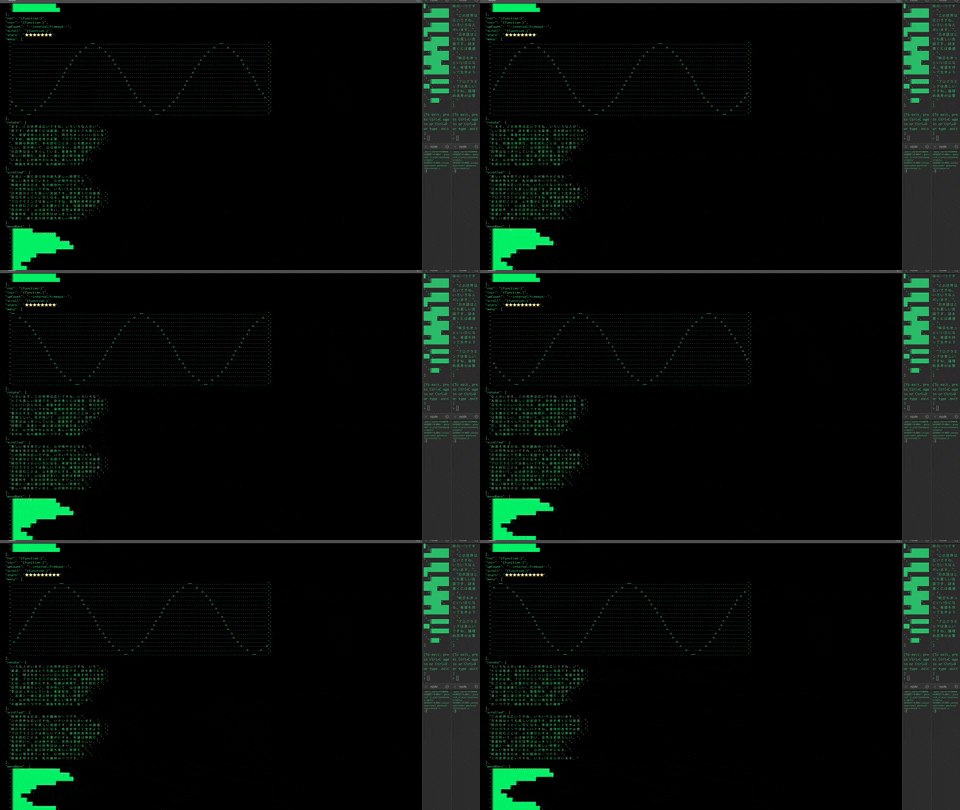
Here was have a more complex example, again using $setInterval to increment a counter
that drives rotation and scrolling of arrays and strings.
```json
> .init -f "example/tailgraphs.yaml"
{
"i": 0,
"mod": "${i%10}",
"ms": 30,
"chars": [
"この世界は広いですね。いろいろな人がいます。",
"日本語はとても美しい言語です。詩を書くには最適。",
"明日もきっといい日になる。希望を持って生きよう。",
"プログラミングは楽しいですね。論理的思考が必要。",
"本を読むことは、心を豊かにする。知識は無限だ。",
"花が咲いて、山は緑が多い。自然は素晴らしい。",
"春夏秋冬、日本の四季ははっきりしている。",
"友達と一緒に遊ぶ時が最も楽しい時間だ。",
"美しい海を見ていると、心が穏やかになる。",
"映画を見るのは、私の趣味の一つです。"
],
"wave": [
"................==................................................................==................................................",
".............o......o..........................................................o......o.............................................",
"..........o............o....................................................o............o..........................................",
"........o................o................................................o................o........................................",
"......o....................o............................................o....................o......................................",
".....o......................o..........................................o......................o.....................................",
"...o..........................o......................................o..........................o...................................",
"..o............................o....................................o............................o..................................",
".o...............................o.................................o...............................o................................",
"..................................o..............................o..................................o..............................o",
"...................................o............................o....................................o............................o.",
"....................................o..........................o......................................o..........................o..",
"......................................o......................o..........................................o......................o....",
".......................................o....................o............................................o....................o.....",
".........................................o................o................................................o................o.......",
"...........................................o............o....................................................o............o.........",
"..............................................o......o..........................................................o......o............",
".................................................==................................................................==..............."
],
"chart": [
"║█████████████████████████████",
"║███████████████████████████████",
"║██████████████████████",
"║████████████",
"║█████████",
"║████",
"║███████",
"║██████████",
"║██████████████████████",
"║████████████████████████"
],
"rot": "${ function($arr){$arr.($substring($, $$.i%$length($)) & $substring($, 0, $$.i%$length($)))} }",
"incr": "${ function(){ $set('/i', i+1) } }",
"upCount": "${ $setInterval(incr, ms) }",
"scroll": "${ function($arr){ $arr[[$$.mod..9]] ~> $append($arr[[0..$$.mod]])} }",
"stars": "${[1..$$.i%20].($=19?'🚀':'⭐')~>$join}",
"wavy": "${ (i;rot(wave)) }",
"rotate": "${ (i;rot(chars)) }",
"scrolled": "${ (i;scroll(chars))}",
"moveBars": "${ (i;scroll(chart))}"
}
```
Setting `--tail /` instructs the REPL to tail the root of the
document "in place" so the screen does not scroll and you can observe
live changes to the json document.
`> .init -f "example/tailgraphs.yaml" --tail /`
# Reactive Behavior
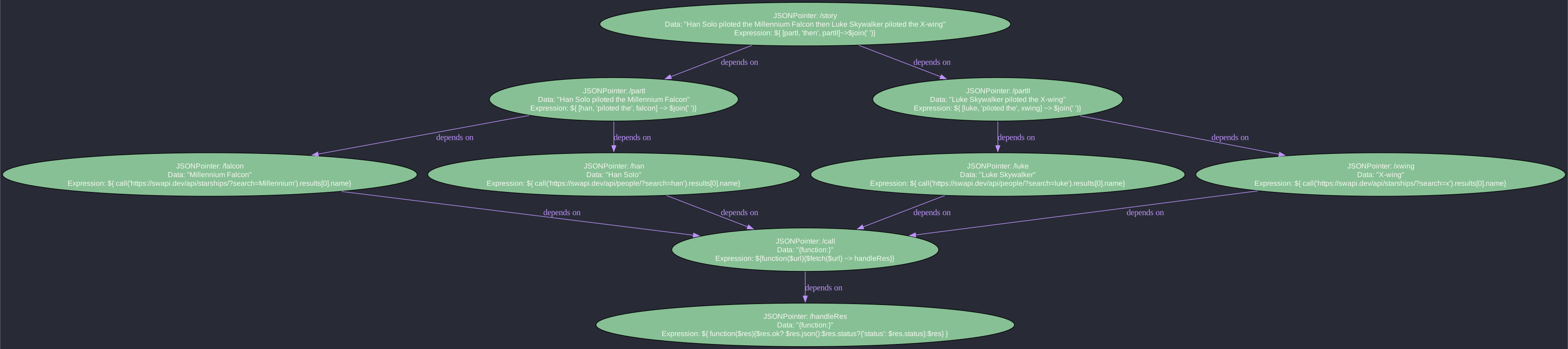
Stated is naturally reactive. In the example below, `story` will evaluate when the promises for `partI` and `partII` have both
resolved, simply because `story` has references to `partI` and `partII`, each of which respectively is triggered by the
resolution of the two fetch functions they each depend on.
```json
> .init -f "example/ex21.json"
{
"call": "${function($url){$fetch($url) ~> handleRes}}",
"falcon": "${ call('https://swapi.tech/api/starships/?name=Millennium').result[0].properties.name}",
"han": "${ call('https://swapi.tech/api/people/?name=han').result[0].properties.name}",
"handleRes": "${ function($res){$res.ok? $res.json():$res.status?{'status': $res.status}:$res} }",
"luke": "${ call('https://swapi.tech/api/people/?name=luke').result[0].properties.name}",
"partI": "${ [han, 'piloted the', falcon] ~> $join(' ')}",
"partII": "${ [luke, 'piloted the', xwing] ~> $join(' ')}",
"story": "${ [partI, 'then', partII]~>$join(' ')}",
"xwing": "${ call('https://swapi.tech/api/starships/?name=x-wing').result[0].properties.name}"
}
> .plan
[
"/handleRes",
"/call",
"/falcon",
"/han",
"/luke",
"/partI",
"/xwing",
"/partII",
"/story"
]
> .out
{
"story": "Han Solo piloted the Millennium Falcon then Luke Skywalker piloted the X-wing",
"handleRes": "{function:}",
"call": "{function:}",
"partI": "Han Solo piloted the Millennium Falcon",
"luke": "Luke Skywalker",
"xwing": "X-wing",
"partII": "Luke Skywalker piloted the X-wing",
"han": "Han Solo",
"falcon": "Millennium Falcon"
}
```
## SVG command
The .svg command serves an SVG diagram of the DAG
```json [false, "$='http://localhost:4042'"]
> .init -f "example/ex21.json"
{
"story": "${ [partI, 'then', partII]~>$join(' ')}",
"handleRes": "${ function($res){$res.ok? $res.json():$res.status?{'status': $res.status}:$res} }",
"call": "${function($url){$fetch($url) ~> handleRes}}",
"partI": "${ [han, 'piloted the', falcon] ~> $join(' ')}",
"luke": "${ call('https://swapi.tech/api/people/?name=luke').result[0].properties.name}",
"xwing": "${ call('https://swapi.tech/api/starships/?name=x-wing').result[0].properties.name}",
"partII": "${ [luke, 'piloted the', xwing] ~> $join(' ')}",
"han": "${ call('https://swapi.tech/api/people/?name=han').result[0].properties.name}",
"falcon": "${ call('https://swapi.tech/api/starships/?name=Millennium').result[0].properties.name}"
}
> .svg --port=4042
Server is running on port 4042
"http://localhost:4042"
```
Access the URL from your web browser to view the SVG diagram.
## YAML
Input can be provided in YAML. YAML is convenient because JSONata prorgrams are often multi-line, and json does not
support text blocks with line returns in a way that is readable. For instance if we compare ex12.json and ex12.yaml,
which is more readable?
```json
falken$ cat ex12.json
{
"url": "https://raw.githubusercontent.com/geoffhendrey/jsonataplay/main/games.json",
"selectedGame": "${game.selected}",
"respHandler": "${ function($res){$res.ok? $res.json():{'error': $res.status}} }",
"game": "${ $fetch(url) ~> respHandler ~> |$|{'player':'dlightman'}| }"
}
```
In YAML the `respHandler` function can be written as a text block, whereas in JSON it must appear on a single line.
```bash
falken$ cat ex12.yaml
```
```yaml
url: "https://raw.githubusercontent.com/geoffhendrey/jsonataplay/main/games.json"
selectedGame: "${game$.selected}"
respHandler$: |
function($res){
$res.ok? $res.json():{'error': $res.status}
}
game$: "$fetch(url) ~> respHandler$ ~> |$|{'player':'dlightman'}|"
```
However, once a YAML file is parsed with the JavaScript runtime it becomes a JavaScript
object. Hence, in the example below a YAML is the input file, but the REPL displays the resulting Javascript object
using JSON syntax. As we can see below, loading the yaml file still results in the function being deisplayed
as it's parsed in-memory JS representation.
```json lines
> .init -f "example/ex12.yaml"
{
"url": "https://raw.githubusercontent.com/geoffhendrey/jsonataplay/main/games.json",
"selectedGame": "${game$.selected}",
"respHandler$": "function($res){\n $res.ok? $res.json():{'error': $res.status}\n}\n",
"game$": "$fetch(url) ~> respHandler$ ~> |$|{'player':'dlightman'}|"
}
```
## Setting Values in the stated REPL
The stated REPL also allows you to dynamically set values in your templates, further aiding in debugging and development.
In the example below `.set /a/0 100` sets a[0] to 100. The syntax of `/a/0` is [RFC-6901 JSON Pointer](https://datatracker.ietf.org/doc/html/rfc6901).
```json
> .init -f "example/ex09.json"
{
"a": [
0,
1,
"${ $[0] + $[1] }"
]
}
> .set /a/0 100
{
"a": [
100,
1,
101
]
}
```
## Expression Scope
Individual JSONata programs are embedded in JSON files between `${..}`. What is the input to the JSONata program?
The input, by default, is the object or array that the expression resides in. For instance in the example **above**, you can see that the JSONata `$` variable refers to the array itself. Therefore, expressions like `$[0]`
refer to the first element of the array.
## Rerooting Expressions
In Stated templates, one way to declare a JSONata expression is by surrounding it by "dollars moustaches".
E.g `${...some expression...}`. JSONata expressions always have a [context](https://docs.jsonata.org/programming#built-in-variables).
The `$` variable always points to the current context. The `$$` variable always points to the input (root context) for an
expression.
In a Stated template, the root context for an expression is the object in which the expression is contained. For
Example:
```json
> .init -f "example/context.json"
{
"a": {
"b": "${[c,' and ',$.c,' and ',$$.c,' are the same thing. $ (current context) is /a, the object in which this expression resides']~>$join}",
"c": "hello"
}
}
> .out
{
"a": {
"b": "hello and hello and hello are the same thing. $ (current context) is /a, the object in which this expression resides",
"c": "hello"
}
}
```
Now we will show how we can change the context of an expression using 'rerooting.' Rerooting allows the expression's root
context to be pointed anywhere in the json document.
In the example below, consider `greeting & ', ' & player1'`. We want `player1` to refer to the content at json pointer `/player1` (the field named 'player1' at the root of the document).
But our expression `greeting & ', ' & player1` is located deep in the document at `/dialog/partI`. So how can we cause
the root of the document to be the context for the JSONata expression `greeting & ', ' & player1`?
You can reroot an expression in a different part of the document using relative rooting `../${}` syntax or you can root an
at the absolute doc root with `/${}`. The example below shows how expressions located below the root object, can
explicitly set their context using the rooting syntax. Both absolute rooting, `/${...}` and relative rooting `../${...}`
are shown.
```json
> .init -f "example/ex04.json"
{
"greeting": "Hello",
"player1": "Joshua",
"player2": "Professor Falken",
"dialog": {
"partI": [
"../../${greeting & ', ' & player1}",
"../../${greeting & ', ' & player2}"
],
"partII": {
"msg3": "/${player1 & ', would you like to play a game?'}",
"msg4": "/${'Certainly, '& player2 & '. How about a nice game of chess?'}"
}
}
}
> .out
{
"greeting": "Hello",
"player1": "Joshua",
"player2": "Professor Falken",
"dialog": {
"partI": [
"Hello, Joshua",
"Hello, Professor Falken"
],
"partII": {
"msg3": "Joshua, would you like to play a game?",
"msg4": "Certainly, Professor Falken. How about a nice game of chess?"
}
}
}
```
An advanced rerooting operator is the `//` absolute root operator. The `/` rooting operator, that we showed above, will never allow the expression
to 'escape' outside of the template it was defined in. But what if we intend for a template to be imported into another template
and we expect there to be a variable defined in the other template that we should use? This is where the `//` absolute root
operator can be used. The `//` operator will set the expression context to the absolute root of whatever the final document is
after all imports have been performed.
```json
> .init -f "example/absoluteRoot.json"
{
"to": "!${'Professor Falken'}",
"greeting": "//${'Hello, ' & to}"
}
> .out
{
"greeting": "Hello, Professor Falken"
}
> .init -f "example/importsAbsoluteRoot.json"
{
"to": "Joshua",
"message": "${$import('example/absoluteRoot.json')}"
}
> .out
{
"to": "Joshua",
"message": {
"greeting": "Hello, Joshua"
}
}
```
## DAG
Templates can grow complex, and embedded expressions have dependencies on both literal fields and other calculated
expressions. stated is at its core a data flow engine. Stated analyzes the abstract syntax tree (AST) of JSONata
expressions and builds a Directed Acyclic Graph (DAG). Stated ensures that when fields in your JSON change, that the
changes flow through the DAG in an optimal order that avoids redundant expression calculation.
stated helps you track and debug transitive dependencies in your templates. You can use the
``from`` and ``to`` commands to track the flow of data. Their output is an ordered list of JSON Pointers, showing
you the order in which changes propagate.
```json
> .init -f "example/ex01.json"
{
"a": 42,
"b": "${a}",
"c": "${'the answer is: '& b}"
}
> .out
{
"a": 42,
"b": 42,
"c": "the answer is: 42"
}
> .from /a
[
"/a",
"/b",
"/c"
]
> .to /b
[
"/a",
"/b"
]
> .to /c
[
"/a",
"/b",
"/c"
]
```
The `.plan` command shows you the execution plan for evaluating the entire template as a whole, which is what happens
when you run the `out` command. The execution plan always ensures the optimal data flow so that no expression is
evaluated twice.
```json
> .init -f "example/ex08.json"
{
"a": "${c}",
"b": "${d+1+e}",
"c": "${b+1}",
"d": "${e+1}",
"e": 1
}
> .plan
[
"/d",
"/b",
"/c",
"/a"
]
> .out
{
"a": 5,
"b": 4,
"c": 5,
"d": 2,
"e": 1
}
```
## visualizing the plan with .svg command
```json [false, "$='http://localhost:4042'"]
> .init -f "example/ex21.json"
{
"call": "${function($url){$fetch($url) ~> handleRes}}",
"falcon": "${ call('https://swapi.tech/api/starships/?name=Millennium').result[0].properties.name}",
"han": "${ call('https://swapi.tech/api/people/?name=han').result[0].properties.name}",
"handleRes": "${ function($res){$res.ok? $res.json():$res.status?{'status': $res.status}:$res} }",
"luke": "${ call('https://swapi.tech/api/people/?name=luke').result[0].properties.name}",
"partI": "${ [han, 'piloted the', falcon] ~> $join(' ')}",
"partII": "${ [luke, 'piloted the', xwing] ~> $join(' ')}",
"story": "${ [partI, 'then', partII]~>$join(' ')}",
"xwing": "${ call('https://swapi.tech/api/starships/?name=x-wing').result[0].properties.name}"
}
> .svg --port=4042
Server is running on port 4042
"http://localhost:4042"
```
Access the URL from your web browser to view the SVG diagram.

# Concurrency
Stated executes expressions in your template according to a plan. The ordering of the plan is critical to ensuring correctness.
As we have seen in the section on reactive behavior, a plan is an array of JSON pointers, each json pointer pointing
to an expression in the template that must be evaluated. The DAG section of this document discusses plans like this:
```json
[
"/handleRes",
"/call",
"/falcon",
"/han",
"/luke",
"/partI",
"/xwing",
"/partII",
"/story"
]
```
Now we are going to discuss what happens if we introduce concurrent behavior. Concurrency can happen if an external
actor, like your code using the stated library, mutates a field of the template concurrently. For example by creating an
array of Promises that each change a field, and calling Promises.all. Concurrency can also happen inside your template
itself by using `$timeout` and `$interval` which schedule functions on the event loop. Stated cannot allow two plans
to concurrently access the same set of variables in the template, as this will cause behavior that is inconsistent with
the expected behavior of a plan. Therefore, this section discusses how Stated provides correct and performant behavior
when concurrent mutations trigger concurrent plan execution.
## Serialized Mutations
A template has a single set of variables. What you see is what you get. The fields of the JSON are the variables
of the program. Using `$timeout` and `$interval` causes concurrent behavior. In an ordinary program, concurrent
modifications to shared state cause unexpected behavior. Not so in stated. Much like a database that implements
[SERIALIZABLE](https://www.postgresql.org/docs/current/transaction-iso.html#:~:text=13.2.-,3.,%2C%20serially%2C%20rather%20than%20concurrently.)
isolation level, stated queues and serializes mutations to the template. Lets see what happens
when we map over an array of 10 integers, using a `$timeout` to generate concurrent mutations for each integer:
```shell
$ cat example/concurrentTimeouts.yaml
start: |
${
[1..10].(
$setTimeout(
function(){
$set('/step1', $string($))
}, $random()*100)
)
}
step1: NA
step2: ${step1 & ':' & step1}
step3: ${step2 & ':' & step2}
step4: ${$set('/final/-', step3)}
final: []
```
the $random timeout causes the /step1 plan to execute out of order with regard to the iputs [1..10]. However, due to
Stated plan serialization, each input propagates through the execution plan while other inputs are locked out. This
guarantees that every value in the final array is correct. For instance we never see "3:3:9:9" which would indicate
that the input `3` had been allowed to begin its plan execution before `9' had completed its plan. As expected, the
outputs are correct, but in a random order.
```yaml
"final": [
"NA:NA:NA:NA",
"5:5:5:5",
"4:4:4:4",
"6:6:6:6",
"10:10:10:10",
"2:2:2:2",
"9:9:9:9",
"7:7:7:7",
"8:8:8:8",
"3:3:3:3",
"1:1:1:1"
]
```
## Atomic State Updates
Stated Workflows provides an atomic primitive that prevents [lost-updates](https://medium.com/@bindubc/distributed-system-concurrency-problem-in-relational-database-59866069ca7c#:~:text=Lost%20Update%20Problem%3A&text=In%20simple%20words%2C%20when%20two,update%20of%20the%20first%20transaction.)
with concurrent mutations of arrays. It does this by using a
special JSON pointer defined by [RFC 6902 JSON Patch for appending to an array](https://datatracker.ietf.org/doc/html/rfc6902#appendix-A.16).
The example above uses this technique to with `$set('final/-', step2)`. Although serialized mutations actually prevents concurrent
updates, the `$forked` command allows for plans to truly run in parallel. Atomic array patching ensures that none of the
concurrent plans will erase data from any other plan when they share an array.
## Multi Version Concurrency Control (MVCC) and $forked
When plans are concise data computations, serialization can be a good strategy. However, what if the steps of the plan
involves talking to external rest services? Serializing these plans will dramatically reduce the throughput
of plan execution. This is where the `$forked` and `$joined` functions come into play. In the example below, we map
over the `names` array and each element (`$`) is `$forked` on the `/name`. When a plan is forked, a copy is made in
memory of the state. This is called Multi Version Concurrency Control (MVCC) and it allows each forked execution plan
to operate on an isolated, complete, state. There is no serialization of plans. Each of the 10 names has a plan that
is executing concurrently.
```json
names: ${['luke', 'han', 'leia', 'chewbacca', 'darth', 'ben', 'c-3po', 'yoda'].($forked('/name',$))}
name: obi
personDetails: ${ $fetch('https://swapi.tech/api/people/?name='&name).json().result[0]}
homeworldURL: ${ personDetails.properties.homeworld}
homeworldDetails: ${ $fetch(homeworldURL).json().result }
homeworldName: ${ $joined('/homeworlds/-', homeworldDetails.properties.name)}
homeworlds: []
```
```json ["data~>$count = 9"]
> .init -f example/homeworlds-forked.yaml --tail "/homeworlds until $count($)=9"
Started tailing... Press Ctrl+C to stop.
[
"Corellia",
"unknown",
"Tatooine",
"Alderaan",
"Tatooine",
"Tatooine",
"Tund",
"Stewjon",
"Kashyyyk"
]
```
Let's add some timing so we can understand tha effect of $forked on performance for I/O heavy plans
like this, with multiple HTTP fetches.
```shell
$ cat example/homeworlds-forked-timed.yaml
startTime$: $millis()
data$: |
(
startTime$;
['luke', 'han', 'leia', 'chewbacca', 'darth', 'ben', 'c-3po', 'yoda'].($forked('/name',$))
)
name: obi
personDetails: ${ $fetch('https://swapi.tech/api/people/?name='&name).json().result[0]}
homeworldURL: ${ personDetails.properties.homeworld}
homeworldDetails: ${ $fetch(homeworldURL).json().result }
homeworldName: ${ $joined('/homeworlds/-', homeworldDetails.properties.name)}
homeworlds: []
totalTime$: $string($millis()-startTime$) & ' ms'
```
Note that we make sure to include a trivial dependency on `startTime$`
from the `data$` expression. This ensures that `startTime$` is calculated first. We will run the .plan
command to verify this.
```json ["data~>$count = 9", "$[0]='/startTime$'","$~>$count=9", "$~>$contains('ms')"]
> .init -f example/homeworlds-forked.yaml --tail "/homeworlds until $count($)=9"
Started tailing... Press Ctrl+C to stop.
[
"unknown",
"Tatooine",
"Tatooine",
"Kashyyyk",
"Tatooine",
"Alderaan",
"Corellia",
"Tund",
"Stewjon"
]
> .plan
[
"/startTime$",
"/data$",
"/personDetails",
"/homeworldURL",
"/homeworldDetails",
"/homeworldName",
"/totalTime$"
]
> .out /homeworlds
[
"Tatooine",
"Tatooine",
"Alderaan",
"unknown",
"Tatooine",
"Kashyyyk",
"Tund",
"Corellia",
"Stewjon"
]
> .out /totalTime$
"781 ms"
```
Let's contrast the performance with the default SERIALIZED isolation level.
```yaml
$ cat example/homeworlds-serialized-timed.yaml
startTime$: $millis()
data$: |
(
startTime$;
['luke', 'han', 'leia', 'chewbacca', 'darth', 'ben', 'c-3po', 'yoda'].(
$setTimeout(function(){$set('/name',$)})
)
)
name: obi
personDetails: ${ $fetch('https://swapi.tech/api/people/?name='&name).json().result[0]}
homeworldURL: ${ personDetails.properties.homeworld}
homeworldDetails: ${ $fetch(homeworldURL).json().result }
homeworldName: ${ $set('/homeworlds/-', homeworldDetails.properties.name)}
homeworlds: []
totalTime$: (homeworlds;$string($millis()-startTime$) & ' ms')
```
```json ["data~>$count = 9", "$~>$count=9", "$~>$contains('ms')"]
> .init -f example/homeworlds-serialized-timed.yaml --tail "/homeworlds until $count($)=9"
[
"Stewjon",
"Corellia",
"Alderaan",
"unknown",
"Tund",
"Tatooine",
"Tatooine",
"Kashyyyk",
"Tatooine"
]
> .out /homeworlds
[
"Tatooine",
"Corellia",
"Alderaan",
"Kashyyyk",
"Tatooine",
"Tund",
"Tatooine",
"unknown",
"unknown"
]
> .out /totalTime$
"6290 ms"
```
The `$forked` variation runs in 781 ms, while the SERIALIZED version ran in 6290 ms. The forked version is 8x faster.
# YAML
Input can be provided in YAML. YAML is convenient because JSONata prorgrams are often multi-line, and json does not
support text blocks with line returns in a way that is readable. For instance if we compare ex12.json and ex12.yaml,
which is more readable?
```json
falken$ cat ex12.json
{
"url": "https://raw.githubusercontent.com/geoffhendrey/jsonataplay/main/games.json",
"selectedGame": "${game.selected}",
"respHandler": "${ function($res){$res.ok? $res.json():{'error': $res.status}} }",
"game": "${ $fetch(url) ~> respHandler ~> |$|{'player':'dlightman'}| }"
}
```
In YAML the `respHandler` function can be written as a text block, whereas in JSON it must appear on a single line.
```bash
falken$ cat ex12.yaml
```
```yaml
url: "https://raw.githubusercontent.com/geoffhendrey/jsonataplay/main/games.json"
selectedGame: "${game$.selected}"
respHandler$: |
function($res){
$res.ok? $res.json():{'error': $res.status}
}
game$: "$fetch(url) ~> respHandler$ ~> |$|{'player':'dlightman'}|"
```
However, once a YAML file is parsed with the JavaScript runtime it becomes a JavaScript
object. Hence, in the example below a YAML is the input file, but the REPL displays the resulting Javascript object
using JSON syntax. As we can see below, loading the yaml file still results in the function being deisplayed
as it's parsed in-memory JS representation.
```json lines
> .init -f "example/ex12.yaml"
{
"url": "https://raw.githubusercontent.com/geoffhendrey/jsonataplay/main/games.json",
"selectedGame": "${game$.selected}",
"respHandler$": "function($res){\n $res.ok? $res.json():{'error': $res.status}\n}\n",
"game$": "$fetch(url) ~> respHandler$ ~> |$|{'player':'dlightman'}|"
}
```
# Complex Data Processing
The example below uses JSONata `$zip` function to combine related data.
```json
> .init -f "example/ex03.json"
{
"data": {
"fn": [
"john",
"jane"
],
"ln": [
"doe",
"smith"
]
},
"names": "${ $zip(data.fn, data.ln) }"
}
> .out
{
"data": {
"fn": [
"john",
"jane"
],
"ln": [
"doe",
"smith"
]
},
"names": [
[
"john",
"doe"
],
[
"jane",
"smith"
]
]
}
```
The example below uses the `$sum` function to compute a `costs` of each product, and then
again uses `$sum` to sum over the individual product costs to get the `totalCost`. In a round-about fashion each
individual product pulls in its cost from the costs array.
```json
> .init -f "example/ex10.json"
{
"totalCost": "${$sum(costs)}",
"costs": "${products.$sum(quantity * price)}",
"products": [
{
"name": "Apple",
"quantity": 5,
"price": 0.5,
"cost": "/${costs[0]}"
},
{
"name": "Orange",
"quantity": 10,
"price": 0.75,
"cost": "/${costs[1]}"
},
{
"name": "Banana",
"quantity": 8,
"price": 0.25,
"cost": "/${costs[2]}"
}
]
}
> .plan
[
"/costs",
"/products/2/cost",
"/products/1/cost",
"/products/0/cost",
"/totalCost"
]
> .out
{
"totalCost": 12,
"costs": [
2.5,
7.5,
2
],
"products": [
{
"name": "Apple",
"quantity": 5,
"price": 0.5,
"cost": 2.5
},
{
"name": "Orange",
"quantity": 10,
"price": 0.75,
"cost": 7.5
},
{
"name": "Banana",
"quantity": 8,
"price": 0.25,
"cost": 2
}
]
}
```
Here is a different approach in which cost of each product is computed locally
then rolled up to the totalCost. Note the difference in the execution `plan` between the example above and this example.
```json
> .init -f "example/ex11.json"
{
"totalCost": "${ $sum(products.cost) }",
"products": [
{
"name": "Apple",
"quantity": 5,
"price": 0.5,
"cost": "${ quantity*price }"
},
{
"name": "Orange",
"quantity": 10,
"price": 0.75,
"cost": "${ quantity*price }"
},
{
"name": "Banana",
"quantity": 8,
"price": 0.25,
"cost": "${ quantity*price }"
}
]
}
> .plan
[
"/products/0/cost",
"/products/1/cost",
"/products/2/cost",
"/totalCost"
]
> .out
{
"totalCost": 12,
"products": [
{
"name": "Apple",
"quantity": 5,
"price": 0.5,
"cost": 2.5
},
{
"name": "Orange",
"quantity": 10,
"price": 0.75,
"cost": 7.5
},
{
"name": "Banana",
"quantity": 8,
"price": 0.25,
"cost": 2
}
]
}
```
# Functions
## JSONata built-in
Stated functions behave exactly as functions described in [JSONata Functions](https://docs.jsonata.org/programming#functions).
All JSONata functions are available in Stated.
## Stated functions
Stated provides many functions not provided out of the box by JSONata.
### $env
`$env` is a function used to read environment variables for Stated templates running in Node.js environment. A default value can
be specified. If there is no default provided and no such variable exists in node `process.env` an error is returned.
```json
> .init -f example/ex24.json
{
"myVar": "${ $env('MY_VAR', 'default value') }"
}
> .out
{
"myVar": "default value"
}
```
### $generate
[Generator functions](https://developer.mozilla.org/en-US/docs/Web/JavaScript/Reference/Global_Objects/AsyncGenerator)
can be used to cause a stated field to receive a series of values. Any field that is set to an AsyncGenerator will receive
the sequence of values from the iterator. You can use generators written in pure JS, like this from `example/myGenerator.mjs`:
```javascript
export async function* myGenerator() {
for (let i = 1; i <= 10; i++) {
yield i;
}
}
```
You can call `myGenerator` from your stated template, as demonstrated in `example/myGenerator.mjs`.
As you can see the final value of 10 is what remains when we execute the `.out` command. However,
keep in mind that all the values were sequentially pushed into the `generated` field, and we see only the final value.
```json
> .init -f example/myGenerator.json --xf example/myGenerator.mjs
{
"generated": "${$myGenerator()}"
}
> .out
{
"generated": 10
}
```
If you are familiar with generators in JS, you know that generated values take a verbose form in which
a `{value, done}` object is [returned](https://developer.mozilla.org/en-US/docs/Web/JavaScript/Reference/Global_Objects/AsyncGenerator/next#return_value).
If you wish to use the more verbose JS style of yielded/returned object, you can pass your generator
to `$generate` and disable `valuesOnly`, as follows. Notice how the yielded values now contain the JS style
`{value, done}`
```json
> .init -f example/myGeneratorVerbose.json --xf example/myGenerator.mjs
{
"generated": "${$myGenerator()~>$generate({'valueOnly':false})}"
}
> .out
{
"generated": {
"value": 10,
"done": true,
"return": "{function:}"
}
}
```
A slight variation on the example accumulates every value yielded by the generator:
```json
> .init -f example/myGenerator2.json --xf example/myGenerator.mjs
{
"generated": "${$myGenerator()}",
"onGenerated": "${$set('/accumulator/-', $$.generated)}",
"accumulator": []
}
```
```json ["data=[1,2,3,4,5,6,7,8,9,10]"]
> .init -f example/myGenerator2.json --xf example/myGenerator.mjs --tail "/accumulator until $=[1,2,3,4,5,6,7,8,9,10]"
Started tailing... Press Ctrl+C to stop.
[
1,
2,
3,
4,
5,
6,
7,
8,
9,
10
]
```
You already saw hoe the built-in `$generate` function can accept a JS AsyncGeneraotr, and options. But $generate
can also be used to convert ordinary arrays or functions into async generators. When provided, the `interval` option,
causes the provided array to yield its elements periodically. When a function is provided, as opposed to an array, the
function is called periodically.
```json
> .init -f example/generate.json
{
"delayMs": 250,
"generated":"${[1..10]~>$generate({'interval':delayMs})}"
}
```
```json ["data.generated=10"]
> .init -f example/generate.json --tail "/ until generated=10"
Started tailing... Press Ctrl+C to stop.
{
"delayMs": 10,
"generated": 10
}
```
This `example/myGenerator3.yaml` shows how you can call `return` and stop a generator.
```yaml
generated: ${$generate($random, {'interval':100, 'valueOnly':false})}
onGenerated: ${$set('/accumulator/-', generated.value)}
accumulator: []
shutOff: ${ $count(accumulator)=10?generated.return('finished!') } # * shut off the generator when the accumulator has 10 items *
```
```json ["$count(data.accumulator)=10"]
> .init -f example/myGenerator3.yaml --tail "/ until $count(accumulator)=10"
Started tailing... Press Ctrl+C to stop.
{
"generated": {
"value": 0.7158161017599369,
"done": false,
"return": "{function:}"
},
"onGenerated": [
"/accumulator/-",
"/shutOff"
],
"accumulator": [
0.9708143589815799,
0.8066003597170972,
0.8373617979948078,
0.7594063106379574,
0.5473418944379163,
0.13642852595187982,
0.25886999662811583,
0.6100150330466272,
0.5257481750954689,
0.7158161017599369
],
"shutOff": {
"value": "finished!",
"done": true
}
}
```
The `maxYield` parameter can also be used to stop a generator:
```json ["$count(data.accumulator)=0", "$count(data.accumulator)=5"]
> .init -f example/myGenerator4.yaml
{
"generated": "${$generate($random, {'interval':10, 'maxYield':5})}",
"onGenerated": "${$set('/accumulator/-', $$.generated)}",
"accumulator": []
}
> .init -f example/myGenerator4.yaml --tail "/ until $count(accumulator)=5"
{
"generated": 0.5289126250886866,
"onGenerated": [
"/accumulator/-"
],
"accumulator": [
0.3260049204634301,
0.4477190160739559,
0.9414436597923774,
0.8593436891141426,
0.5289126250886866
]
}
```
### accumulate, default, and self
`$accumulate` is in some ways the opposite of `$generate`. The `$accumulate` function takes two arguments:
1. the accumulator - the array that will accumulate the item at its end
2. the item - the item that will be pushed on to the accumulator
`$accumulate` provides an efficient, copy free way to mutate an array in place. This example illustrates how to combine
`$self` and `$default` to accumulate the output of a generator. `$self` refers to the value of `b` itself. On initialization
`$self` us undefined, as its expression has not yet evaluated. Therefore to initialize `b` to a an empty array we can
pass `$self` through the `$default` function, which will return [] when `$self` is undefined, but otherwise passes
`$self` through.
```json [false, "data.b=[1,2,3,4,5,6,7,8,9,10]"]
> .init -f example/accumulate1.json
{
"a": "${[1..10]~>$generate({'interval':25})}",
"b": "${$self~>$default([])~>$accumulate(a)}"
}
> .init -f example/accumulate1.json --tail "/ until a=10"
Started tailing... Press Ctrl+C to stop.
{
"a": 10,
"b": [
1,
2,
3,
4,
5,
6,
7,
8,
9,
10
]
}
```
### $setTimeout
`$setTimeout` is the JavaScript `setTimeout` function. It receives a function and an timeout
expressed as milliseconds. The function is called after the timeout. Example `ex15.json` demonstrates an
intersting use of `$setTimout`. The `counter` variable is updates, which causes `upCount$` to re-evaluate due to
its reactive dependency on `counter`. In this way, each time `counter` changes, it schedules its next change 1 second
in the future.:
```json
{
"counter": 0,
"upCount$": "counter<10 ? ($setTimeout(function(){$set('/counter', counter+1)}, 1000);'counting'):'done'"
}
```
```json ["data.counter=3"]
> .init -f example/ex15.json --tail "/ until counter=3"
Started tailing... Press Ctrl+C to stop.
{
"counter": 3,
"upCount$": "counting"
}
>
```
### $setInterval
`$setInterval` is the JavaScript `setInterval` function. It receives a function and an interval
expressed as milliseconds. The function is called every inteval. Example `ex14.json` shows how reaction
to `counter` changing is used to clear the interval when count exceeds 10.:
```json
{
"incr": "${function(){$set('/counter',counter+1)}}",
"counter": 0,
"upCount": "${ $setInterval(incr, 1000) }",
"status": "${(counter>10?($clearInterval(upCount);'done'):'counting')}"
}
```
```json ["data.counter=3"]
> .init -f example/ex14.json --tail "/ until counter=3"
Started tailing... Press Ctrl+C to stop.
{
"incr": "{function:}",
"counter": 3,
"upCount": "--interval/timeout--",
"status": "counting"
}
```
### $fetch
JSONata provides the standard JS fetch function. You can use it exactly as you would in JS, except that
Stated wraps fetch so that any exceptions are caught and converted to error objects. This is because JSONata
does not have excpetions as a language construct.
This example fetches JSON over the network and uses the JSONata transform operator to set the
`player` field on the fetched JSON.
[Here is the JSON file](https://raw.githubusercontent.com/geoffhendrey/jsonataplay/main/games.json) that it downloads and operates on.
You can see why DAG and evaluation order matter. selectedGame does not exist until the game field has been populated by
fetch.
```json
> .init -f "example/ex12.json"
{
"url": "https://raw.githubusercontent.com/geoffhendrey/jsonataplay/main/games.json",
"selectedGame": "${game.selected}",
"respHandler": "${ function($res){$res.ok? $res.json():{'error': $res.status}} }",
"game": "${ $fetch(url) ~> respHandler ~> |$|{'player':'dlightman'}| }"
}
> .out
{
"url": "https://raw.githubusercontent.com/geoffhendrey/jsonataplay/main/games.json",
"selectedGame": "Global Thermonuclear War",
"respHandler": "{function:}",
"game": {
"titles": [
"chess",
"checkers",
"backgammon",
"poker",
"Theaterwide Biotoxic and Chemical Warfare",
"Global Thermonuclear War"
],
"selected": "Global Thermonuclear War",
"player": "dlightman"
}
}
```
### $import
The sequence below explains by example that the $import function which is used to fetch and initialize
remote templates (or local literal templates) into the current template
```json
> .note "let's take a simple template..."
"============================================================="
> .init -f "example/ex17.json"
{
"commanderDetails": {
"fullName": "../${commander.firstName & ' ' & commander.lastName}",
"salutation": "../${$join([commander.rank, commanderDetails.fullName], ' ')}",
"systemsUnderCommand": "../${$count(systems)}"
},
"organization": "NORAD",
"location": "Cheyenne Mountain Complex, Colorado",
"commander": {
"firstName": "Jack",
"lastName": "Beringer",
"rank": "General"
},
"purpose": "Provide aerospace warning, air sovereignty, and defense for North America",
"systems": [
"Ballistic Missile Early Warning System (BMEWS)",
"North Warning System (NWS)",
"Space-Based Infrared System (SBIRS)",
"Cheyenne Mountain Complex"
]
}
> .note "now let's see what it produced"
"============================================================="
> .out
{
"commanderDetails": {
"fullName": "Jack Beringer",
"salutation": "General Jack Beringer",
"systemsUnderCommand": 4
},
"organization": "NORAD",
"location": "Cheyenne Mountain Complex, Colorado",
"commander": {
"firstName": "Jack",
"lastName": "Beringer",
"rank": "General"
},
"purpose": "Provide aerospace warning, air sovereignty, and defense for North America",
"systems": [
"Ballistic Missile Early Warning System (BMEWS)",
"North Warning System (NWS)",
"Space-Based Infrared System (SBIRS)",
"Cheyenne Mountain Complex"
]
}
> .note "what happens if we put it on the web and fetch it?"
"============================================================="
> .init -f "example/ex19.json"
{
"noradCommander": "${ norad.commanderDetails }",
"norad": "${ $fetch('https://raw.githubusercontent.com/geoffhendrey/jsonataplay/main/norad.json') ~> handleRes }",
"handleRes": "${ function($res){$res.ok? $res.json():{'error': $res.status}} }"
}
> .note "If we look at the output, it's just the template."
"============================================================="
> .out
{
"noradCommander": {
"fullName": "../${commander.firstName & ' ' & commander.lastName}",
"salutation": "../${$join([commander.rank, commanderDetails.fullName], ' ')}",
"systemsUnderCommand": "../${$count(systems)}"
},
"norad": {
"commanderDetails": {
"fullName": "../${commander.firstName & ' ' & commander.lastName}",
"salutation": "../${$join([commander.rank, commanderDetails.fullName], ' ')}",
"systemsUnderCommand": "../${$count(systems)}"
},
"organization": "NORAD",
"location": "Cheyenne Mountain Complex, Colorado",
"commander": {
"firstName": "Jack",
"lastName": "Beringer",
"rank": "General"
},
"purpose": "Provide aerospace warning, air sovereignty, and defense for North America",
"systems": [
"Ballistic Missile Early Warning System (BMEWS)",
"North Warning System (NWS)",
"Space-Based Infrared System (SBIRS)",
"Cheyenne Mountain Complex"
]
},
"handleRes": "{function:}"
}
> .note "Now let's use the import function on the template"
"============================================================="
> .init -f example/ex16.json
{
"noradCommander": "${ norad.commanderDetails }",
"norad": "${ $fetch('https://raw.githubusercontent.com/geoffhendrey/jsonataplay/main/norad.json') ~> handleRes ~> $import}",
"handleRes": "${ function($res){$res.ok? $res.json():{'error': $res.status}} }"
}
> .out
{
"noradCommander": {
"fullName": "Jack Beringer",
"salutation": "General Jack Beringer",
"systemsUnderCommand": 4
},
"norad": {
"commanderDetails": {
"fullName": "Jack Beringer",
"salutation": "General Jack Beringer",
"systemsUnderCommand": 4
},
"organization": "NORAD",
"location": "Cheyenne Mountain Complex, Colorado",
"commander": {
"firstName": "Jack",
"lastName": "Beringer",
"rank": "General"
},
"purpose": "Provide aerospace warning, air sovereignty, and defense for North America",
"systems": [
"Ballistic Missile Early Warning System (BMEWS)",
"North Warning System (NWS)",
"Space-Based Infrared System (SBIRS)",
"Cheyenne Mountain Complex"
]
},
"handleRes": "{function:}"
}
> .note "You can see above that 'import' makes it behave as a template, not raw JSON."
"============================================================="
> .note "We don't have to fetch ourselves to use import, it will do it for us."
"============================================================="
> .init -f "example/ex18.json"
{
"noradCommander": "${ norad.commanderDetails }",
"norad": "${ $import('https://raw.githubusercontent.com/geoffhendrey/jsonataplay/main/norad.json')}"
}
> .out
{
"noradCommander": {
"fullName": "Jack Beringer",
"salutation": "General Jack Beringer",
"systemsUnderCommand": 4
},
"norad": {
"commanderDetails": {
"fullName": "Jack Beringer",
"salutation": "General Jack Beringer",
"systemsUnderCommand": 4
},
"organization": "NORAD",
"location": "Cheyenne Mountain Complex, Colorado",
"commander": {
"firstName": "Jack",
"lastName": "Beringer",
"rank": "General"
},
"purpose": "Provide aerospace warning, air sovereignty, and defense for North America",
"systems": [
"Ballistic Missile Early Warning System (BMEWS)",
"North Warning System (NWS)",
"Space-Based Infrared System (SBIRS)",
"Cheyenne Mountain Complex"
]
}
}
```
#### Importing bits of other templates
Suppose you just want to import a function defined in another template. The `$import` function understands
URL fragments with JSON Pointers. In this example we use a URL with a fragment to import just a function
from a remote template. Note that the URL ends in `#/resourceMapperFn`
```json
> .init -f "example/resourceMapperB.json"
{
"input": {
"foo": 42,
"bar": "something",
"zap": "zing"
},
"resourceMapperAFn": "${$import('https://raw.githubusercontent.com/cisco-open/stated/main/example/resourceMapperA.json#/resourceMapperFn')}",
"resourceMapperBFn": "${ function($in){$in.foo < 30 and $in.zap='zing'?[{'type':'B', 'id':$in.foo, 'bar':$in.bar, 'zap':$in.zing}]:[]} }",
"BEntities": "${ (resourceMapperBFn(input))}",
"entities": "${ BEntities?BEntities:resourceMapperAFn(input)}"
}
> .out
{
"input": {
"foo": 42,
"bar": "something",
"zap": "zing"
},
"resourceMapperAFn": "{function:}",
"resourceMapperBFn": "{function:}",
"BEntities": [],
"entities": [
{
"Type": "A",
"id": 42,
"bar": "something"
}
]
}
```
#### Setting up local imports with --importPath
You can import local files by specifying a folder where stated will look for the imported files
```json
> .init -f "example/localImport.json" --importPath=./example
{
"noradCommander": "${ norad.commanderDetails }",
"norad": "${ $import('ex17.json')}"
}
> .out
{
"noradCommander": {
"fullName": "Jack Beringer",
"salutation": "General Jack Beringer",
"systemsUnderCommand": 4
},
"norad": {
"commanderDetails": {
"fullName": "Jack Beringer",
"salutation": "General Jack Beringer",
"systemsUnderCommand": 4
},
"organization": "NORAD",
"location": "Cheyenne Mountain Complex, Colorado",
"commander": {
"firstName": "Jack",
"lastName": "Beringer",
"rank": "General"
},
"purpose": "Provide aerospace warning, air sovereignty, and defense for North America",
"systems": [
"Ballistic Missile Early Warning System (BMEWS)",
"North Warning System (NWS)",
"Space-Based Infrared System (SBIRS)",
"Cheyenne Mountain Complex"
]
}
}
```
#### Import Javascript ES modules
Repl and cli support importing javascript functions. If provided file to --xf has a .js or .mjs extension, it will be
loaded and all exported functions will be added to TemplateProcessor's execution context.
An example "src/test/test-export.js" exports 3 functions
```js
const barFunc = (input) => `bar: ${input}`;
// explicitly define exported functions and their names
export const foo = () => "foo";
export const bar = barFunc;
export const __init = (templateProcessor) =>{
templateProcessor.setData("/messageFromInitFunction", "__init sidecar succeeded");
}
```
The functions can be used in the stated template context by using the -xf argument which spreads
the exported values into the context making them accessible as `$` variables. For example the function `foo()` exported from the js module is available as `$foo`.
```json
> .init -f example/importJS.json --xf=example/test-export.js
{
"res": "${ $bar($foo()) }"
}
> .out
{
"messageFromInitFunction": "__init sidecar succeeded",
"res": "bar: foo"
}
```
This can be combined with the `--importPath` option to import files relative to that path
```json
> .init -f example/importJS.json --importPath=example --xf=test-export.js
{
"res": "${ $bar($foo()) }"
}
> .out
{
"messageFromInitFunction": "__init sidecar succeeded",
"res": "bar: foo"
}
```
you can also directly import an entire modules using the `$import` function from within a template.
You must set the --importPath. For instance, `example/myModule.mjs`contains functions `getGames` and `getPlayers`
```js
export function getGames(){
return [
"chess",
"checkers",
"backgammon",
"poker",
"Theaterwide Biotoxic and Chemical Warfare",
"Global Thermonuclear War"
]
}
export function getPlayers(){
return [
"dlightman",
"prof. Falken",
"joshua",
"WOPR"
];
}
```
Upon running `example/importLocalJsModule.yaml`, which does `$import('./myModule.mjs')` you will see the field `myModule`
contains the functions, which are called in the template.
```yaml
> .init -f example/importLocalJsModule.yaml --importPath=example
{
"myModule": "${$import('./myModule.mjs')}",
"games": "${myModule.getGames()}",
"players": "${myModule.getPlayers()}"
}
> .out
{
"myModule": {
"getGames": "{function:}",
"getPlayers": "{function:}"
},
"games": [
"chess",
"checkers",
"backgammon",
"poker",
"Theaterwide Biotoxic and Chemical Warfare",
"Global Thermonuclear War"
],
"players": [
"dlightman",
"prof. Falken",
"joshua",
"WOPR"
]
}
```
#### The __init sidecar function
If the es module exports a function named `__init`, this function will be invoked with the initialized TemplateProcessor
as an argument. This is useful as a 'sidecar' if you want to add code to interact with the template you are loading in
the REPL. This example will inject a message into the template. Your function can be async. It's return value, if any
is ignored.
```javascript
export const __init = (templateProcessor) =>{
templateProcessor.setData("/messageFromInitFunction", "__init sidecar succeeded");
}
```
### $open
Allowing expressions to open local files is a security risk. For this reason the core TemplateProcessor does
not support the $open function. However, the CLI/REPL which are for local usage allow the $open function. Additionally,
programs that want to allow properly guarded `$open` operations may inject a `$open` function of their choosing
into the TemplateProcessor contexet. $open accepts a relative path, and parses the JSON or YAML file on that path into
an object.
```json [false, "true", false, "a.c='the answer is: 42' and b.c='the answer is: 42'", "true"]
> .note This shows two equivalent ways to open a json or yaml file using $open
"============================================================="
> .cd example
"Current directory changed to: /Users/falken/proj/jsonataexperiments/example"
> .init -f "importLocal.json"
{
"a": "${'ex01.json'~>$open~>$import}",
"b": "${$import($open('ex01.json'))}"
}
> .out
{
"a": {
"a": 42,
"b": 42,
"c": "the answer is: 42"
},
"b": {
"a": 42,
"b": 42,
"c": "the answer is: 42"
}
}
> .cd ..
"Current directory changed to: /Users/falken/proj/jsonataexperiments"
```
### $set
You have already seen how the REPL `.set` command works. The REPL simply calls the internal $set function.
The `$set` function can be called from your JSONata blocks or function. The `$set` function is used to push data into
other parts of the template. The function signature is `$set(jsonPointer, value)`. The
set command returns an array of JSON Pointers that represent the transitive updates that resulted from calling `set`.
In the example below `$set('/systems/1', 'JOSHUA')` is used to push the string "JOSHUA" onto the `systems` array.
```json
> .init -f "example/ex13.json"
{
"systems": [
"WOPR"
],
"onBoot": "${ $set('/systems/1', 'JOSHUA')}",
"newSystem": "${systems[1]}"
}
> .out
{
"newSystem": "JOSHUA",
"onBoot": [
"/systems/1",
"/newSystem"
],
"systems": [
"WOPR",
"JOSHUA"
]
}
```
### $debounce
Debouncing is a technique used in software development, particularly in web development and event handling,
to control or limit the frequency of a particular action or event when it occurs rapidly or frequently.
It helps prevent excessive or redundant executions of the action, making applications more efficient and
responsive.
In this example we rapidly change a counter and feed it into a debounced function that appends the count to
an accumulator array, `acc`. The `interval` is terminated when `count` reaches 100, and due to debouncing,
only a single value, 100, is written into `acc`. We use the `--tail "/ until acc[0]=100"` to tail the
root document (`/`) until a jsonata expression condition is met. The condition we check is
`acc[0]=100` which is the expected debounced value.
```json
> .init -f "example/debounce.yaml"
{
"acc": [],
"appendAcc": "${ function($v){$set('/acc/-', $v)} ~> $debounce(15)}",
"counter": "${ function(){($set('/count', $$.count+1); $$.count)} }",
"count": 0,
"rapidCaller": "${$setInterval(counter~>appendAcc, 10)}",
"stop": "${ count=100?($clearInterval($$.rapidCaller);'done'):'not done' }"
}
```
```json ["data.acc=[100] and data.stop='done' and data.count=100"]
> .init -f "example/debounce.yaml" --tail "/ until acc[0]=100"
Started tailing... Press Ctrl+C to stop.
{
"acc": [
100
],
"counter": "{function:}",
"count": 100,
"rapidCaller": "--interval/timeout--",
"stop": "done"
}
```
### $defer
While `$debounce` is used to create a debounced function, `$defer` can be a more concise approach when you simply want a
"slowed down" version of a rapidly changing variable. $defer takes two arguments:
1. The json pointer to the field you wish to defer (or "slow down")
2. An optional number of milliseconds, T.
`$defer` will always produce one initial value, which comes from the deferred field. `$defer` will not produce a
subsequent value until the deferred field has remained unchanges for T ms.
For example, suppose you are collecting a query string from a user
input. Each character entered mutates the `query` field, but we don't want to do anything with `query` unless the user
pauses or stops typing characters. In the example below, an `$setInterval` call is used to simulate a user entering
the characters of a `sampleQuery` into the `query` field at a rate of one every 25ms. Fast typer! The `deferredQuery$` will begin with the inital value of `query` ("") and remain unchanged
until the `query`stops receiving changes and reaches its final state of "Would you like to play a game? How about a nice game of chess?"
```json
> .init -f "example/defer.yaml"
{
"sampleQuery": "Would you like to play a game? How about a nice game of chess?",
"query": "",
"deferredQuery$": "$defer('/query', 100)",
"counter$": "function(){ $set('/count', count+1)}",
"count": 0,
"appendQuery$": "$set('/query', sampleQuery~>$substring(0,count))",
"rapidCaller$": "$setInterval(counter$, 25)",
"stop$": "count=$length(sampleQuery)\n ?($clearInterval(rapidCaller$);'done')\n :'simulating typing' \n"
}
```
To watch the data changing we can use the `--tail until` to tail the changing template output until it reaches the final state.
```json ["data.deferredQuery$ = data.sampleQuery"]
> .init -f example/defer.yaml --tail "/ until deferredQuery$ = 'Would you like to play a game? How about a nice game of chess?'"
Started tailing... Press Ctrl+C to stop.
{
"sampleQuery": "Would you like to play a game? How about a nice game of chess?",
"query": "Would you like to play a game? How about a nice game of chess?",
"deferredQuery$": "Would you like to play a game? How about a nice game of chess?",
"counter$": "{function:}",
"count": 62,
"appendQuery$": [
"/query"
] ,
"rapidCaller$": "--interval/timeout--",
"stop$": "done"
}
```
Here is a screencapture showing the two commands above executed in the REPL.
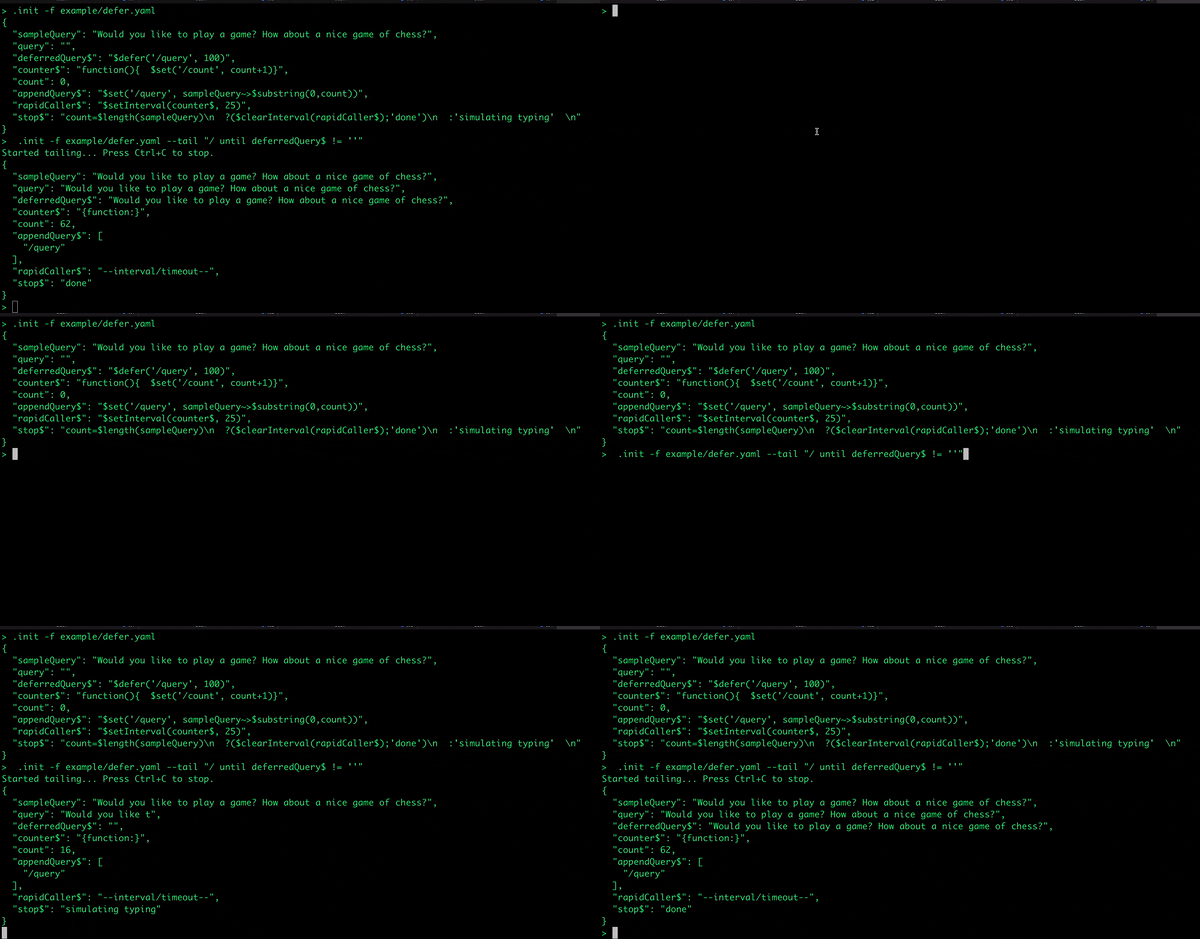
### $rateLimit
Rate limiting allows to ensure than no than one function call is executed withing some time. For exameple,
we want to ensure that a function calling external APIs does not overload it.
```json
>.init -f example/rateLimit.yaml
{
"acc": [],
"appendAcc": "${ function($v){$set('/acc/-', $v)} ~> $rateLimit(100)}",
"counter": "${ function(){($set('/count', $$.count+1); $$.count)} }",
"count": 0,
"rapidCaller": "${$setInterval(counter~>appendAcc, 10)}",
"stop": "${ count=100?($clearInterval($$.rapidCaller);'done'):'not done' }",
"accCount": "${ $count(acc) }"
}
```
Below output demonstrates, that `rateLimit` function calls to to set `acc` to once in no less than 100ms, which will
result in only 10 counts added o the `acc` array, the first one, the last one, and 10 in between.
```json ["data.accCounter = 12"]
>.init -f example/rateLimit.yaml --tail "/ until accCount=12"
Started tailing... Press Ctrl+C to stop.
{
"acc": [
1,
10,
19,
28,
38,
48,
57,
66,
75,
85,
94,
100
],
"counter": "{function:}",
"count": 100,
"rapidCaller": "--interval/timeout--",
"stop": "done",
"accCount": 12
}
```
## Custom Functions
Stated let's you define and call functions. Custom functions are simply JSONata functions. Functions
are not a feature of Stated, they are a feature of JSONata.
### Simple Custom Function Example
```json
> .init -f "example/ex05.json"
{
"hello": "${ (function($to){'hello ' & $to & '. How about a nice game of ' & $$.game})}",
"to": "David",
"game": "chess",
"greeting$": "hello(to)"
}
> .out
{
"hello": "{function:}",
"to": "David",
"game": "chess",
"greeting$": "hello David. How about a nice game of chess"
}
```
### More Complex Function Example
Here is an elaborate example of functions. The `fibonnaci` function itself is pulled into the last element of `x`
using the expression ``/${fibonacci}``. The first element of the array contains `$[2]($[1])`. Can you see that
it invokes the `fibonacci` function passing it the value 6? Hint: `$[2]` is the last element of the array which
will pull in the `fibonacci` function and `$[1]` is the middle element of the array, holding the static value `6`.
So `$[2]($[1])` expands to `fibonacci(6)`. The value 6th fibonacci number is 8, which is what `fibonacci(6)` returns.
```json
> .init -f "example/ex06.json"
{
"x": [
"${$[2]($[1])}",
6,
"/${fibonacci}"
],
"fibonacci": "${ function($n){$n=1?1:$n=0?0:fibonacci($n-1)+fibonacci($n-2)}}"
}
> .out
{
"x": [
8,
6,
"{function:}"
],
"fibonacci": "{function:}"
}
```
Let's take a more complex example where we generate MySQL instances:
```json
> .init -f "example/mysql.json"
{
"name": "mysql",
"count": 1,
"pn": 3306,
"providerName": "aws",
"tmp": {
"host": "/${ [1..count].{'database_instance.host':'mysql-instance-' & $ & '.cluster-473653744458.us-west-2.rds.amazonaws.com'}}",
"port": "/${ [1..count].{'database_instance.port:':$$.pn}}",
"provider": "/${[1..count].{'cloud.provider': $$.providerName}}",
"instanceId": "/${[1..count].{'cloud.database_instance.id':'db-mysql-instance-' & $formatBase($,16)}}",
"instanceName": "/${[1..count].{'database_instance.name':'MySQL instance' & $}}",
"clusterName": "/${[1..count].{'database_instance.cluster._name':'MySQL cluster' & $}}"
},
"instances": "${$zip(tmp.host, tmp.port, tmp.provider, tmp.instanceId, tmp.instanceName, tmp.clusterName)~>$map($merge)}"
}
> .out
{
"name": "mysql",
"count": 1,
"pn": 3306,
"providerName": "aws",
"tmp": {
"host": {
"database_instance.host": "mysql-instance-1.cluster-473653744458.us-west-2.rds.amazonaws.com"
},
"port": {
"database_instance.port:": 3306
},
"provider": {
"cloud.provider": "aws"
},
"instanceId": {
"cloud.database_instance.id": "db-mysql-instance-1"
},
"instanceName": {
"database_instance.name": "MySQL instance1"
},
"clusterName": {
"database_instance.cluster._name": "MySQL cluster1"
}
},
"instances": {
"database_instance.host": "mysql-instance-1.cluster-47365374