https://github.com/citruscs/csgo-menu-maker
Interactive UIs in vanilla Counter-Strike: Global Offensive™.
https://github.com/citruscs/csgo-menu-maker
csgo csgo-c python python3 python37
Last synced: over 1 year ago
JSON representation
Interactive UIs in vanilla Counter-Strike: Global Offensive™.
- Host: GitHub
- URL: https://github.com/citruscs/csgo-menu-maker
- Owner: citrusCS
- License: mit
- Created: 2019-02-15T21:31:06.000Z (over 7 years ago)
- Default Branch: master
- Last Pushed: 2023-04-11T08:00:47.000Z (over 3 years ago)
- Last Synced: 2025-04-13T05:13:44.348Z (over 1 year ago)
- Topics: csgo, csgo-c, python, python3, python37
- Language: Python
- Size: 142 KB
- Stars: 130
- Watchers: 10
- Forks: 11
- Open Issues: 3
-
Metadata Files:
- Readme: README.md
- License: LICENSE
Awesome Lists containing this project
README
csgo-menu-maker
===============

## Coming here from somewhere that isn't GitHub? Check out the [Quick-Start Guide!](https://git.io/fhj0L)
## About
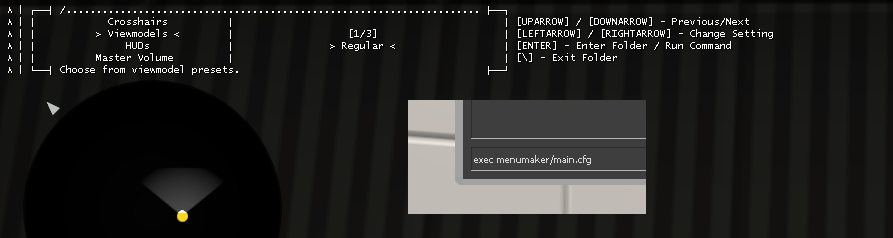
The Source(TM) engine has a console command system that is extremely powerful when leveraged correctly. I used it to create a system of menus and widgets that allows users to customize their game configuration on-the-fly in terms of things like crosshairs, viewmodels, and HUD looks.
`csgo-menu-maker` uses a versatile configuration language (spoiler alert: it's yml) which lets users with very little to no coding experience create these menus.
Over the past month of writing this, I learned a lot about Python, [source console scripting,](https://developer.valvesoftware.com/wiki/Developer_Console) and [tracking down bugs that are older than I am.](https://git.io/fhj0O) In the process of discovering my own and Valve's bugs, I may have left a few in this project, so don't be too hard on me.
## Usage
Here's a glimpse into the language used to make these menus. For example, to create the demo menu above:
```
tree:
Crosshairs:
type: config.crosshairs
presets:
General:
color: [0, 255, 255]
Pistol Rounds:
color: [0, 255, 0]
t_shape: 1
dot: 1
Viewmodels:
type: config.viewmodels
presets:
Regular:
offset: [2.5, 0, -1.5]
fov: 60
Gangster:
offset: [1.5, 2, 2]
fov: 68
HUDs:
type: config.huds
presets:
Regular:
scale: 0.9
Navigator:
radar_rotate: 0
radar_icon_scale: 0.8
Master Volume: sound.volume.master
```
For a better guide, check out the [Tutorial.](https://git.io/fhh53)
## Installing
See the [Installation Guide](https://git.io/fhh5O) for a visual and clear explanation. If you are more technically minded, here are some commands:
```
pip install pyyaml csgo-menu-maker
```
```
python -m csgomenumaker
```
Have fun!
-- Citrus