https://github.com/clear-code/fcitx5-virtualkeyboard-ui
https://github.com/clear-code/fcitx5-virtualkeyboard-ui
Last synced: 6 months ago
JSON representation
- Host: GitHub
- URL: https://github.com/clear-code/fcitx5-virtualkeyboard-ui
- Owner: clear-code
- Created: 2022-02-15T03:11:03.000Z (over 4 years ago)
- Default Branch: master
- Last Pushed: 2024-06-24T01:40:34.000Z (about 2 years ago)
- Last Synced: 2024-06-24T02:42:03.766Z (about 2 years ago)
- Language: C++
- Size: 268 KB
- Stars: 7
- Watchers: 10
- Forks: 2
- Open Issues: 0
-
Metadata Files:
- Readme: README.md
- License: LICENSES/LGPL-2.1-or-later.txt
Awesome Lists containing this project
README
# fcitx5-virutalkeyboard-ui
## What's this?
A virtual keyboard UI module for [Fcitx5](https://github.com/fcitx/fcitx5), based on ClassicUI bundled in Fcitx5.
The main target environment of this module is [Weston](https://gitlab.freedesktop.org/wayland/weston/).
On X11, it partially works but not yet perfect, need further work.
Currently following languages/layouts are supported:
* English (using keyboard-us)
* Japanese (using fcitx5-anthy)
* Korean (using fcitx5-hangul)
* Rusian (using keyboard-ru)
* Simplified Chinese (using fcitx5-chinese-addons)
* Traditional Chinese (using fcitx5-chewing)
[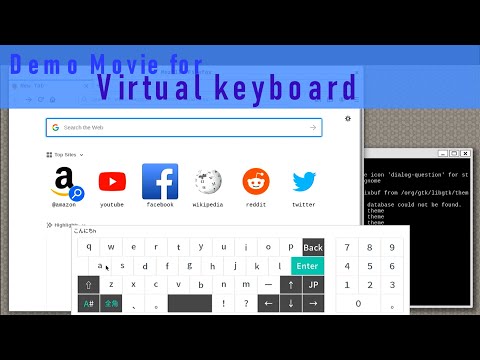](https://www.youtube.com/watch?v=f1QBqWy_Ps4)
## Prerequisites
Currently some patches are required to Fcitx5:
* For fcitx5-virtualkeyboard-ui `master` branch:
* [fcitx5 5.0.14+virtual-keyboard-prerequisites](https://github.com/clear-code/fcitx5/tree/5.0.14%2Bvirtual-keyboard-prerequisites)
* For fcitx5-virtualkeyboard-ui `fcitx-5.0.8` branch:
* [fcitx5 5.0.8+virtual-keyboard-prerequisites](https://github.com/clear-code/fcitx5/tree/5.0.8%2Bvirtual-keyboard-prerequisites)
Optionally Fcitx5's inputmethod addons listed above are also required to support each languages.
In Yocto environment, you can use [meta-inputmethod](https://gitlab.com/clear-code/meta-inputmethod) to install these prerequisites.
The yocto recipe for fcitx5-virtualkeyboard-ui itself isn's published. If you need it, please contact us.
## How to build
```console
$ cmake -B build
$ cmake --build build
$ cmake --install build
```
## Example Configuration
`~/.config/fcitx5/profile`
```ini
[Groups/0]
# Group Name
Name=US
# Layout
Default Layout=us
# Default Input Method
DefaultIM=keyboard-us
[Groups/0/Items/0]
# Name
Name=keyboard-us
# Layout
Layout=
[Groups/1]
# Group Name
Name=JP
# Layout
Default Layout=us
# Default Input Method
DefaultIM=anthy
[Groups/1/Items/0]
# Name
Name=keyboard-us
# Layout
Layout=
[Groups/1/Items/1]
# Name
Name=anthy
# Layout
Layout=
[Groups/2]
# Group Name
Name=CH
# Layout
Default Layout=us
# Default Input Method
DefaultIM=pinyin
[Groups/2/Items/0]
# Name
Name=keyboard-us
# Layout
Layout=
[Groups/2/Items/1]
# Name
Name=pinyin
# Layout
Layout=
[Groups/3]
# Group Name
Name=TW
# Layout
Default Layout=us
# Default Input Method
DefaultIM=chewing
[Groups/3/Items/0]
# Name
Name=keyboard-us
# Layout
Layout=
[Groups/3/Items/1]
# Name
Name=chewing
# Layout
Layout=
[Groups/4]
# Group Name
Name=KR
# Layout
Default Layout=us
# Default Input Method
DefaultIM=hangul
[Groups/4/Items/0]
# Name
Name=keyboard-us
# Layout
Layout=
[Groups/4/Items/1]
# Name
Name=hangul
# Layout
Layout=
[Groups/5]
# Group Name
Name=RU
# Layout
Default Layout=us
# Default Input Method
DefaultIM=keyboard-ru
[Groups/5/Items/0]
# Name
Name=keyboard-ru
# Layout
Layout=
[GroupOrder]
0=US
1=JP
2=CH
3=TW
4=KR
5=RU
```
`~/.config/fcitx5/config`
* Avoid displaying IM information that causes trouble when switching languages.
```ini
...
[Behavior]
ShowInputMethodInformation=False
...
```