https://github.com/cliffano/open-sesame
CLI tool for adding your public IP address to AWS security group's inbound rules
https://github.com/cliffano/open-sesame
aws cli nodejs
Last synced: 10 months ago
JSON representation
CLI tool for adding your public IP address to AWS security group's inbound rules
- Host: GitHub
- URL: https://github.com/cliffano/open-sesame
- Owner: cliffano
- License: mit
- Created: 2017-02-12T11:50:08.000Z (over 9 years ago)
- Default Branch: main
- Last Pushed: 2024-06-23T08:56:32.000Z (about 2 years ago)
- Last Synced: 2025-01-07T14:40:54.031Z (over 1 year ago)
- Topics: aws, cli, nodejs
- Language: JavaScript
- Homepage:
- Size: 13 MB
- Stars: 3
- Watchers: 2
- Forks: 1
- Open Issues: 1
-
Metadata Files:
- Readme: README.md
- Changelog: CHANGELOG.md
- License: LICENSE
Awesome Lists containing this project
README

[](https://github.com/cliffano/open-sesame/actions?query=workflow%3ACI)
[](https://snyk.io/test/github/cliffano/open-sesame)
[](http://david-dm.org/cliffano/open-sesame)
[](https://coveralls.io/r/cliffano/open-sesame?branch=master)
[](http://www.npmjs.com/package/open-sesame)
Open Sesame
-----------
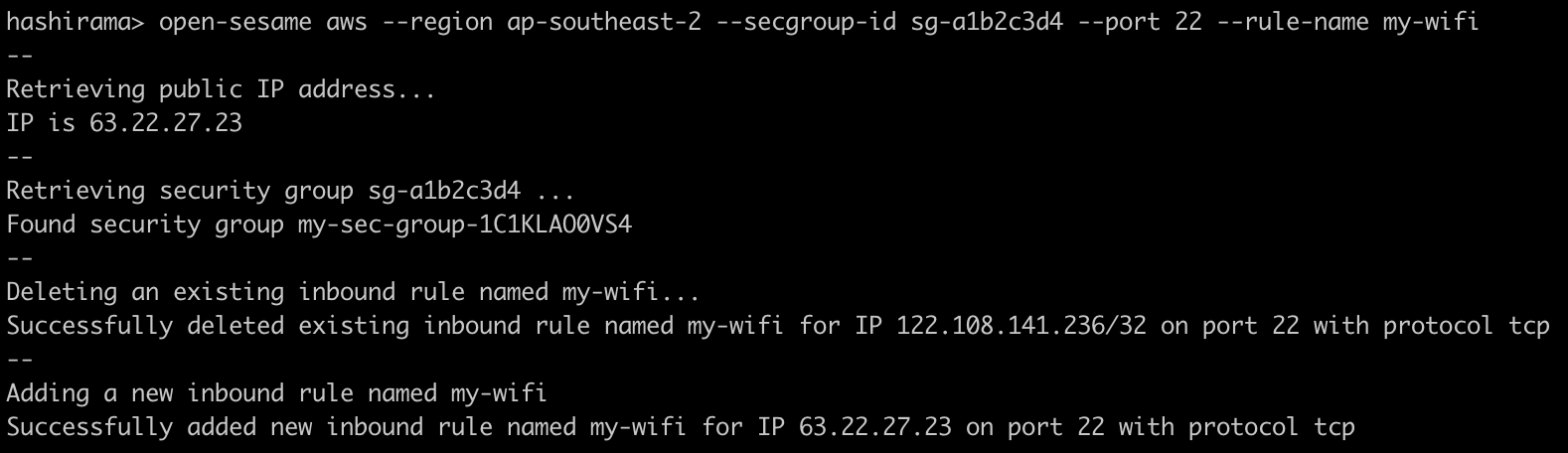
Open Sesame is a CLI tool for adding your public IP address to AWS security group's inbound rules.
This is handy when you're sitting behind a dynamic IP (e.g. you're using a Wi-Fi dongle) and would like to allow access from that IP to some AWS resources through a security group.
Installation
------------
npm install -g open-sesame
Usage
-----
Add inbound rule to specified security group, rule will be named 'open-sesame':
open-sesame aws --region ap-southeast-2 --secgroup-id sg-12345678
Add inbound rule with specified port and name:
open-sesame aws --region ap-southeast-2 --secgroup-id sg-12345678 --port 22 --rule-name some-wi-fi
Note: open-sesame 1.x.x uses `--name` arg instead of `--rule-name` .
Add inbound rules to multiple security groups:
open-sesame aws --region ap-southeast-2 --secgroup-id sg-12345678,sg-87654321
Permission
----------
You can use the example below to provision an IAM policy for Open Sesame to use:
{
"Version": "2012-10-17",
"Statement": [
{
"Sid": "OpenSesame0",
"Effect": "Allow",
"Action": [
"ec2:DescribeSecurityGroups"
],
"Resource": [
"*"
]
},
{
"Sid": "OpenSesame1",
"Effect": "Allow",
"Action": [
"ec2:RevokeSecurityGroupIngress",
"ec2:AuthorizeSecurityGroupIngress"
],
"Resource": [
"arn:aws:ec2:::security-group/sg-12345678",
"arn:aws:ec2:::security-group/sg-87654321"
]
}
]
}
Colophon
--------
[Developer's Guide](https://cliffano.github.io/developers_guide.html#nodejs)
Build reports:
* [Code complexity report](https://cliffano.github.io/open-sesame/complexity/plato/index.html)
* [Unit tests report](https://cliffano.github.io/open-sesame/test/mocha.txt)
* [Test coverage report](https://cliffano.github.io/open-sesame/coverage/c8/index.html)
* [Integration tests report](https://cliffano.github.io/open-sesame/test-integration/cmdt.txt)
* [API Documentation](https://cliffano.github.io/open-sesame/doc/jsdoc/index.html)